Establishing secure connection…Loading editor…Preparing document…

Mississippi Order on Petition to Change Name

This template is fully customizable. Edit the text, fill out the fields, and send it for signature. Give it a try!
Mississippi Order on Petition to Change Name

What the Mississippi Order on Petition to Change Name Is

A Mississippi Order on Petition to Change Name is a court-issued document that formally approves an individual’s request to change their legal name within the state. The order records the court’s findings, directs the clerk to enter the new name on court records, and provides the petitioner with an official judgment to update identity documents and records. The order typically includes case caption, petitioner details, findings of notice or publication where required, any limitations imposed by the court, and the judge’s signature and date of entry.

Why a Court Order Matters for a Legal Name Change

A signed Mississippi order creates an official record that government and private entities accept when updating identification, financial accounts, and legal records. It provides clear proof of the court’s authorization and resolves conflicts between old and new names for administrative, legal, and financial purposes.

Why a Court Order Matters for a Legal Name Change

Who Typically Uses This Order and When

The Mississippi Order on Petition to Change Name is used by individuals, guardians, and attorneys when a court-approved name change is required.

  • Individual petitioners who want to change their legal name following state procedure and a court hearing.
  • Parents or guardians seeking a name change for a minor or dependent under Mississippi law.
  • Attorneys filing and presenting petitions on behalf of clients, including supporting documentation and service proof.

Typical Signatories and Their Roles

Petitioner

An individual who files the petition and appears at any required hearing. The petitioner must provide accurate identity details, sign under penalty of perjury when required, and present proof for updating government and private records after the order is entered.

Presiding Judge

A circuit or chancery court judge reviews the petition, ensures statutory requirements are met, and signs the order. The judge’s signature and the clerk’s file stamp make the order an official public record the petitioner can use for identity updates.

Key Security and Compliance Elements to Watch For

Encryption: TLS 1.2/1.3 transit; AES-256 at rest
Audit Trail: Signed document event log and timestamps
HIPAA: Compliant when BAA executed
ESIGN / UETA: Legal framework for electronic signatures
21 CFR Part 11: Applicable for FDA-regulated recordkeeping
SOC 2 / ISO: SOC 2 Type II and ISO 27001 certifications

Step-by-Step: Completing the Mississippi Name-Change Order

Follow these steps to fill, submit, and receive a signed order that allows you to update records across agencies.

  • 01
    Prepare petition: Collect ID, birth certificate, and background details.
  • 02
    Complete order: Fill the court’s order with accurate names and case number.
  • 03
    File with clerk: Submit to county circuit clerk and pay fees.
  • 04
    Attend hearing: Appear or provide proof of notice if a hearing is required.

Where to File and How the Order Moves Through Court

The filing and processing path varies by county; use the county circuit clerk as the central point for submission and record entry.

  • County Clerk: Files petition, assigns case number, collects fees.
  • Service of Process: Notice or publication may be required before a hearing.
  • Court Hearing: Judge reviews facts and signs order if lawful.
  • Record Entry: Clerk enters order into court docket and issues certified copy.

Digital Workflow Basics for Completing and Sending the Order

Set up a straightforward electronic workflow to reduce errors: configure fields, choose signer authentication, include a notarization step if needed.

Field Configuration
Petitioner Name Required text field, exact-match validation
Signature Block Signer signature and date required
Authentication Email link or SMS code for signer verification
Notarization Add notarize field or RON step if required

Technical Considerations for eFiling and eSigning

Ensure the platform supports secure signatures, required authentication, and produces an unalterable PDF with an audit trail.

  • Integrations: Salesforce, NetSuite, Google Workspace
  • File formats: PDF and DOCX accepted
  • Authentication: Email, SMS, or advanced methods

Common Timeframes and Deadlines to Expect

Timing depends on local procedures. Confirm scheduling and notice requirements with the county clerk to avoid dismissal or delay.

Filing to Hearing:

Typically 2–8 weeks depending on docket

Notice or Publication:

May require 1–4 weeks prior to hearing

Clerk Entry:

Order entered same day or within days

Receiving Certified Copy:

Available immediately or after clerk processing

Updating Agencies:

Timelines vary by agency and document type

Key Milestones from Filing to Record Update

Track these milestones to know when you can use the order to change records and notify third parties.

01

File Petition

Petition submitted to county clerk; pays required fee.

02

Notice / Publication

Proof of notice or publication provided if required.

03

Court Hearing

Judge hears the petition and rules on the request.

04

Order Entry

Clerk files the signed order and issues certified copies.

Common Preparation Mistakes to Avoid

  • Incorrect names or inconsistent name formats between petition and ID causing verification delays.
  • Failing to attach required proof of identity or supporting documents requested by the clerk.
  • Not following local notice or publication procedures leading to continuances or dismissals.
  • Attempting to update third-party records before receiving a certified, signed order from the clerk.

Risks and Consequences of an Incorrect Order

Order Rejection: Clerk may reject incomplete filings
Delay: Processing or hearing delays increase wait times
Legal Challenge: Third parties may raise objections in some cases
Identity Mismatch: Mismatched documents hinder account updates
Costs: Additional fees for re-filing or corrections
Privacy: Publication requirements may affect confidentiality

Essential Elements Found in a Professional Order

A complete Mississippi order follows a consistent structure so courts, agencies, and private parties can rely on its authority and contents.

Court Caption

Includes court name, county, case or cause number, and party names so the order is clearly tied to the docket.
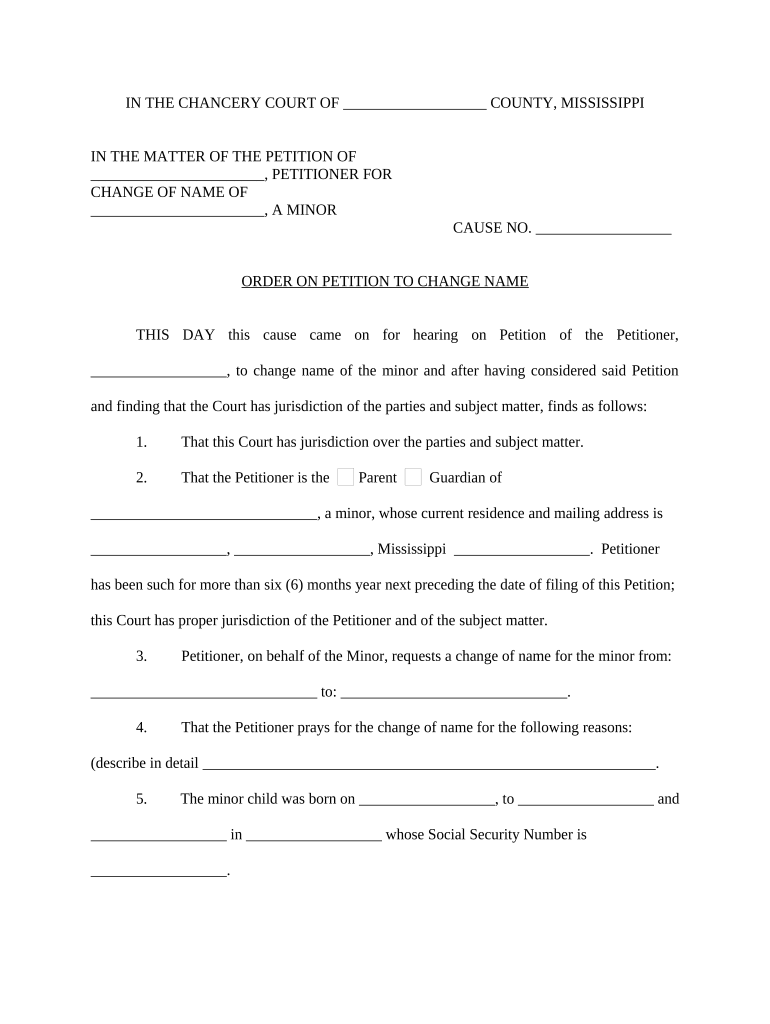
Findings

A concise recital of facts the court relied on, such as identity verification and notice or publication compliance, to justify the change.

Order Language

Explicit statement changing the petitioner’s name to the new legal name and directing agencies to accept the change.

Limitations

Any court-imposed restrictions, such as prohibitions on fraud-related name changes or use for evasion of obligations.

Judge Signature

Judge’s printed name, signature, and date of entry that make the order a binding court judgment.

Clerk Stamp

Court clerk’s file stamp and certified copy notation used to validate copies for third-party updates.

Supporting Documents Commonly Paired with the Order

Courts and agencies commonly require or accept supporting documents alongside the signed order to complete identity updates.

Certified Copy

A court-certified copy of the signed order for presenting to agencies and private institutions.

Proof of Identity

Government-issued ID such as driver’s license or passport to confirm the petitioner’s identity for updates.

Birth Certificate

Original or certified birth record when updating vital records and some government IDs.

Notice Proof

Affidavit of publication or service documents showing compliance with notice requirements when mandated.

How Organizations Use Court Orders in Practice

Real-world examples show how a signed order streamlines administrative updates and reduces manual paperwork for organizations handling identity changes.

Tim Martin, Martin Properties

The interface is simple and easy-to-use for our team; more importantly, it is just as easy for our customers.

  • Platform flexibility reduced turnaround time for tenant record updates.
  • With a reliable signed court order, Martin Properties updated leases, background checks, and vendor agreements without in-person visits, improving customer experience while maintaining compliance.

Brian Fitzgibbons, Optica Ventures LLC

The interface is simple and easy-to-use for our team; more importantly, it is just as easy for our customers.

  • Electronic handling preserved audit trails.
  • Optica Ventures used certified orders to update corporate records and investor documents quickly, minimizing administrative friction and ensuring consistent identity data across systems.

Configuring an Electronic Signing Workflow for the Order

A compact workflow reduces errors: validate identity, require signer authentication, include notarization if the clerk requires it, and generate a certified PDF.

Field Configuration
Signer Authentication Email link with SMS code or advanced methods
Notary Step Add remote notarization or in-person notarize field
Certified PDF Generate tamper-evident PDF with audit trail
Storage Secure archival with access logging

Comparing eSignature Options for Completing and Certifying the Order

Platform pricing and capabilities vary. signNow listed first for comparison. Confirm plan details directly with each vendor when choosing a solution for notarization or high-volume filing support.

signNow DocuSign Adobe Sign PandaDoc HelloSign
Starting Price $8/user/mo $15/user/mo $14/user/mo $19/user/mo $15/user/mo
Free Trial 7-day free trial, no card Varies by vendor Varies by vendor Varies by vendor Varies by vendor
Bulk Send Yes Yes Yes Yes No
Audit Trail Yes Yes Yes Yes Yes
HIPAA Compliant Yes Yes Yes No No
Envelope Cap No cap 100 envelopes/user/year Varies Varies Varies

Frequently Asked Questions About the Mississippi Name-Change Order

Answers to common questions about filing, signatures, notarization, and updating records after the court signs the order.


Need help? Contact support

be ready to get more
Join over 28 million airSlate SignNow users