Establishing secure connection…Loading editor…Preparing document…

Mississippi Motion to Compel Discovery Documents

This template is fully customizable. Edit the text, fill out the fields, and send it for signature. Give it a try!
Mississippi Motion to Compel Discovery Documents

What the Mississippi Motion to Compel Discovery Documents Is

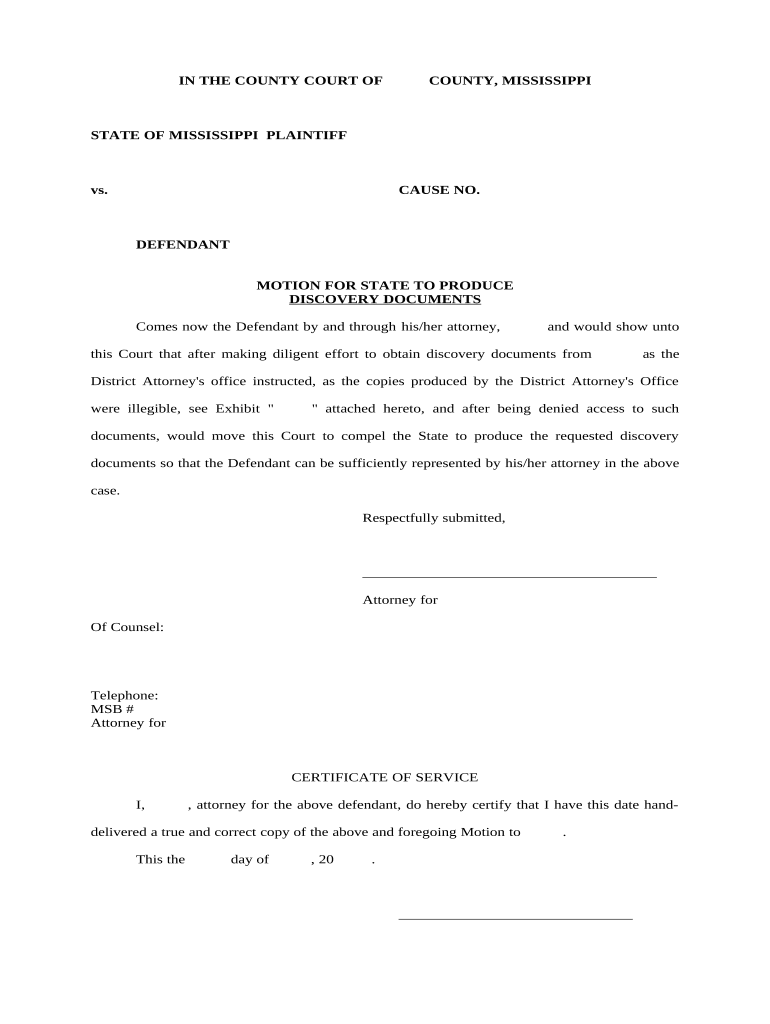
The Mississippi Motion to Compel Discovery Documents is a civil pleading filed in Mississippi courts to ask a judge to require an opposing party to produce documents, electronically stored information (ESI), or other materials requested in discovery but withheld, evasively produced, or not produced at all. The motion identifies the specific requests at issue, summarizes responses or objections, documents good-faith conferral efforts, and asks for an order compelling production and, where appropriate, expense shifting or other relief under Miss. R. Civ. P. 26 and 37.

Why a Motion to Compel Matters in Mississippi Litigation

A properly drafted Motion to Compel focuses the court on unresolved discovery, can obtain enforceable production schedules, and may secure cost recovery or sanctions for wrongful withholding of materials.

Why a Motion to Compel Matters in Mississippi Litigation

Who Typically Prepares and Files This Motion

Attorneys, paralegals, and pro se litigants in Mississippi civil cases prepare and file motions to compel discovery documents.

  • Civil defense attorneys managing incomplete responses from plaintiffs and coordinating document collection.
  • Plaintiff counsel seeking withheld ESI, contracts, communications, or financial records for case preparation.
  • Self-represented litigants enforcing discovery rights and documenting compliance failures without retained counsel.

Step-by-Step: Preparing and Filing a Motion to Compel

Use this sequence to prepare exhibits, document conferral, draft required recitals, and follow filing and service procedures under local rules.

  • 01
    Draft motion: Summarize requests, responses, conferral efforts.
  • 02
    Attach exhibits: Attach requests, responses, correspondence, and privilege logs.
  • 03
    Certificate of conferral: Detail good-faith attempts to meet and confer.
  • 04
    File and serve: E-file per court rules and serve opposing counsel.

Common Questions About Mississippi Motions to Compel

Answers to frequent procedural and practical questions about preparing, filing, and enforcing a Mississippi Motion to Compel discovery documents.


Need help? Contact support

eSignature Vendor Comparison for Discovery Documents and Filings

Baseline feature and pricing comparisons help evaluate eSignature vendors for serving and submitting discovery-related documents electronically.

signNow DocuSign Adobe Sign PandaDoc HelloSign
Starting Price $8/user/mo $15/user/mo $14/user/mo $19/user/mo $15/user/mo
Free Trial 7-day free trial Varies Varies Varies Varies
Bulk Send Yes (Business Premium) Varies Varies Varies Varies
Audit Trail Yes Yes Yes Yes Yes
HIPAA Compliant Yes (BAA) Varies Varies Varies Varies
Envelope Cap No cap 100 envelopes/user/year Varies Varies Varies

Key Components of a Professional Mississippi Motion to Compel Discovery Documents

A complete motion is organized, fact-based, and supported by documentary exhibits that allow the court to identify disputed requests, evaluate objections, and enter appropriate orders.

Caption

The court caption must include the full case title, docket number, and court name so the motion is filed and indexed correctly in the case record.
Introduction

State your identity as movant, the relief sought, and a concise summary of the discovery items at issue and the opposing party’s position.

Factual background

Provide a short chronology of requests, responses, and conferral attempts with dates and participants so the court can track the dispute.

Requests at issue

List each disputed request by number, briefly quote or summarize the request, and note the opposing party’s response or objection exactly as written.

Meet-and-confer

Attach or summarize correspondence and calls demonstrating attempts to resolve the dispute; courts expect a specific statement of good-faith efforts.

Prayer for relief

Specify the exact production required, the desired format and timeline, and any request for fees, costs, or sanctions with supporting legal authority.

Required Information and Security-Related Fields

Confidentiality: Identify sensitive categories.
Protected Health Info: Flag HIPAA items requiring redaction.
ESI Protocols: Specify native or PDF formats.
Privilege Log: Summarize withheld documents' basis.
Chain of Custody: Document collection and storage steps.
Audit Trail: Record timestamps and access logs.

Penalties and Risks of an Incorrect or Incomplete Motion

Sanctions: Monetary or non-monetary sanctions.
Attorney's Fees: Costs may be awarded to movant.
Contempt: Persistent noncompliance can lead to contempt.
Adverse Inference: Court may instruct jury against party.
Evidentiary Exclusion: Nonproduced evidence may be excluded.
Delay: Improper motions cause schedule disruption.

Common Mistakes When Preparing a Motion to Compel

  • Failing to attach the original discovery requests and the exact responses cited, making it hard for the court to confirm the dispute.
  • Providing a vague or boilerplate certificate of conferral that lacks dates, participant names, and the substance of communications.
  • Asking the court for broad, unspecified relief instead of itemized production and clear format and timing instructions.
  • Neglecting to propose a reasonable production timeline or ignoring ESI complexity and associated technical protocols.

Where to File, Serve, and Submit the Motion

Motions to compel follow local filing and service rules; confirm your county or circuit court's e-filing system, notice requirements, and hearing procedures before submission.

  • Prepare motion: Complete motion with exhibits and proposed order.
  • Serve opposing counsel: Serve by email and certified mail if required.
  • File with clerk: E-file or deliver paper per local rules.
  • Attend hearing: Be ready to present argument and evidence.

How to Customize and eFile the Motion Online

Configure document settings and signer authentication when preparing the motion and associated certificates for electronic submission and service.

Field Configuration
Document format PDF for filing; preserve native ESI copies separately
Signer authentication Attorney email or verified e-service account
Exhibit handling Combine exhibits into a single bookmarked PDF
Retention Store signed copy and audit trail per record retention

Distribution and eSubmission Options for Discovery Motions

Choose a submission workflow that supports PDF, DOCX attachments, preserves timestamps, and integrates with court e-filing systems when available.

  • File formats: PDF, DOCX supported for attachments
  • Integration: Works with common e-filing and cloud systems
  • Audit data: Provides timestamp and signing records

Practical Use Cases for the Motion to Compel

Realistic examples show how different litigants use a Motion to Compel to address withheld documents, ESI issues, or privilege disputes.

Small Firm Enforcement

A solo plaintiff attorney documents repeated email nonproduction

  • opposing counsel provided incomplete logs
  • the court ordered production within 14 days, awarded partial expenses, and set ESI protocol.

In-House Counsel ESI

Company counsel seeks native format source files for critical transactions

  • IT produced only PDFs
  • the motion requested native ESI and costs; judge ordered phased native production with agreed search terms.

Tips for Accurate, Efficient Motion Preparation

Follow these practical tips to reduce procedural defects, speed judicial review, and improve chances of obtaining complete production without unnecessary delay.

Preserve ESI early
Issue a litigation hold and document preservation steps immediately; failure to preserve can lead to spoliation claims and sanctions.
Be specific
Cite each request by number and include short quotations; courts favor precise, narrow motions over broad, ambiguous demands.
Propose practical timelines
Offer phased production dates and reasonable search parameters to demonstrate cooperation and reduce burden objections.
Use exhibits effectively
Attach request/response pairs, email threads, and privilege logs so the court can resolve disputes without additional briefing.
be ready to get more
Join over 28 million airSlate SignNow users