Establishing secure connection…Loading editor…Preparing document…

Mississippi Interpleader

This template is fully customizable. Edit the text, fill out the fields, and send it for signature. Give it a try!
Mississippi Interpleader

What the Mississippi Interpleader Is

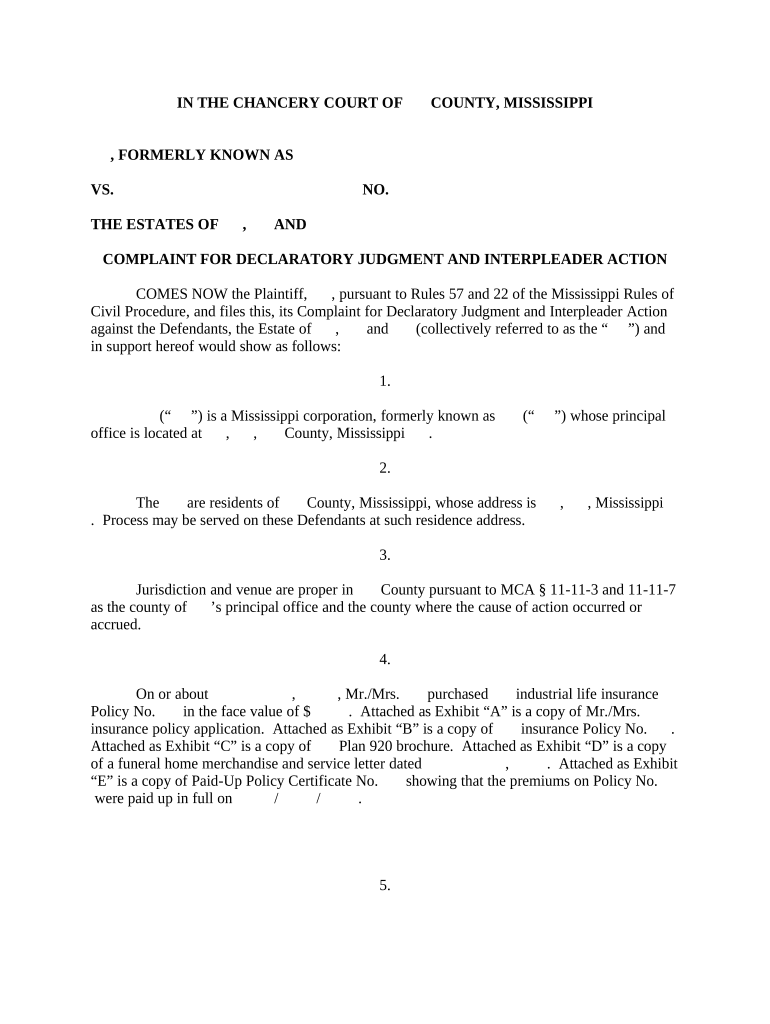
A Mississippi Interpleader is a legal filing used when a neutral stakeholder holds money or property and two or more parties claim the same interest. The stakeholder asks the court to determine rightful ownership, to deposit the disputed funds with the court, and to be discharged from further liability once the court resolves competing claims. Interpleader can be filed in Mississippi state court under state procedures or in federal court under statutory interpleader when jurisdictional requirements are met. The procedure prevents multiple liabilities and consolidates claimants into a single adjudication.

Why Stakeholders Use a Mississippi Interpleader

Interpleader protects neutral holders from duplicative liability, avoids multiple lawsuits, and centralizes competing claims so a single court decides distribution of disputed funds.

Why Stakeholders Use a Mississippi Interpleader

Who Typically Initiates or Responds to an Interpleader

Each participant has distinct obligations: stakeholders must deposit or identify the disputed property; claimants must be served and assert their entitlement.

  • Banks and escrow agents holding disputed funds often file to avoid multiple obligations.
  • Employers or insurers when benefits or proceeds are claimed by multiple parties.
  • Attorneys representing neutral stakeholders or claimants who need consolidated adjudication.

Core Components of a Professional Mississippi Interpleader

A complete Interpleader filing combines factual clarity, proper party identification, and clear procedural requests to the court for deposit and discharge.

Parties

Full legal names and roles for stakeholder and each claimant, with contact and counsel details to ensure proper service and notice.
Subject Funds

Precise description of the property or funds at issue, including amounts, account numbers, and any conditions or encumbrances.

Statement of Claims

Concise summary of competing claimant positions and any documentary support that establishes divergent assertions of entitlement.

Relief Sought

Clear requests that the court accept deposit, enjoin claimants from suing the stakeholder, and discharge the stakeholder from liability.

Jurisdictional Basis

Statement citing state law or, for federal interpleader, statutory grounds such as 28 U.S.C. §1335 and any minimal-diversity or amount requirements.

Proposed Procedure

Suggested steps for notice, claim filing deadlines, suggested bond or deposit, and proposed timing for a distribution hearing.

Essential Information to Include

Stakeholder Name: Full legal entity
Claimant Names: All competing parties
Fund Description: Amount and account
Jurisdiction: State or federal court
Relief Requested: Deposit and discharge
Supporting Docs: Contracts, notices

Step-by-Step: Preparing the Interpleader Filing

Follow this sequence to prepare a clear, serviceable interpleader complaint and supporting materials for Mississippi or federal courts.

  • 01
    Identify Parties: List stakeholder and all claimants with addresses.
  • 02
    Document Fund: Attach account statements or vouchers showing the disputed property.
  • 03
    Draft Complaint: State claims, jurisdiction, deposit request, and a discharge plea.
  • 04
    File and Serve: Submit to clerk, follow service and notice requirements.

How to Configure an Online Interpleader Workflow

Set up an e-filing-ready workflow that covers document upload, signer roles, authentication, and file format for court submission.

Field Configuration
Upload Document PDF with embedded exhibits
Add Parties Role-based signer entries
Set Authentication Email or SMS code
File Format PDF/A preferred for court

Where to File and How Claims Are Routed

Interpleader filings proceed through court intake, service of process to claimants, potential deposit of funds, and a hearing to adjudicate competing claims.

  • Court Filing: File complaint with appropriate clerk's office.
  • Service: Serve all claimants per civil procedure rules.
  • Deposit: Place funds with clerk or post bond as ordered.
  • Adjudication: Court resolves claims and directs distribution.

Digital Signing and eSubmission Considerations

Confirm local court e-filing rules before e-submitting; preserve audit trails and any needed notarizations or certified records.

  • ESIGN/UETA Compliance: Signatures meet federal/state e-sign laws
  • Authentication: Use email, SMS code, or stronger methods
  • File Types: Submit PDF/A when courts permit

Typical Timing and Deadlines to Expect

Timelines vary by court; plan for immediate service and prompt scheduling of hearings once the complaint is filed and funds are secured.

Immediate Deposit:

Deposit or bond often required at filing or by court order.

Service Deadline:

Serve claimants per local civil procedure timelines.

Response Period:

Claimants typically have the normal answer period under court rules.

Pretrial Scheduling:

Court may set hearing within weeks to months.

Distribution Order:

Distribution occurs after claims adjudicated or settled.

Common Errors to Avoid When Preparing an Interpleader

  • Failing to name every potential claimant, which can leave unresolved claims and continued liability for the stakeholder.
  • Using vague fund descriptions or incorrect amounts, leading to disputes over what was actually deposited with the court.
  • Neglecting jurisdictional prerequisites for federal statutory interpleader (minimal diversity, statutory amount), risking dismissal.
  • Skipping proof of service or improper service methods that invalidate the court’s ability to bind claimants.

Risks and Consequences of an Incorrect Interpleader

Continued Liability: Stakeholder remains exposed
Sanctions: Court may impose penalties
Delayed Distribution: Claimants face prolonged delay
Increased Costs: Litigation and bond expenses rise
Jurisdictional Dismissal: Case may be dismissed
Professional Risk: Potential malpractice exposure

eSignature Platform Comparison for Interpleader Workflows

Comparing common eSignature vendors on cost and core capabilities relevant to preparing and executing interpleader documents; signNow is listed first for reference.

signNow DocuSign Adobe Sign PandaDoc HelloSign
Starting Price $8/user/mo $15/user/mo $14/user/mo $19/user/mo $15/user/mo
Free Trial 7-day free trial No No Yes, limited Yes, limited
Bulk Send Yes Yes Yes Yes No
Audit Trail Yes Yes Yes Yes Yes
HIPAA Compliant Yes Yes Yes No No

Frequently Asked Questions About Mississippi Interpleader

Answers to common questions about when to file an interpleader, how e-signatures are treated, and what to expect procedurally.


Need help? Contact support

be ready to get more
Join over 28 million airSlate SignNow users