Establishing secure connection…Loading editor…Preparing document…

Mississippi Motion for Leave to File Amended Complaint

This template is fully customizable. Edit the text, fill out the fields, and send it for signature. Give it a try!
Mississippi Motion for Leave to File Amended Complaint

What the Mississippi Motion for Leave to File Amended Complaint Is

A Mississippi Motion for Leave to File Amended Complaint is a court filing requesting permission to change an existing complaint by adding, removing, or revising claims, parties, or factual allegations. The motion typically attaches the proposed amended complaint and explains why amendment is appropriate, including any facts discovered after the original filing or corrected errors. Courts consider prejudice to the opposing party, delay, and the movant's diligence when deciding whether to grant leave. The filing must be served on all parties and entered with the clerk according to local court rules.

Why You Might File a Motion for Leave in Mississippi

Filing a motion for leave lets a party correct deficiencies, add newly discovered claims or parties, and align pleadings with evidence while preserving procedural rights and avoiding later dismissal.

Why You Might File a Motion for Leave in Mississippi

Who Typically Prepares and Files This Motion

Both litigators and self-represented parties file motions for leave when pleadings require revision due to new facts or legal errors.

  • Plaintiff counsel preparing a proposed amended complaint to reflect newly obtained evidence or corrected claims.
  • Defense counsel responding with opposition or cross-motions when amendment would prejudice existing defenses.
  • Pro se litigants seeking to cure pleading defects or add claims discovered after the original complaint.

Common Signers and Filers

Plaintiff Attorney

An attorney representing the plaintiff typically drafts and signs the motion for leave, attaches the proposed amended complaint, and certifies service. They must show diligence, explain the necessity of amendment, and demonstrate minimal prejudice to the defendant.

Pro Se Litigant

A self-represented party may complete and sign this motion without counsel. Courts expect clear justification, proper formatting, timely service, and compliance with local filing rules; pro se filings are scrutinized for sufficiency and timely procedure.

Required Information and Core Fields

Court Caption: Court name, parties, case number
Motion Title: Clear title and relief requested
Proposed Complaint: Attach full, redlined proposed pleading
Grounds Stated: Explain facts and legal basis
Signature Block: Attorney or party signature
Certificate of Service: Date and method of service

Risks and Consequences of Errors

Motion Denied: Court may refuse amendment
Waived Claims: Untimely amendment can forfeit rights
Sanctions Risk: Frivolous motions may trigger sanctions
Delay: Procedural delays can extend litigation
Service Defects: Improper service may invalidate filing
Prejudice to Party: Added parties or claims may be barred

Common Mistakes to Avoid

  • Failing to attach the proposed amended complaint or submitting only a summary, which leaves the court without the exact pleading it must evaluate.
  • Neglecting to explain why amendment is necessary or how newly discovered facts justify changing the pleadings, making the motion vulnerable to denial.
  • Missing local formatting or filing requirements, such as failing to include the correct case caption, page limits, or required certificates of service.
  • Serving the motion improperly or failing to indicate the method and date of service, resulting in defective notice and potential rehearing.

Step-by-Step: Preparing and Filing the Motion

Follow a concise sequence to prepare, file, and serve a Mississippi motion for leave to amend.

  • 01
    Draft Motion: Explain grounds and include proposed pleading
  • 02
    Attach Proposed: Submit full redlined amended complaint
  • 03
    Certify Service: State date and method of serving parties
  • 04
    File with Clerk: Submit per local court e-filing rules

Setting Up an Electronic Filing Workflow

Configure your e-filing and document assembly to meet local court technical and formatting requirements.

Field Configuration
Court Selection Choose the specific Mississippi court docket
Document Format Use PDF/A, single file where required
Signature Method Apply eSign or wet signature per court rules
Attachments Include exhibits and redline versions

Where to File and How the Process Flows

Understand the filing route and service steps so your motion is accepted and the record is complete.

  • File with Clerk: Submit via the court's e-filing portal or deliver to clerk
  • Serve Other Parties: Deliver motion and proposed pleading to opposing counsel
  • Await Response: Defendant may file opposition or consent
  • Hearing or Ruling: Court schedules hearing or issues written decision

Digital Signing and Submission Essentials

E-signature platforms and e-filing portals must support secure PDFs and signer authentication.

  • File Formats: PDF/A or standard PDF accepted
  • Authentication: Email, SMS code, or stronger verification
  • Integrations: Support for court portals and document storage

Timing Considerations and Typical Scheduling

Be aware of scheduling impacts: amendment requests affect discovery, pretrial deadlines, and trial preparation timelines.

Early-Stage Amendments:

Courts are often more permissive before discovery closes

After Discovery:

Courts weigh prejudice and delay if amendment is late

Statute of Limitations:

Amendment cannot resurrect an expired limitations period

Response Time:

Opposing parties must be served and given time to respond

Hearing Schedule:

Court may set expedited or standard hearing dates

Key Milestones from Draft to Ruling

Track these sequential milestones to keep the motion timely and procedurally correct.

01

Draft and Attach

Prepare motion and proposed amended complaint thoroughly

02

File and Serve

Submit with the clerk and serve opposing parties

03

Opposition Period

Allow time for responses and potential replies

04

Decision or Hearing

Attend hearing or await court order on the motion

How a Motion for Leave Differs from Filing an Amended Complaint Directly

Compare when court permission is required versus when amendment may be filed as a matter of right.

Criteria Motion for Leave Amended Complaint as of Right
Permission Needed no (narrow circumstances)
Attach Proposed Pleading often encouraged
Timing Constraint after deadline early filing window
Court Discretion high lower

E-signature vendor comparison for preparing and signing motions

Compare baseline pricing and core capabilities relevant to preparing, signing, and sharing court filings; signNow is listed first per vendor order requirements.

signNow DocuSign Adobe Sign PandaDoc HelloSign
Starting Price $8/user/mo $15/user/mo $14/user/mo $19/user/mo $15/user/mo
Free Trial 7-day free trial Varies by plan Varies by plan Varies by plan Varies by plan
Bulk Send Yes Yes Yes Yes No
Audit Trail Yes Yes Yes Yes Yes
HIPAA Compliant Yes Yes Yes No No

Real-World Examples of Digital Document Use in Litigation

These examples illustrate how organizations use electronic workflows for document preparation and signature in legal contexts.

Optica Ventures LLC

The interface is simple and easy-to-use for our team; more importantly, it is just as easy for our customers.

  • Law firms used digital signing to circulate proposed amended complaints and obtain counsel signatures quickly.
  • As a result, docket-ready filings were produced faster, service records improved, and the firm avoided in-person signature delays while keeping a secure audit trail.

Xerox (NetSuite Ops)

airSlate SignNow provides us with the flexibility needed to get the right signatures on the right documents, in the right formats.

  • Corporate legal departments used integrations to populate motion captions and attach exhibits.
  • This reduced manual assembly time, ensured consistent formatting across filings, and preserved a tamper-evident record for compliance and audit purposes.

Frequently Asked Questions

Answers to common questions about filing a Mississippi Motion for Leave to File Amended Complaint and electronic handling.


Need help? Contact support

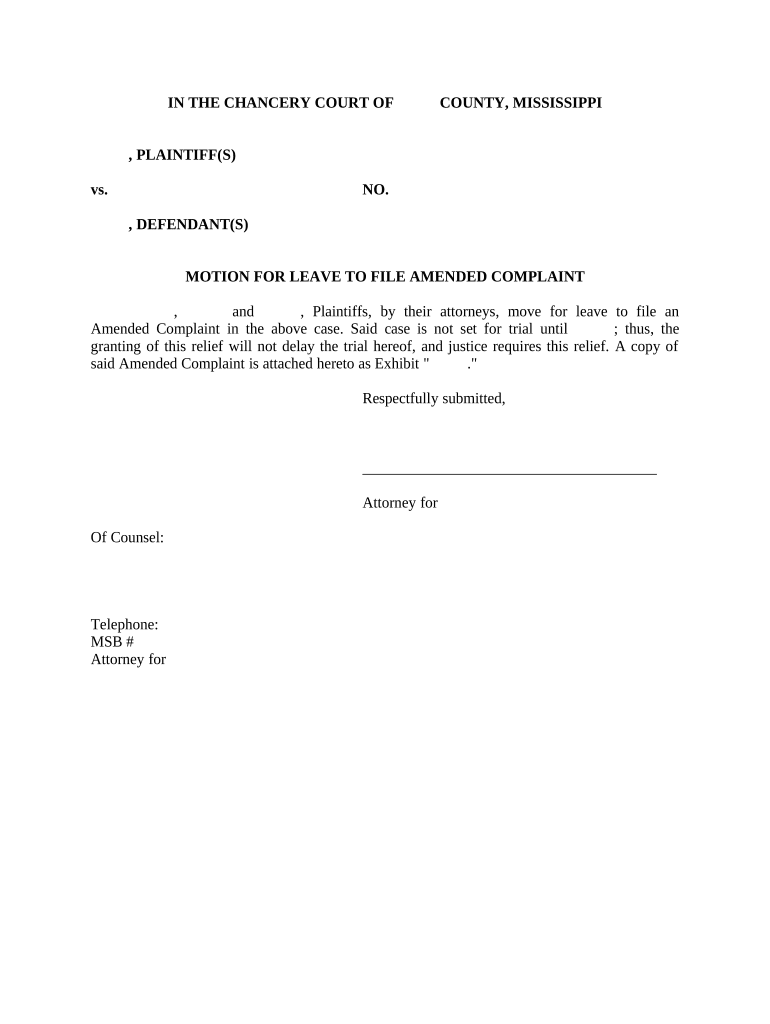
Essential Components of a Professional Motion for Leave

A complete motion combines procedural statements, substantiating facts, and a clear proposed pleading to make the court's review straightforward.

Court Caption

Accurate party names and case number, matching the original complaint and court docket entries, to ensure correct filing and docketing.
Legal Argument

Concise memorandum explaining legal grounds for amendment and addressing potential prejudice to opposing parties, citing applicable standards where appropriate.

Factual Support

Statement of facts showing why amendment is necessary, including discovery dates, newly discovered evidence, or corrected factual errors.

Proposed Pleading

Full version of the amended complaint attached; include redline or highlighted changes if local rules request them.

Service Certificate

Detailed certificate listing parties served, methods used, and date of service to establish compliance with notice obligations.

Proposed Order

Submit a proposed order for the judge’s signature to streamline decision-making and provide clear relief language if the court grants leave.

be ready to get more
Join over 28 million airSlate SignNow users