Establishing secure connection…Loading editor…Preparing document…

Mississippi Order of Dismissal

This template is fully customizable. Edit the text, fill out the fields, and send it for signature. Give it a try!
Mississippi Order of Dismissal

What the Mississippi Order of Dismissal Is

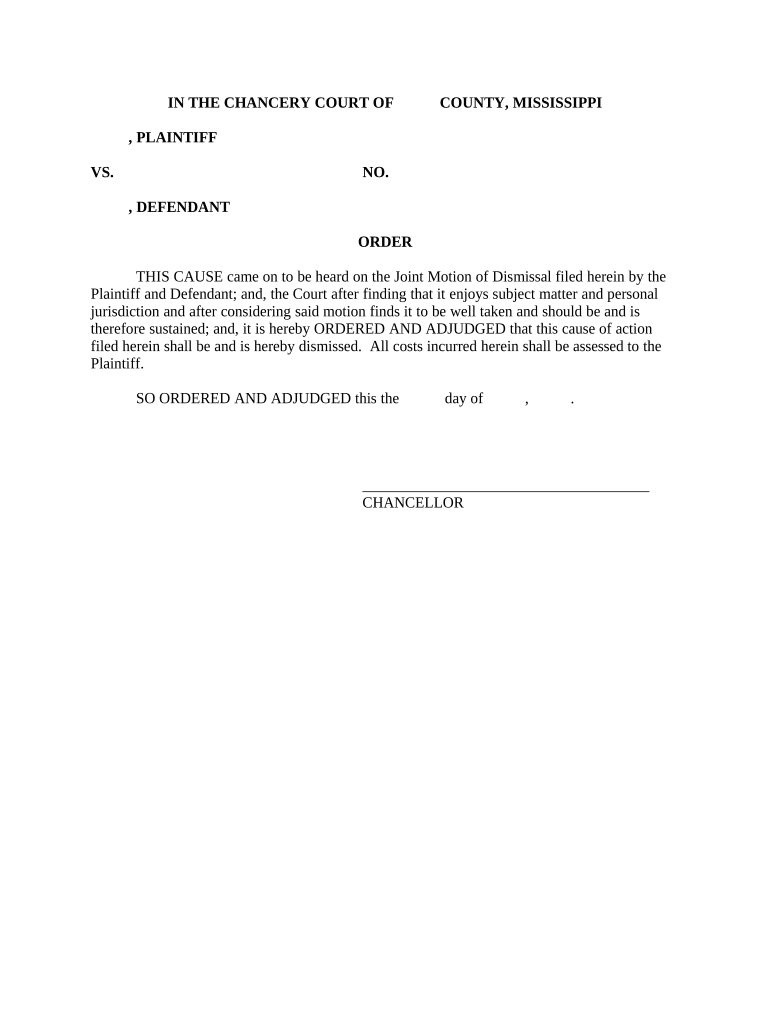
A Mississippi Order of Dismissal is a formal court document used to end a civil action or a specific claim without a final judgment on the merits. It records the parties' agreement or the court's direction to terminate proceedings and directs the clerk to mark the case closed. The order typically includes case caption information, the identity of moving parties, a brief statement of the disposition, and any conditions (costs, costs taxed, or reservation of claims) required by the court before closure.

Why an Accurate Order of Dismissal Matters

A properly prepared Order of Dismissal ensures the case is closed cleanly, preserves rights where intended, and prevents future procedural disputes. It creates an official record that the parties and the court rely on for case status, fee allocation, and any refilement limitations.

Why an Accurate Order of Dismissal Matters

Who commonly prepares or files this order

The order is typically prepared by attorneys, pro se litigants, or court clerks when parties agree to end a matter or when the court dismisses a claim.

  • Plaintiffs and defendants coordinating a stipulation of dismissal after settlement or compromise.
  • Attorneys entering a unilateral dismissal under court rule or local practice.
  • Court clerks recording the judge’s signed dismissal order after disposition.

Confirm who must sign, whether a judge or counsel must endorse the order, and local filing steps before submitting to avoid rejection.

Authorized signatories and typical roles

Lead Attorney

An attorney of record commonly signs a proposed order for submission; the attorney must be authorized by the client and must include bar number and contact for service. The attorney often files a stipulation or motion concurrently to justify entry of dismissal.

Judge or Clerk

A judge may sign the final order or issue a docket entry adopting the parties’ proposal; when a judge must sign, the clerk processes and files the signed order to close the record.

Essential components to include in the order

A complete Mississippi Order of Dismissal uses standard captioning and clear disposition language. Include any retained rights and cost allocations to avoid ambiguity at closing.

Caption

Full court caption with court name, docket/case number, and parties to match the initiating documents exactly to ensure proper case closure.
Title

A concise title such as 'Order of Dismissal' or 'Stipulated Order of Dismissal' to indicate whether dismissal is by stipulation or court order.

Disposition Statement

A brief declaration that the action or specific claims are dismissed, specifying whether dismissal is with or without prejudice and any reservation of rights.

Costs and Fees

Language allocating costs, attorney’s fees, or taxing of costs, if agreed or ordered, to provide a clear financial resolution before case closure.

Signatures

Signature blocks for counsel and the judge or clerk, with dates and printed names; include bar numbers for attorneys of record.

Service and Filing Block

A notation confirming electronic filing and proof of service to opposing parties, including the method and date of service.

Step-by-step: preparing and filing the order

Follow a clear sequence to prepare, sign, and file the dismissal to ensure the clerk accepts and closes the case.

  • 01
    Draft Order: Prepare text matching the settlement or court instruction, including caption and disposition language.
  • 02
    Obtain Signatures: Collect signatures from counsel and any parties required; include judge signature if already ordered.
  • 03
    File with Clerk: Submit the order via the court’s accepted filing method, typically e-filing or in-person delivery.
  • 04
    Serve Opposing Parties: Provide proof of service to all parties and note service method in the filing.

Where the order goes after you finish it

Routing varies by court level; use the correct channel so the clerk can process the entry and close the docket.

  • E-File Portal: Submit the proposed order through the court’s electronic filing system where available for immediate docketing.
  • Clerk’s Office: Deliver a signed order to the clerk for in-court or administrative entry when e-filing is not used.
  • Judge’s Chambers: If a judge must sign, submit the proposed order through chambers per local procedures for judicial endorsement.
  • Service Certificate: Include a certificate of service stating who received the order, how, and when it was served.

Digital signing and eSubmission considerations

Courts and clerks differ on acceptance of electronic signatures and e-filed proposed orders; confirm the local rule before relying on e-signature alone.

  • Authentication: Use a reliable signer authentication method to link the signature to the party.
  • Document Format: File in PDF/A or court-accepted PDF to preserve formatting and signature evidence.
  • Audit Trail: Keep a complete audit trail showing signer identity, timestamps, and IP addresses.

When courts allow electronic submission, retain native copies and a tamper-evident PDF with audit metadata to support the official record.

How this order differs from related court documents

An Order of Dismissal is distinct from a judgment or a voluntary nonsuit; choose the correct document type to reflect the intended legal effect.

Document Type Order of Dismissal Final Judgment
Purpose terminates claims resolves merits and may award relief
Prejudice Effect with/without prejudice typically final
Appeal Window may trigger appeal deadlines starts final appeal clock
Use After Settlement possible if damages awarded

Timing and typical processing expectations

Timeframes depend on the court and whether the order requires a judge’s signature; plan filings to meet local deadlines and service obligations.

Prepare Immediately:

Draft and circulate the proposed order as soon as settlement is reached to avoid delays.

Judge Review Time:

Allow several business days for judicial review if the order requires endorsement.

E-Filing Cutoffs:

E-filing systems often accept filings until close of business; check the portal’s cutoff time.

Service Deadline:

Serve all parties contemporaneously with filing or per local rule to preserve notice.

Motion to Set Aside:

Deadlines for post-dismissal motions vary by rule; act promptly if you intend to seek relief.

Common errors to avoid

  • Incorrect captioning or case number entry that causes the clerk to misfile the order and delay closure.
  • Vague dismissal language that fails to specify whether the dismissal is with or without prejudice.
  • Submitting unsigned or improperly dated orders when the judge’s signature is required for entry.
  • Failure to include a certificate of service or to follow the court’s service rules, resulting in rejected filings.

Consequences of an incorrect or incomplete order

Reopening Risk: The court may set aside or reopen the case for procedural defects.
Sanctions: Mistakes or misrepresentations can expose a party to sanctions under court rules.
Delay: Administrative rejections prolong case resolution and increase costs.
Service Defect: Improper service can render the order ineffective against unserved parties.
Appeal Issues: Ambiguous dismissal language may create unintended appeal opportunities.
Recordkeeping Burden: Poor documentation complicates future enforcement or refilement decisions.

Practical tips to prepare a clean dismissal order

A few procedural habits reduce rejections and post-closure disputes; apply consistent formatting and follow local rules precisely.

Confirm Case Metadata
Verify party names, case number, and court title against the initiating pleadings and docket to ensure accurate filing and avoid clerical misrouting.
Use Clear Dismissal Language
State whether dismissal is with or without prejudice and describe any retained claims expressly to prevent ambiguity and future litigation over scope.
Include Service Proof
Attach or include a certificate of service with method and date; failure to show proper service can require refiling or court notice.
Keep a Signed PDF with Audit Trail
Preserve a tamper-evident PDF with signature metadata and signer authentication evidence to substantiate parties’ agreement if questioned later.

Real-world examples of use

Below are concise examples showing how dismissal orders are used in practice and why precise drafting mattered to the outcome.

Settlement Dismissal

A plaintiff and defendant executed a settlement and filed a stipulated dismissal

  • The judge signed the proposed order the same week
  • Clear 'with prejudice' language and a costs clause prevented later re-litigation and minimized post-settlement disputes.

Administrative Dismissal

A court dismissed for lack of prosecution after inactivity

  • The clerk entered an administrative order closing the docket
  • The plaintiff moved to reinstate promptly and the court required a showing of good cause to reopen the case.

eSignature vendor comparison for preparing and signing dismissal orders

Reliable eSignature platforms vary by price, compliance, and enterprise features. The table compares starting price, trial availability, bulk send, audit trail, HIPAA compliance, and envelope limits.

signNow DocuSign Adobe Sign PandaDoc HelloSign
Starting Price $8/user/mo $15/user/mo $14/user/mo $19/user/mo $15/user/mo
Free Trial Yes, 7-day trial Varies Varies Varies Varies
Bulk Send Yes Yes Yes Yes Yes
Audit Trail Yes Yes Yes Yes Yes
HIPAA Compliant Yes Yes Yes No No
Envelope Cap No cap 100 envelopes/user/year Varies Varies Varies

Frequently asked questions about Orders of Dismissal

Answers to common procedural and legal questions when preparing or filing a Mississippi Order of Dismissal.


Need help? Contact support

be ready to get more
Join over 28 million airSlate SignNow users