Establishing secure connection…Loading editor…Preparing document…

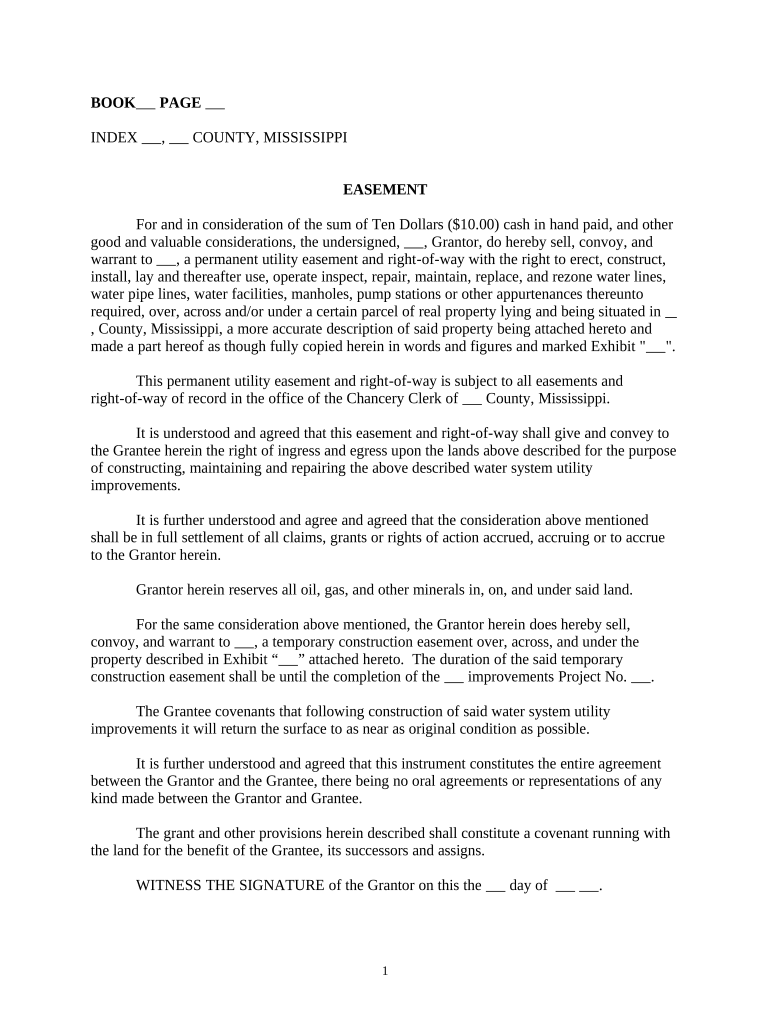
Mississippi Utility Easement

This template is fully customizable. Edit the text, fill out the fields, and send it for signature. Give it a try!
Mississippi Utility Easement

What a Mississippi Utility Easement Is and what it covers

A Mississippi Utility Easement is a written legal instrument by which a property owner (grantor) grants a utility provider (grantee) a nonpossessory right to enter, install, operate, maintain, repair, and replace infrastructure on a defined portion of land. The document identifies the parties, records an exact legal description or survey, defines permitted uses and operational limits (including width, depth, and allowed equipment), sets access windows and restoration obligations, and specifies compensation or consideration when applicable. Properly drafted and recorded easements preserve title clarity and set expectations for maintenance and liability.

Why a recorded easement matters for owners and utilities

A recorded Mississippi Utility Easement establishes public notice of utility rights, reduces title objections, and delineates responsibility for construction and long‑term maintenance. Clear easement language protects landowner interests, simplifies future transactions, and ensures the utility can service customers while limiting disputes over access and repairs.

Why a recorded easement matters for owners and utilities

Who commonly uses a Mississippi Utility Easement

Common users include parties who negotiate access, those who record title documents, and professionals who prepare or review the instrument.

  • Property owners — Grantors who require precise limits, compensation terms, and restoration obligations to protect residual property value.
  • Utility companies — Grantees seeking reliable access, defined work areas, maintenance windows, and indemnity for infrastructure operations.
  • Title companies and attorneys — Review instruments for recordability, chain of title impacts, and lender requirements or exceptions.

Typical signers and their roles

Property Owner

A property owner (grantor) signs to convey a limited right while retaining fee title. The owner should confirm the legal description, compensation, restoration obligations, permitted access times, and any vegetation or use restrictions that affect remaining property rights and marketability.

Utility Agent

A utility representative or land agent signs on behalf of the grantee to secure construction and maintenance rights. The agent verifies survey accuracy, confirms easement width and type (exclusive versus nonexclusive), and ensures required corporate authority and regulatory consents are in place.

Essential data fields to include

Owner Name: Enter the owner's full legal name.
Utility Name: Record the grantee's legal corporate or municipal name.
Legal Description: Provide survey metes and bounds or recorded plat.
Property Address: Include street address, city, state, and ZIP.
Parcel ID: List county tax parcel or property identifier.
Notary Acknowledgment: Include notary block with signature and official seal.

Step-by-step: complete and record an easement

Follow these steps to prepare, execute, notarize, and record a Mississippi Utility Easement with accurate evidence of rights and public notice.

  • 01
    Gather Documents: Collect deed, current survey, parcel ID, and title commitment.
  • 02
    Define Easement: Draft scope, width, location, permitted uses, and duration.
  • 03
    Sign & Notarize: All grantors sign in front of a notary per state rules.
  • 04
    Record: File at the county recorder and obtain recording details.

Configure an electronic workflow for easement execution

Set up a signing workflow that matches your execution order, authentication needs, and recordkeeping requirements before sending the document for signatures.

Signature Authentication Method Email link, SMS code, or identity verification
Notary and Acknowledgment Settings Select RON or in-person notary option per state
Routing Order Sequential or parallel signer order
Audit Trail Capture Enable IP, timestamp, and action logs
Storage and Export Format Export signed PDF/A for recorder compatibility

Typical process flow from draft to recorded easement

The common process moves from drafting through execution and recording, with distribution of certified copies to stakeholders and title insurers.

  • Prepare Draft: Attorney or land agent prepares instrument and exhibits.
  • Sign: Parties sign; corporate authorizations or consents attached.
  • Notarize: Notary completes acknowledgment or jurat per state rules.
  • Record & Distribute: Recorder accepts instrument and parties receive certified copy.

Technical requirements for e-signing and e‑filing

Confirm your platform supports secure authentication, recorder-ready PDFs, and audit trails before using electronic execution for an easement.

  • Integrations: Salesforce, NetSuite, Google Workspace
  • File Formats: PDF/A, DOCX, TIFF exports supported
  • Security: TLS 1.2/1.3 and AES-256 at rest

Timing considerations and typical processing expectations

Recording and processing times differ by county; prompt recording preserves priority, while notarization must precede or accompany filing per local clerk requirements.

Recording Recommendation:

Record immediately after execution and notarization to establish priority.

Notarization Timing:

Notarize before filing; unsigned acknowledgments are often rejected.

County Processing Time:

Processing depends on clerk workload and may vary significantly.

Tax Reporting:

Report consideration in accordance with IRS guidance when required.

Dispute Deadlines:

Title disputes and adverse possession follow state statutes.

Key milestones from negotiation to public recording

Track these milestones to maintain schedule and protect priority; timely completion at each stage reduces rework and legal exposure.

01

Negotiation

Agree terms, compensation, and access protocol between parties.

02

Survey and Description

Obtain a survey to produce an accurate legal description.

03

Execution

Secure signatures, corporate authorizations, and notarization.

04

Recording

File the instrument at the county recorder with exhibits.

Common mistakes to avoid when preparing an easement

  • Relying on a rough sketch instead of a formal legal description leads to ambiguous boundaries, title objections, and future disputes over the exact easement area.
  • Failing to confirm corporate signatory authority or required approvals causes execution invalidity and may require re‑execution with documented resolutions.
  • Not specifying maintenance, restoration, or vegetation controls creates recurring conflicts and potential cost disputes between the landowner and the utility.
  • Recording in the wrong county or omitting the parcel identifier delays public notice and undermines the easement's priority against later conveyances.

Consequences of incorrect or incomplete easement documents

Recording Failure: Priority risk; unenforceable rights.
Ambiguous Description: Boundary disputes and litigation.
Wrong Signatory: Conveyance may be voidable.
Missing Notary: Recording rejected by clerk.
Tax Reporting: Possible IRS reporting obligations.
Scope Dispute: Operational conflicts with owner rights.

Practical examples: real customers and remote execution

These examples show how remote execution and careful drafting improved turnaround and compliance for property instruments in practice.

Tim Martin

Martin Properties executed multiple site easements remotely to maintain project schedules during offsite field work.

  • Remote signing avoided on-site execution delays.
  • "I can process and execute all of these documents online with 100% compliance and built-in security. Whether on mobile or working offline, I can get forms back to their necessary parties efficiently."

Kodi‑Marie Evans

Xerox used automated signature workflows tied to its ERP to reduce manual handoffs for infrastructure agreements.

  • Integration automated approvals and reduced rekeying.
  • "airSlate SignNow provides us with the flexibility needed to get the right signatures on the right documents, in the right formats, based on our integration with NetSuite."

Compare common eSignature vendors for easement workflows

Vendor pricing and core capabilities vary; signNow is listed first per page guidance and competitor pricing is provided for comparison without date annotations.

signNow DocuSign Adobe Sign PandaDoc HelloSign
Starting Price $8/user/mo $15/user/mo $14/user/mo $19/user/mo $15/user/mo
Free Trial 7-day free trial Varies by promotion Varies by promotion Yes, limited Yes, limited
Bulk Send Yes Yes Yes Yes No
Audit Trail Yes Yes Yes Yes Yes
HIPAA Compliant Yes Yes Yes No No

Frequently asked questions about Mississippi Utility Easements

Answers below address common legal, recording, and execution questions including electronic and notarization options.


Need help? Contact support

be ready to get more
Join over 28 million airSlate SignNow users