Establishing secure connection…Loading editor…Preparing document…

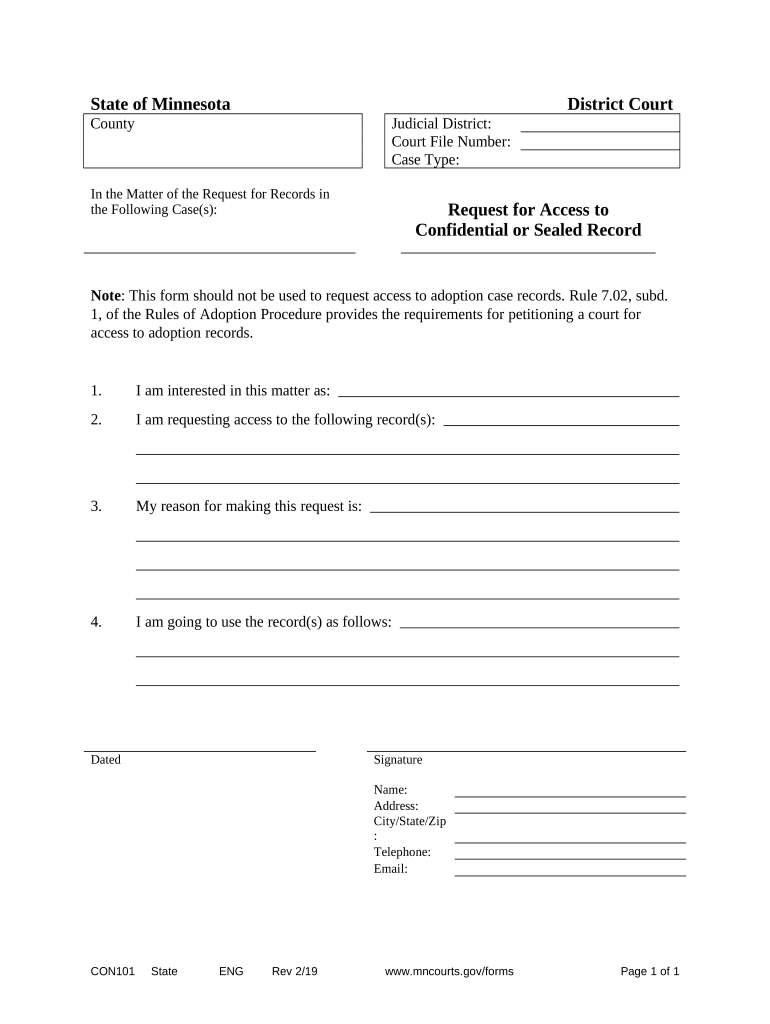
Minnesota Request for Access to Confidential Record

This template is fully customizable. Edit the text, fill out the fields, and send it for signature. Give it a try!
Minnesota Request for Access to Confidential Record

What the Minnesota Request for Access to Confidential Record Is

The Minnesota Request for Access to Confidential Record is a formal request used to obtain copies or review access to government-held records that are designated confidential or private under Minnesota law. It sets out the requester, the records sought, the purpose, and any required proof of identity or authority. Agencies use this request to evaluate whether the records can be disclosed, whether redaction is required, and to document statutory bases for withholding. This form helps both requesters and custodial agencies follow required procedures and preserve legal rights.

Why this request matters for access and compliance

Use this request to obtain civil or administrative records where access is limited by statute, contract, or privacy rules; it clarifies identity, scope, and legal basis and creates a written record for the agency to process.

Why this request matters for access and compliance

Who prepares and who responds to this request

Identifying the correct requester and custodial office at the outset speeds review and reduces returned or incomplete requests.

  • Requesters and claimants — Individuals, attorneys, or authorized representatives who need access to specific confidential records for a permitted purpose.
  • Custodial agencies — Government units, records officers, or data practices compliance staff who evaluate, redact, and release records where allowed.
  • Legal and compliance advisors — Counsel who assert privileges, advise on exemptions, or represent parties in appeals.

Core elements of a professional Minnesota Request for Access to Confidential Record

A complete request follows a consistent structure so agencies can quickly identify the records sought and the authority authorizing disclosure.

Requester Details

Full legal name, contact information, and relationship to subject; include mailing address, phone and email so the agency can respond without delay.
Record Description

Concise, specific description of the records (dates, file numbers, subject names, departments) to prevent overbroad requests and to speed record retrieval.

Purpose / Authority

Explain the permitted purpose or legal basis for access, such as authorized representative status, court order, or statutory entitlement.

Identity Verification

State what proof of identity or authority is attached (copy of ID, power of attorney, signed release) so the agency can confirm entitlement.

Scope & Limits

Specify date range, document types, and custodial units to avoid unnecessary searches and to reduce the chance of denials for vagueness.

Record Handling

Indicate preferred delivery method, confidentiality needs, and whether redactions by the agency are acceptable or a protective order will be sought.

Security and privacy considerations to include

Encryption: TLS 1.2/1.3 in transit
Data at rest: AES-256 encryption
HIPAA compliance: BAA required for PHI
Audit trail: Maintain signed access logs
Access controls: Role-based permissions
Retention: Document request and response

Step-by-step completion and submission process

Follow these sequential steps to prepare and submit a complete request that agencies can process without unnecessary follow-up.

  • 01
    Prepare request: Draft a clear scope and attach ID and authorization.
  • 02
    Submit to custodian: Send to the records officer or designated agency mailbox.
  • 03
    Agency review: Agency determines exemptions and redaction needs.
  • 04
    Receive response: Accept, appeal, or request clarification as provided.

Typical processing workflow after submission

Agencies follow a predictable path from receipt to release; understanding each step helps set expectations and plan appeals if needed.

  • Receipt and Logging: Request logged; tracking number assigned.
  • Scope Assessment: Records office narrows custodial holdings to the described scope.
  • Privacy Review: Staff identifies exempt or confidential portions for redaction.
  • Delivery: Files delivered or pickup arranged, with redactions applied as required.

Digital workflow settings to speed processing

Configure your digital submission so the agency receives complete metadata and attachments to avoid manual follow-up.

Field Configuration
Request Title Use 'Confidential Record Request — [Subject]'
Attachments Attach ID as PDF; label files descriptively
Preferred Delivery Select secure email or physical pickup
Contact Info Provide daytime phone and email

How to submit electronically and technical requirements

Confirm agency submission guidelines; some offices require physical signatures, notarization, or specific portal use for confidential records.

  • Accepted formats: PDF, DOCX, TIFF
  • Authentication: Email plus government ID recommended
  • Attachments: Label each file clearly

Timing expectations and statutory response windows

Response deadlines vary by agency and by the type of record; some statutes set specific windows while others require prompt handling.

Initial Acknowledgment:

Varies by agency; often prompt

Agency Review Period:

Statutory response windows differ

Redaction Processing:

Time depends on volume and sensitivity

Appeal Deadline:

Appeal timelines are agency-specific

Record Delivery:

Timing set in the agency response

Key milestones from request to release

Track these milestones to monitor progress and preserve appeal rights if release is delayed or denied.

01

Submit Request

Deliver the completed request and required ID to the designated office.

02

Agency Intake

Records staff log and review scope; ask for clarification if unclear.

03

Legal Assessment

Agency applies exemption law and determines redactions or partial withholding.

04

Final Delivery

Agency provides documents, redactions, or denial with appeal information.

Common mistakes that delay confidential-record requests

  • Insufficient specificity — Overbroad requests force broad searches and slow responses.
  • Missing identity proof — Failure to attach required ID delays verification and release.
  • Unclear authority — Not documenting representative authority causes the agency to withhold access.
  • Wrong recipient — Sending to the wrong department leads to rerouting and processing delays.

Risks and potential consequences to be aware of

Access denial: May result from valid statutory exemptions
Delayed response: Administrative backlog or incomplete request
Data breach: Improper handling can expose sensitive data
Appeal cost: Legal review or litigation expenses
Incorrect disclosure: Liability for unauthorized release
Administrative fines: Agency-specific penalties may apply

Typical eSignature vendor pricing and capability snapshot

Comparison of entry pricing and key capabilities relevant to confidential-record workflows; signNow appears first as a platform option for eSigning and secure submissions.

signNow DocuSign Adobe Sign PandaDoc HelloSign
Starting Price $8/user/mo $15/user/mo $14/user/mo $19/user/mo $15/user/mo
Free Trial 7-day free trial Trial available Trial available Free tier available Trial available
Bulk Send Yes (Business Premium) Yes Yes Yes No
Audit Trail Yes Yes Yes Yes Yes
HIPAA Compliant Yes (BAA available) Yes Yes No No

Practical tips for accurate and efficient completion

Follow these guidelines to minimize follow-up requests and improve the chance of a timely, complete response.

Be specific and concise
Describe records using identifiers, narrow date ranges, and file or incident numbers when available. Specificity reduces search time and the likelihood of an overbroad denial or requests for clarification.
Attach clear proof of identity or authority
Include a legible copy of government-issued photo ID and written authorization for representatives. Missing or unclear documentation is the most common cause of processing delays and denials.
Select a secure delivery method
Request secure email or encrypted file transfer for confidential records. Plain email may be rejected for PHI or financial data; note delivery preferences in the submission.
Document every interaction
Keep dated copies of the request, agency acknowledgments, produced materials, and any fee invoices. A documented trail supports administrative appeals and compliance reviews.

Real-world examples of secure requests and processing

Two concise scenarios illustrate how requesters and agencies handle confidential-record access in practice.

Healthcare Request

A clinic patient submitted a targeted records request for lab reports

  • 'The team was exceptional and responsive'
  • The clinic supplied redacted records via secure email after ID verification and a signed HIPAA release, shortening turnaround and avoiding paper handling.

Property Records

A property owner requested title correspondence tied to a dispute

  • 'I can process and execute all of these documents online'
  • The county office accepted a secure submission, applied statutory redactions, and provided certified copies for legal review.

Frequently asked questions about Minnesota Request for Access to Confidential Record

Answers to common questions about electronic submission, identity verification, redaction, appeals, and retention for confidential-record requests.


Need help? Contact support

be ready to get more
Join over 28 million airSlate SignNow users