Establishing secure connection…Loading editor…Preparing document…

Minnesota Petition in Adoption Proceedings

This template is fully customizable. Edit the text, fill out the fields, and send it for signature. Give it a try!
Minnesota Petition in Adoption Proceedings

What the Minnesota Petition in Adoption Proceedings Is

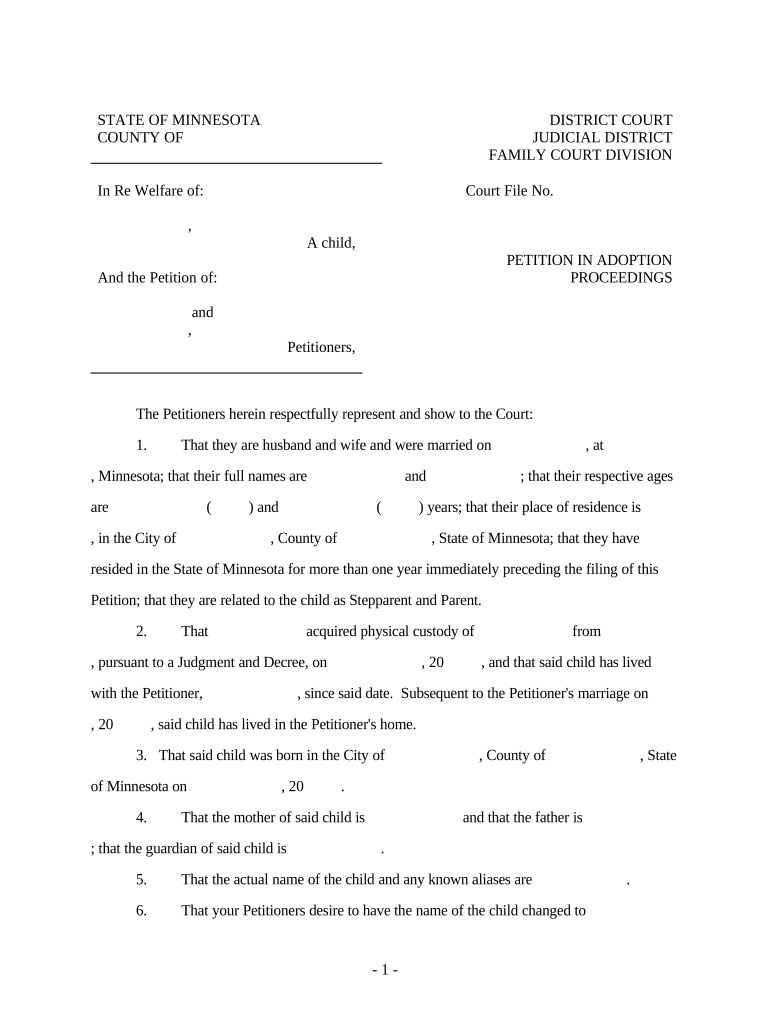
The Minnesota Petition in Adoption Proceedings is the formal court filing that asks a Minnesota district court to establish a legal parent-child relationship. It sets out petitioner information, child details, consent statements, prior parental rights status, and proposed orders. The petition initiates the adoption case, triggers service and notice requirements, and provides the court with statutory bases for granting adoption under Minnesota law. Proper completion ensures the clerk accepts the filing and the case proceeds to investigation, hearing, and final decree stages.

Why a Carefully Prepared Petition Matters

A complete, accurate petition avoids delays in court processing, supports the social study and background checks, and reduces the risk of dismissal or additional court orders.

Why a Carefully Prepared Petition Matters

Who Typically Prepares and Files This Petition

Multiple parties may prepare or file the petition; each has different responsibilities and documentation requirements.

  • Adoptive parents or petitioners who initiate the case and supply biographical, residence, and consent information.
  • Attorneys who draft petitions to ensure statutory compliance and represent petitioners in hearings and service matters.
  • Agencies or licensed facilitators that submit agency-specific paperwork and coordinate home studies and background checks.

Check local rules for whether the petitioner, attorney, or agency must file electronically or supply original signatures.

Signatory Roles and Typical Duties

Petitioner / Adoptive Parent

The petitioner signs factual statements, verifies consent where applicable, provides identifying information, and certifies service. The petitioner is responsible for ensuring documents are truthful and complete; mismatches in names or dates can delay the case.

Agency / Attorney

An attorney or licensed agency may sign verification pages, file motions, and serve other parties. They ensure statutory language is used and may need to provide supporting affidavits, home study reports, and placement documentation to the court.

Step-by-Step: Completing and Filing the Petition

Follow these sequential steps to prepare the petition, attach exhibits, and submit to the court clerk or electronic filing system.

  • 01
    Prepare Documents: Assemble petition, consents, and home study.
  • 02
    Review Requirements: Confirm county-specific filing rules and fees.
  • 03
    Sign and Notarize: Execute in presence of required witnesses or notary.
  • 04
    File with Court: Submit via eFile or in-person to the clerk.

How the Petition Moves Through the Minnesota Court System

A typical flow traces filing, service, background checks, hearing, and the final decree; timing varies by county and case complexity.

  • Filing: Clerk accepts petition and assigns case number.
  • Service: Other parties receive notice per court rules.
  • Investigation: Social services and the court review the home study.
  • Hearing & Decree: Judge holds hearing and may issue final order.

Key Sections Included in a Professional Petition

A well-constructed petition organizes statutory statements, factual background, consent language, supporting exhibits, jurisdictional assertions, and a clear proposed order to simplify judicial review.

Caption

Court name, county, case number, and caption identifying petitioner and child; accuracy expedites clerk processing and docketing.
Jurisdiction Statement

Specific language establishing court jurisdiction and petitioner residency to meet statutory venue requirements and avoid remand.

Factual Allegations

Chronological facts about placement, birth parent status, and placement history to support the court’s best-interests determination.

Consent and Termination

Signed consents, termination orders, or clear explanation of why consent is not required in this case.

Supporting Exhibits

Attachments such as the home study, agency reports, background checks, and any prior court orders necessary for review.

Proposed Decree

Draft findings and decree language for the judge to adopt, reducing drafting errors and shortening the hearing.

Confidential and Compliance Considerations

Confidentiality: Seal records when permitted by statute
HIPAA: Protect medical records; BAA if using a vendor
Record Integrity: Retain tamper-evident signed copies
Child Privacy: Omit nonessential identifying data in public filings
Access Controls: Limit access to case participants only
Audit Trail: Preserve signing and submission logs

Consequences of Incorrect or Incomplete Petitions

Filing Rejection: Clerk may refuse or return the petition
Hearing Delay: Incomplete exhibits postpone court dates
Loss of Standing: Improper service can invalidate the case
Statutory Noncompliance: Missing jurisdiction facts may lead to dismissal
Privacy Breach: Improperly redacted PII can create liability
Cost Increases: Additional filings and counsel time raise expenses

Common Preparation Pitfalls to Avoid

  • Using inconsistent names or dates across exhibits, which creates identity issues and may require supplemental affidavits to correct.
  • Attaching incomplete home studies or unsigned consents; missing signatures are one of the most frequent causes of continuances.
  • Assuming e-signature acceptance for all adoption forms; certain courts require original signatures or specific authentication.
  • Failing to confirm the county clerk’s filing fee and e-filing requirements, which can prevent the clerk from accepting the petition.

How to Configure an Online Petition Workflow

Set up fields, signer order, authentication, and supporting-document uploads to match court and agency requirements.

Field Placement Place name, DOB, signature, and date fields in logical order
Authentication Require email or SMS code for petitioner identity
Notary/RON Step Insert notary step when required by jurisdiction
Attachment Handling Allow multi-file uploads for home studies and consents
Template Saving Save completed petition as a reusable template

Sharing, Filing, and Integration Options

Decide whether to file electronically, deliver to parties by email, or produce notarized wet-signatures based on court rules and privacy needs.

  • Email Delivery: Secure envelope with audit trail
  • Court E-filing: Submit via county eFile portal
  • Document Storage: Use encrypted cloud storage

Verify integration requirements for case management or agency portals and ensure chosen channels meet privacy and record-retention obligations.

Timing Considerations and Typical Deadlines

Key deadlines depend on local scheduling, service rules, and any statutorily prescribed waiting periods; plan filings accordingly.

Service of Process:

Serve other parties per Minnesota rules promptly after filing

Background Checks:

Allow several weeks for completion of criminal and child protection checks

Home Study Timeline:

Home studies often require 30–90 days for completion

Hearing Scheduling:

County docket availability commonly sets hearing within 4–12 weeks

Final Decree:

Judge may issue decree at hearing or set a follow-up date

Milestones from Filing to Final Decree

Use this milestone sequence to track the petition from submission through disposition.

01

Case Initiation

Clerk assigns case number and docket entry

02

Service and Notice

Other parties receive paperwork and deadlines

03

Investigation Stage

Social services complete assessments and reports

04

Hearing and Order

Judge hears evidence and issues the decree

Paper Petition versus Electronic Petition: Key Differences

Compare the common attributes of paper and electronic petitions to decide which method suits your case and court.

Criteria Paper Petition Electronic Petition
Acceptance universal varies by court
Processing Speed slower faster
Signature Requirement wet original often required e-sign allowed when accepted
Audit Trail limited robust metadata and logs

Technical and Platform Considerations for eFiling and Signing

Ensure selected platforms support required file formats, authentication levels, and integration with court e-filing systems before using them.

  • File Formats: PDF and DOCX widely accepted
  • Authentication: Email, SMS, or stronger methods
  • Integrations: Connectors for case management systems

Confirm platform compliance with HIPAA or other industry rules when handling sensitive health or social-service records and preserve audit trails for court review.

Illustrative Scenarios of Petition Uses

These concise examples show common petition types and the supporting documentation typically required.

Private Agency Adoption

An adoptive couple files after placement by an agency

  • Agency provides home study and placement papers
  • The petition attaches agency consents, home study, criminal background checks, and any termination orders to support a timely hearing and decree.

Stepparent Adoption

A stepparent petitions where one parent consents or rights are terminated

  • Noncustodial parent served per rule
  • The court often requires evidence of relationship, domicile, and clear consent or termination documentation before issuing a decree.

Frequently Asked Questions About the Minnesota Adoption Petition

Answers to common procedural and technical questions when completing or filing an adoption petition in Minnesota.


Need help? Contact support

be ready to get more
Join over 28 million airSlate SignNow users