Establishing secure connection…Loading editor…Preparing document…

Motion to Change Venue

This template is fully customizable. Edit the text, fill out the fields, and send it for signature. Give it a try!
Motion to Change Venue

What a Motion to Change Venue Is and When It Applies

A Motion to Change Venue is a formal written request filed in court asking the judge to transfer a pending case to a different geographic forum. Typical grounds include improper venue, convenience of witnesses, prejudice in the original forum, or forum non conveniens in civil matters. The motion usually cites statutory or rule-based authority, explains factual reasons for transfer, and attaches supporting affidavits or exhibits. Courts evaluate timeliness, prejudice, and convenience; hearings or briefing schedules are common. The moving party must serve opposing parties and follow local civil procedure and filing rules.

Why Filing a Motion to Change Venue May Matter

A well-supported motion can preserve procedural rights, reduce travel and litigation costs, and potentially secure a more neutral jury pool. It clarifies jurisdictional objections early and documents factual reasons for transfer. Using a secure eSignature and document workflow tool can streamline preparation, signature collection, and distribution while maintaining an audit trail for court filing and service.

Why Filing a Motion to Change Venue May Matter

Who Typically Prepares and Files This Motion

Attorneys in civil and criminal matters usually prepare the motion; self-represented litigants may also file one following local rules.

  • Civil plaintiffs and defendants seeking a more convenient or neutral forum.
  • Criminal defense counsel when venue concerns affect fair trial rights or witness accessibility.
  • In-house corporate counsel or outside counsel coordinating multi-jurisdictional litigation.

Common Pitfalls to Avoid

  • Filing late after answering the complaint, which may waive venue objections and reduce chances of transfer.
  • Relying on conclusory statements without sworn affidavits, witness declarations, or concrete proof of inconvenience.
  • Failing to follow local format, service, and filing requirements, causing rejection or delay by the clerk.
  • Omitting a proposed order or failing to address opposing party’s anticipated rebuttal on forum selection.

Key Security and Compliance Considerations for Court Documents

Encryption: TLS 1.2/1.3 in transit; AES-256 at rest
Certifications: SOC 2 Type II and ISO 27001 available
HIPAA: HIPAA-compliant with BAA available
Audit Trail: Detailed timestamps, IP, and action log
Access Controls: Role-based permissions and SSO options
Records Retention: Secure storage with exportable copies

Consequences of a Deficient or Late Motion

Motion Denied: Case remains in original venue
Waiver of Objection: Late objection can forfeit venue rights
Sanctions: Court may impose fees or sanctions
Increased Costs: Travel and extended litigation expenses
Delay in Proceedings: Hearing schedules prolong case timeline
Jurisdictional Risk: Wrong forum may impair enforcement

Step-by-Step: Preparing and Filing the Motion

Follow a structured workflow: gather facts, prepare the motion, include exhibits, verify service, and track hearing dates.

  • 01
    Assess Basis: Identify statutory or rule-based grounds.
  • 02
    Draft Motion: State facts, legal standard, and relief requested.
  • 03
    Attach Evidence: Include affidavits, declarations, and exhibits.
  • 04
    File and Serve: File with court clerk and serve opposing counsel.

Typical Workflow for Electronic Preparation and Submission

Electronic workflows reduce manual steps while ensuring the motion and exhibits remain organized, signed, and auditable for court filing and service.

  • Upload Documents: Import motion, exhibits, and proposed order.
  • Place Signature Fields: Add signature, date, and attestation fields where required.
  • Authenticate Signers: Use email, SMS, or stronger methods for signer ID.
  • Export for Filing: Produce court-ready PDF and certificate of completion.

Essential Elements of a Professional Motion to Change Venue

A complete motion is concise, legally grounded, and supported by sworn evidence and a proposed order. Assemble documents so the court and opposing parties can readily evaluate the transfer request.

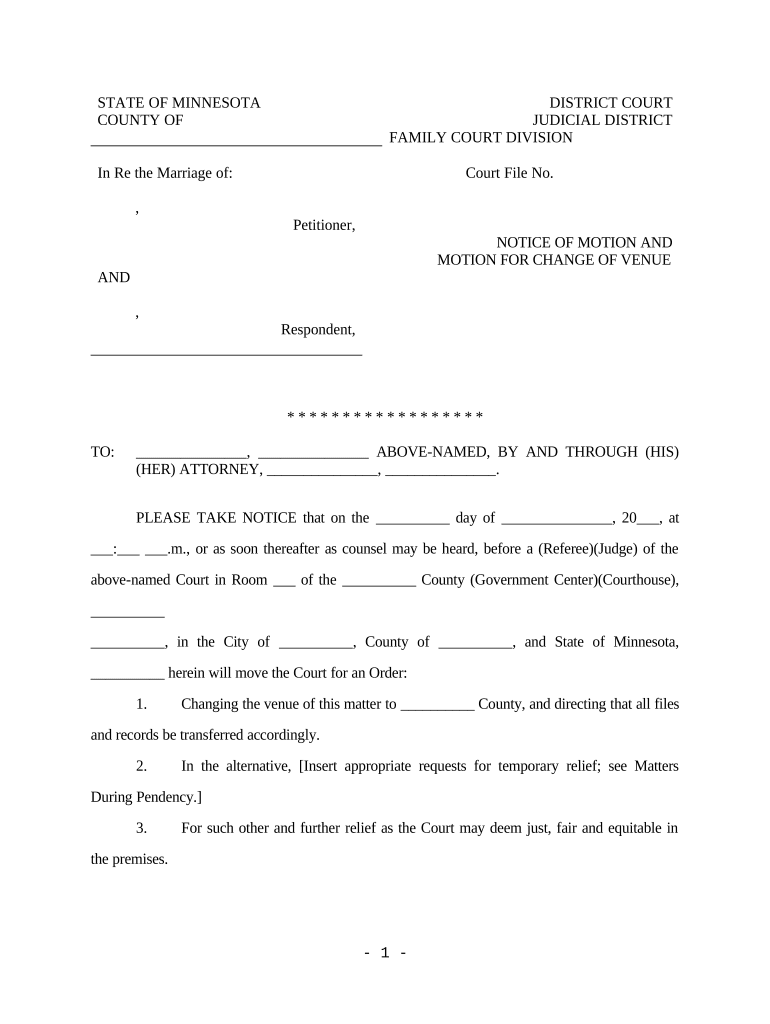
Caption

Court name, parties, docket number, and title identifying the motion.
Statement of Facts

Chronological, citation-supported facts showing why original venue is improper or inconvenient.

Legal Argument

Cite governing statutes or rules and apply relevant case law to the facts.

Affidavits and Exhibits

Sworn witness statements, travel distances, and documentary proof of prejudice.

Proposed Order

Draft order specifying new venue and any conditions for transfer.

Certificate of Service

Proof that all opposing parties and the clerk received filings.

Practical Tips for a Clear, Court-Ready Motion

Adopt consistent formatting, verify citations, and include a concise table of contents for lengthy exhibits to aid judicial review.

Follow Local Rules
Match page limits, font size, and filing procedures exactly.
Support with Declarations
Use notarized or sworn declarations to substantiate factual claims.
Be Specific
Quantify distances, witness locations, and anticipated travel burdens.
Prepare Proposed Order
Provide a clean, editable order for judicial convenience.

Technical and Integration Considerations for eSubmission

Confirm that your eSignature solution exports court-ready PDFs, maintains audit trails, and integrates with case management or storage systems.

  • Supported Formats: PDF, DOCX, and printable images
  • Integrations: Salesforce, NetSuite, Microsoft 365 supported
  • Authentication: Email, SMS, and advanced signer verification

Typical Configuration Settings for an eFiling Workflow

Map each workflow field to court requirements: document types, signature placement, signer identity, and delivery method before initiating signature requests.

Field Configuration
Document Type Motion, Declaration, Proposed Order
Signature Placement Attorney signature block and date
Signer Authentication Email or SMS code; stronger KBA if required
Delivery Email to counsel and eFiling export

Timing Considerations and Typical Deadlines

Deadlines vary by jurisdiction; common expectations include early filing, prompt service, and local rules for hearing notices and opposition deadlines.

File Early:

Many courts require venue objections before or with the responsive pleading

Opposition Deadline:

Opposing party typically has 14–30 days to respond, per local rule

Hearing Date:

Hearing often scheduled 20–60 days after filing, depending on calendar

Reply Deadline:

Reply briefs commonly due 7–14 days before hearing

Service Timing:

Proof of service must accompany filings per local procedure

Representative Scenarios Where a Motion to Change Venue Helped

Two brief examples show when transfer requests are typical and what supporting facts mattered most to the court.

Local Witness Burden

A plaintiff filed for transfer due to key witness travel burdens and documentary evidence location.

  • Court weighed witness convenience and travel costs.
  • The court granted transfer after sworn declarations quantified distance and scheduling hardships, reducing trial disruption and expense.

Prejudicial Publicity

A defendant requested venue change citing intense local media coverage and potential juror bias.

  • The motion included news clippings and juror challenge statistics.
  • The judge transferred venue to a less-affected county, citing risk to impartial jury and supporting evidentiary submissions.

Comparing eSignature Vendor Pricing and Features for Motion Preparation

Basic vendor capabilities and price points for common eSignature vendors. Place platform choice against needs like bulk send, HIPAA compliance, and envelope limits when preparing court filings.

signNow DocuSign Adobe Sign PandaDoc HelloSign
Starting Price $8/user/mo $15/user/mo $14/user/mo $19/user/mo $15/user/mo
Free Trial 7-day free trial Varies by plan Varies by plan Varies by plan Varies by plan
Bulk Send Yes Yes Yes Yes No
Audit Trail Yes Yes Yes Yes Yes
HIPAA Compliant Yes Yes Yes No No
Envelope Cap No cap 100 envelopes/user/year Varies Varies Varies

Frequently Asked Questions About Motions to Change Venue

Answers to common procedural and technical questions about drafting, signing, filing, and defending a venue motion in U.S. courts.


Need help? Contact support

be ready to get more
Join over 28 million airSlate SignNow users