Establishing secure connection…Loading editor…Preparing document…

Motion for Review of Certification

This template is fully customizable. Edit the text, fill out the fields, and send it for signature. Give it a try!
Motion for Review of Certification

What the Motion for Review of Certification Is

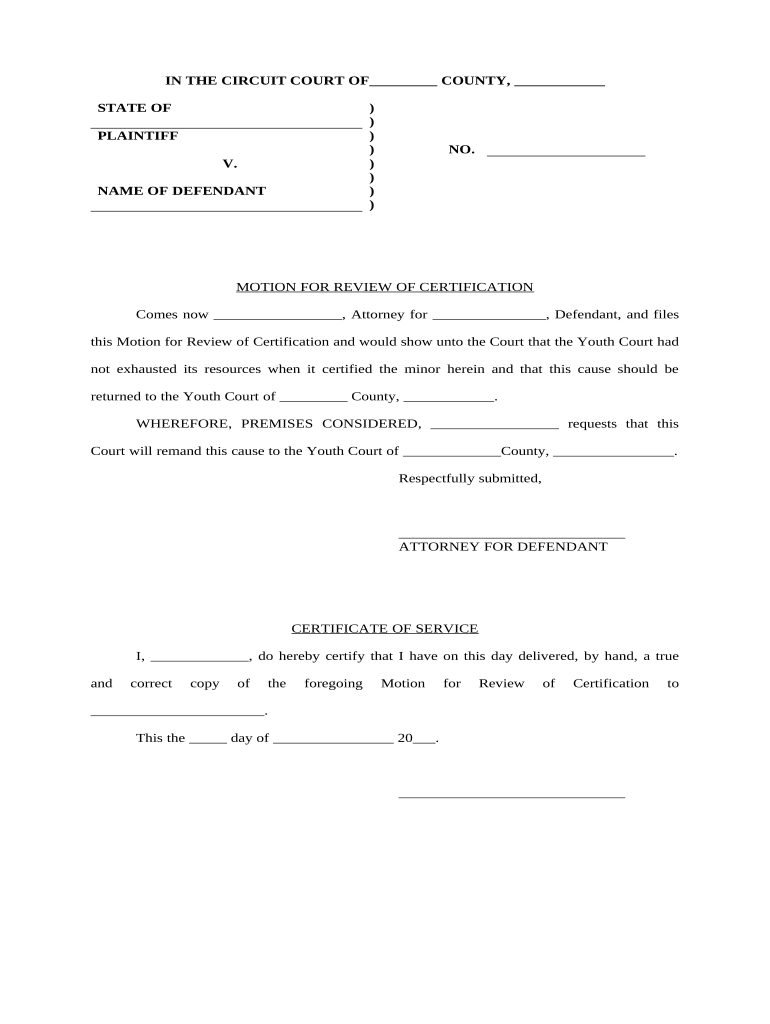
A Motion for Review of Certification is a formal written request asking an issuing authority, licensing board, or tribunal to reconsider, modify, or vacate a prior certification decision. It frames the legal and factual grounds for review, identifies the parties and case number, and asks the decision-maker to overturn or amend the certification. Typical uses include challenges to professional-license suspensions, administrative certification denials, or agency determinations affecting eligibility. Timeliness, proper service, and a clear statement of relief sought are essential to preserve review rights and ensure the motion is heard.

Why filing a Motion for Review of Certification matters

Filing preserves legal rights, creates an official record for appeal, and can halt enforcement actions while review is pending. The motion focuses review on factual errors, procedural irregularities, or misapplied law and requests corrective relief such as reinstatement, modification, or remand for further proceedings.

Why filing a Motion for Review of Certification matters

Typical users and representatives

These motions are filed by affected individuals or entities and often involve counsel or authorized representatives.

  • Licensed professionals and certificate holders seeking reinstatement or dispute resolution.
  • Attorneys and regulatory representatives filing on behalf of clients.
  • Employers, educational institutions, or credentialing bodies with a statutory interest in the certification outcome.

Parties should confirm standing, statutory review rights, and any agency-specific rules before filing to avoid dismissal for lack of jurisdiction or improper petitioner status.

Core elements to include in a professional motion

A clear, well-ordered motion increases the chance of acceptance and focused review by the deciding body.

Case Caption

Include court or agency name, docket/case number, party names, and contact details to ensure correct routing and service.
Statement of Jurisdiction

Cite the specific statute or rule authorizing review and explain why the reviewing body has authority to hear the motion.

Grounds for Review

Set out precise legal and factual bases for relief (procedural error, new evidence, misapplication of law, material defect in certification).

Supporting Evidence

List exhibits and declarations, identify witnesses, and explain how each item supports the claimed error or relief sought.

Relief Requested

Describe exactly what you want the reviewer to do (vacate, modify, remand, stay enforcement) and include proposed remedial language.

Service & Certificate

Attach a certificate of service showing how and when parties were served, per agency or court rules.

Required identifiers and case data

Petitioner name: Full legal name
Respondent name: Agency or opposing party
Case number: Docket or file number
Filing date: MM/DD/YYYY
Contact details: Address, phone, email
Attachments: Exhibit index

Step-by-step: preparing the motion

Follow a consistent sequence to prepare a defensible, procedurally compliant motion suitable for court or administrative review.

  • 01
    Identify authority: Confirm the statute or rule permitting review and the applicable deadline.
  • 02
    Assemble evidence: Collect exhibits, affidavits, and records that directly support the claimed error.
  • 03
    Draft motion: Write concise factual statement, legal argument, and precise remedy requested.
  • 04
    Serve parties: Serve per procedural rules and file certificate of service with the motion.

Typical filing and review flow

The following describes common operational steps from filing to final disposition; specific agencies may vary procedural details and timelines.

  • Prepare filing: Complete motion, exhibits, and service certificate for submission.
  • File with agency: Submit to the designated clerk or portal per agency rules.
  • Serve participants: Provide copies to all required parties and note method and date.
  • Await ruling: Agency issues order, schedules hearing, or denies on procedural grounds.

Configuring a digital workflow for the motion

Many filers use electronic document workflows to collect signatures, attach exhibits, and maintain an audit trail for administrative submissions.

Field Configuration
Document format PDF/A preferred for archival integrity
Signature method eSignature or scanned wet signature per agency acceptance
Authentication Email + access code or advanced signer ID where required
Retention settings Enable immutable audit trail and export options

Digital filing and platform compatibility

Use platforms that support required formats, signer authentication, and audit trails for admissibility.

  • signNow integrations: Salesforce, Microsoft 365, NetSuite and common cloud storage providers
  • Supported formats: PDF, DOCX, and exported PDF/A
  • Security standards: TLS in transit, AES-256 at rest

Ensure the chosen service allows export of a completed signed PDF with an audit trail and supports any agency requirements for notarization or authenticated submission.

Common timing considerations

Deadlines and response windows vary by agency; check the controlling statute or rule before filing to avoid forfeiture of review rights.

Filing deadline:

Often 20–30 days from certification notice; verify agency rule.

Service timeframe:

Some rules require same-day or next-business-day service to named parties.

Answer period:

Agency or respondent may have 10–30 days to file a response.

Hearing schedule:

Hearings commonly set 30–90 days after filing, depending on congestion.

Appeal window:

Administrative decisions often carry separate appeal deadlines to courts.

Common mistakes to avoid

  • Missing the statutory filing deadline or relying on untimely mail causes forfeiture of review rights and often cannot be cured.
  • Failing to attach or index supporting exhibits leaves factual assertions unsubstantiated and weakens the motion.
  • Incorrect service or failure to certify service may result in dismissal for lack of proper notice.
  • Vague or overly broad relief requests hamper practical remedies; state precisely the corrective action you seek.

Consequences of an incorrect or incomplete motion

Forfeiture: Loss of right to review
Dismissal: Motion rejected without prejudice or on procedural grounds
Sanctions: Potential fees or disciplinary measures for bad-faith filings
Enforcement: Original certification remains effective
Delayed relief: Extended administrative or judicial timelines
Evidence exclusion: Late disclosures may be barred

eSignature vendor pricing and feature snapshot

Comparison of common plan starting prices and capabilities relevant to filing motions and collecting signatures. Verify vendor plans for feature availability and billing terms.

signNow DocuSign Adobe Sign PandaDoc HelloSign
Starting Price $8/user/mo $15/user/mo $14/user/mo $19/user/mo $15/user/mo
Free Trial 7-day free trial Varies Varies Varies Varies
Bulk Send Yes (Business Premium) Varies Varies Varies No
Audit Trail Yes Yes Yes Yes Yes
HIPAA Compliant Yes (BAA) Yes Yes No No
Envelope Cap No cap 100 envelopes/user/year Varies Varies Varies

Frequently asked questions about the Motion for Review of Certification

Answers to common procedural and practical questions about preparing, signing, and filing a motion to review a certification decision.


Need help? Contact support

be ready to get more
Join over 28 million airSlate SignNow users