Establishing secure connection…Loading editor…Preparing document…

New Jersey Civil Complaint

This template is fully customizable. Edit the text, fill out the fields, and send it for signature. Give it a try!
New Jersey Civil Complaint

What a New Jersey Civil Complaint Is and When It’s Used

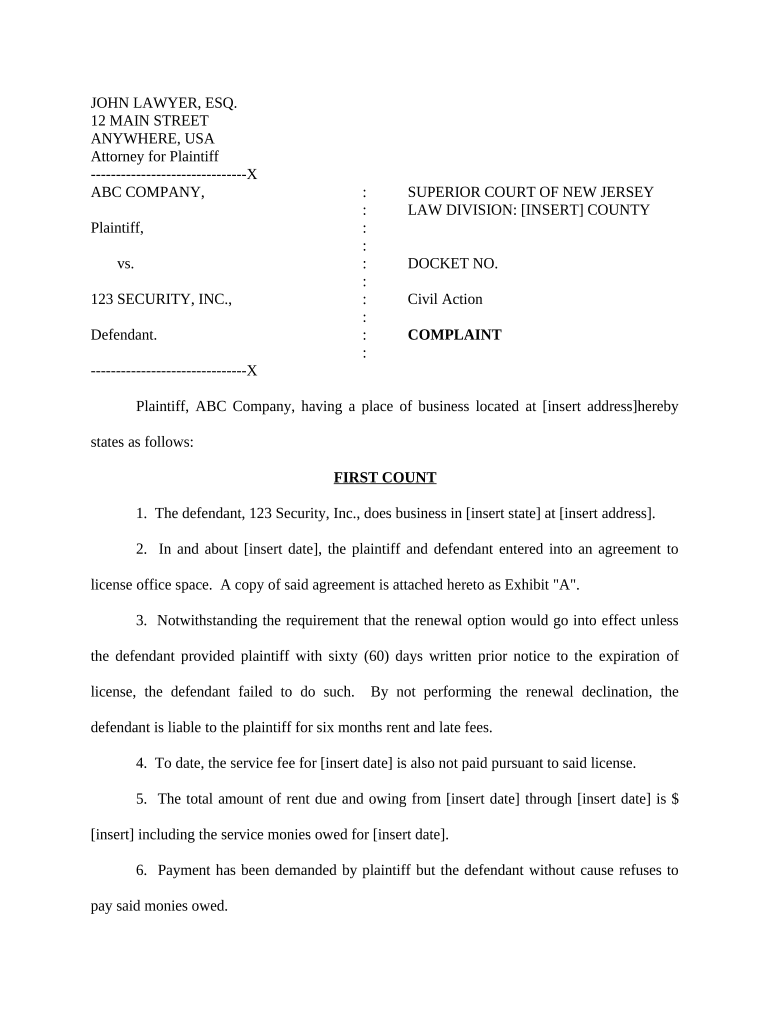
A New Jersey Civil Complaint is the initial pleading a plaintiff files in state court to start a civil lawsuit. It identifies the parties, states jurisdiction and venue, summarizes factual allegations, and requests relief such as money damages, injunctive relief, or declaratory judgment. In New Jersey, complaints must meet court procedural rules for form and content, provide a signed certification of service where applicable, and be accompanied by the required filing fee or fee waiver application. Proper drafting and supporting exhibits increase the likelihood the case advances past initial review.

Why the Complaint Matters for Case Progress and Rules

The civil complaint defines the scope of the dispute, preserves claims before statute of limitations expire, and notifies defendants of allegations so they can respond. It triggers court deadlines, service requirements, and potential early motion practice.

Why the Complaint Matters for Case Progress and Rules

Who Prepares and Files a New Jersey Civil Complaint

Plaintiffs, attorneys, in-house counsel, and self-represented litigants prepare complaints; court clerks accept filings and manage docketing.

  • Plaintiff or Plaintiff’s Attorney prepares factual allegations, selects causes of action, and signs the complaint.
  • Court Clerk accepts filings, assigns a docket number, and processes the filing fee or fee waiver.
  • Process Server or Sheriff effects service of process on defendants following New Jersey rules.

Accuracy at filing affects service, response windows, and potential default or dismissal outcomes; confirm party names, addresses, and relief requested before submission.

Step-by-Step: Filing a New Jersey Civil Complaint

A concise sequence to prepare, file, and serve a New Jersey civil complaint so deadlines and procedures are met.

  • 01
    Draft complaint: Describe parties, jurisdiction, facts, causes of action, and requested relief.
  • 02
    Attach exhibits: Include contracts, correspondence, or other documents referenced in counts.
  • 03
    File with court: Submit to the county clerk or eCourts portal and pay or apply for a fee waiver.
  • 04
    Serve defendants: Arrange service by process server, sheriff, or approved method under court rules.

Options for Customizing an Electronic Complaint Workflow

Common configuration choices when preparing a complaint for e-filing or electronic signature capture.

Field Configuration
Signature Block Enable typed or drawn signature; include signature date field
Conditional Exhibits Show exhibit upload fields only when referenced in specific counts
Authentication Require email verification or SMS code for signer identity
Audit Trail Capture timestamps, IP addresses, and signer events

From Draft to Docket: How Filing and Service Proceed

A practical routing of the complaint from preparation to service and defendant response.

  • Prepare Document: Draft complaint, exhibits, and case information sheet.
  • File with Court: Submit via county e-filing portal or in-person at clerk’s office.
  • Receive Docket Number: Court assigns number and issues a stamped copy for service.
  • Effect Service: Serve defendant; file proof of service to start response clock.

Digital Filing and Signing: Technical Considerations

Electronic complaints require compatible file formats, secure signing, and appropriate authentication to satisfy court and statutory requirements.

  • Supported Formats: PDF/A is preferred for e-filing and retention; include searchable text when possible.
  • Signer Authentication: Use email verification, SMS code, or stronger ID proofing where required.
  • Audit Trail & Security: Capture timestamps, IP logs, and tamper-evident signatures for admissibility.

Confirm the receiving court’s e-filing technical specifications before submission and maintain original signed records according to retention rules.

Core Elements to Include in a Professional New Jersey Civil Complaint

Ensure the complaint contains essential sections and structured content so the court and opposing parties clearly understand the claims and relief sought.

Caption

Court name, county, docket caption, and party names in the correct order and format.
Jurisdiction & Venue

Statement of subject-matter jurisdiction and why venue is proper in the selected county.

Parties

Full legal names, business designations, and service addresses for each party.

Factual Allegations

Numbered paragraphs describing the events giving rise to the claim with date ranges and specific acts.

Causes of Action

Separate counts, legal elements, and factual predicates linked to allegations.

Demand for Relief

Specific remedies requested, including monetary damages, equitable relief, attorney’s fees, and costs.

Essential Data Points That Must Be Accurate

Party Names: Full legal names
Addresses: Physical service addresses
Dates: MM/DD/YYYY format
Exhibit References: Exhibit letter/number
Signature: Signer name and date
Contact Info: Attorney bar number

Common Pitfalls When Preparing a Complaint

  • Using an incorrect party name that prevents valid service or garnishment procedures.
  • Failing to attach or properly reference exhibits supporting key factual assertions.
  • Selecting the wrong venue or court division leading to transfer or dismissal.
  • Omitting a clear demand for relief, which can complicate damages calculations and motions.

Consequences of Errors or Incomplete Complaints

Dismissal Risk: Court may dismiss claims for failure to state a claim.
Default Judgment: Improper service may still lead to procedural default if not cured.
Statute of Limitations: Delay in filing can bar claims; check applicable limitation period.
Sanctions: Frivolous or misleading pleadings can expose attorneys to sanctions.
Inadmissible Evidence: Improperly authenticated exhibits may be excluded at trial.
Appeal Issues: Early procedural mistakes can limit appellate remedies.

Key Deadlines and Timing Expectations

Filing and response deadlines determine how the case proceeds; track calendar days and service dates carefully.

Filing Date:

Case begins on date complaint is accepted by clerk

Service Window:

Serve defendants within the court’s prescribed timeframe

Answer Deadline:

Typically 35 days after service in New Jersey for state law defendants

Motion Timelines:

Motions follow local rule schedules for briefing and oral argument

Statute of Limitations:

Ensure timely filing before applicable limitations expire

Milestones from Filing to Initial Court Event

Sequential milestones mark critical progress points in the early lifecycle of a civil case.

01

Filing and Docketing

Clerk assigns docket number and issues stamped complaint.

02

Service of Process

Plaintiff effects service and files proof of service to start response clock.

03

Defendant Response

Defendant files answer or motion to dismiss within the court-prescribed period.

04

Initial Case Management

Court schedules case management conference or scheduling order.

Sample eSignature Vendor Comparison for Completing and Signing Complaints

Typical pricing and feature distinctions among common eSignature providers. signNow is listed first per comparative format; verify plan details with each vendor before purchase.

signNow DocuSign Adobe Sign PandaDoc HelloSign
Starting Price $8/user/mo $15/user/mo $14/user/mo $19/user/mo $15/user/mo
Free Trial 7-day free trial Varies by vendor Varies by vendor Varies by vendor Varies by vendor
Bulk Send Yes (Business Premium) Varies by plan Varies by plan Varies by plan Varies by plan
Audit Trail Yes Yes Yes Yes Yes
HIPAA Compliant Yes Yes Yes No No

Illustrative Examples of Complaint Use in Practice

Real-world scenarios where a well-drafted complaint and electronic workflow supported timely litigation steps and service.

Commercial Contract Dispute

A mid-size firm filed a breach claim with attached contract exhibits

  • Used e-signature to collect corporate sign-offs quickly
  • The digital workflow reduced time to file and ensured all exhibits were properly timestamped and retained for discovery.

Personal Injury Claim

An individual consolidated medical records and provider bills as exhibits

  • Electronic consent forms and notarized medical authorizations were used
  • Centralized files simplified service and enabled faster responses to defense motions.

Tips to Prepare a Clear and Defensible Civil Complaint

Practical habits that reduce errors, streamline service, and support litigation readiness.

Be Precise
Use full legal names, specific dates, and numbered paragraphs to link facts to causes of action.
Support Allegations
Attach key documents as exhibits and reference them in the body of the complaint for evidentiary clarity.
Check Venue and Jurisdiction
Confirm the selected county and court division match the case facts and statutory venue rules.
Preserve Proof of Service
File proof of service promptly and retain copies to prevent disputes over service timing.

Frequently Asked Questions About New Jersey Civil Complaints

Answers to common procedural and practical questions when preparing or filing a civil complaint in New Jersey.


Need help? Contact support

be ready to get more
Join over 28 million airSlate SignNow users