Establishing secure connection…Loading editor…Preparing document…

Louisiana Motion for a New Trial

This template is fully customizable. Edit the text, fill out the fields, and send it for signature. Give it a try!
Louisiana Motion for a New Trial

What a Louisiana Motion for a New Trial Is

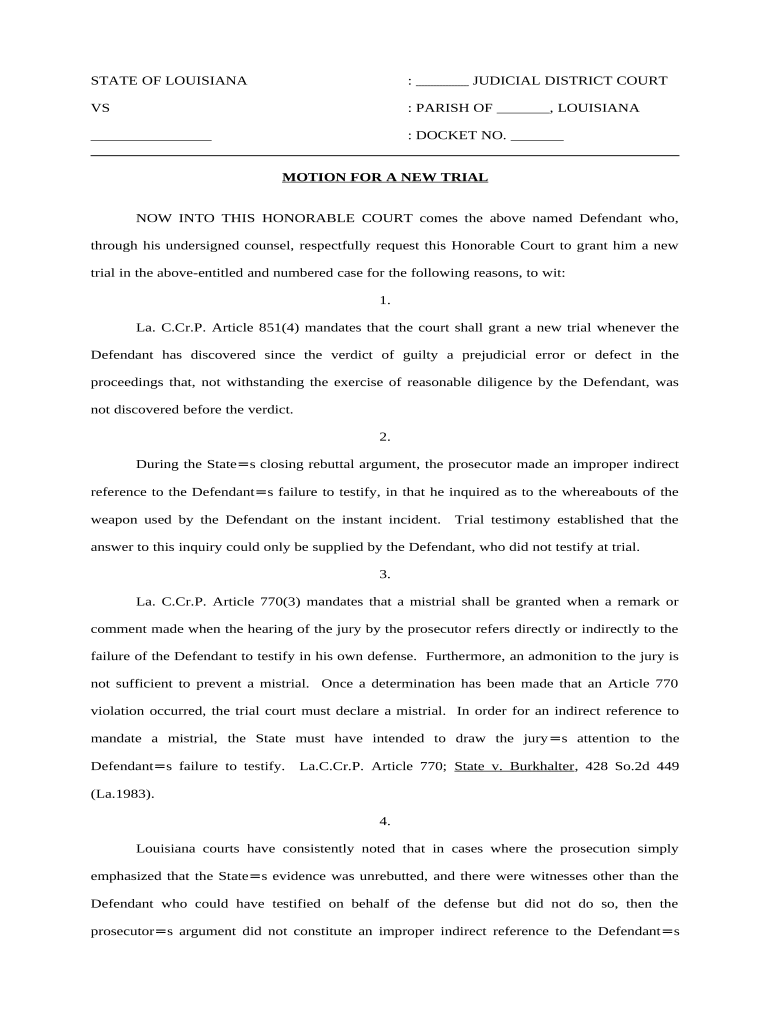
A Louisiana Motion for a New Trial is a court pleading filed after a civil or criminal judgment that asks the trial court to set aside the verdict and order a new trial. It identifies legal or procedural errors, newly discovered evidence, or other grounds that affected the trial's fairness. Federal Rule of Civil Procedure 59 provides the model for motions in federal cases, while state practice follows Louisiana civil procedure and local rules. Because courts control signature and filing formats, confirm the court's e-filing and signature requirements before submitting electronically.

Why Filing a Motion for a New Trial Matters

A Motion for a New Trial allows a party to request correction of trial-level errors, present newly discovered evidence, or seek relief from an unjust verdict without immediately appealing. It preserves issues for appeal and can avoid the cost and delay of appellate proceedings when the trial court grants a remedy.

Why Filing a Motion for a New Trial Matters

Who Typically Prepares and Files This Motion

The Motion for a New Trial is most often prepared by counsel but may be filed by a litigant proceeding pro se; preparation requires familiarity with local rules and evidence standards.

  • Trial attorneys who represent civil or criminal litigants in state or federal court and who handle post-judgment remedies and appeals.
  • Pro se litigants who lost at trial and seek reconsideration or preservation of issues before pursuing an appeal.
  • Appellate-focused counsel who review trial records and file motions to preserve error and avoid unnecessary appellate briefing.

Core Components of a Professional Motion for a New Trial

A complete motion organizes the case caption, concise factual statement, specific legal grounds, supporting evidence, legal argument with authorities, and a clear prayer for relief so the court can rule efficiently.

Caption

Full court caption with parties, court name, docket number, and judge so the clerk and parties can identify the case without ambiguity.
Statement of Facts

Concise recitation of trial events and judgment date, focusing on facts relevant to the asserted grounds for a new trial.

Legal Grounds

Specify statutory or procedural grounds (e.g., errors of law, procedural irregularity, newly discovered evidence) with citations to the controlling rules.

Supporting Evidence

Attach exhibits, affidavits, or transcripts that directly support assertions; identify why evidence was unavailable earlier if claiming it is newly discovered.

Argument

Apply law to facts in short, numbered points; cite authority and explain how the alleged error impacted substantial rights or the verdict.

Relief Requested

State the specific remedy sought (new trial, amended judgment, or other relief) and propose any scheduling preferences for a hearing.

Information Required on Every Motion

Case Caption: Parties, court, docket number
Judgment Date: Date judgment entered
Movant Identity: Name and counsel details
Grounds Listed: Specific legal basis
Exhibits Noted: List attached evidence
Signature Block: Movant or attorney signature

Step-by-Step: Preparing the Motion for a New Trial

Follow a clear sequence so the court can process the motion and opposing parties can respond within required deadlines.

  • 01
    Confirm Timing: Determine the applicable filing window for the court.
  • 02
    Draft Grounds: List discrete legal or factual reasons for relief.
  • 03
    Attach Evidence: Include exhibits, affidavits, and transcripts as needed.
  • 04
    File and Serve: E-file per court rules and effect service on all parties.

How to Customize and File the Motion Online

Use a consistent electronic workflow to prepare, sign, and e-file the motion while meeting court and e-filing system requirements.

Template Start from a motion template to ensure required sections are included
Conditional Language Use conditional clauses to toggle criminal vs civil language
Signer Roles Assign attorney or movant as signer with contact details
Authentication Select email or multi-factor signer verification
E-file Format Export as court-acceptable PDF/A with embedded exhibits

Typical Filing and Service Flow

A reliable process includes drafting, internal review, signature, e-filing, and confirmed service to opposing counsel or parties.

  • Draft Motion: Prepare motion and attach supporting exhibits
  • Internal Review: Confirm citations, exhibits, and signature block
  • E-File With Clerk: Submit through court e-filing portal per local rules
  • Serve Opposing Parties: Serve electronically or by allowed methods and retain proof

Technical Requirements for eSubmission and Signatures

Verify the court's e-filing portal requirements, accepted file formats, and any signature authentication rules before e-submitting a Motion for a New Trial.

  • File Format: PDF/A recommended by many courts
  • Signature Type: Court may require attorney e-signature or filer authentication
  • Proof of Service: E-service confirmation or return receipt

Typical Deadlines and Timing Considerations

Deadlines for motions for a new trial differ by jurisdiction; verify local rules and federal schedules where applicable before filing.

Federal Courts (FRCP 59):

28 days after entry of judgment for a new trial motion

Louisiana State Courts:

Varies by parish and local rules; confirm with the clerk

Response Window:

Opposing party deadlines vary; local rules set response period

Hearing Scheduling:

Court sets hearing date after briefs and service are complete

Appeal Preservation:

Timely motion may preserve appellate issues and toll appeal timing

Common Preparation and Filing Mistakes

  • Missing or vague grounds that fail to explain how an error affected substantial rights, undermining the motion's merit.
  • Late filing beyond the court's deadline, which typically results in denial or waiver of the motion.
  • Improper service on opposing counsel or failure to file proof of service in the clerk’s record.
  • Relying on documents not properly authenticated or failing to show why evidence was newly discovered.

Consequences of Errors in Filing or Substance

Motion Denied: No relief granted
Waived Issues: Loss of appellate preservation
Sanctions Risk: Potential fee or conduct sanctions
Costs Assessed: Court may award costs to opponent
Delay in Case: Extended litigation timeline
Adverse Ruling: Judge may reject repeated motions

eSignature Pricing Comparison for Filing and Signing Documents

Common eSignature vendors and plan starting prices are shown below to help assess platform cost when preparing and signing court filings; signNow is listed first by design.

signNow DocuSign Adobe Sign PandaDoc HelloSign
Starting Price $8/user/mo $15/user/mo $14/user/mo $19/user/mo $15/user/mo
Free Trial Yes, 7-day trial Varies by vendor Varies by vendor Varies by vendor Varies by vendor
Bulk Send Yes Yes Yes Yes No
Audit Trail Yes Yes Yes Yes Yes
HIPAA Compliant Yes Yes Yes No No

Frequently Asked Questions About the Motion for a New Trial

Answers to common questions on timing, signatures, attachment of exhibits, and e-filing help avoid procedural rejections and preserve appellate issues.


Need help? Contact support

be ready to get more
Join over 28 million airSlate SignNow users