Establishing secure connection…Loading editor…Preparing document…

New York General Business Franchise Tax Return

This template is fully customizable. Edit the text, fill out the fields, and send it for signature. Give it a try!
New York General Business Franchise Tax Return

What the New York General Business Franchise Tax Return Is

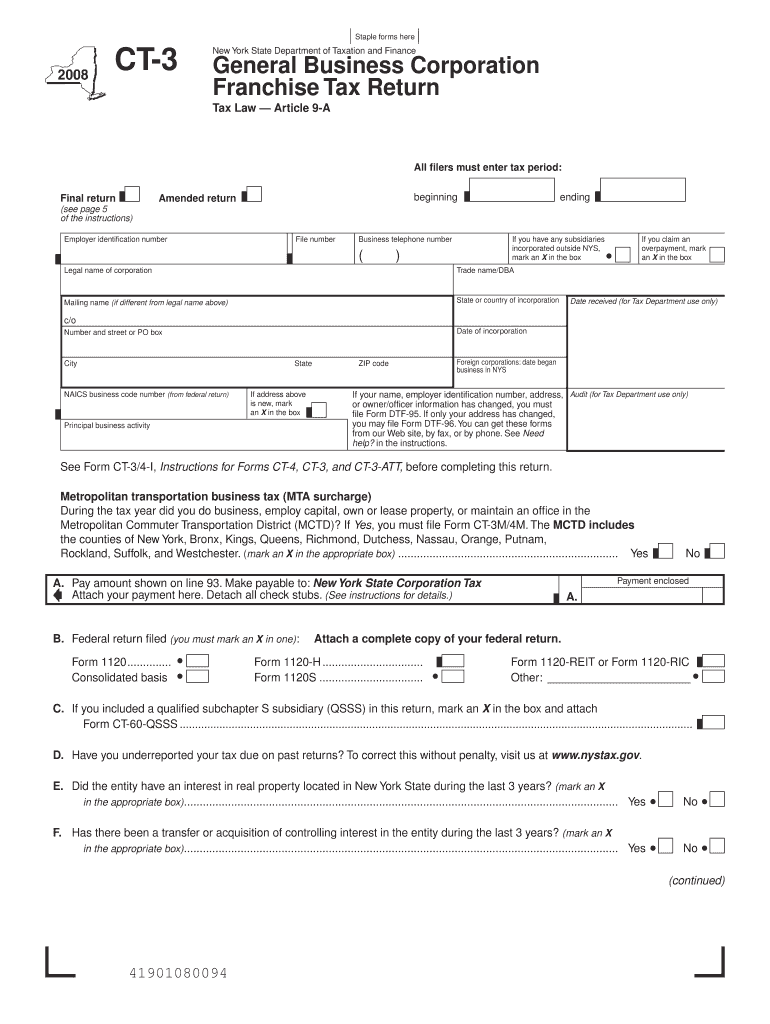
The New York General Business Franchise Tax Return is the primary filing used by corporations and certain business entities to report taxable income, calculate franchise tax liability, and remit payments to the New York State Department of Taxation and Finance. It captures entity identification, tax year period, federal taxable income adjustments, apportionment or allocation factors for multistate businesses, and credits or prepayments. The return supports paper or electronic filing methods and may require attachments such as schedules, reconciliations, and supporting worksheets that substantiate income, deductions, and apportionment factors.

Why Accurate Filing Matters for Your Business

Timely and correct submission determines tax liability, avoids interest and penalties, and creates a clear audit record for state review; accurate apportionment prevents over- or under-taxation across jurisdictions.

Why Accurate Filing Matters for Your Business

Who Typically Prepares This Return

The return is typically prepared by in-house tax teams, external accountants, or corporate tax advisors who handle multistate filings and entity-level reporting.

  • CFOs and tax directors who coordinate state filings and estimated payments
  • Tax preparers and CPAs responsible for corporate and franchise tax compliance
  • Business owners of S or C corporations seeking to confirm state tax treatment

Choose a preparer familiar with New York apportionment rules and required documentation to reduce audit risk and ensure correct credits and adjustments.

Step-by-step: Completing and Submitting the Return

Follow a clear sequence from record collection to final filing to reduce errors and processing delays.

  • 01
    Gather Documents: Collect federal return, schedules, and state adjustments.
  • 02
    Reconcile Income: Adjust federal taxable income for New York differences.
  • 03
    Compute Apportionment: Calculate sales/payroll/property factors for allocation.
  • 04
    File and Pay: Submit via NY online portal or paper; remit balance due.

Key sections to review on the New York return

The return is organized into identification, taxable income computation, apportionment, credits and prepayments, tax calculation and payment, and required attachments; each section affects final tax due and potential audit exposure.

Entity Identification

Name, EIN, NAICS code, and mailing address used to match the return with state accounts and notices.
Income Reconciliation

Adjust federal taxable income for state-specific additions and subtractions to compute New York taxable base.

Apportionment

Sales, property, and payroll factors determine the portion of income apportioned to New York for multistate filers.

Credits and Prepayments

Include tax credits, estimated payments, and prior year credits to reduce tax liability and indicate refund or balance due.

Tax Calculation

Applies statutory rate(s) and minimum tax rules to compute final franchise tax owed.

Attachments

Schedules, reconciliations, and supporting worksheets must accompany the return when required by instructions.

Where the return goes and how it is processed

Submissions route to the New York State Department of Taxation and Finance; choose electronic filing for speed and an auditable record when supported.

  • Prepare: Assemble returns and schedules.
  • Submit: File via NY online portal or paper.
  • Payment: Pay balance online or by check.
  • Confirmation: Retain filing receipt and confirmation number.

Typical eSubmission workflow settings

Configure each workflow option consistently to ensure signatures, attachments, and routing align with corporate controls and NY filing requirements.

Field Configuration
Authentication Email link or SMS code for signer verification
Signature Type Electronic signature with audit trail
Attachments Allow PDF schedules and reconciliation worksheets
Routing Order Set signer order for review and approval

Technical considerations for digital signing and filing

Use platforms that support PDF, DOCX, audit trails, and integrations with accounting or document storage systems.

  • File Formats: PDF and DOCX supported
  • Integrations: Common: Salesforce, NetSuite, Google Workspace
  • Authentication: Email, SMS, or advanced methods

Confirm the chosen platform preserves signed document integrity, stores an audit trail, and can export records for NY State review.

Timing: common deadlines and payment schedules

Deadlines depend on entity type, tax year, and whether estimated payments apply; consult NY Department of Taxation and Finance for exact due dates.

Return Due Date:

Varies by entity; generally follows federal filing cycle

Estimated Payments:

Quarterly for entities meeting payment thresholds

Extension Options:

State extension may mirror federal procedures; extensions usually extend filing, not payment

Amendments:

File amended return if material errors are discovered

Record Retention:

Retain records to substantiate return and payments

Key milestones in the filing lifecycle

Track milestones from preparation through post-filing to maintain compliance and be audit-ready.

01

Record Collection

Gather federal return, state schedules, and supporting worksheets.

02

Calculation

Compute adjustments, apportionment, and tax due.

03

Submission

File via online portal or paper and record confirmation.

04

Post-Filing Review

Address notices, reconcile payments, and retain documents.

eSignature vendor pricing and feature snapshot

This high-level comparison shows starting prices and common feature availability for eSignature platforms. signNow appears first per vendor order requirements.

signNow DocuSign Adobe Sign PandaDoc HelloSign
Starting Price $8/user/mo $15/user/mo $14/user/mo $19/user/mo $15/user/mo
Free Trial 7-day free trial, no credit card required Varies by plan Varies by plan Varies by plan Varies by plan
Bulk Send Yes (Business Premium) Yes Yes Yes No
Audit Trail Yes Yes Yes Yes Yes
HIPAA Compliant Yes Yes Yes No No

Security and compliance considerations for eSubmission

Encryption in transit: TLS 1.2/1.3
Encryption at rest: AES-256
Certifications: SOC 2 Type II
Health data: HIPAA (BAA required)
Regulated records: 21 CFR Part 11 support
Signature law: ESIGN and UETA compliance

Penalties and risks associated with incorrect or late filings

Late Filing: Interest and penalties assessed by NY
Underpayment: Underpayment penalties may apply
Accuracy Penalty: Penalties for substantial understatement
Criminal Risk: Intentional fraud can lead to prosecution
Backup Withholding: Incorrect TINs can trigger withholding
Audit Exposure: Incomplete records increase audit likelihood

Common mistakes to avoid when preparing the return

  • Using names or EINs that don’t match federal registrations, causing processing delays and reconciliations
  • Failing to include required schedules or apportionment worksheets that substantiate New York allocations
  • Missing estimated payment deadlines and incurring underpayment penalties and interest
  • Relying on incomplete electronic audit trails when proof of signer intent is required

How different organizations approach New York franchise filings

Examples show practical ways companies prepare, sign, and submit returns while keeping audit trails and reducing delays.

Optica Ventures — Small Corporate Filing

A small C corporation collects federal return and state adjustments into one packet.

  • Uses electronic signatures and a consolidated PDF.
  • This approach reduced submission errors and shortened reconciliation time between federal and state filings.

Xerox — Enterprise Workflow

A large multi-state filer centralizes apportionment factors.

  • Routes returns through role-based approvals.
  • Centralized routing preserves audit trails, enforces consistent calculations, and streamlines estimated payment coordination.

Frequently asked questions about filing and eSigning the New York return

Answers address legal validity, filing channels, signer authority, common amendments, and use of electronic signatures for New York filings.


Need help? Contact support

be ready to get more
Join over 28 million airSlate SignNow users