Establishing secure connection…Loading editor…Preparing document…

Notice to Creditors

This template is fully customizable. Edit the text, fill out the fields, and send it for signature. Give it a try!
Notice to Creditors

What a Notice to Creditors Is and when it’s used

A Notice to Creditors is a formal legal notice issued in probate or estate administration that alerts potential creditors an estate is open, provides deadlines and instructions for submitting claims, and creates a public record linking claims to the estate. Usually issued by an executor, administrator, or court, the notice establishes claim bar dates and required proof formats. Proper preparation and service help protect estate assets by consolidating claims for review and limiting late or unknown claims; specific procedural requirements depend on state probate law.

Why issuing a clear Notice to Creditors matters

A properly issued notice preserves estate assets by setting authoritative claim deadlines, reduces personal liability for the representative, and creates documentary proof of service and publication for dispute resolution under state probate rules.

Why issuing a clear Notice to Creditors matters

Step-by-step: preparing and issuing the notice

Follow these core steps to prepare and serve a Notice to Creditors; sequencing reduces procedural failures and helps preserve estate protections.

  • 01
    Gather Details: Collect decedent name, estate case number, known creditors, and deadlines.
  • 02
    Draft Notice: Include deadline, filing instructions, and required proof of debt.
  • 03
    Serve/Publish: Serve known creditors and publish in the court-approved paper if required.
  • 04
    Record Proof: File affidavits of service and publication with the probate court.

Frequently asked questions and troubleshooting

Answers to common procedural and technical questions about Notice to Creditors preparation, service, digital signing, and state differences.


Need help? Contact support

Who typically prepares and receives these notices

Typical users include personal representatives, probate counsel, and creditors who must follow filing instructions and deadlines.

  • Personal representatives prepare and serve notices on behalf of the estate and monitor incoming claims.
  • Probate attorneys draft compliant notices, advise on state rules, and file proof of service with the court.
  • Creditors and claimants receive the notice and must submit proof before the stated deadline to preserve recovery rights.

Using clear templates and consistent service methods reduces disputes and helps courts and estates process claims efficiently.

Representative and creditor roles

Personal Representative

The executor or administrator appointed to manage the estate, responsible for issuing the Notice to Creditors, evaluating and paying valid claims, and filing affidavits of service or publication per court rules; must follow statutory timelines to limit personal exposure.

Creditor / Claimant

A party owed money by the decedent who receives the notice and must timely submit proof of debt according to the notice instructions; accuracy and supporting documents improve claim adjudication speed.

Security and compliance considerations for digital notices

Encryption: AES-256 encryption for data at rest.
In-transit Security: TLS 1.2/1.3 for data in transit.
Certifications: SOC 2 Type II and ISO 27001 certified.
HIPAA: HIPAA-compliant; BAA available when required.
eSignature Law: Compliant with ESIGN and UETA.
Authentication: Supports multi-factor and advanced authentication.

Key risks and legal consequences to avoid

Late Claims Barred: Claims may be time-barred.
Incorrect Notice: Probate delays and added costs.
Tax Exposure: Backup withholding or IRS fines.
Notary Defect: May invalidate service.
Personal Liability: Representative risk if service improper.
Evidence Gaps: Lost proof weakens estate defense.

Common preparation mistakes to avoid

  • Using an incomplete estate name or incorrect case number causes mismatches and can lead to rejected claims or court corrections that delay administration.
  • Failing to follow state publication or service rules results in improper notice and can reopen estate distributions or increase exposure to creditor claims.
  • Omitting filing instructions or required supporting documents leads to creditor confusion and prevents efficient claims adjudication by the estate.
  • Relying on unverified email addresses or unsigned PDFs for service may be insufficient under local court rules or state statutes.

How issuance and tracking typically work

A Notice to Creditors workflow includes drafting, authentication, service or publication, and retention of proof; each step should create an auditable record.

  • Upload Template: Load the notice into your document system or e-sign platform.
  • Add Fields: Place signature, date, and case number fields for each signer.
  • Authenticate: Authenticate signers with email, SMS, KBA, or RON as required.
  • Retain Proof: Export audit trail and file affidavits with the court.

Digital delivery and platform requirements

Digital workflows simplify Notice to Creditors delivery but require compatible file formats, signer authentication, and secure storage.

  • Formats Supported: PDF, DOCX, and XML outputs.
  • Integrations: Salesforce, NetSuite, Google Workspace, Box.
  • Authentication: Email, SMS, KBA, and RON options.

Recommended workflow settings for notices

Configure fields, signer order, and notarization options to match court rules before sending or publishing notices to creditors.

Field Configuration
Signature Method Electronic signature or wet signature per state.
Authentication Level Email or SMS code; use KBA if required.
Notarization Option In-person or RON; check state requirements.
Retention Policy Store signed document plus audit trail securely.

At-a-glance differences vs other probate notices

A compact comparison highlights common procedural distinctions between general probate notices and a dedicated Notice to Creditors.

Criteria Probate Notice Creditor Notice
E-sign allowed often often
Typical deadline varies varies
Filing location court court/clerk
Publication needed sometimes sometimes

Pricing and basic feature comparison for eSignature vendors

Core pricing and feature availability across common eSignature vendors. signNow appears first in the table to align with vendor ordering requirements.

signNow DocuSign Adobe Sign PandaDoc HelloSign
Starting Price $8/user/mo $15/user/mo $14/user/mo $19/user/mo $15/user/mo
Free Trial Yes, 7-day trial Varies by plan Varies by plan Varies by plan Varies by plan
Bulk Send Yes Yes Yes Yes No
Audit Trail Yes Yes Yes Yes Yes
HIPAA Compliant Yes Yes Yes No No
Envelope Cap No cap 100 envelopes/user/year Varies by plan Varies by plan Varies by plan

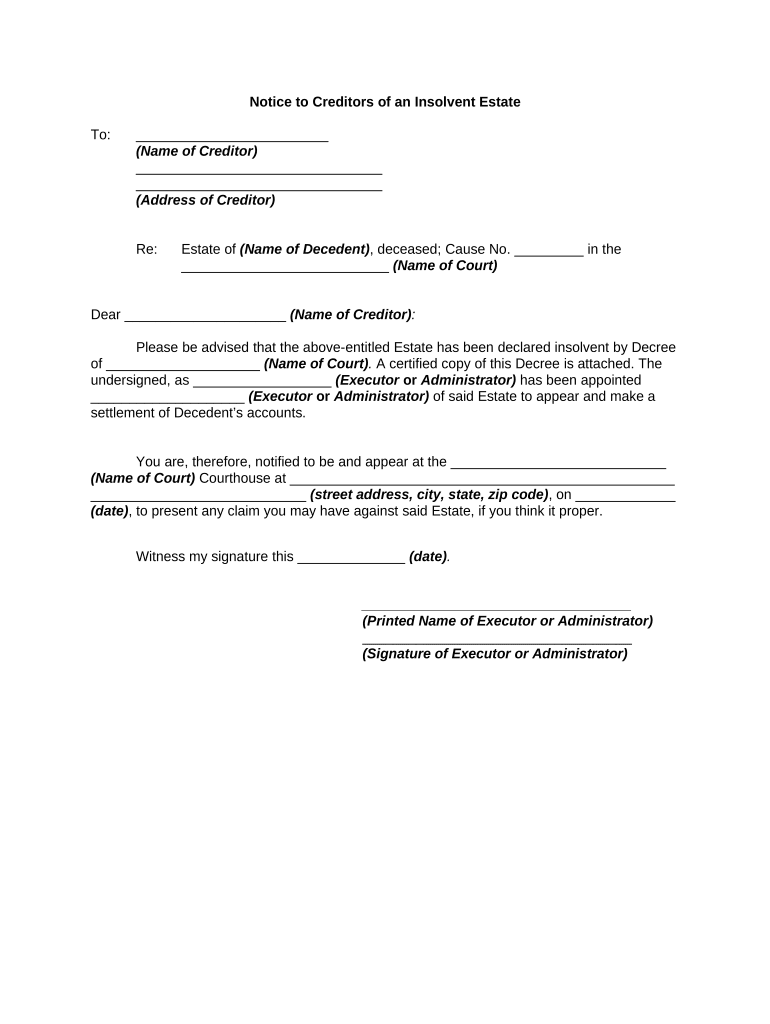
Essential elements of a professional Notice to Creditors

A complete notice includes identifying information, clear deadlines, filing instructions, proof requirements, and verifiable service language to support estate administration.

Caption

Include the probate court caption, estate name, and case number so the notice is unmistakably tied to the court file and docket entries.
Claim Deadline

State the final date for submitting claims in MM/DD/YYYY format and indicate whether the deadline is measured from service or publication.

Service Instructions

Provide precise submission methods (mail address, court clerk, electronic submission if accepted) and indicate any required certification or delivery proof.

Required Proof

List documents creditors must attach (invoices, contracts, account statements) and any affidavit language required by the court for claim verification.

Publication Statement

When publication is required, state the publication period, name of the publication, and the representative’s responsibility to file an affidavit of publication.

Signature & Notary

Include the signatory’s printed name, title, signature, date, and any notary or witness blocks required by state law for affidavits or acknowledgements.

be ready to get more
Join over 28 million airSlate SignNow users