Establishing secure connection…Loading editor…Preparing document…

Notice to Lessor of Decision Not to Exercise Option to Purchase

This template is fully customizable. Edit the text, fill out the fields, and send it for signature. Give it a try!
Notice to Lessor of Decision Not to Exercise Option to Purchase

What this Notice Is and when you use it

A Notice to Lessor of Decision Not to Exercise Option to Purchase is a written, dated communication from a tenant or option holder informing the landlord or lessor that the tenant will not exercise a previously agreed option to buy the leased property. The notice documents the decision before the option expiration, preserves contractual timelines, and triggers any post-decision obligations such as lease continuation, security deposit handling, or property turn-back procedures. Clear, timely notice reduces disputes about deadlines and protects both parties' rights under the lease and any option agreement.

Why a formal notice matters

Providing written notice of your decision not to exercise an option creates a clear record, avoids accidental forfeiture or misinterpretation of deadlines, and starts any follow-up obligations under the lease or option agreement. This helps both parties plan next steps such as relisting, repairs, or deposit disposition.

Why a formal notice matters

Who prepares and who receives this notice

Use a written, dated notice delivered under the lease's delivery requirements; record the delivery method and retain copies for the retention period applicable to the property and transaction.

  • Tenants with an option to purchase the leased premises, often residential or commercial lessees notifying the lessor of non-exercise.
  • Lessees represented by brokers or counsel who submit notices on behalf of the tenant to preserve contractual rights.
  • Landlords or lessors who receive the notice and must act on post-notice obligations such as marketing or returning deposits.

Core elements to include in a professional notice

A complete notice is concise but includes the essential facts and a clear statement declining the purchase option. Use plain language and follow any notice format or delivery method required by the lease.

Heading

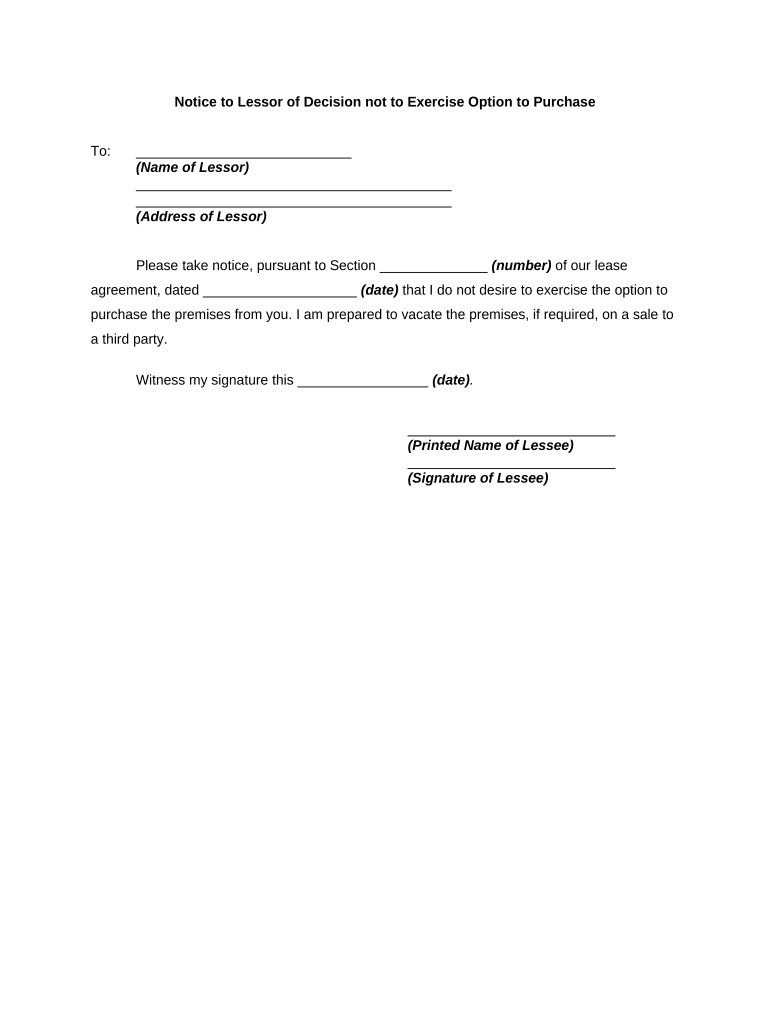
A brief title such as 'Notice of Decision Not to Exercise Option to Purchase' placed at the top of the document for immediate clarity and recordkeeping.
Identification

Full legal names of tenant and lessor, lease address, and any option agreement reference number or date so the parties and property are unambiguously identified.

Statement

A clear sentence that the tenant elects not to exercise the option to purchase, with no conditional language to avoid ambiguity about intent.

Effective Date

The date the notice is delivered and the intended effective date of the decision; this determines timing for post-notice obligations such as listing or repairs.

Delivery Method

State how the notice was delivered (personal delivery, certified mail, email if allowed) and include tracking or proof-of-delivery details when available.

Signature

Signature block for the tenant (or authorized signatory) with printed name, title if applicable, and date; include contact information for follow-up.

Minimum information fields to capture

Tenant Name: Full legal name
Lessor Name: Full legal name
Property Address: Street, city, state, ZIP
Option Reference: Agreement date or clause
Decision Date: MM/DD/YYYY format
Signature: Signer name and date

Step-by-step: completing and delivering the notice

Follow a short checklist to complete the notice, confirm delivery requirements in the lease, and keep proof of delivery.

  • 01
    Draft Notice: Prepare a concise document including identification, statement, and signature.
  • 02
    Confirm Lease Rules: Review the lease's notice requirements for timing and permitted delivery methods.
  • 03
    Deliver Notice: Send via the required method (certified mail, personal delivery, or allowed email) and obtain proof.
  • 04
    Retain Records: Save the signed notice and delivery evidence for the retention period applicable to the transaction.

Configuring an online workflow for this notice

When sending the notice electronically, set up fields and authentication to create an auditable record and satisfy consent requirements.

Field Configuration
Document Template Upload standardized notice template with locked identification fields
Signature Field Required signature block with date field
Authentication Email plus optional SMS code for signer attribution
Proof of Delivery Enable audit trail and download certificate of completion

Digital delivery and eSignature considerations

Retain the signed file and audit trail in secure storage that supports reproduction for legal or regulatory review; verify the lease allows electronic notices before relying on e-delivery.

  • File Formats: PDF or DOCX accepted
  • Authentication: Email link or SMS code
  • Audit Trail: Timestamp, IP, and action log

Where to send or file the notice

Deliver the notice to the lessor as the lease specifies; below are common routing options and how they function in practice.

  • Lease-Specified Address: Send to the exact address or email provided in the lease to ensure compliance with delivery clauses.
  • Registered Agent: If lessor is a company, deliver to the registered agent only when the lease allows corporate service.
  • Property Manager: Direct to the property manager when lease lists a management company for notices.
  • Courier or Certified Mail: Use tracked delivery and retain proof such as tracking numbers or signed receipts.

Timing and deadlines to watch

Check the option clause for exact notice windows; missing a deadline can convert rights or trigger penalties under the lease or option agreement.

Option Expiration:

Provide notice before the option's stated expiration date

Lease Notice Window:

Comply with any advance notice period defined in the lease

Delivery Confirmation:

Obtain proof of delivery on or before the deadline

Follow-up Period:

Expect a response period for lessor actions (e.g., relisting) per lease terms

Record Retention:

Keep notice and delivery evidence for the recommended retention period

Key milestones after sending the notice

Track milestones from notice delivery through any lessor responses and subsequent lease actions to ensure obligations are met.

01

Notice Sent

Record date and delivery proof; this starts the post-notice timeline.

02

Lessor Acknowledgement

Wait for any lease-required acknowledgment or confirm silence is treated as acceptance.

03

Post-Notice Actions

Lessor may list property for sale or schedule inspections per the lease.

04

Final Reconciliation

Complete deposit refunds, escrow reconciliations, and property turn-back procedures.

Common mistakes to avoid

  • Missing the option expiration date or misreading a deadline window, causing forfeiture.
  • Using ambiguous language that leaves the decision conditional or unclear.
  • Delivering by an unapproved method under the lease and losing proof of proper notice.
  • Failing to retain the signed notice and delivery evidence for the applicable retention period.

Consequences of an incorrect or late notice

Loss of Rights: Late or missing notice can forfeit the option to purchase under the contract.
Contract Disputes: Ambiguous statements can lead to litigation over intent and damages.
Financial Exposure: Costs for relisting, holdover penalties, or escrow disputes may arise.
Administrative Fines: Certain local rules may impose administrative fees for improper notices.
Tax/Reporting Issues: Improper timing can affect tax reporting or treaty treatment for transactions.
Recordkeeping Failures: Inadequate retention may hamper defense in a contractual dispute.

eSignature vendor comparison for sending this notice

Compare basic pricing and key capabilities when choosing an eSignature provider for notice delivery and audit trail needs; signNow is listed first per vendor ordering rules.

signNow DocuSign Adobe Sign PandaDoc HelloSign
Starting Price $8/user/mo $15/user/mo $14/user/mo $19/user/mo $15/user/mo
Free Trial 7-day free trial Varies Varies Yes, limited Yes, limited
Bulk Send Yes Yes Yes Yes No
Audit Trail Yes Yes Yes Yes Yes
HIPAA Compliant Yes Yes Yes No No

Frequently asked questions about the notice

Answers to common questions on form content, delivery, signatures, and next steps to reduce misunderstanding and implementation errors.


Need help? Contact support

be ready to get more
Join over 28 million airSlate SignNow users