Establishing secure connection…Loading editor…Preparing document…

Wisconsin Notice to School of Delinquency Petition

This template is fully customizable. Edit the text, fill out the fields, and send it for signature. Give it a try!
Wisconsin Notice to School of Delinquency Petition

What the Wisconsin Notice to School of Delinquency Petition Is

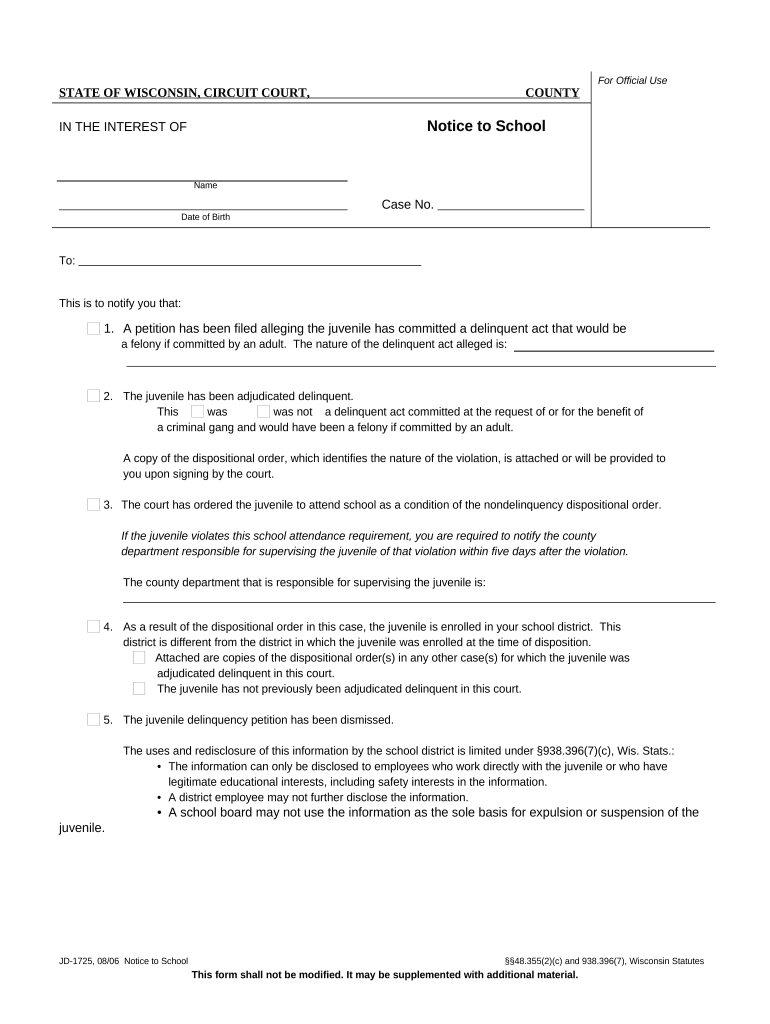
The Wisconsin Notice to School of Delinquency Petition is a formal notification provided to a student’s school when a juvenile delinquency petition has been filed in juvenile court or when school officials must be informed of pending legal proceedings affecting a student. The notice identifies the student, the juvenile court case number, relevant dates, and a contact for the filing agency or guardian. It helps schools coordinate attendance, educational services, custody or placement concerns, and appropriate confidentiality protections under education and health privacy laws while the juvenile matter proceeds in court.

Why this Notice Matters for Schools and Families

Providing the notice ensures the school has the facts it needs to protect the student’s educational rights, coordinate with court-ordered placements or supports, and maintain required records. It also creates a documented chain of communication between the court or filing authority and the school.

Why this Notice Matters for Schools and Families

Who typically prepares or receives this notice

Several parties are involved in creating or acting on the notice depending on the case and local procedures.

  • Parents or guardians who inform the school about a pending juvenile petition and coordinate records and custody details.
  • School administrators and attendance officers who update records, arrange services, and work with court liaisons.
  • County juvenile intake workers or court clerks who serve the notice to the school as part of filing procedures.

Roles vary by county and district; local juvenile court rules and school district policy determine exact responsibilities.

Typical authorized signers and contacts

School Attendance Officer

Typically a district employee responsible for attendance records and student services; reviews the notice for accuracy, updates the student’s file, notifies counselors or special education staff if required, and logs the receipt per district protocol.

Juvenile Court Intake

Court intake staff or county case worker who files the petition and supplies the notice; provides the case number, contact points, and any court-ordered restrictions or placement instructions to the school as part of court paperwork.

Required core information fields

Student full name: Legal name as on school records
Date of birth: MM/DD/YYYY format
School district ID: Local student or SIS identifier
Case number: Juvenile court docket number
Alleged incident date: MM/DD/YYYY if known
Filing contact: Name, phone, and email

Step-by-step: Preparing and sending the notice

Follow these practical steps to prepare, deliver, and document the school notice tied to a delinquency petition.

  • 01
    Gather records: Collect student identity and case information before drafting the notice.
  • 02
    Complete notice: Fill required fields, attach supporting court documents, and check for accuracy.
  • 03
    Deliver to school: Send via district preferred method — email to admin, secure upload, or court service.
  • 04
    Retain proof: Save signed notice, delivery receipts, and audit trail records for the case file.

Configuring a secure online workflow

Set up a digital workflow that secures the notice, captures signatures, and records delivery events.

Field Configuration
Authentication method Email link or SMS code for signer identity
Required signers Guardian and school administrator signatures
Accepted formats PDF preferred; DOCX convertible
Audit trail Enable IP, timestamp, and event log retention

Digital signing and platform considerations

Use a platform that supports secure e-signatures, audit trails, and the file formats your school district accepts.

  • File formats: PDF and DOCX accepted; PDF recommended
  • Security standards: TLS 1.2/1.3 in transit and AES-256 at rest
  • Privacy compliance: HIPAA BAA and FERPA considerations must be addressed

Configure signer authentication, record retention, and export options up front; confirm the district’s preferred delivery channel before sending.

Where to file and how to route the notice

Route the notice according to local juvenile court and district procedures; typical destinations and actions are listed below.

  • Upload to case file: Attach the notice to the court docket when filing.
  • Send to school admin: Email or secure portal to the attendance officer.
  • Copy to guardian: Provide guardian a signed copy for records.
  • Log delivery: Record the service method and timestamp for the file.

Timing and expected response items

Timing varies by county and local court rules; use the court’s filing instructions and district policy to confirm deadlines.

Notice timing:

Deliver the notice at filing or per the court’s scheduling order.

School response window:

The school may have a court-specified window to acknowledge receipt.

Record updates:

Update attendance and supports promptly after school receipt.

Confidential handling:

Limit access to staff with legitimate educational interest.

Retention action:

Keep copies per retention policy and applicable law.

Common mistakes to avoid when preparing the notice

  • Incomplete student identifiers such as missing SIS ID or DOB that prevent schools from locating the correct record and delay processing.
  • Sending the notice to an incorrect school address or generic inbox rather than the district attendance officer or designated court liaison.
  • Failing to redact unrelated medical or sensitive information, which can create FERPA or HIPAA compliance issues.
  • Not saving delivery proof or an audit trail, leaving no record to confirm the school actually received the notice.

Risks and potential consequences of errors

Missed deadline: Court sanctions or delayed hearings
Invalid service: Notice may be ineffective for school action
FERPA violation: Administrative review or corrective obligations
Privacy breach: HIPAA exposure if health data improperly shared
Incomplete data: Case processing and school coordination delays
Unsigned notice: Possible rejection by school or court

Real-world examples of secure digital notices

Below are examples where secure digital signing and clear notices improved administrative handling and reduced turnaround time.

Optica Ventures (COO)

An operations team replaced paper routing with digital forms to simplify signers across locations.

  • The interface is simple and easy-to-use for internal and external users.
  • The result: fewer manual handoffs, consistent documentation, and faster confirmations while preserving an auditable trail for legal teams and partners.

Martin Properties (Founder)

A small organization digitized routine notices and consent forms to avoid delays from in-person signatures.

  • Mobile signing enabled field staff to complete forms on-site.
  • Processing time dropped, compliance with recordkeeping improved, and staff could access signed documents immediately for follow-up actions.

Practical tips for accurate, efficient notice handling

Adopt clear procedures to reduce rework, maintain privacy, and ensure the school and court accept the notice.

Confirm identity
Verify the student’s legal name and DOB against the district information system before sending the notice to avoid mismatches.
Limit disclosures
Share only information necessary for the school’s educational and safety obligations; redact unrelated medical or investigative details when appropriate.
Use secure delivery
Send notices via the school’s preferred secure portal or an encrypted email method and preserve delivery receipts and audit trails.
Document service method
Record how and when the notice was delivered, including recipient name, method, timestamp, and any confirmation returned by the school.

Frequently asked questions about the notice and eSubmission

Answers to common questions about preparing, sending, and retaining a Wisconsin Notice to School of Delinquency Petition.


Need help? Contact support

be ready to get more
Join over 28 million airSlate SignNow users