Establishing secure connection…Loading editor…Preparing document…

Notice of Foreclosure

This template is fully customizable. Edit the text, fill out the fields, and send it for signature. Give it a try!
Notice of Foreclosure

What a Notice of Foreclosure Is and when it’s used

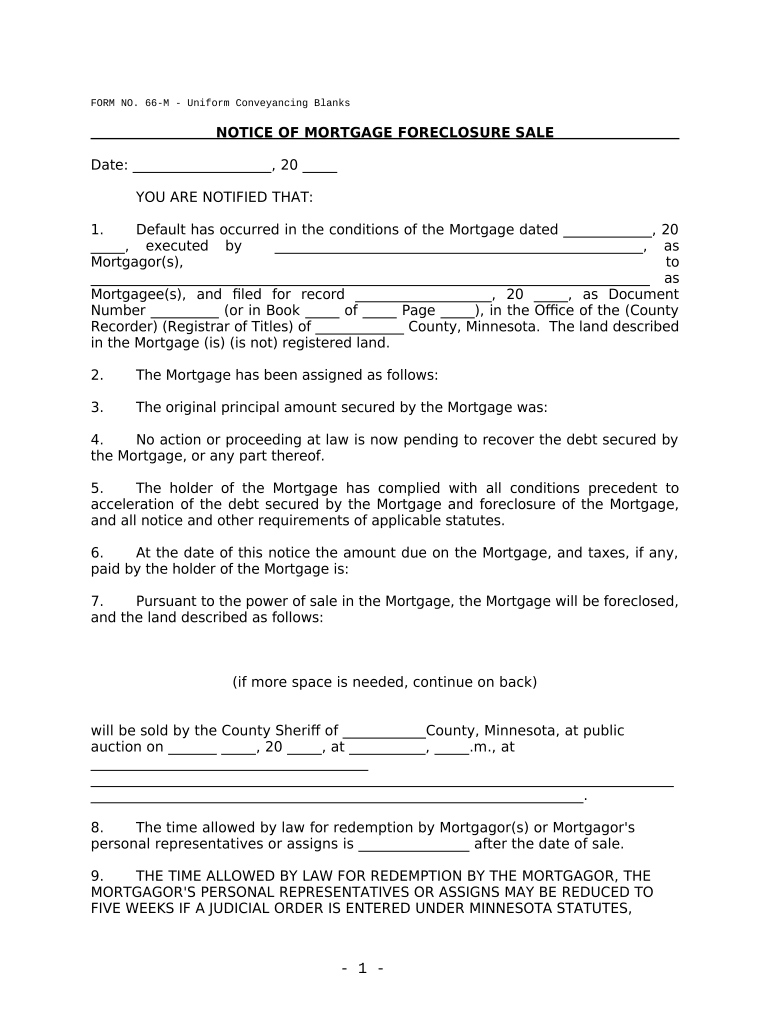
A Notice of Foreclosure is a formal written statement that a lender, trustee, or mortgagee files or serves to begin or announce the process of selling a secured property after a borrower’s default. It identifies the borrower and property, summarizes the default, states the amount due or cure instructions where required, and notifies interested parties of the scheduled sale or the right to cure. State statutes and the mortgage or deed of trust control timing, required content, and delivery methods. Accuracy and compliance with state law are essential to preserve enforceability.

Why an accurate Notice of Foreclosure matters

A correct notice protects legal rights, supports enforceability of a sale, and reduces the risk of post-sale challenges or civil claims. Clear notices also document compliance with statutory timelines and provide an auditable record of attempts to resolve default.

Why an accurate Notice of Foreclosure matters

Who prepares and receives a Notice of Foreclosure

Precise roles and required recipients depend on the mortgage instrument and state foreclosure method (judicial vs. nonjudicial).

  • Lenders and servicers: Prepare notices, track cure amounts, and coordinate sale logistics.
  • Trustees and foreclosure agents: Publish and serve sale notices, maintain trustee records.
  • Borrowers and lienholders: Receive notice, exercise cure or redemption rights where allowed.

Authorized signers and their roles

Lender Representative

A loan servicer or authorized officer may sign on behalf of the lender when the servicer has written or recorded authority; include job title and contact information to support attribution and intent.

Trustee or Attorney

A trustee or designated foreclosure attorney can sign notices where state law permits; signatory authority should be documented in the trust deed, assignment, or power-of-attorney records to avoid later challenge.

Key elements to include in a professional Notice of Foreclosure

A compliant notice combines identity, factual detail, and procedural information so recipients can act or object within statutory windows. The following components are standard across most jurisdictions.

Case and Loan Details

Borrower full legal name, current loan number, property street address, and county; use the exact name(s) shown on the mortgage or deed instrument to avoid service or title problems.
Statement of Default

Clear description of the default event(s) (missed payments, insurance lapse, taxes), the period covered, and the specific amount required to cure if a cure is permitted under the mortgage or state law.

Cure and Redemption Information

If state law allows cure or redemption, show the cure amount, payment method, and deadline. For states that disallow cure, clearly state that the sale is scheduled and list the sale date and location.

Sale Logistics

Trustee sale date, time, and physical or online sale location. Where remote auctions are allowed, include the URL or platform identifier and any access or registration instructions.

Recording and Service Data

Reference to recorded mortgage or deed of trust (book/page or instrument number), recording county, and method and dates of service to comply with state notice statutes.

Contact and Notice Recipient

Name, address, and phone of the party giving notice, plus a statement of rights and consequences; include trustee or attorney contact for questions and redemption procedures, if applicable.

Step-by-step: preparing and issuing a Notice of Foreclosure

Follow these sequential steps to prepare, approve, serve, and record a compliant notice. Timing and required steps vary by state and by whether the proceeding is judicial or nonjudicial.

  • 01
    Confirm authority: Verify trustee or servicer has written authority and supporting assignments recorded.
  • 02
    Assemble documentation: Gather the mortgage, payment history, notice of default, and assignment records.
  • 03
    Prepare notice: Populate all required fields, calculate cure amount, and schedule sale per statute.
  • 04
    Serve and record: Serve required parties by the statutory method and record any required documents with the county recorder.

Where to file, record, and send the notice

Notices typically move through internal review, external service, and county recording; follow the state statute and local recorder rules for each step.

  • Internal review: Legal and default servicing confirm amounts and authority.
  • Service to borrower: Mail, personal service, or statutory delivery methods as required.
  • Notice to lienholders: Send to junior lienholders or parties of record per state law.
  • County recording: Record notice or related assignments with the county recorder if required.

Digitizing the Notice workflow — recommended configuration

Configure an electronic workflow that enforces required fields, signer order, authentication, and retention to reduce defects and support auditability.

Field Configuration
Document Template Lock required fields and include conditional text for state-specific clauses.
Signer Authentication Use email plus SMS or knowledge-based checks for higher assurance.
Notarization Enable RON or in-person notarization workflows as applicable.
Storage & Retention Auto-archive PDF/A with audit trail and role-based access controls.

Digital signing and technical prerequisites

Ensure your chosen platform meets statutory authentication needs, preserves an immutable audit trail, and supports long-term export for recording or litigation.

  • Integrations: Salesforce, NetSuite, Microsoft 365, Google Workspace supported
  • Formats: PDF, DOCX, and HTML input/output compatibility
  • Security: TLS in transit and AES-256 at rest

Common statutory timing items and processing expectations

Timing requirements for notices and sales are highly state-specific; below are common milestones and the typical range of expectations.

Notice of Default:

Issue as required by state — often before sale; timing varies by statute

Notice of Sale:

Published or served within the statutory window before sale (varies widely)

Publication Requirements:

Some states require publication in a local newspaper for consecutive weeks

Redemption Period:

If allowed, redemption window varies; many states limit or disallow redemption

Recording Deadlines:

Record assignments or notices per county rules to preserve priority

Milestone timeline leading to a trustee or sheriff’s sale

A high-level sequential view of core milestones in a typical nonjudicial foreclosure workflow.

01

Pre-Default Outreach

Loan servicer attempts loss-mitigation and documents default status

02

Notice of Default

Formal notice recorded or served to start the statutory cure period

03

Notice of Sale

Published or served within the statutory window before the sale date

04

Trustee/Sheriff Sale

Public auction conducted per statute; sale confirmed or challenged post-sale

Common preparation errors that lead to delay or challenge

  • Incomplete borrower identification leading to mis-service or missed parties and subsequent rehearing requests.
  • Incorrect recording references or instrument numbers that disconnect the notice from the mortgage record.
  • Failure to follow state-specific publication or service methods, causing statutory defects and potential court intervention.
  • Using ambiguous cure amounts or dates that enable disputes over whether default was properly cured before sale.

Immediate risks of an incorrect or noncompliant notice

Sale Delay: Potential delay or voiding of sale
Liability: Civil damages or quiet-title suits
Regulatory Action: State regulator investigations
Title Issues: Title defects for purchaser
Costs: Increased legal and publication expenses
Reputational: Negative impact on servicing operations

Practical examples from real users

These short examples illustrate how organizations streamline notices and recordkeeping while maintaining compliance and audit trails.

Martin Properties

Martin Properties digitized notice generation and signing to reduce turnaround time.

  • They used secure templates and remote signing for offsite owners.
  • As the founder noted, 'I can process and execute all of these documents online with 100% compliance and built-in security.'

Optica Ventures LLC

Optica streamlined borrower communications and tracking for distressed assets.

  • They centralized notice templates and served notices electronically where permitted.
  • The COO observed the interface was simple for both staff and customers, improving response times and record accuracy.

Practical tips for accurate and efficient notices

Use consistent templates, require supporting documentation, and validate identities to reduce errors and litigation exposure.

Use standardized templates
Create state-specific templates with locked essential fields, conditional clauses, and validation rules to prevent missing or malformed notices.
Document authority
Keep recorded assignments, trustee appointments, and servicer authority on file before issuing notices to ensure signatory legitimacy.
Preserve audit trails
Retain signed PDFs with time-stamped audit trails, IP logs, and notarial records to support enforceability and post-sale defense.
Confirm service and publication
Track proof of mailing, publication affidavits, and county recorder filings to verify statutory compliance and prevent challenge.

eSignature vendor comparison for Notices and related workflows

Comparing common capability and pricing dimensions helps choose a platform that supports notarization, audit trails, and integration with recorder or servicing systems.

signNow DocuSign Adobe Sign PandaDoc HelloSign
Starting Price $8/user/mo $15/user/mo $14/user/mo $19/user/mo $15/user/mo
Free Trial 7-day free trial, no credit card No No Yes, limited Yes, limited
Bulk Send Yes (Business Premium) Yes Yes Yes No
Audit Trail Yes Yes Yes Yes Yes
HIPAA Compliant Yes Yes Yes No No
Envelope Cap No envelope cap 100 envelopes/user/year Varies by plan Varies by plan Varies by plan

Frequently asked questions about Notices of Foreclosure

Answers to common questions about electronic notices, validity, notarization, revocation, and required support documents.


Need help? Contact support

be ready to get more
Join over 28 million airSlate SignNow users