Establishing secure connection…Loading editor…Preparing document…

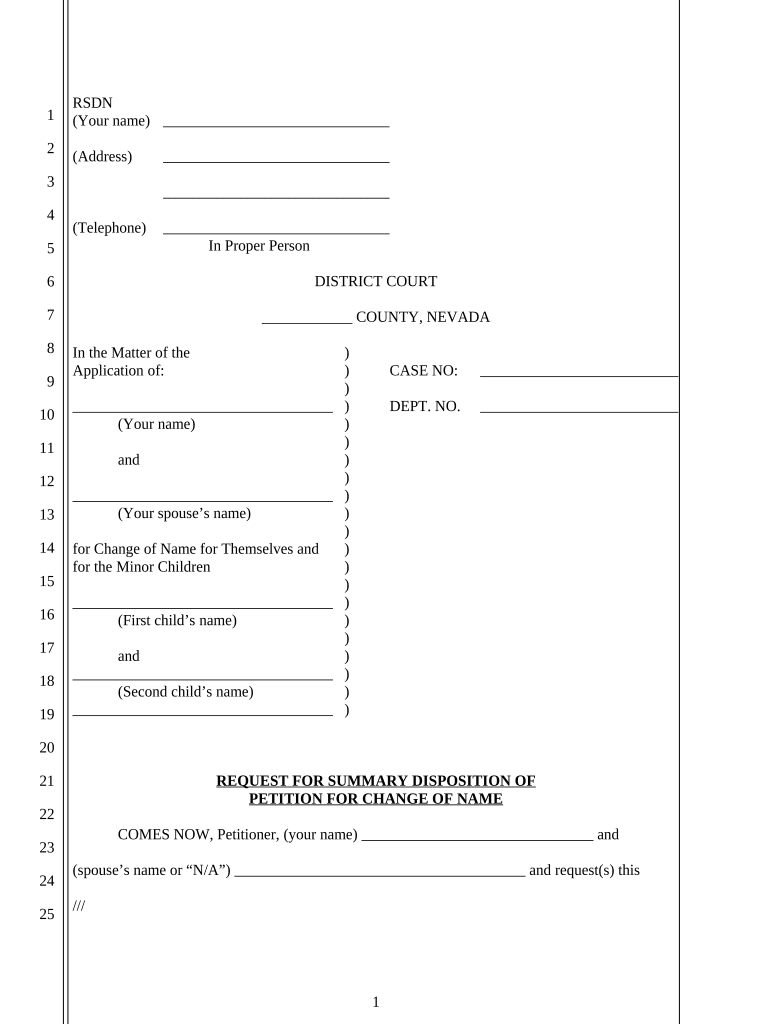
Nevada Request for Summary Disposition of Petition for Change of Name

This template is fully customizable. Edit the text, fill out the fields, and send it for signature. Give it a try!
Nevada Request for Summary Disposition of Petition for Change of Name

What this Nevada Request for Summary Disposition of Petition for Change of Name is

The Nevada Request for Summary Disposition of Petition for Change of Name is a court filing asking the judge to rule on a name-change petition without a full adversary hearing. It summarizes the facts, cites legal authority, and attaches evidence showing there is no genuine dispute of material fact so the court can grant the petition as a matter of law.

Why filing a Request for Summary Disposition may be appropriate

A summary disposition request can shorten litigation, limit cost and courtroom time, and provide a faster final order when the material facts are undisputed. Courts grant summary relief where the moving papers and evidence show no triable issue remains.

Why filing a Request for Summary Disposition may be appropriate

Who typically prepares or files this request

Confirm local district court rules and any local form requirements before submitting to ensure admissible evidence and proper service.

  • Self-represented petitioner preparing a concise legal statement with supporting declarations and exhibits.
  • Private attorney filing on behalf of their client and attaching legal memoranda and proof of notice.
  • Court clerks receive filings and process docket entries after documents comply with local rules.

Who can sign and submit this request

Petitioner

The petitioner or their authorized attorney signs declarations, verifies facts, and files the request with the clerk under penalty of perjury; accuracy in names and dates is essential to avoid dismissal or perjury exposure.

Attorney

A licensed Nevada attorney may sign and file on behalf of the petitioner, prepare the memorandum of law, and handle service and courtroom notices according to Nevada Rules of Civil Procedure.

Required information and core fields to include

Court caption: Name, court, case number
Petitioner identity: Full legal name
Proposed name: New full name
Grounds stated: Basis for change
Evidence listed: Declarations/exhibits
Signature block: Signed and dated

Penalties and risks of errors or misstatements

Dismissal risk: Court may deny the motion
Delay exposure: Additional hearings required
Perjury risk: False declarations may incur penalties
Service defects: Improper service can void filing
Fees and costs: Repeat filings increase expenses
Confidentiality issues: Improper notice may expose private data

Common preparation mistakes to avoid

  • Failing to attach a properly executed declaration or affidavit that authenticates exhibits, which leaves factual assertions unsupported and vulnerable to challenge.
  • Using inconsistent names or dates between the petition, supporting papers, and exhibits; mismatches increase the chance of rejection or additional court inquiries.
  • Neglecting to follow local rules for service and proof of service, which can result in the court declining to consider the request until notice requirements are satisfied.
  • Submitting unsigned or undated signature blocks or relying on initials where a full signature and date are required under Nevada practice.

Step-by-step: completing the Request for Summary Disposition

Follow a clear sequence: prepare the motion, attach declarations and exhibits, serve opposing parties, and file with the clerk using required formats and proofs.

  • 01
    Draft motion: Summarize facts and legal grounds concisely
  • 02
    Attach evidence: Include sworn declarations and exhibits
  • 03
    Serve parties: Follow Nevada service and proof rules
  • 04
    File with clerk: Submit copies and proof of service

How to customize and submit this form online

Set up a simple e-filing workflow with required fields, signer roles, and authentication before routing to the court and opposing parties.

Field Configuration
Case Caption Field Read-only, prefilled from case metadata
Signature Field Require full signature and date
Declaration Upload Mandatory PDF attachment
Service Confirmation Checkbox plus upload of proof

Where to file, serve, and submit supporting papers

Understand the routing: file with the clerk, serve parties per local rules, and retain proof of service and court-stamped copies.

  • File with clerk: Submit originals or e-file through the court portal
  • Serve opposing parties: Use personal service, mail, or e-service as allowed
  • Upload exhibits: Attach exhibits as separate, bookmarked PDFs
  • Retain stamped copy: Keep court-stamped or e-file receipt

Digital signing and acceptable submission formats

Use audit-ready e-signature records that capture signer identity, timestamp, and an immutable audit trail to support admissibility and compliance with ESIGN and UETA.

  • Preferred file types: PDF/A or standard PDF
  • Signature methods: Typed, drawn, or digital PKI accepted
  • Authentication: Email or multi-factor verification

Key timelines and filing expectations

Timing varies by court and procedure; observe service windows, opposition deadlines, and hearing scheduling when planning a summary disposition request.

Filing to hearing window:

Local rules set scheduling; courts often require several weeks' notice

Opposition deadline:

Opposing party generally has fixed days to respond

Reply period:

Short reply window follows opposition filing

Hearing or submission:

Court may rule on papers or hold short hearing

Entry of order:

Judge issues written order after ruling

Typical processing milestones for the motion

A summary view of sequential steps helps you track what occurs from filing through final order in a clear, numbered sequence.

01

Prepare motion

Draft motion, evidence, and proof of service

02

File and docket

Clerk accepts filing and assigns calendar

03

Opposition period

Parties file responses within set days

04

Decision issued

Court rules and enters an order

eSignature solution pricing comparison for supporting filings and signatures

Common eSignature providers and baseline pricing to consider for electronic completion, notarization workflows, and secure signature capture for court submissions.

signNow DocuSign Adobe Sign PandaDoc HelloSign
Starting Price $8/user/mo $15/user/mo $14/user/mo $19/user/mo $15/user/mo
Free Trial 7-day free trial No No Yes, limited Yes, limited
Bulk Send Yes Yes Yes Yes No
Audit Trail Yes Yes Yes Yes Yes
HIPAA Compliant Yes Yes Yes No No

Practical tips for accurate and efficient completion

Small procedural choices improve admissibility and speed; apply consistent formatting and follow local rules to reduce needless delays.

Check local rules and forms
Consult the relevant Nevada district court local rules before filing; use any court-provided name-change or motion templates to conform to formatting and service requirements.
Attach sworn declarations
Include a clear, signed declaration that verifies facts under penalty of perjury and authenticates exhibits to meet the standard for summary disposition evidence.
Use clear exhibit labeling
Number and label each exhibit consistently and reference exhibit numbers in the motion and declarations to aid judicial review and reduce questions from the clerk.
Keep a certified copy
After the order is entered, obtain a certified or court-stamped copy to present to agencies, banks, and recorders that require proof of the name change.

Representative examples of document workflows in practice

Real-world users show how digital signing and organized filings speed resolution and maintain compliance during name-change proceedings.

Tim Martin, Martin Properties

I can process and execute all of these documents online with 100% compliance and built-in security.

  • Tim Martin described using online signatures for property and identity changes at scale.
  • He noted that mobile signing and offline options allowed timely submissions and reduced in-person steps for clients and staff, improving turnaround.

Dan Rotelli, BIS

We felt most comfortable with airSlate SignNow given their SOC 2 certification and strict focus on ESIGN and UETA act compliance.

  • Dan Rotelli emphasized compliance during sensitive legal workflows.
  • He highlighted that audit trails and secure storage simplified producing certified copies and meeting court evidentiary expectations when submitting name-change materials.

Frequently asked questions and troubleshooting

Answers to common procedural and technical questions about preparing, signing, and submitting a Nevada Request for Summary Disposition of Petition for Change of Name.


Need help? Contact support

be ready to get more
Join over 28 million airSlate SignNow users