Establishing secure connection…Loading editor…Preparing document…

New York Protection Order

This template is fully customizable. Edit the text, fill out the fields, and send it for signature. Give it a try!
New York Protection Order

What a New York Protection Order Is and When It Applies

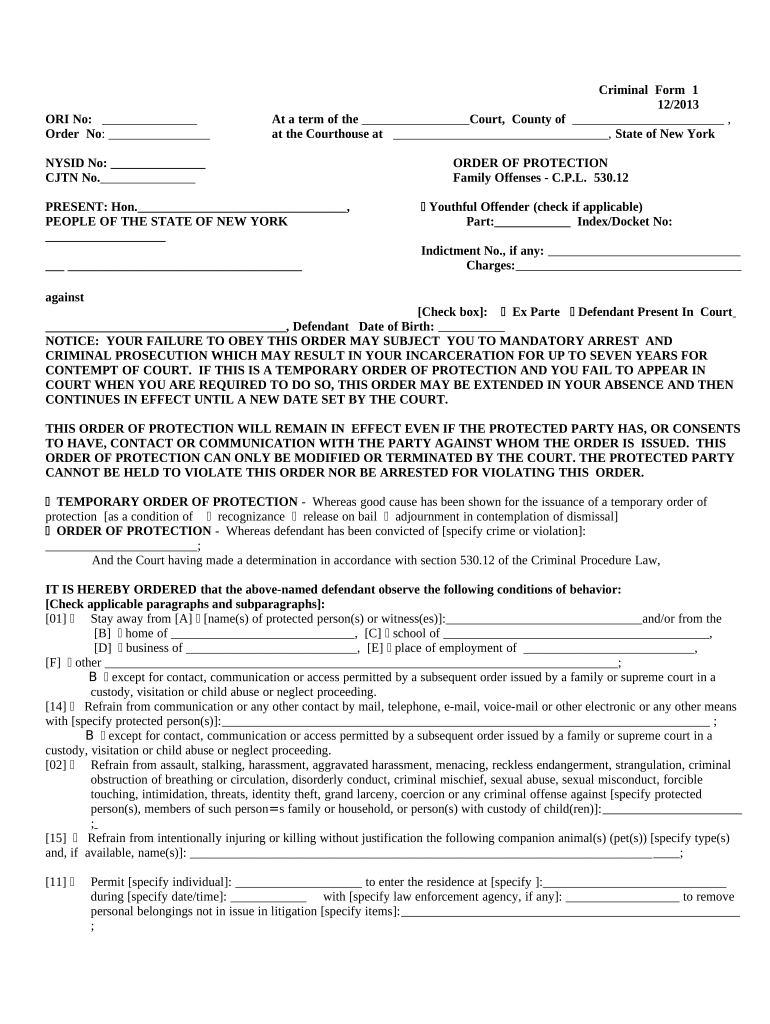
A New York Protection Order is a court-issued directive that limits contact, communication, and certain behaviors by one person toward another to prevent harassment, stalking, domestic violence, or other threatening conduct. Protection orders may be issued by Family Court, Criminal Court, or Supreme Court depending on the facts and parties involved. Orders can include stay-away terms, temporary custody or residence protections, and forfeiture or surrender of weapons. Emergency temporary orders may be granted without the respondent present and are replaced or confirmed after a full court hearing.

Why a Clear, Complete Protection Order Matters

A precise, correctly completed order clarifies legal protections, supports enforcement by police, and reduces the risk of return-to-court disputes. Proper drafting and service improve enforceability across jurisdictions and help courts address safety needs promptly.

Why a Clear, Complete Protection Order Matters

Who Typically Prepares or Signs a Protection Order

People and organizations involved with protection orders include petitioning victims, attorneys, court clerks, and law enforcement who enforce orders.

  • Petitioners and survivors seeking immediate safety and legal remedies in court.
  • Family or criminal defense attorneys drafting pleadings and representing parties at hearings.
  • Court staff and law enforcement handling filing, service, and enforcement logistics.

Each role has distinct responsibilities: petitioners provide facts, attorneys ensure legal sufficiency, and courts issue and track enforceable terms.

Core Elements Found in a Professional New York Protection Order

A complete protection order includes specific, enforceable terms and administrative details so courts and police can act without ambiguity.

Petition Detail

Clear factual statement of alleged conduct, dates, locations, and witnesses so the court can assess the need for protection and determine scope of relief requested.
Parties Identified

Full legal names, aliases, dates of birth, and contact details for petitioner and respondent to prevent misidentification and aid service and enforcement.

Immediate Relief

Specific temporary measures such as stay-away distances, no-contact directives, and temporary custody or housing arrangements effective upon issuance.

Duration & Review

Start and end dates, conditions for renewal or modification, and any required follow-up hearing dates so parties know when protections lapse or change.

Enforcement Terms

Precise prohibitions, permitted exceptions, surrender of firearms if ordered, and criminal contempt consequences to enable law enforcement action.

Service & Notice

How the respondent was served, who served the order, and the date of service to establish the order’s effect and any appeals timeline.

Stepwise Process to Complete and File a New York Protection Order

Follow these sequential steps to prepare and submit a protection order petition correctly.

  • 01
    Gather Evidence: Collect dates, photos, messages, police reports, and witness names supporting your petition.
  • 02
    Complete Petition: Fill all form fields accurately and attach supporting exhibits.
  • 03
    File with Court: Submit petition at the appropriate court clerk’s office or via the court’s e-filing system where available.
  • 04
    Attend Hearing: Appear at any scheduled hearing; emergency temporary orders may be issued before a full hearing.

How Filing, Service, and Enforcement Typically Flow

A streamlined sequence clarifies who does what and when so protections take effect and are enforceable.

  • File Petition: Petitioner submits the form and supporting materials to the court clerk.
  • Judge Reviews: Judge may issue an emergency temporary order after reviewing the allegations.
  • Service Executed: Law enforcement or process server delivers the order to the respondent.
  • Full Hearing: Court holds a hearing to confirm, modify, or deny longer-term protection.

Technical Options for Preparing and Sharing the Protection Order

Courts increasingly accept electronically prepared documents; verify the local court's e-filing and e-sign rules before submission.

  • Document Format: PDF or DOCX accepted by many systems
  • Authentication: Email or SMS code for signer verification
  • Recordkeeping: Audit trail and tamper-evident PDF recommended

Use secure eSignature platforms that support audit trails, encryption, and optional advanced authentication to match the court’s requirements.

Timing Considerations and Typical Court Timeframes

Timeframes vary by county and court; plan for immediate actions and follow-up court dates when you file a petition.

Emergency Relief:

Temporary orders can take effect immediately upon judicial approval.

Service Timing:

Respondent must be served before full hearing; timelines vary by method.

Hearing Schedule:

Full hearing is scheduled after initial temporary relief; local practice determines exact dates.

Duration of Order:

Final order length depends on court findings and statutory limits.

Appeal Window:

Deadlines for appeal or modification are set by court rules and vary.

Common Pitfalls When Preparing a Protection Order

  • Using vague or non-measurable restrictions that hinder enforcement by police or courts.
  • Failing to include full identifying details for the respondent, causing service or enforcement delays.
  • Not attaching contemporaneous evidence (photos, messages, reports) to support emergency relief.
  • Assuming all courts accept the same e-filing or e-signature formats without verifying local rules.

Consequences of Errors or Violations

Contempt: May result in fines or jail time
Criminal Charges: Violations can lead to misdemeanor or felony charges
Loss of Privileges: Court-ordered restrictions on custody or contact
Firearm Surrender: Court may require immediate surrender of weapons
Civil Liability: Wrongful filing risks sanctions or costs
Enforcement Issues: Incomplete orders may be unenforceable

Record Security and Compliance for Electronic Forms

Encryption: TLS 1.2/1.3 in transit
Data at Rest: AES-256 encrypted storage
Legal Frameworks: ESIGN and NY ESRA recognized
Healthcare Rules: HIPAA compliance available with BAA
Audit Trail: Detailed timestamps and IP records
Certifications: SOC 2 Type II and ISO 27001

Comparing eSignature Pricing and Key Capabilities

Platform costs and feature limits affect how you prepare and send protection orders electronically; signNow is listed first for comparison.

signNow DocuSign Adobe Sign PandaDoc HelloSign
Starting Price $8/user/mo $15/user/mo $14/user/mo $19/user/mo $15/user/mo
Free Trial 7-day free trial, no card Available Available Available Available
Bulk Send Yes Yes Yes Yes No
Audit Trail Yes Yes Yes Yes Yes
HIPAA Compliant Yes Yes Yes No No
Envelope Cap No envelope cap 100 envelopes/user/year No cap No cap No cap

Real-World Examples of Secure Document Workflows

These examples illustrate how organizations used secure e-signature platforms to manage sensitive legal documents and compliance needs.

BIS — Dan Rotelli

When BIS needed stricter compliance controls for client legal documents, they standardized on a secure e-sign workflow to centralize records and reduce errors.

  • Focused on SOC 2 and ESIGN compliance.
  • Dan Rotelli noted confidence in SOC 2 certification and ESIGN/UETA compliance, which simplified acceptance by legal partners and reduced administrative follow-ups across multiple jurisdictions.

Fertility Centers — John Butler

A healthcare provider moved consent and legal forms online to streamline patient intake and protect health information.

  • Needed HIPAA-ready eSign capabilities.
  • John Butler praised the platform’s security and API flexibility, which allowed integration with clinical systems while preserving audit trails and patient privacy controls.

Frequently Asked Questions About New York Protection Orders

Answers to common questions on enforceability, e-signatures, service, and next steps when orders are violated or need amendment.


Need help? Contact support

be ready to get more
Join over 28 million airSlate SignNow users