Caption
Court name, case number, parties identified, and official headings that tie the order to a specific guardianship file and judge.
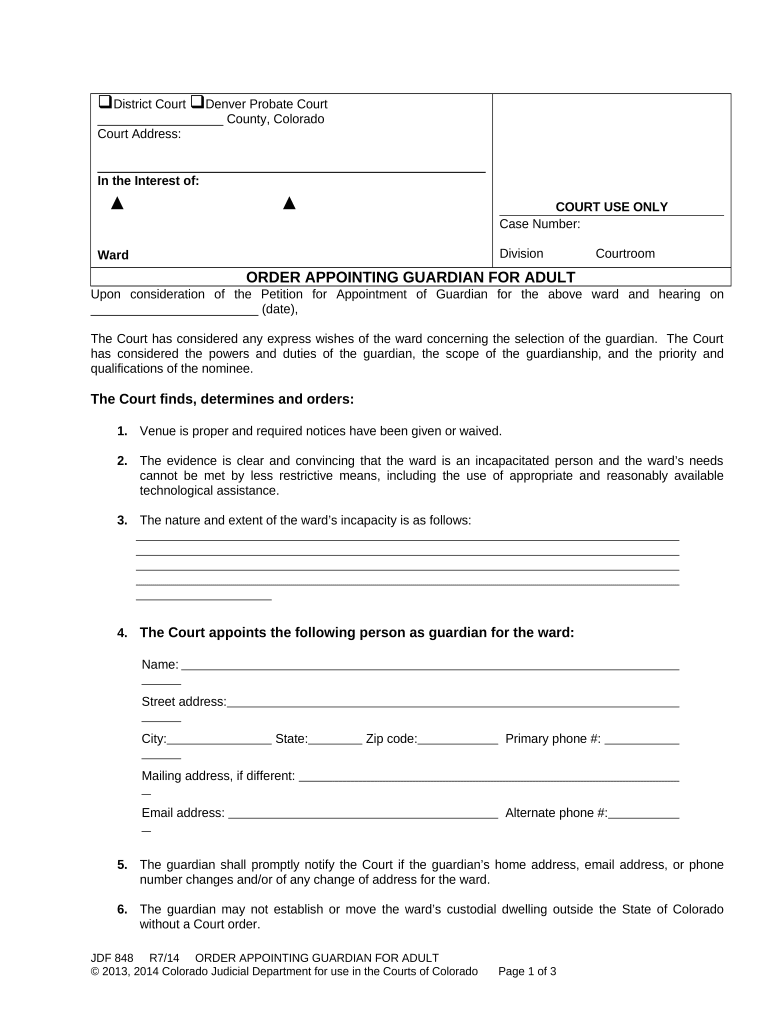
The order establishes legal authority to protect an adult’s health, safety, and assets when they cannot act for themselves. It clarifies decision scope, reduces disputes among family members, and creates a supervised mechanism for financial management and medical decision-making under state law.

Parties involved in a guardianship case often include family members, attorneys, court investigators, and the proposed guardian; clerks and judges complete and sign the formal order after hearing.
An adult nominated to serve as guardian. May be a family member, friend, or public guardian. Responsible for managing the adult’s personal care, finances, or both as specified by the court and must comply with reporting and bond requirements where ordered.
Judge or clerk of court who signs and enters the order. Their signature finalizes the appointment, establishes the guardian's legal authority, and sets supervisory terms such as inventories, accountings, and review hearings.
Court name, case number, parties identified, and official headings that tie the order to a specific guardianship file and judge.
Factual findings supporting incapacity, based on medical reports, testimony, or evaluator statements that justify court intervention and appointment.
Clear statement naming the guardian, the effective date, and whether appointment is temporary or permanent, including successor provisions if applicable.
Detailed powers granted (personal care, medical, financial), express limitations, and any required court approval for major acts like sale of property.
Inventory, accounting, and periodic reporting requirements, plus any bond requirements and the schedule for court reviews or accountings.
Record that required notices were provided; lists parties served and includes proof of service or waiver where permitted by local rules.
| Field | Configuration |
|---|---|
| eSign Method | Electronic signature or wet ink, per court rule |
| Authentication Level | Email + SMS or ID verification |
| Routing Order | Proposed guardian → attorney → clerk |
| Document Storage | Secure archive with audit trail |
Use a secure eSignature platform that supports audit trails, identity verification, and the file formats accepted by courts.
Ensure chosen tools meet court electronic filing specifications and preserve tamper-evident records and a detailed audit trail for the signed order.
Typically 2–8 weeks after filing
Serve respondent 10–30 days before hearing
Interested parties often have 7–30 days to object
Court may require inventory within 30–90 days
Annual or biennial reviews in many jurisdictions
Start the case by filing the petition and proposed order.
Provide required notice to respondent and interested persons.
Judge reviews evidence and rules on capacity and appointment.
Guardian completes inventories, accounts, and periodic reports as ordered.
| Document | Order Appointing Guardian | Durable Power of Attorney |
|---|---|---|
| Purpose | court-ordered protection | private delegation |
| Activation | after court finding | as specified by principal |
| Court Supervision | ongoing court oversight | no court oversight |
| Revocation | by court only | by principal while competent |
| signNow | DocuSign | Adobe Sign | PandaDoc | HelloSign | |
|---|---|---|---|---|---|
| Starting Price | $8/user/mo | $15/user/mo | $14/user/mo | $19/user/mo | $15/user/mo |
| Free Trial | 7-day free trial | Varies | Varies | Varies | Varies |
| Bulk Send | Yes | Yes | Yes | Yes | No |
| Audit Trail | Yes | Yes | Yes | Yes | Yes |
| HIPAA Compliant | Yes | Yes | Yes | No | No |
A court clinic digitized intake to speed petitions and reduce mail delays by weeks
A hospital relied on court-certified orders to update medical decision makers quickly