Establishing secure connection…Loading editor…Preparing document…

Order of Parental Rights

This template is fully customizable. Edit the text, fill out the fields, and send it for signature. Give it a try!
Order of Parental Rights

What an Order of Parental Rights Is and what it does

An Order of Parental Rights is a court-issued legal document that defines, transfers, limits, or clarifies parental rights and responsibilities for a specific child or children. It may establish custody, decision-making authority, visitation schedules, or the termination or reassignment of parental rights in adoption or guardianship matters. Orders are typically issued by family or probate courts after hearings or consent agreements, and they become enforceable court orders when signed by a judge. Parties should follow local procedural rules to file, serve, and record the order.

Why a clear Order of Parental Rights matters

An Order of Parental Rights provides legal clarity about who may make decisions for a child, creates enforceable custody and visitation terms, and documents changes to parental status such as termination or adoption. Clear orders reduce disputes and aid compliance with enforcement mechanisms.

Why a clear Order of Parental Rights matters

Who prepares and relies on these orders

Typical users who prepare or rely on an Order of Parental Rights include attorneys, parents, guardians, and courts managing custody and adoption matters.

  • Private attorneys representing parents or guardians in custody, termination, or guardianship proceedings.
  • Family or probate courts issuing orders after hearings or on stipulated agreements.
  • Child welfare agencies and foster-care systems enforcing placement and parental-rights determinations.

Primary roles involved

Parent

A parent filing or responding to a petition for custody or termination. May provide evidence, attend hearings, and sign consent documents; must verify identity and ensure names and dates match official records to avoid delays or disputes.

Court Clerk

Court clerks process filings, apply docket numbers, and prepare proposed orders for judicial signature. Accurate filing data and correct service information speed entry and reduce the risk of incorrect or incomplete orders being issued.

Required identification and case data

Child's Full Name: Full legal name as on birth certificate
Child's Date of Birth: Enter as MM/DD/YYYY format
Parent or Guardian Names: Full legal names for all listed parents
Case Number: Court docket number assigned at filing
Court and County: Name of issuing court and county
Effective Date: Enter as MM/DD/YYYY; controls enforceability

Step-by-step: prepare, file, and finalize the order

Follow these steps to prepare and file an Order of Parental Rights accurately and in proper sequence.

  • 01
    Prepare Petition: Draft petition stating requested parental rights changes
  • 02
    Gather Documents: Attach birth certificates, IDs, and prior orders
  • 03
    File with Court: Submit to family or probate court clerk
  • 04
    Attend Hearing: Provide testimony or consent; obtain judge's signature

Typical routing: filing, service, recording, and distribution

Typical routing and service options for the order include court filing, notifying parties, and recording when required by law.

  • File: File original with court clerk; obtain stamped copy
  • Serve: Serve all parties per state rules (personal or mail)
  • Record: Record with county when order affects custody records
  • Distribute: Provide certified copies to schools and agencies

Digital submissions and authentication options

Electronic submission and e-signature options can simplify execution but must meet legal and court rules for signatures and notarization.

  • File Format: PDF/A or scanned court-acceptable format
  • Authentication: Email, SMS code, or KBA as allowed
  • Notarization: RON or in-person when required

Key timing considerations when you file

Key timeframes vary by procedure; courts set deadlines for service, hearings, and appeal periods that affect enforceability of the order.

Service Deadline:

Follow state rules; often 30–60 days before hearing

Hearing Notice:

Court issues date; parties must appear or submit waivers

Appeal Period:

Varies by state; typically 30 days to appeal

Record Retention:

Retain certified order per local record rules

Amendment Window:

Motions to modify require notice and possible hearing

Common preparation mistakes to avoid

  • Using inconsistent names or dates (for example, nicknames instead of legal names) causes service failures, delays in court processing, and potential reopening of finalized orders.
  • Failing to serve all required parties according to state rules can invalidate proceedings or require re-notification and additional hearings, increasing time and cost.
  • Neglecting to obtain a judge's signature or to file the signed order with the clerk may leave the order unenforceable and subject to challenge.
  • Relying on improper electronic signing methods when courts require notarization or stricter authentication can result in rejection or need for re-execution.

Consequences of incorrect or incomplete orders

Unenforceable Order: Court may refuse enforcement
Contempt Risk: Parties may face contempt charges
Child Welfare Action: Possible placement changes by agency
Fines and Costs: Monetary penalties and attorney fees
Appeal Expenses: Higher legal costs on appeal
Uncertain Custody: Future proceedings may reopen rights

Core components you should include in the order

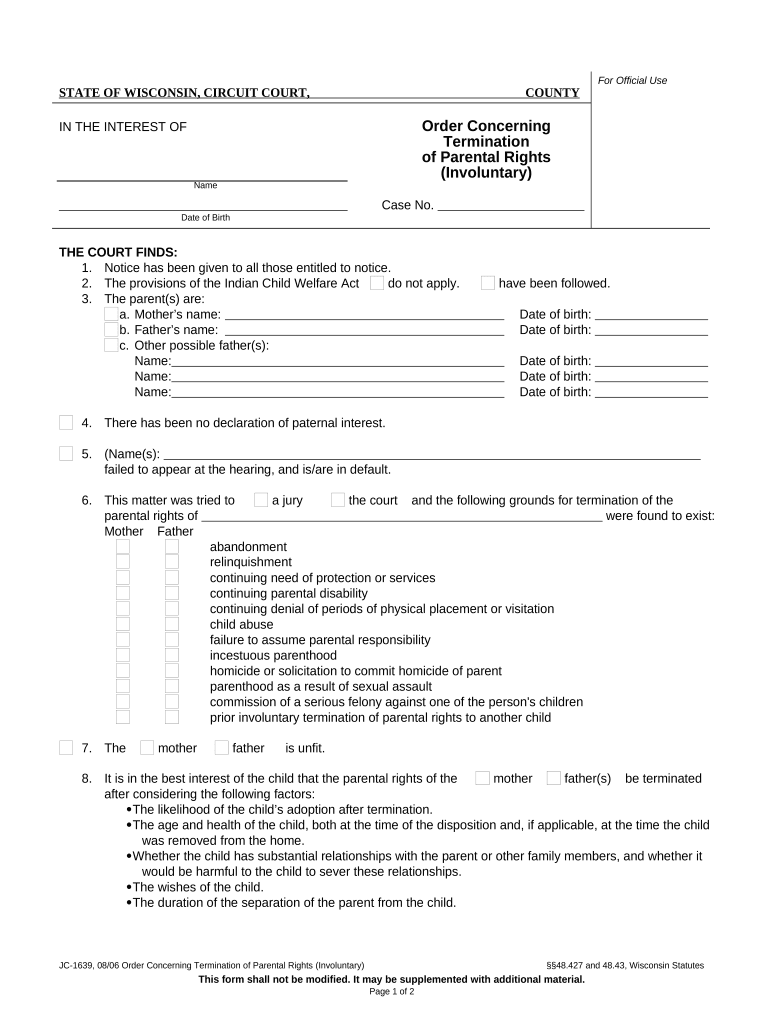
A complete Order of Parental Rights includes clear parties, jurisdictional statements, specific rights transferred or reserved, implementation details, enforcement language, and signature blocks.

Parties

Identify the child, parents, guardians, and any third parties. Use full legal names and relationships; include dates of birth and contact information where required to avoid ambiguity in enforcement.
Jurisdiction

State the court name, county, and case number. Confirm the court has subject-matter jurisdiction and personal jurisdiction over the parties to prevent later challenges or venue defects.

Rights Specified

Describe custody, decision-making authority, visitation schedules, medical consent, education authority, and any limitations or conditions, and specify dispute resolution methods to reduce interpretive disputes.

Enforcement

Include remedies such as contempt language, make-up parenting time procedures, and jurisdiction for enforcement; specify whether attorney's fees or sanctions may be awarded for violations.

Signatures

Provide signature blocks for judge, parents, guardians, and attorneys. Include printed names, dates, and notary acknowledgements or witness lines as required by local law and contact information.

Attachments

Attach exhibits such as parenting plans, custody schedules, prior court orders, or adoption consents. Clearly label exhibits and incorporate them by reference in the order text.

Practical examples of how orders are used

Real-world examples show how Orders of Parental Rights are used in adoption, guardianship, and custody modifications.

Adoption example

In an adoption proceeding, parents and agencies prepared a consent order to terminate parental rights and transfer guardianship using a court-approved form.

  • All parties signed and the judge entered the order that day.
  • The clear, itemized order specified decision-making authority, visitation terms, and a record of consent; having precise names, dates, and notarized signatures avoided post-judgment disputes and allowed agencies to update records promptly.

Custody modification example

A parent sought modification of custody after relocation; the court reviewed an agreed proposed order changing parental decision-making authority.

  • Counsel submitted evidence and a signed consent order.
  • Because the order included precise service records, certified copies, and explicit enforcement language, agencies and schools updated their records without further litigation, and the new schedule was implemented on the effective date.

Best practices to ensure a defensible order

Follow best practices to reduce errors, ensure enforceability, and streamline court acceptance of parental-rights orders.

Use full legal names in all fields
Always enter full legal names exactly as they appear on government-issued IDs and birth certificates. Mismatches lead to service issues, identity disputes, and may require re-filing or supplemental affidavits, which delay finality and increase costs.
Confirm jurisdiction and correct venue before filing
Verify the court's subject-matter jurisdiction and proper venue before filing. If jurisdiction is challenged, orders risk being vacated; include supporting facts in the petition and attach necessary affidavits or proofs of residency to strengthen the record.
Serve every party per state service rules
Follow the exact service methods prescribed by state rules and file proof of service. Improper service can nullify proceedings and require additional hearings or substituted service motions.
Retain originals and certified copies securely
Keep certified originals in a secure, indexed location and maintain encrypted digital copies. Make certified copies available to schools and agencies that require them for administrative actions.

Milestone timeline from filing to enforcement

Major processing milestones from filing to enforcement are useful to track for each Order of Parental Rights.

01

Filing

Court accepts petition and assigns case number

02

Service

Proof of service must be filed per rules

03

Hearing

Judge hears evidence or approves stipulated order

04

Entry

Signed order entered and certified copies distributed

How this order differs from adoption consent forms

Quick comparison clarifies how an Order of Parental Rights differs from adoption-related consent documents and where each is used.

Criteria Order of Parental Rights Adoption Consent
Primary Purpose modify parental rights transfer parental rights permanently
Typical Parties parents, courts, agencies birth parents, adoptive parents
Legal Effect creates enforceable custody terms terminates and assigns rights
Notarization court signature typically required consent often notarized

E-signature vendor comparison for executing orders

Baseline vendor comparison for e-signature options commonly used to execute legal orders; signNow listed first per guidance.

signNow DocuSign Adobe Sign PandaDoc HelloSign
Starting Price $8/user/mo $15/user/mo $14/user/mo $19/user/mo $15/user/mo
Free Trial Yes, 7-day free trial Varies Varies Varies Varies
Bulk Send Yes Yes Yes Yes No
Audit Trail Yes Yes Yes Yes Yes
HIPAA Compliant Yes Yes Yes No No

FAQs: execution, e-signing, and enforcement questions

Answers to common questions about completing, signing, and enforcing an Order of Parental Rights, including e-signature and notarization concerns.


Need help? Contact support

be ready to get more
Join over 28 million airSlate SignNow users