Establishing secure connection…Loading editor…Preparing document…

Order to Dismiss for Workers' Compensation

This template is fully customizable. Edit the text, fill out the fields, and send it for signature. Give it a try!
Order to Dismiss for Workers' Compensation

What an Order to Dismiss for Workers' Compensation Is

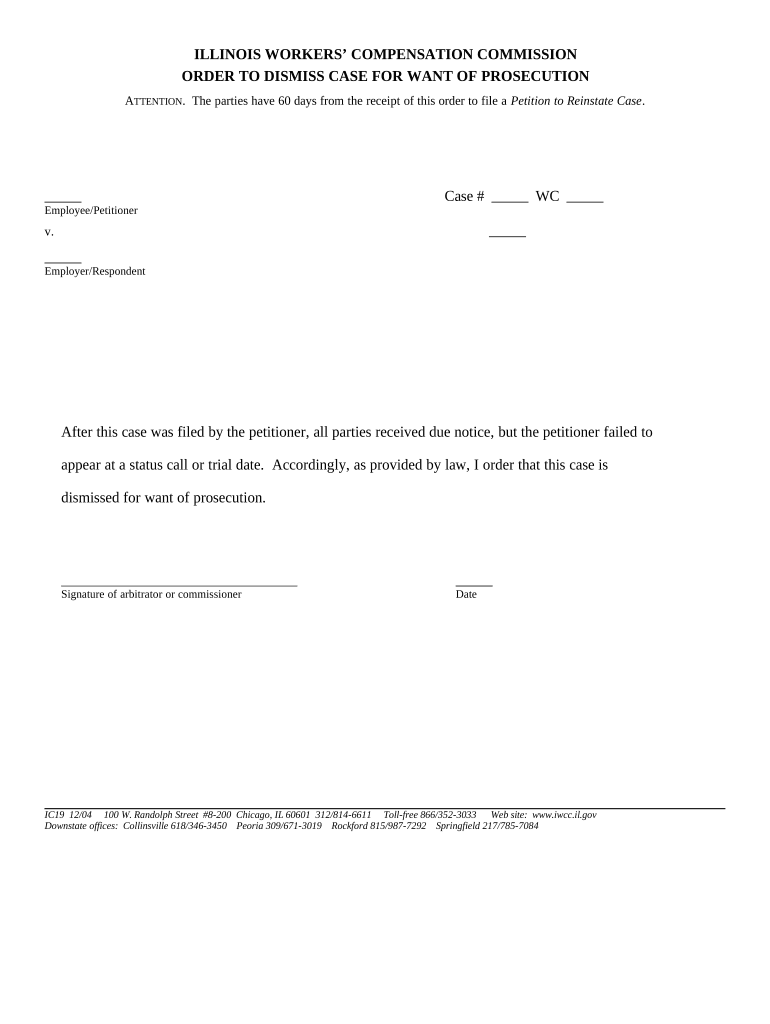
An Order to Dismiss for Workers' Compensation is a formal court or administrative decision that ends a workers' compensation matter without further proceedings, either because the claimant withdraws the claim, the parties settle, jurisdictional defects exist, or the claim lacks merit. The order typically names the case, identifies the moving party, states the legal grounds for dismissal, and specifies whether the dismissal is with or without prejudice. Use this document to record dismissal terms, preserve the record, and notify all parties and the workers' compensation board or commission.

Why a Clear, Properly Drafted Order Matters

A correctly prepared Order to Dismiss clarifies the case status, prevents unintended reopenings, and creates an enforceable record for employers, insurers, claimants, and the workers' compensation agency. It helps avoid procedural challenges and downstream disputes over reopening, benefits, or billing.

Why a Clear, Properly Drafted Order Matters

Who Typically Prepares or Uses This Order

The Order to Dismiss is used by legal representatives, claims adjusters, employers, and administrative law judges to document case closure and notify stakeholders.

  • Claims adjusters: prepare and submit dismissal paperwork to close reserves and finalize payments.
  • Employer HR or legal teams: confirm administrative compliance and internal recordkeeping after dismissal.
  • Attorneys and representatives: file the order with the workers' compensation commission and serve opposing parties.

Core Components of a Professional Order to Dismiss

A concise, well-structured Order to Dismiss reduces ambiguity and supports enforceability by listing parties, case identifiers, factual basis, legal grounds, disposition language, and signature blocks for the adjudicating official.

Caption

Court or board name, case number, and party names must appear exactly as in the underlying file to avoid administrative mismatch or processing delays.
Case Identifier

Include the docket or claim number, hearing date if any, and insurer claim number so records can be cross-referenced across employer, carrier, and agency systems.

Basis for Dismissal

State the reason (settlement, withdrawal, lack of jurisdiction, voluntary dismissal) with concise factual support to prevent reopening disputes.

Disposition Language

Specify whether dismissal is 'with prejudice' or 'without prejudice' and any conditions such as dismissal contingent on executed settlement documents.

Service & Filing

Record how and when the order was served on parties and filed with the workers' compensation commission to establish the effective date.

Signature Block

Provide signature and printed name of the judge or administrative official, date, and any required attestation or seal to validate the order.

Step-by-Step: Preparing and Filing an Order to Dismiss

Follow a consistent sequence to prepare, approve, serve, and file the Order to Dismiss to reduce rejection risk and create a defensible administrative record.

  • 01
    Draft Order: Populate caption, claim number, grounds, and disposition language carefully.
  • 02
    Obtain Approvals: Secure signatures or settlement releases from parties and insurers if required before filing.
  • 03
    Serve Parties: Provide copies to claimant, employer, and carrier using the method required by the board.
  • 04
    File with Agency: Submit the order to the workers' compensation commission per its e-filing or mail rules.

Where to File and How the Process Moves Forward

After drafting and obtaining necessary signatures, route the Order to Dismiss through service, agency filing, and docketing so the dismissal becomes effective and recorded.

  • Serve the Parties: Provide a copy via certified mail, electronic service, or agency-prescribed method.
  • File with Commission: E-file if the board accepts electronic filings; otherwise, submit a paper copy per local rules.
  • Agency Docketing: Agency staff assign an entry date; retain proof of docketing or stamped copy.
  • Close Internal File: Update claim systems, reserves, and employer records to reflect dismissal.

How to Configure an Online Workflow for This Order

Configure fields, signer order, and required attachments in your e-filing or eSignature platform to automate routing and ensure completeness.

Field Configuration
Case Caption Required text field, autofill from case record
Signature Order Judge last; claimant and insurer before filing
Attachments Settlement release or proof of service required
Authentication Email plus SMS code for external signers

Delivery and Digital Signing Considerations

Choose a platform that supports secure signing, audit trails, and formats accepted by the workers' compensation agency.

  • File Formats: PDF or PDF/A preferred
  • Authentication: Email + SMS or stronger
  • Audit Trail: Timestamp, IP, and action log

Check the agency's e-filing guidelines for accepted formats and authentication levels; retain completed audit records and filed copies for compliance and potential appeals.

Essential Data Fields to Include

Claimant Name: Full legal name
Employer Name: Registered business name
Claim Number: Agency docket or carrier ID
Date of Incident: MM/DD/YYYY
Grounds: Settlement or withdrawal
Judge Signature: Name, title, date

Typical Timelines and Processing Expectations

Timing varies by jurisdiction; confirm local board rules. Use these typical benchmarks when planning service and internal processes.

Draft & Review Time:

1–5 business days depending on approvals

Service Period:

Service effective immediately upon delivery method used

Agency Processing:

Often 7–30 days for docket entries and stamping

Appeal Windows:

Subject to state statute—commonly 10–30 days

Reopening Requests:

May be allowed within statute of limitations

Key Milestones from Draft to Dismissal

Track these milestones sequentially to ensure the order is effective and recorded in the administrative file.

01

Prepare Draft

Complete form with precise case identifiers and grounds for dismissal.

02

Obtain Signatures

Collect required party and insurer approvals before filing.

03

Serve Parties

Provide proof of service per board rules and retain receipts.

04

File and Docket

Submit to the commission and retain the stamped or docketed copy.

Common Mistakes to Avoid

  • Using an incorrect claim or docket number that prevents the agency from matching the order to the file and leads to processing delays.
  • Failing to state whether dismissal is with or without prejudice, causing confusion about the claimant's right to refile.
  • Not serving all required parties or using an unacceptable service method under local rules, which can void the filing.
  • Submitting incomplete settlement documentation when dismissal is conditioned on release, enabling opponents to move to reopen the case.

Consequences of an Incorrect Order to Dismiss

Reopening Risk: Case may be reopened
Administrative Delay: Processing postponed
Sanctions: Possible fines or costs
Appeal Exposure: Creates grounds for appeal
Reserve Errors: Incorrect insurer accounting
Record Gaps: Missing proof of service

Real-World Examples of How an Order to Dismiss Is Used

These examples illustrate common scenarios where the Order to Dismiss resolves the administrative matter and documents the parties' intent.

Law Firm Settlement

An employer and claimant reached a monetary settlement

  • Dismissal filed contingent on executed release
  • The order closed the case, insurer closed reserves, and all parties received stamped copies for records.

Claim Withdrawn

A claimant withdrew their complaint before hearing

  • Administrative judge entered dismissal without prejudice
  • The order recorded service and clarified the claimant may refile subject to statutory limits.

eSignature Vendor Comparison for Filing and Signing Dismissal Orders

Pricing and feature availability vary across vendors; signNow is listed first per comparison. Confirm platform HIPAA, BAA, and RON support before use for health-related or notarized dismissals.

signNow DocuSign Adobe Sign PandaDoc HelloSign
Starting Price $8/user/mo $15/user/mo $14/user/mo $19/user/mo $15/user/mo
Free Trial 7-day free trial Varies Varies Varies Varies
Bulk Send Yes Yes Yes Yes No
Audit Trail Yes Yes Yes Yes Yes
HIPAA Compliant Yes Yes Yes No No

Frequently Asked Questions — Practical Answers

Answers below address frequent questions about validity, signatures, filing, and electronic methods for an Order to Dismiss in workers' compensation matters.


Need help? Contact support

be ready to get more
Join over 28 million airSlate SignNow users