Establishing secure connection…Loading editor…Preparing document…

California Notice of Pendency of Action

This template is fully customizable. Edit the text, fill out the fields, and send it for signature. Give it a try!
California Notice of Pendency of Action

What the California Notice of Pendency of Action Is

A California Notice of Pendency of Action, commonly called a lis pendens, is a recorded public notice that a pending lawsuit may affect title to, or possession of, specific real property. Filing the notice alerts potential buyers, lenders, and other interested parties that the property is subject to litigation, which can cloud title and limit transfers while the dispute proceeds. The notice itself does not determine legal rights; it preserves a plaintiff’s ability to enforce a future judgment affecting the parcel identified in the recorded instrument.

Why recording a Notice of Pendency matters

Recording a Notice of Pendency protects substantive rights by warning third parties of an adverse claim against property, preserves a link between property and litigation outcomes, and can deter transfers that would frustrate an eventual judgment.

Why recording a Notice of Pendency matters

Who typically files or relies on a Notice of Pendency

The Notice of Pendency is primarily used when a lawsuit directly affects title to real property or the right to possession; it is a document-driven tool used by plaintiffs and their counsel.

  • Plaintiff or plaintiff’s attorney filing to preserve a property remedy and notify interested parties.
  • Title companies and lenders checking public records during title searches and underwriting.
  • Buyers and escrow officers alerted to litigation before completing a purchase or loan.

Use of the notice is procedural and strategic: it protects remedies related to property while litigation is ongoing and informs transaction parties of recorded claims.

Core elements included in a professional Notice of Pendency

A complete and compliant notice identifies the litigation, the property, filing party, and recording details clearly so third parties can locate related court records and parcel descriptions.

Caption

Case title and court identification placed exactly as shown on the complaint to enable cross-reference with court dockets and filings.
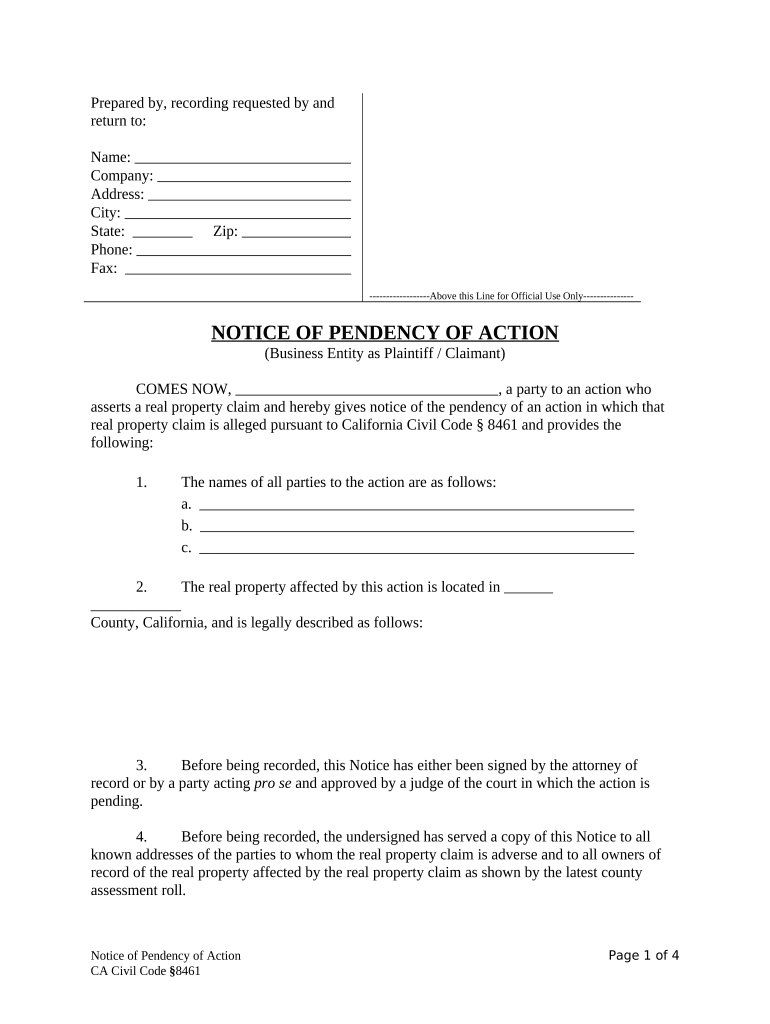
Party Names

Full legal names of plaintiff and defendant, including business entity format, to avoid ambiguity in public records and title searches.

Property Description

Legal description or assessor’s parcel number (APN) sufficient for the county recorder to identify the affected parcel without requiring extra interpretation.

Recording Info

County recorder block including book/page or instrument number, and recording date so reviewers can confirm when the notice became effective.

Case Number

Court-assigned case or docket number used for linkages between recorded notice and the underlying pleadings in the clerk’s file.

Signature

Signature of the filing party or attorney and printed name, plus contact information for service and follow-up communications.

Essential information fields for the notice

Case Caption: Exact court caption
Jurisdiction: Court name and county
Case Number: Docket or case number
Property ID: APN or legal description
Filing Party: Plaintiff name and contact
Recording Data: Recorder entry details

Step-by-step: preparing and recording the notice

Follow these steps to prepare, record, and serve a Notice of Pendency so it effectively alerts third parties and preserves property-related remedies.

  • 01
    Draft notice: Populate caption, case number, and property description accurately.
  • 02
    Verify parcel: Confirm APN and legal description with county records or assessor data.
  • 03
    Record document: Submit to the county recorder in the county where the property lies.
  • 04
    Serve parties: Serve defendant and affected parties per civil procedure rules.

How to set up an online workflow for Notices of Pendency

An online workflow streamlines drafting, signer routing, and county recorder delivery while preserving an audit trail for service and recording steps.

Field Configuration
Document template Preload caption, case number, and APN fields
Signer roles Plaintiff or attorney as primary signer
Authentication Email + SMS or stronger KBA for high-assurance signing
Recording step Export signed PDF for county recorder submission

Where to file and how the notice propagates

Recording location and post-recording distribution determine the notice’s public visibility and legal effect; follow local county rules for formats and delivery.

  • County Recorder: File the notice where the property is located for public notice and title recordation.
  • Court Docket: Ensure the case number and caption match court filings for cross-reference.
  • Service: Serve opposing parties according to civil procedure obligations.
  • Title Parties: Provide copies to title companies and lenders when closing or refinancing is pending.

Digital signing and delivery considerations

Electronic preparation and secure e-signing reduce turnaround time but must satisfy identity, intent, and retention requirements to preserve enforceability.

  • File formats: PDF or PDF/A for county recorder compatibility
  • Authentication: Email + SMS code or multi-factor methods
  • Integrations: Connectors to cloud storage and case management

When using a third-party e-signature provider, confirm compliance with ESIGN and UETA, ensure long-term access to signed records, and verify county recorder acceptance of electronically prepared PDFs.

Typical timelines and filing expectations

Timelines vary by local practice; record promptly after filing and serve opposing parties quickly to avoid procedural challenges or motions to expunge.

Recording timeframe:

Record as soon as feasible after filing to place buyers on notice

Service deadline:

Serve defendants per civil rules; delays risk procedural objections

Duration of effect:

Notice generally remains until released or final judgment resolves property issues

Challenge period:

Defendants may move to expunge a wrongful or insufficient notice

Replacement filings:

File an amended notice if parcel identification or caption errors occur

Common mistakes to avoid when preparing a Notice of Pendency

  • Using an imprecise legal description that fails to identify the correct parcel, which can lead to expungement or limited protection.
  • Mismatching the case caption or docket number with court records, making it difficult for title examiners to link the notice to the underlying action.
  • Failing to serve required parties under civil procedure, exposing the filer to procedural dismissal or sanctions.
  • Assuming a recorded notice resolves substantive title issues; the underlying suit still controls final rights.

Potential penalties and legal risks

Expungement: Court may order removal
Monetary damages: Liability for wrongful filing
Attorney fees: Fee awards possible
Sanctions: Court sanctions for misuse
Title delay: Sales and refinances impeded
Perjury risk: False statements carry legal exposure

Frequently asked questions about Notices of Pendency

Answers to common questions about recording, enforceability, removal, and electronic handling of a Notice of Pendency.


Need help? Contact support

eSignature vendor comparison for executing and distributing Notices of Pendency

Compare typical plan features and starting prices among common eSignature providers; confirm plan details and compliance needs before selecting a vendor.

signNow DocuSign Adobe Sign PandaDoc HelloSign
Starting Price $8/user/mo $15/user/mo $14/user/mo $19/user/mo $15/user/mo
Free Trial 7-day free trial No No Yes, limited Yes, limited
Bulk Send Yes Yes Yes Yes No
Audit Trail Yes Yes Yes Yes Yes
HIPAA Compliant Yes Yes Yes No No
be ready to get more
Join over 28 million airSlate SignNow users