Establishing secure connection…Loading editor…Preparing document…

Personal Restraint Petition

This template is fully customizable. Edit the text, fill out the fields, and send it for signature. Give it a try!
Personal Restraint Petition

What a Personal Restraint Petition Is and when it’s used

A Personal Restraint Petition is a post-conviction legal filing used to challenge unlawful restraint, jurisdictional defects, or substantial constitutional errors that affected a criminal conviction or sentence. It gives a detained person, or counsel acting on their behalf, a procedural vehicle to request relief such as vacatur, resentencing, or release when direct appeal remedies are exhausted.

Why a Personal Restraint Petition matters for post-conviction relief

Filing a Personal Restraint Petition preserves fundamental rights, creates a record for appellate review, and can provide relief from unlawful confinement, sentencing errors, or ineffective assistance of counsel where other remedies are unavailable.

Why a Personal Restraint Petition matters for post-conviction relief

Who typically prepares or files this petition

Common filers and participants include detained individuals, public defenders, and private appellate counsel who handle post-conviction matters.

  • Detained individual represented pro se or by counsel seeking relief from unlawful restraint or sentence
  • Public defender or appointed counsel preparing procedural post-conviction filings and record requests
  • Private appellate attorney specializing in constitutional claims, jurisdictional defects, or ineffective assistance of counsel

Parties should confirm local court rules for filing, service, and required attachments before submitting a petition.

Representative users and roles

Incarcerated Petitioner

An individual in custody who claims unlawful restraint. They often need counsel assistance to gather trial records, medical or disciplinary records, and to draft constitutional or statutory grounds for relief.

Appellate Counsel

An attorney experienced in post-conviction practice who drafts legal argumentation, compiles the appellate record, secures necessary affidavits, and manages service and oral argument when required by the appellate court.

Core components you’ll find in a professional petition

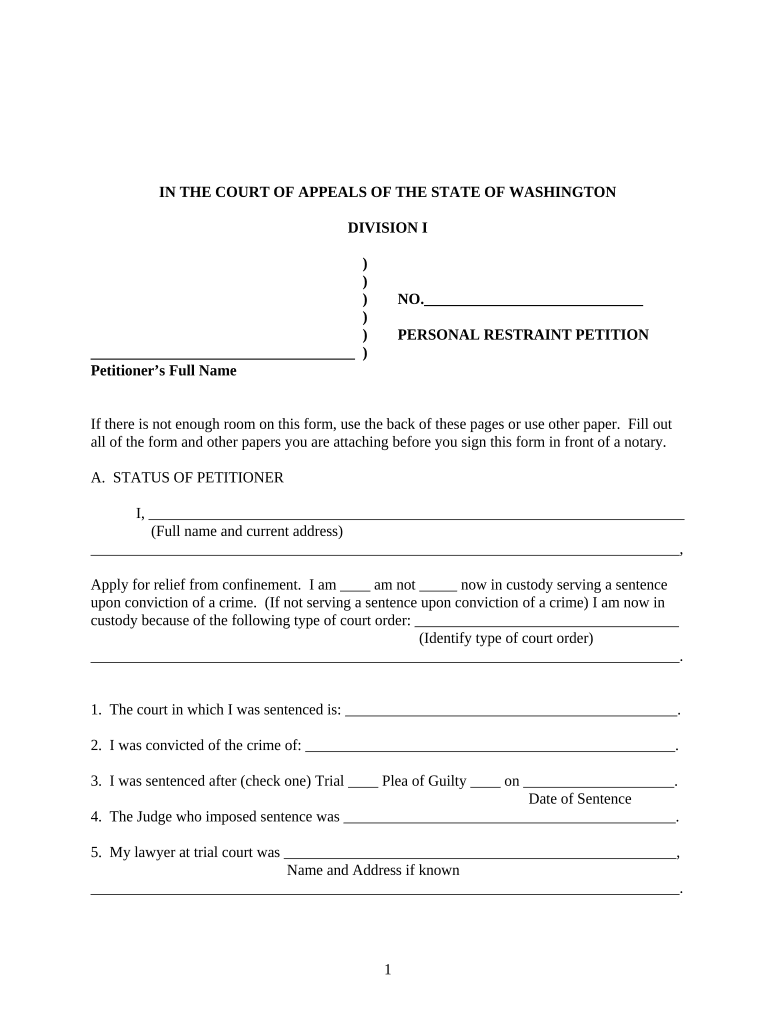
A complete petition organizes the case caption, factual narrative, legal grounds, supporting evidence, relief requested, and a signed verification attesting to accuracy and service.

Caption

Court caption, case number, and party names. This identifies the original conviction and the court that imposed the sentence and is essential for correct docketing.
Statement of Facts

A concise, chronological narrative of trial and post-trial events limited to facts relevant to the claimed error or unlawful restraint, with dates and citations to the record.

Grounds for Relief

Clear, numbered legal claims (constitutional, statutory, jurisdictional, ineffective assistance) describing how each claim affected the conviction or sentence.

Supporting Evidence

Indexed exhibits such as transcripts, affidavits, medical records, or sentencing documents that substantiate factual assertions and link to legal claims.

Relief Requested

Specific remedy sought (vacatur, resentencing, release, remand for an evidentiary hearing) and the legal basis for the requested relief.

Verification

Signed statement under penalty of perjury verifying the truth of the petition and listing service details and the date of signing.

Step-by-step filing process

Follow these sequential steps to prepare, sign, and file a petition in compliance with court rules and service requirements.

  • 01
    Gather Records: Order transcripts and medical or disciplinary records.
  • 02
    Draft Petition: Compose facts, grounds, and requested relief.
  • 03
    Attach Exhibits: Assemble and paginate supporting documents.
  • 04
    File and Serve: File with the clerk and effect service on respondents.

Configuring an online petition workflow

When using an electronic workspace, configure fields, attachment handling, and signer authentication to match court and service rules.

Field Configuration
Docketing Electronic filing per court rules
Signatures eSignature with required authentication
Attachments PDF exhibits bookmarked and indexed
Service Email plus certified mail if required

Overview of the filing and review flow

This describes the typical movement of a petition from preparation to the court’s review and disposition.

  • Prepare: Draft petition and exhibits.
  • File: Submit to the clerk or e-file portal.
  • Serve: Serve state and prosecuting authorities.
  • Review: Court screens and schedules further proceedings.

Technical considerations for digital completion and submission

Confirm the court accepts electronic filings, verify required file formats, and set signer authentication appropriate to the court's rules.

  • File Formats: PDF, DOCX supported
  • Authentication: Email or multi-factor
  • Integrations: Salesforce, NetSuite, Box

Use an e-filing workflow that preserves metadata and the audit trail, and confirm that generated PDFs meet the court’s size and format limits before submitting.

Key legal risks and consequences of errors

Procedural Default: Missed deadlines may bar review
Record Gaps: Missing transcripts weaken claims
Incorrect Service: Faulty service can void filing
Perjury Risk: False affidavits carry penalties
Jurisdictional Error: Wrong court selection leads to dismissal
Ineffective Drafting: Unclear grounds risk summary denial

Common preparation and filing mistakes to avoid

  • Failing to attach key exhibits such as trial transcripts or sentencing documents, which prevents the court from evaluating the asserted errors and often results in summary dismissal.
  • Submitting an unsigned or improperly verified petition, including omitted dates or incomplete verification language, which courts commonly treat as jurisdictional defects.
  • Using vague or unsupported grounds that lack record citations or factual detail; courts require specific factual support linked to the record for each claim.
  • Neglecting established service rules for respondents and prosecutors; incorrect service can delay proceedings or lead to dismissal for defective process.

Practical tips for an accurate, efficient petition

Adopt a consistent checklist-driven approach to avoid common errors and reduce processing time.

Assemble the Record
Obtain certified transcripts, sentencing records, and institutional files early. Index exhibits, include page citations in the facts, and cross-reference record citations to make claims verifiable and reduce requests for supplementation.
Be Specific and Concise
Frame each ground with a short title, concise factual basis, and direct explanation of why the error was prejudicial. Avoid long narrative tangents that obscure the legal issue.
Follow Local Rules
Match formatting, page limits, and service procedures to the court’s local rules. Courts frequently reject filings that deviate from prescribed margins, font sizes, or certificate of service formats.
Preserve Metadata and Audit Trail
When using electronic tools, keep original file metadata, a clear audit trail of signatures, and proof of service to address any later authenticity or timeliness disputes.

Typical eSignature provider pricing and features for petition workflows

Common eSignature providers offer tiered plans; compare starting price, trial availability, bulk-send, audit trail, and HIPAA support when choosing a solution for legal filings.

signNow DocuSign Adobe Sign PandaDoc HelloSign
Starting Price $8/user/mo $15/user/mo $14/user/mo $19/user/mo $15/user/mo
Free Trial 7-day free trial Yes Yes Yes Yes
Bulk Send Yes Yes Yes Yes Yes
Audit Trail Yes Yes Yes Yes Yes
HIPAA Compliant Yes Yes Yes No No

Frequently asked questions about Personal Restraint Petitions

Answers to common procedural and technical questions about preparing, filing, and serving a petition, and about using electronic tools where permitted.


Need help? Contact support

be ready to get more
Join over 28 million airSlate SignNow users