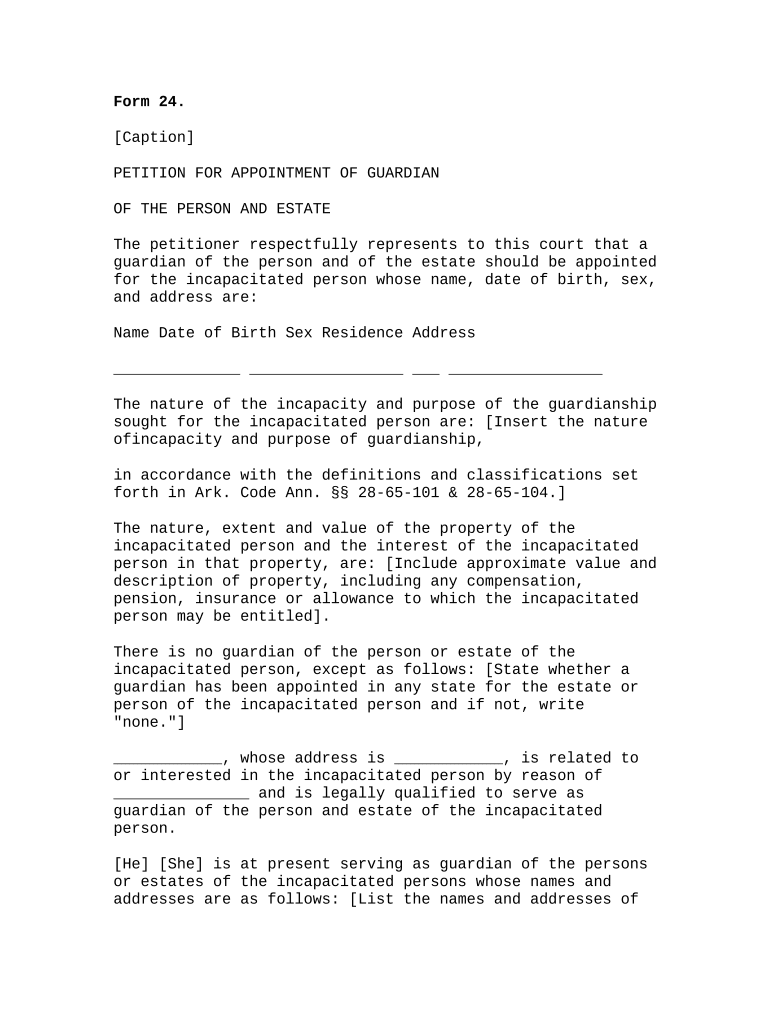
Petition for Appointment of Guardian of the Person and Estate
What the Petition for Appointment of Guardian of the Person and Estate Is
Why this Petition Matters for Protecting a Vulnerable Adult
Filing the petition establishes court supervision for personal care and estate management, creates legal authority for decision-making, and triggers required safeguards such as bond, accounting, and periodic reporting to protect the proposed ward.
Who Typically Prepares and Files This Petition
Family members, close caregivers, and attorneys commonly prepare the petition; courts require clear factual support for incapacity and need for guardianship.
- Petitioners and families seeking court-ordered decision-making authority for an incapacitated adult, often when informal arrangements are insufficient.
- Probate and guardianship attorneys who draft pleadings, prepare supporting medical affidavits, and represent petitioners at hearings.
- Court-appointed investigators, guardian ad litem, or public guardians who evaluate the proposed ward and report to the court.
The court evaluates petitioners, investigates alternatives to guardianship, and orders the least restrictive scope of authority consistent with the ward's needs.
Step-by-Step: Filing a Petition for Appointment of Guardian of the Person and Estate
-
01Gather Documents: Collect medical affidavits, financial records, and identity documents before drafting the petition.
-
02Complete Petition: Fill all fields accurately, attach exhibits, and prepare proposed orders and notice forms.
-
03File and Serve: File with the county probate court and serve required parties following local rules.
-
04Attend Hearing: Present evidence at hearing; court may appoint investigator or order evaluations before final appointment.
Configuring an Online Workflow for This Petition
| Field | Configuration |
|---|---|
| Authentication Method | Email plus SMS code or knowledge-based authentication for higher assurance. |
| Signature Order | Petitioner signs first; attorney or guardian signs after verification. |
| Conditional Fields | Reveal bond amount and estate schedules only if estate exceeds threshold. |
| Attachments Required | Attach physician statement, proof of service, and proposed order PDFs. |
Where to File and Who Must Receive the Petition
-
County Probate Court: File the original petition with the probate or superior court in the ward's county of residence.
-
Service to Interested Parties: Serve spouse, adult children, nominated guardian, and any existing agents via required methods.
-
Court Investigator or GAL: Provide copy to court investigator or guardian ad litem when ordered for evaluation.
-
Adult Protective Services: Notify APS or similar agencies when allegations of abuse or neglect appear in the petition.
Typical Timelines and Deadlines to Expect
Temporary Orders:
Emergency temporary guardianship can be granted within days to weeks depending on urgency
Hearing Notice Period:
Notice periods often range from 7 to 21 days before a scheduled hearing
Investigation Period:
Court investigator reports typically filed within 10 to 60 days of appointment
Accounting Deadlines:
Inventory and initial accounting commonly due within 90 days after appointment
Appeal Period:
Appeals of guardianship orders typically must be filed within 30 days of entry
Key Milestones from Filing to Final Appointment
Petition Filed
Court receives petition and assigns case number and calendar date for hearing.
Temporary Hearing
Court may grant temporary orders if immediate protection is necessary pending investigation.
Investigation & Reports
Court investigator or GAL evaluates the ward and files a written report.
Final Hearing and Order
Court holds final hearing, rules on capacity, and issues appointment and letters of guardianship.
Common Mistakes That Delay Appointment
- Incomplete medical affidavits or unsigned exhibits lead courts to continue hearings and request supplemental evidence.
- Improper service on required parties or using wrong venue results in dismissal or re-service orders and additional delay.
- Omitting inventory of assets or unclear estate valuation causes bond calculation and accounting setbacks.
- Failing to propose limited or least-restrictive powers invites objections and expanded judicial scrutiny at hearing.
Risks and Legal Consequences of Errors in the Petition
eSignature Vendor Comparison for Filing and Managing Petitions
| signNow | DocuSign | Adobe Sign | PandaDoc | HelloSign | |
|---|---|---|---|---|---|
| Starting Price | $8/user/mo | $15/user/mo | $14/user/mo | $19/user/mo | $15/user/mo |
| Free Trial | 7-day free trial | Varies | Varies | Varies | Varies |
| Bulk Send | Yes | Yes | Yes | Yes | Varies |
| Audit Trail | Yes | Yes | Yes | Yes | Yes |
| HIPAA Compliant | Yes | Yes | Yes | Varies | Varies |
| Envelope Cap | No cap | 100 envelopes/user/year | Varies by plan | Varies by plan | Varies by plan |
Technical Considerations for eSigning and eFiling
Ensure chosen platform meets court and privacy requirements: secure storage, audit trail, and required integrations for eFiling.
- Supported Formats: PDF and Word DOCX accepted for most courts
- Integrations: Connects with systems like Microsoft 365, Google Workspace, and NetSuite
- Security: TLS 1.2/1.3 in transit; AES-256 at rest
Practical Examples of Petition Workflows
Family Caregiver Scenario
A daughter documents progressive cognitive decline and attaches physician reports to a complete petition.
- She serves adult children and files with the county probate court.
- The court orders an investigator, grants a temporary guardian, and schedules a final hearing where limited financial powers are approved with required bond.
Attorney-Assisted Filing
An attorney prepares a petition with an estate inventory and proposed limited guardianship powers.
- The petitioner uses conditional fields to include asset exhibits only if above thresholds.
- After investigation and a short hearing, the court appoints a guardian with periodic accountings and clearly defined medical decision limits.
Frequently Asked Questions About the Petition
-
Can the petition be signed electronically?
Electronic signatures are generally legally valid under the ESIGN Act (15 U.S.C. ch. 96) and UETA in most jurisdictions, but some courts require original signatures or have specific eFiling rules. Confirm local court rules before using e-signatures for filings.
-
Who is eligible to file the petition?
Typically family members, interested persons, or agencies may file. Courts may permit professional fiduciaries or public guardians to petition when no suitable family member exists; local statutes determine standing and priority.
-
What supporting medical evidence is required?
A physician's affidavit, neuropsychological evaluation, or clinical records describing functional incapacity are commonly required. Provide dated, signed medical reports that directly address the ward's decision-making abilities.
-
How long until a guardian is appointed?
Timing varies: emergency temporary orders can be issued within days, whereas final appointment often takes weeks to months depending on investigation, notice periods, and court backlog.
-
Can the scope of guardianship be limited?
Yes. Courts prefer the least restrictive alternative and commonly grant limited powers (medical only, financial only, or specific transactions) tailored to the ward's needs and preserved rights.
-
How can a guardianship be challenged or revoked?
Interested parties may petition to terminate or modify guardianship by showing restored capacity or changed circumstances; courts review evidence and may order re-evaluation before modifying or ending guardianship.