Establishing secure connection…Loading editor…Preparing document…

Release Funds Form

This template is fully customizable. Edit the text, fill out the fields, and send it for signature. Give it a try!
Release Funds Form

What the Release Funds Form Is and when it’s used

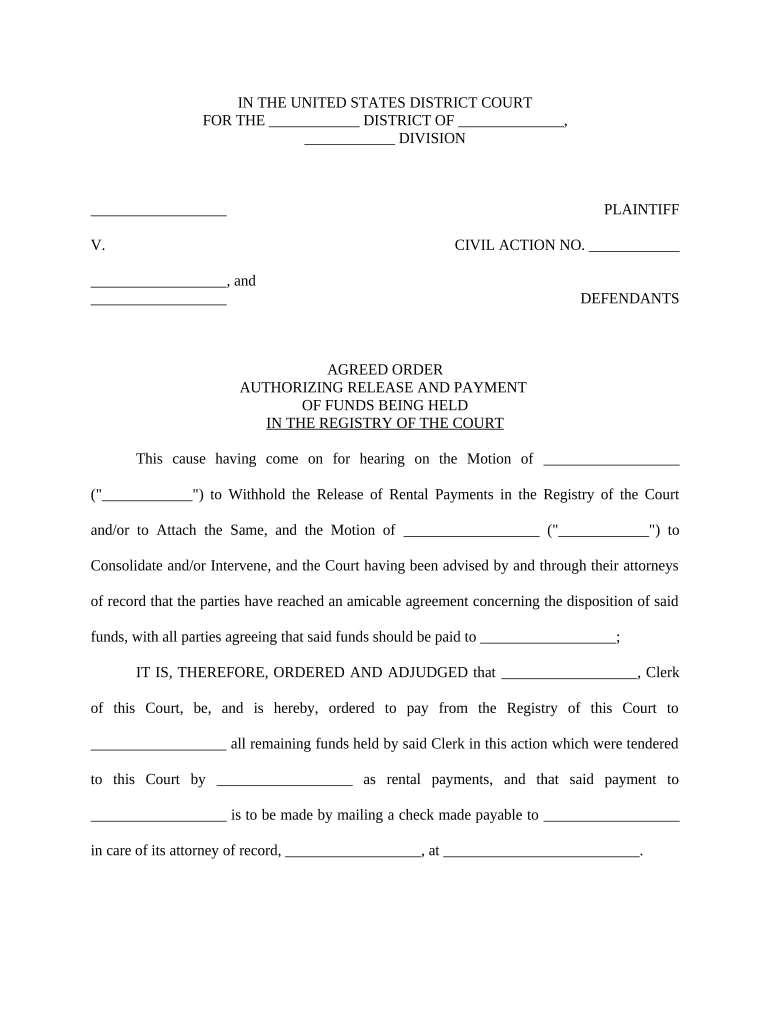
A Release Funds Form documents authorization to transfer, disburse, or release held funds from one party to another and records the conditions under which funds are released. Common in escrow, construction retainage, legal settlements, and escrowed vendor payments, the form names payer and payee, identifies the amount, and sets release conditions. Proper completion creates an auditable record of consent, payment details, and timing, reducing disputes and clarifying liability for payors, payees, and custodial agents such as escrow companies or trustees.

Why a clear Release Funds Form matters

A well‑prepared form reduces payment disputes, creates a verifiable chain of authorization, and records conditions tied to release. It also supports compliance, auditability, and risk mitigation when third parties, lenders, or regulators review transactions.

Why a clear Release Funds Form matters

Typical users and roles for the Release Funds Form

Teams use this form where funds are held in trust, escrow, or a custodial account; signers vary by industry and transaction type.

  • Escrow officers and title companies managing closing disbursements and lender instructions.
  • Construction contractors and owners authorizing retainage or final payment after lien waivers or inspections.
  • Legal counsel and settlement administrators documenting court or settlement-ordered disbursements.

Identify the authorized signers and any required witnesses or notarization steps before routing the form to avoid processing delays.

Step-by-step: completing a Release Funds Form

Follow these sequential steps to ensure the form is complete, authorized, and ready for processing.

  • 01
    1. Gather documents: Collect contract, invoice, lien waivers, and any approval notices.
  • 02
    2. Enter payment details: Specify amount, payee name, and routing precisely.
  • 03
    3. Obtain authorizations: Secure signatures from all authorized signers and any required witnesses.
  • 04
    4. Submit to custodian: Send to escrow agent, bank, or settlement administrator with supporting documents.

Where the Release Funds Form goes after signing

Understand the routing path so each party receives the document and supporting evidence necessary to release funds securely.

  • Originator: Sender or contracting party creates the form and attaches supporting documents.
  • Signers: Designated signatories review, authenticate, and sign in the required order.
  • Custodian: Escrow agent or bank receives the completed form and validates documentation.
  • Disbursement: Custodian issues funds per instructions and logs the transaction for audit.

Recommended digital workflow settings for online completion

Configure the eWorkflow to capture identity, maintain audit trails, and automate reminders to speed approvals and preserve evidence.

Field Configuration
Signer authentication Email link, SMS code, or knowledge-based authentication
Field types Signature, Date, Initial, Checkbox, Text fields
Automatic reminders Set 3-day and 7-day reminders for outstanding signers
Bulk send Enable for mass disbursements on supported plans

How to distribute and accept the Release Funds Form electronically

Choose channels that preserve the audit trail and support required authentication methods for your industry and transaction.

  • Email and links: Secure signing links with audit trail
  • Integrated systems: Salesforce, NetSuite, Microsoft 365, Google Workspace
  • In-person or kiosk: Tablet or kiosk mode for on-site signings

Use platforms that retain timestamps, signer attribution, and tamper-evident copies to support compliance and dispute resolution.

Key sections to include on a professional Release Funds Form

Ensure the form contains clear identification, release terms, signature blocks, supporting attachments, payment routing, and dispute resolution language.

Identification

Full legal names of payer, payee, custodian, and contact details for each party.
Release terms

Exact amount, conditions for release, effective date, and any prorations or adjustments.

Supporting evidence

Referenced attachments such as invoices, lien waivers, inspection certificates, or court orders.

Payment routing

Bank account details, ACH routing, or escrow disbursement instructions with payee verification.

Signature and capacity

Signatures, printed names, titles, and signer authority or corporate resolution reference.

Dispute and indemnity

Clauses describing liability, holdbacks, or indemnification tied to the release.

Required information elements at a glance

Payer: Legal entity or individual name
Payee: Recipient legal name
Amount: Numeric and written amount
Effective date: MM/DD/YYYY format required
Payment instructions: Bank or escrow routing details
Signer authority: Title and signing capacity

Common mistakes that slow disbursement

  • Using inconsistent names between payee and bank account; causes banking holds and KYC delays.
  • Vague release conditions such as 'upon completion' without defining acceptance criteria or inspection standards.
  • Missing or unsigned supporting documents like lien waivers or vendor invoices necessary for custodian verification.
  • Incorrect routing information for ACH or wire transfers leading to rejected or misdirected payments.

Penalties and risks of incorrect or incomplete releases

Tax reporting exposure: Backup withholding or incorrect 1099 reporting
Bank rejection: Return of funds and processing delay
Fraud risk: Unauthorized transfers without strong authentication
Contract breach: Potential liability and damage claims
Regulatory fines: Industry fines for noncompliance
Dispute costs: Attorney and recovery expenses

Key timing considerations and deadlines

Adhere to tax, contract, and escrow timing rules; missed deadlines can create reporting obligations or late payment disputes.

Tax reporting timing:

Provide payee info timely to support 1099 reporting and avoid backup withholding

Contractual release windows:

Follow contract-specified holdback and notice periods before disbursement

Escrow agent processing:

Allow bank clearing times and internal escrow review periods

Notarization scheduling:

Plan for notary or RON session availability if required

Record retention start:

Retention period often begins on effective date or disbursement date

Real-world examples of Release Funds Forms in practice

These anonymized customer vignettes show how workflows and document structure resolved common release challenges.

Optica Ventures LLC — Brian Fitzgibbons

A small property manager standardized a single release template to shorten closings by several days

  • The template required final inspection and signed tenant release
  • Standardized fields and audit trails reduced follow-ups and made bank reconciliation consistent across properties.

Martin Properties — Tim Martin

A regional brokerage moved to online releases for security deposit disbursements

  • Signers confirmed identity via mobile authentication
  • The firm eliminated mailed checks, documented each release, and reduced tenant disputes during move-out season.

Comparing common eSignature options for Release Funds Forms

Price and capability differences matter for high-volume releases; signNow is listed first to enable direct capability comparison against major competitors.

signNow DocuSign Adobe Sign PandaDoc HelloSign
Starting Price $8/user/mo $15/user/mo $14/user/mo $19/user/mo $15/user/mo
Free Trial 7-day trial Yes, trial Yes, trial Yes, trial Yes, trial
Bulk Send Yes Yes Yes Yes No
Audit Trail Yes Yes Yes Yes Yes
HIPAA Compliant Yes Yes Yes No No

Practical tips to avoid delays and disputes

Follow these practical steps to ensure accurate, auditable releases that minimize bank holds and legal exposure.

Use standardized templates
Standard templates reduce omissions, ensure consistent language for release conditions, and speed reviews by legal or escrow agents compared with ad hoc drafts.
Verify signer authority
Confirm signer capacity through corporate resolutions or power of attorney documentation; record title and signing authority to prevent post‑disbursement challenges.
Attach supporting documents
Always attach invoices, lien waivers, inspections, or court orders cited in the release to give the custodian immediate verification and reduce back‑and‑forth.
Keep auditable records
Retain tamper-evident signed copies, audit logs with IP and timestamp, and any authentication evidence to support later disputes or regulatory reviews.

FAQs and troubleshooting for Release Funds Forms

Answers to common questions about authority, notarization, digital signing, and corrective steps when errors occur.


Need help? Contact support

be ready to get more
Join over 28 million airSlate SignNow users