Establishing secure connection…Loading editor…Preparing document…

Wisconsin Judgment for Unpaid Restitution/Forfeiture

This template is fully customizable. Edit the text, fill out the fields, and send it for signature. Give it a try!
Wisconsin Judgment for Unpaid Restitution/Forfeiture

What the Wisconsin Judgment for Unpaid Restitution/Forfeiture Is

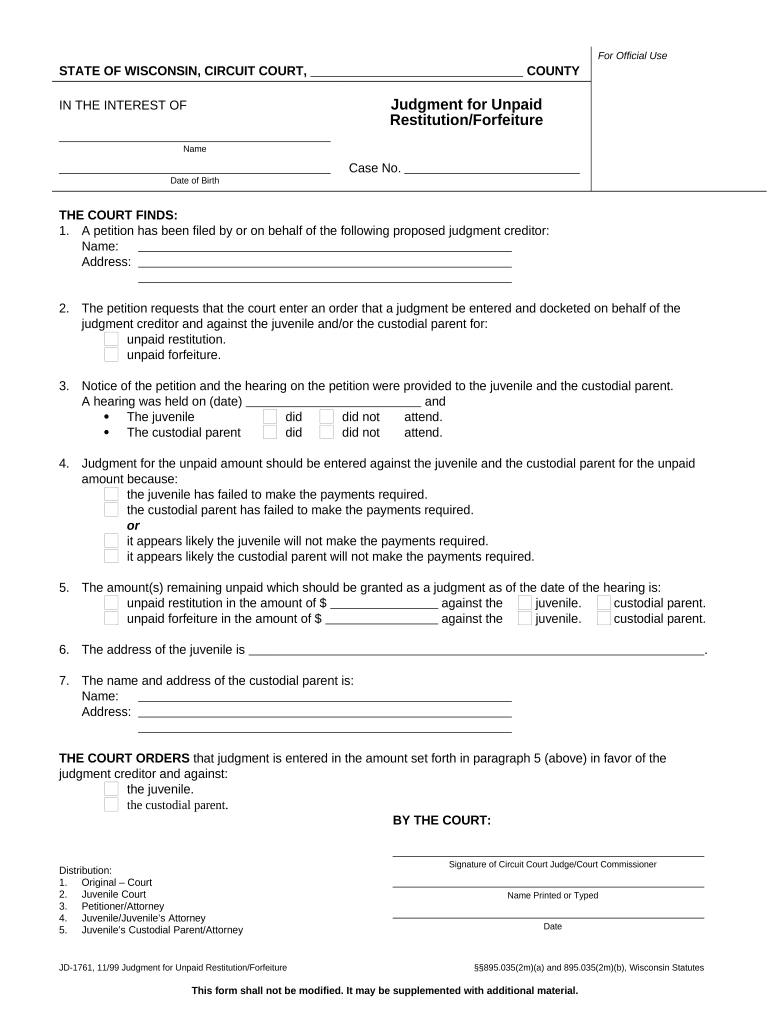
A Wisconsin Judgment for Unpaid Restitution/Forfeiture is a court-entered document that records a defendant's legal obligation to pay restitution to victims and/or forfeit designated property or funds following criminal proceedings. The judgment specifies amounts, property descriptions, payment schedules, interest or collection terms, and the court order establishing enforcement rights; it becomes enforceable as a civil judgment and is typically entered in the county circuit court docket where the conviction occurred.

Why a Clear, Complete Judgment Matters

A correctly completed judgment creates enforceable civil remedies, enables collection actions, and documents the court’s intent. Electronic signatures and retained records are generally valid under the ESIGN Act (15 U.S.C. §7001) and state UETA rules when the four e‑signature elements—intent, consent, attribution, and retention—are satisfied.

Why a Clear, Complete Judgment Matters

Who Commonly Prepares and Signs This Judgment

Government attorneys, court staff, defense counsel, and victim advocates prepare or review the judgment before entry.

  • Prosecutors and victim services units responsible for restitution terms and proof of losses.
  • Court clerks and judges who enter, sign, and docket the final judgment.
  • Defense counsel and defendants for review, payment arrangements, or appeals.

Each participant has distinct responsibilities: prosecutors draft or propose, judges sign, and clerks file and serve the entered judgment.

Typical Roles and Responsibilities

Prosecutor

State or county attorneys prepare proposed restitution and forfeiture language, attach supporting loss documentation, and may request entry of judgment to enable enforcement or collection through civil remedies.

Court Clerk

The clerk records the judgment in the circuit court docket, issues certified copies, posts the judgment to public records as required, and provides notice to parties for enforcement or collection purposes.

Essential Information the Judgment Must Include

Case Number: Court docket identifier.
Court Name: County circuit court.
Parties: Defendant and victim/creditor names.
Restitution Amount: Total sum ordered.
Forfeiture Description: Specific property or funds.
Payment Terms: Schedule and interest.

Consequences of Errors or Omitted Information

Enforceability Delay: Missing details can delay collection.
Incorrect Amount: Leads to disputes and potential rehearing.
Service Failures: Improper service may void enforcement.
Appeal Exposure: Procedural errors increase reversal risk.
Interest Miscalculation: Results in inaccurate totals.
Lost Remedies: Statute of limitations or priority issues.

Common Preparation Pitfalls to Avoid

  • Leaving the payment schedule vague or open-ended, which complicates enforcement and creates disagreement about due dates and arrears calculations.
  • Failing to attach or reference supporting documentation for victim losses or seized property, which weakens collection and appeals defenses.
  • Using inconsistent names or identifiers for parties, creating mismatches between the judgment, docket, and enforcement paperwork.
  • Assuming electronic signature validity without capturing required consent and retention evidence, which can raise admissibility issues.

Step-by-Step: Completing the Judgment Form

Follow these steps to prepare a usable, enforceable judgment for unpaid restitution and forfeiture in Wisconsin; verify county-specific local rules before filing.

  • 01
    Identify Case: Enter accurate docket number and court division.
  • 02
    Record Parties: List defendant, victims, and counsel with full legal names.
  • 03
    Specify Orders: State restitution totals and forfeiture descriptions precisely.
  • 04
    Set Terms: Include payment schedule, due dates, interest, and enforcement clauses.

How Filing and Entry Usually Proceed

The procedural flow includes drafting, judicial review, entry by the clerk, service on parties, and placement on the docket for enforcement or collection.

  • Drafting: Prosecutor or counsel prepares proposed judgment.
  • Judicial Approval: Judge reviews and signs the order.
  • Clerk Entry: Clerk records judgment and issues certified copies.
  • Service: Certified copies served per local rules.

Key Sections to Include in a Professional Judgment

A complete judgment separates the restitution and forfeiture components, states how amounts were calculated, sets a payment framework, and provides enforcement instructions to clerks and collection agencies.

Caption

Court name, case number, parties, and title identifying the document as a judgment for unpaid restitution and/or forfeiture, ensuring clear docket placement and record retrieval.
Restitution Order

A precise statement of the restitution amount, itemized losses if applicable, and the legal basis for victim recovery to support collection and audit.

Forfeiture Order

Detailed description of property or funds to be forfeited, location or account identifiers, and instructions for disposition consistent with statutory requirements.

Payment Schedule

Start date, installment amounts, due dates, late fees, and interest rate or statutory accrual method to eliminate ambiguity in collections.

Enforcement Terms

Authority for wage garnishment, liens, collections, and post-judgment remedies; reference to local procedures for levies or property seizure.

Clerk and Judge Entries

Signature lines for the judge, certificate of entry by the clerk, and space for docket stamps or clerk filing information required by county rules.

Practical Tips for Accurate Completion

Adopt consistent document controls and capture evidence to support the judgment; accurate drafting reduces enforcement friction and appellate exposure.

Use Exact Legal Names
Confirm party names against the criminal docket and government ID; mismatched names can impede enforcement and public record searches.
Attach Supporting Exhibits
Include loss summaries, receipts, and inventory reports supporting restitution and forfeiture amounts to provide clear evidentiary basis.
Document Service
Record how certified copies were served and preserve proof of service to support collection and avoid challenges to notice.
Preserve Audit Evidence
When using electronic signatures, retain the audit trail showing signer identity, timestamp, and consent to electronic records for admissibility.

Typical Timing and Key Deadlines to Track

Timelines vary by case and county; track payment due dates, enforcement windows, appeal periods, and any statutory interest accrual applicable to judgments.

Payment Due Date:

As specified in the judgment; nonpayment triggers collection remedies.

Installment Start:

Begin on the date stated in the schedule or upon entry as ordered.

Interest Accrual:

If specified, interest runs from entry or as the judgment states.

Enforcement Window:

Judgments remain enforceable under state law; check county rules for execution timing.

Appeal Period:

Parties must consult local rules for post-judgment appeal deadlines.

Selected eSignature Pricing and Capability Snapshot

Comparison of starter pricing and common capabilities. signNow is listed first per vendor ordering requirements; verify vendor details for plan limits and enterprise options.

signNow DocuSign Adobe Sign PandaDoc HelloSign
Starting Price $8/user/mo $15/user/mo $14/user/mo $19/user/mo $15/user/mo
Free Trial 7-day free trial Varies Varies Varies Varies
Bulk Send Yes Yes Yes Yes No
Audit Trail Yes Yes Yes Yes Yes
HIPAA Compliant Yes Yes Yes No No

Frequently Asked Questions About Wisconsin Judgments and eSigning

Answers to common questions about validity, filing, signatures, and enforcement when preparing a judgment for unpaid restitution or forfeiture.


Need help? Contact support

be ready to get more
Join over 28 million airSlate SignNow users