Establishing secure connection…Loading editor…Preparing document…

Subpoena for Rule 2004 Examination

This template is fully customizable. Edit the text, fill out the fields, and send it for signature. Give it a try!
Subpoena for Rule 2004 Examination

What the Subpoena for Rule 2004 Examination Is

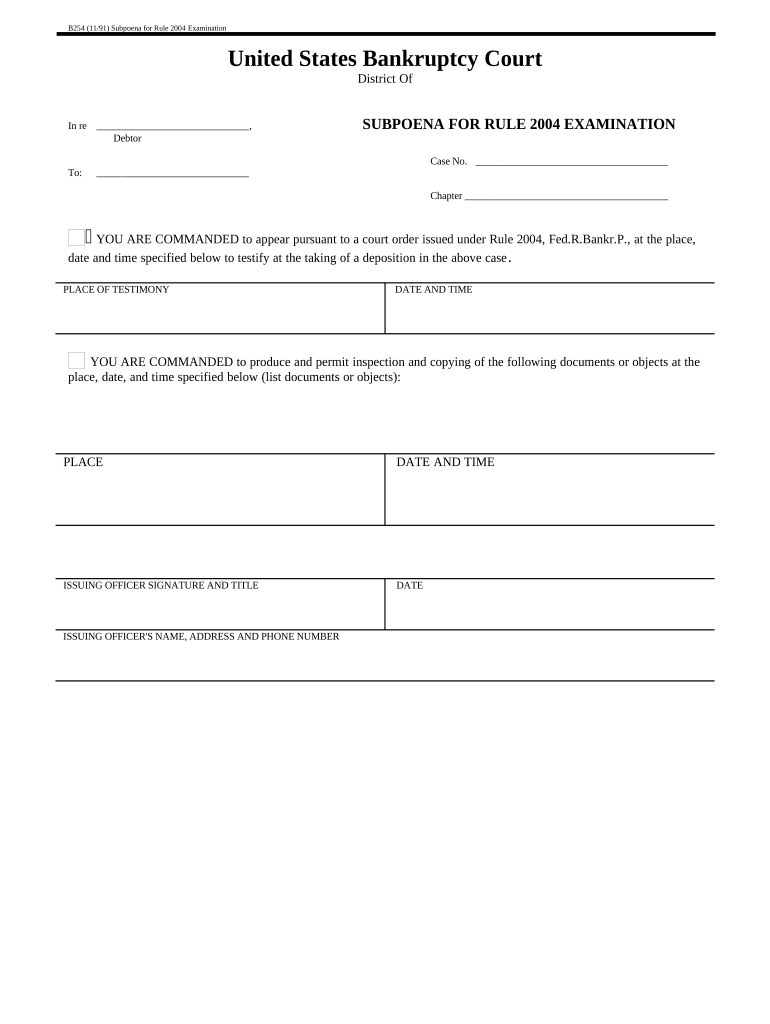
A Subpoena for Rule 2004 Examination is a discovery device authorized by Federal Rule of Bankruptcy Procedure 2004 that permits trustees, creditors, and other parties in interest to examine a debtor or third parties and to obtain documents, testimony, and records relevant to the debtor's financial affairs. It functions as a wide-ranging investigative tool in bankruptcy cases, often used to verify assets, transactions, and insider dealings; courts treat Rule 2004 procedures as distinct from adversary discovery and permit broad document production and oral examination.

Why a Rule 2004 Subpoena Matters in Bankruptcy Inquiries

A Rule 2004 subpoena uncovers evidence, tests creditor claims, and helps trustees and committees assess estate assets and liabilities. Properly drafted subpoenas reduce litigation risk and preserve evidence while enabling focused, court-supervised fact-gathering.

Why a Rule 2004 Subpoena Matters in Bankruptcy Inquiries

Who Typically Prepares or Responds to a Rule 2004 Subpoena

Several stakeholder groups rely on Rule 2004 subpoenas to investigate estate matters and to compel production of records.

  • Bankruptcy trustees and examiners who investigate debtor affairs and asset transfers on behalf of the estate.
  • Creditors' committees and secured creditors seeking verification of claims, liens, and asset valuations.
  • Counsel for debtors and third parties who must prepare production, assert privileges, or move to quash.

Parties that serve or respond should understand both courtroom procedure and local bankruptcy rules to avoid service, privilege, and timing pitfalls.

Key parts of a professional Rule 2004 subpoena

A clear, enforceable Rule 2004 subpoena includes identifiers, scope limits, precise document requests, scheduling details, service instructions, and proof-of-service language to support court enforcement.

Caption

Court name, bankruptcy case caption, and judge or case number must match the underlying bankruptcy docket and appear prominently.
Issuing Party

Name and role of the party requesting the exam (trustee, committee, examiner) plus counsel contact information for return and objections.

Scope of Inquiry

Clear description of topics or time periods covered—avoid vague terms and tailor requests to relevant estate transactions and accounts.

Document Requests

Numbered list of specific documents and records to produce, with date ranges and format instructions (electronic native or PDF).

Date, Time, Location

State exact examination date/time and physical or remote appearance method; include instructions for producing documents in advance.

Service & Proof

Describe permitted service methods, identify process server or e-service expectations, and include a certificate of service template for filing.

Essential identifying information for the form

Court Name: Full district and division name
Case Number: Bankruptcy docket number
Debtor Name: Exact legal debtor name
Requesting Party: Trustee or committee name
Exam Date/Time: MM/DD/YYYY and time zone
Location/Method: Physical address or remote link

Step-by-step: preparing and issuing a Rule 2004 subpoena

Follow a short sequence to prepare, approve, serve, and document a Rule 2004 examination while minimizing procedural challenge.

  • 01
    Assemble Records: Collect case docket, debtor identification, and targeted document list.
  • 02
    Draft Subpoena: Create caption, scope, and production specifics in numbered requests.
  • 03
    Court Authorization: Obtain any required court order or file the subpoena per local rule.
  • 04
    Serve and File: Serve recipient using approved method and file certificate of service.

How to configure an online Rule 2004 subpoena workflow

When using electronic tools, set authentication, fields, attachments, and retention before sending to ensure compliance and auditability.

Field Configuration
Authentication Level Email + SMS code or ID verification
Document Fields Signature, date, certificate of service field
Attachments Allow native files and searchable PDFs
Retention & Audit Enable audit trail and exportable logs

Where to file, serve, and record a Rule 2004 subpoena

The typical routing sequence is court docket alignment, authorized issuance, service on the witness, and filing proof of service with the bankruptcy court.

  • File with Court: Align caption and docket entry if required by local rule.
  • Serve Parties: Serve the witness, debtor, and relevant counsel per local service rules.
  • Remote Service: Use authorized e-service methods where permitted by local rule.
  • File Proof: Submit a certificate of service to the court docket promptly.

Technical considerations for electronic preparation and submission

Use PDF/A or searchable PDF formats, maintain audit logs, and choose signer authentication appropriate to the risk and court acceptance.

  • File Format: PDF/A or searchable PDF preferred
  • Integrations: Link to case management and cloud storage
  • Signer Authentication: Email plus SMS or ID verification

Ensure the chosen platform supports exportable audit trails, explicit signature timestamps, and retention controls so the court can verify service, identity, and document integrity without manual reconstruction.

Timing and deadlines to watch with Rule 2004 subpoenas

Local rules set service timing and any required notice periods; plan for court availability and production lead time when scheduling examinations.

Advance Notice:

Provide reasonable lead time for document assembly and counsel review.

Local Motion Timing:

Comply with any local notice or motion schedules before issuance.

Document Production Period:

Specify clear production deadlines in the subpoena.

Objection Window:

Allow time for service recipients to object or move to quash.

Proof of Service Filing:

File certificate promptly to preserve the record.

Common mistakes to avoid when preparing a Rule 2004 subpoena

  • Using overly broad or vague requests that prompt motions to quash and court pushback, increasing litigation cost and delay.
  • Failing to verify the exact debtor name and case number, which can result in misservice and an unfiled or returned subpoena.
  • Neglecting to include a clear certificate of service or using an unapproved service method that the court may not accept.
  • Skipping pre-filing meet-and-confer steps where required by local rule, which can cause sanctions or denial of relief.

Potential consequences of defects or misuse

Quash or Denial: Court may quash improper subpoenas
Sanctions: Monetary sanctions under court rules
Contempt Exposure: Refusal to comply can trigger contempt
Privilege Waiver: Overbroad production risks waiving privilege
Perjury Risk: False testimony can lead to criminal penalties
Service Defect: Improper service may void compliance

Practical examples of Rule 2004 subpoena use

Two concise examples show how subpoenas support estate inquiries and document collection in real-case scenarios.

Example 1

A trustee subpoenaed bank records to trace suspicious transfers over a three‑year period

  • The request specified native electronic CSV statements
  • Production enabled rapid reconciliation, leading to turnover of concealed assets to the estate for creditor distribution.

Example 2

A creditors' committee used a Rule 2004 subpoena to obtain executive communications and invoices

  • The subpoena limited time range and file formats to reduce burden
  • Counsel produced a privilege log and negotiated narrow categories, avoiding a protracted quash motion.

eSignature platform pricing and feature comparison for subpoena workflows

Compare core pricing and compliance features relevant when preparing, serving, and archiving subpoenas; signNow is listed first to align vendor comparisons.

signNow DocuSign Adobe Sign PandaDoc HelloSign
Starting Price $8/user/mo $15/user/mo $14/user/mo $19/user/mo $15/user/mo
Free Trial 7-day free trial Varies by plan Varies by plan Varies by plan Varies by plan
Bulk Send Yes Yes Yes Yes No
Audit Trail Yes Yes Yes Yes Yes
HIPAA Compliant Yes Yes Yes No No
Envelope Cap No cap 100 envelopes/user/year No cap No cap No cap

Frequently asked questions about Rule 2004 subpoenas

Answers to common procedural and technical questions about preparing, serving, and responding to Rule 2004 subpoenas in U.S. bankruptcy cases.


Need help? Contact support

be ready to get more
Join over 28 million airSlate SignNow users