Establishing secure connection…Loading editor…Preparing document…

Tennessee Certificate of Trust

This template is fully customizable. Edit the text, fill out the fields, and send it for signature. Give it a try!
Tennessee Certificate of Trust

What the Tennessee Certificate of Trust Is and when it’s used

A Tennessee Certificate of Trust is a short, recordable document summarizing a trust's existence and the authority of named trustees without disclosing trust terms. It is used to prove a trustee's power to act when dealing with third parties, such as real property recorders, financial institutions, or title companies. The certificate typically includes the trust name, date, trustee names, and a statement of powers; it is intended to permit transactions while protecting beneficiaries’ privacy and limiting the need to file the full trust instrument.

Why a Certificate of Trust matters for Tennessee transactions

A concise certificate lets trustees complete real estate transfers, open accounts, and satisfy third-party requirements without exposing private trust provisions. It streamlines verification, reduces requests for full trust copies, and helps title companies and banks rely on trustee authority while preserving beneficiary privacy.

Why a Certificate of Trust matters for Tennessee transactions

Who commonly prepares and accepts a Tennessee Certificate of Trust

Trustees, trust attorneys, title officers, and institutional custodians are the primary users who prepare, review, or accept certificates.

  • Trustees and successor trustees who need to sign, convey, or manage trust property without producing the full trust instrument.
  • Title companies and real estate closing agents who require proof of trustee authority for recording or closing.
  • Banks, brokerage firms, and custodians who accept a certificate instead of a complete trust document to open or change accounts.

Use the certificate when you must prove authority quickly while protecting confidential trust provisions from widespread disclosure.

Typical signers and their roles

Trustee — Individual

The trustee signs to exercise powers granted by the trust. Confirm that the name used exactly matches the trustee's legal name and any organization name listed in trust documents to avoid acceptance problems.

Trust Attorney

An attorney often prepares and reviews the certificate to ensure accuracy and to include any protective language. Attorneys may add a legal opinion or ensure the certificate conforms with local recording office preferences.

Security, compliance, and document controls to include

Encryption: AES-256 at rest; TLS 1.2/1.3 in transit
Audit Trail: Timestamped signing record with IP and action log
Access Controls: Role-based permissions and account authentication
HIPAA / BAA: BAA required when health data involved
ESIGN / UETA: Meets federal and most state e-signature standards
Retention: Tamper-evident storage and durable copy preservation

Step-by-step: completing a Tennessee Certificate of Trust

Follow these steps to prepare a clear, record-ready certificate that third parties and recorders can accept.

  • 01
    Identify trust: Enter full trust name and original trust date.
  • 02
    List trustees: Provide current trustee names and capacities.
  • 03
    State powers: Summarize trustee powers relevant to the transaction.
  • 04
    Sign and notarize: Trustee signs before a notary with required acknowledgement.

How the Certificate of Trust is used in a transaction

This sequence shows the typical flow from preparation to acceptance by third parties and recorders.

  • Prepare: Draft certificate from trust data and confirm trustee identities.
  • Notarize: Trustee signs before notary; record audio-video if RON used.
  • Deliver: Provide certificate to title company or bank.
  • Record / Accept: County recorder or institution files or retains certificate.

Digital workflow settings for online completion

Configure a signing workflow that matches trustee authentication and recording office requirements.

Field Configuration
Signature Field Require signer signature and printed name
Notary Block Include acknowledgement and notary fields
Authentication Use email + SMS code or stronger ID verification
Audit Trail Capture IP, timestamp, and signer device info

Platform capabilities to support eSigning and notarization

Choose a platform that supports secure eSignatures, notarization workflows, and retention of audit trails.

  • File types: PDF and DOCX supported
  • Integrations: Connects with cloud storage
  • Authentication: SMS, email, or KBA options

Ensure the vendor provides tamper-evident storage, strong encryption, and a notarization workflow (in-person or RON) that meets Tennessee recording office expectations.

Timing considerations and common deadlines

Plan for notarization and recording timelines; processing times vary by county and by whether remote notarization is used.

Notarization scheduling:

Book notary in advance; mobile notaries add travel time.

Remote notarization:

RON sessions may require identity proofing and recording retention.

County recording:

County recorders usually process within days to weeks.

Title company review:

Expect title review and clearance before closing.

Delay risks:

Incomplete certificates cause rejections and added delay.

Common pitfalls to avoid when preparing the certificate

  • Using informal or shortened trust names leads to mismatches and requests for the original trust instrument.
  • Omitting a clear statement of trustee authority can cause banks or title companies to refuse reliance.
  • Failing to notarize or using an improperly formatted notary block often results in recorder rejection.
  • Uploading low-quality scans or redacted signature blocks can prevent acceptance by financial institutions.

Risks and legal consequences of an incorrect or fraudulent certificate

Invalid transfer: Property transactions may be voided
Liability: Trustees may face personal liability
Title defects: Title insurers may deny coverage
Regulatory fines: Notary or recording violations risk penalties
Fraud exposure: Misrepresentations can trigger criminal charges
Document rejection: Recorder will return noncompliant filings

Essential components to include in a professional certificate

A clear certificate contains elements that let third parties rely on trustee authority while minimizing disclosure of trust contents.

Trust identification

Full trust name and original execution date so the instrument is uniquely identified for title and account reviews.
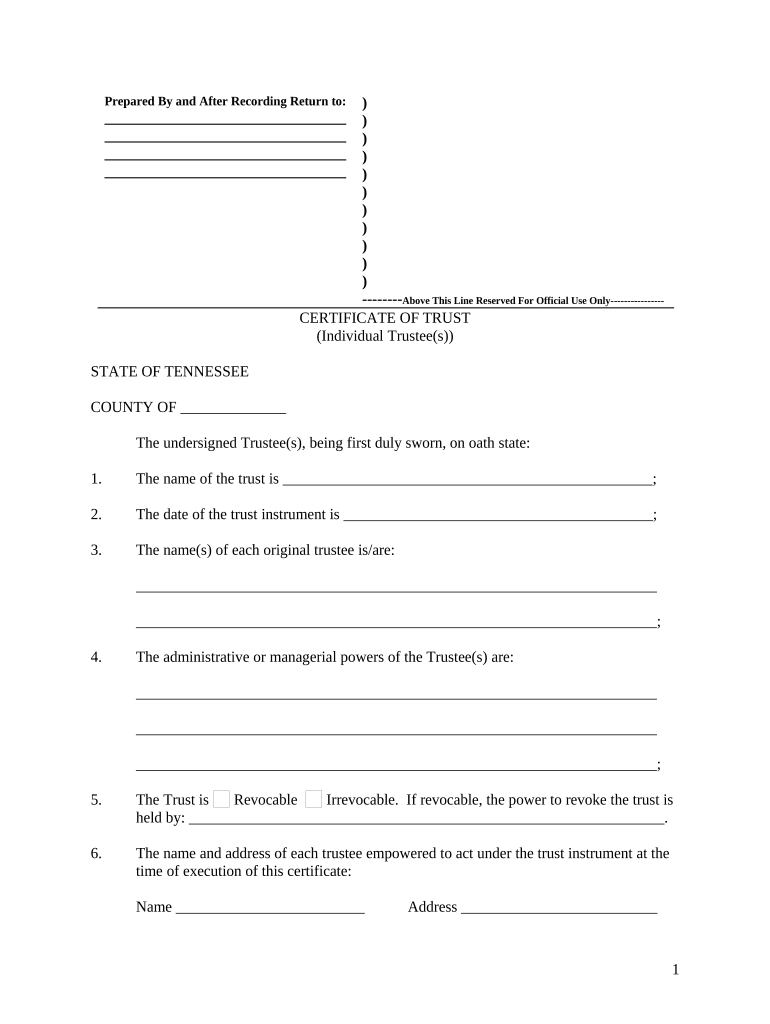
Trustee details

Names and capacities of present trustees, and a statement confirming their authority to act on behalf of the trust.

Statement of powers

A concise recital of the powers being exercised, such as the power to sell or convey real property, without listing beneficiaries.

Notary acknowledgement

A recorder-acceptable notary block with venue, date, and notary signature to validate execution.

Recording reference

If applicable, cite prior recording book/page or instrument number to connect the certificate to the trust record.

Limitations and disclaimers

Optional statements that identify any limits on authority or specify that the certificate is not the full trust instrument.

How to save and share the certificate in common formats

Use standard naming and file formats to facilitate acceptance by title companies, banks, and county recorders.

Download formats

Save final executed copies as PDF/A and keep a DOCX draft for internal edits; PDF/A ensures long-term preservation.

File naming

Use a consistent scheme: TrustName_CertificateOfTrust_MMDDYYYY.pdf to aid indexing and retrieval.

Backup copies

Retain encrypted cloud and offline backups with version control and access logs.

Delivery options

Provide certified PDF to title and bank; recorders may require original paper or county-specific eRecording formats.

Practical examples of when a certificate resolves common needs

Two short scenarios show typical uses where a Certificate of Trust avoids disclosing the entire trust instrument.

Property Closing

A trustee needs to transfer a parcel to a buyer

  • Title company requests proof of authority, not full trust
  • The certificate supplies names, trust date, and power to convey, enabling recording while keeping beneficiaries confidential and speeding closing.

Bank Account

A trustee wishes to open an investment account in the trust's name

  • The bank wants written proof of signatory authority
  • The certificate confirms trustee identity and powers, letting the institution accept the account without reviewing trust provisions.

Comparing eSignature vendor pricing and capabilities for trust certificates

Choose a provider that supports notarization workflows, audit trails, and secure storage; vendor pricing and features vary by plan and usage needs.

signNow DocuSign Adobe Sign PandaDoc HelloSign
Starting Price $8/user/mo $15/user/mo $14/user/mo $19/user/mo $15/user/mo
Free Trial 7-day free trial Varies by plan Varies by plan Varies by plan Varies by plan
Bulk Send Yes Yes Yes Yes No
Audit Trail Yes Yes Yes Yes Yes
HIPAA Compliant Yes Yes Yes No No

Practical tips for accurate and efficient certificates

Follow consistent formatting, confirm trustee identity, and consult local recording rules to reduce friction and rework.

Confirm exact names
Match trustee and trust names to the original instrument and any entity formation records to prevent rejection by banks or recorders.
Use precise authority language
Specify the exact power being exercised (for example, conveyance of property) and avoid vague generalities that trigger additional requests.
Coordinate notarization
Ensure the notary block conforms to county requirements and, when using RON, that identity proofing and recording retention meet local standards.
Keep a certified copy
Retain an executed, notarized original and a certified PDF/A copy to supply to institutions and for long-term archival.

Frequently asked questions about Tennessee Certificates of Trust

Answers to common questions about preparation, acceptance, signing, and retention of certificates in Tennessee.


Need help? Contact support

be ready to get more
Join over 28 million airSlate SignNow users