Session Header
Course title, learning objectives, location, date range and session ID to uniquely identify each training event for tracking and reporting.
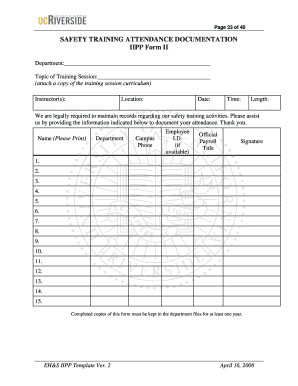
Clear attendance documentation establishes proof of training, helps satisfy regulatory recordkeeping requirements, reduces liability in incident reviews, and supports workforce competency tracking for ongoing safety programs.

Organizations responsible for workplace safety create and maintain attendance documentation to meet regulatory, contractual, and insurance needs.
Course title, learning objectives, location, date range and session ID to uniquely identify each training event for tracking and reporting.
Full name, credentials, company, and contact information so verifier can confirm instructor qualifications and content delivery.
Attendee rows with full name, employee ID, role, contact, arrival time, and departure time to show presence and participation.
Designated fields for signature, date, and signature method; include space for witness or supervisor initials where required.
Fields for accommodations, deviations from agenda, competency check results, or remedial actions taken during the session.
Fields for document owner, retention tag, document version, and audit trail reference for chain-of-custody and retention compliance.
A one‑page roster optimized for in-person sessions that prints clearly and includes lines for handwritten names, times, and signatures.
Optional completion certificate populated from attendance fields to confirm competency and training hours for credentialing.
Export attendee rows as CSV for HR or LMS import, preserving IDs, timestamps, and completion status for downstream systems.
Final signed copy saved as PDF/A with embedded audit trail to support long‑term retention and legal review.
| Field | Configuration |
|---|---|
| Signer Authentication | Email link or SMS code authentication for attendee attribution. |
| Auto Date Stamping | Enable automatic date/time stamps at signing to ensure accurate timestamps. |
| Conditional Fields | Show remedial training fields only when attendees mark 'incomplete'. |
| Retention Tagging | Apply a retention label (e.g., 5 years) to automate archival policies. |
Ensure the eSignature platform supports required file types, integrations, and authentication methods before using it for attendance records.
Submit attendance records to HR within 7 business days of the session.
Maintain injury and training-related records for at least 5 years (29 CFR §1904.33).
If records include protected health information, retain for 6 years (45 CFR §164.530(j)).
Conduct yearly audits of training records and update retention tags.
Keep attendance tied to payroll or certification dates for at least 3 years when tax-relevant.
Assign trainer and publish session details to participants.
Capture attendee data and signatures during the session.
Quality-check entries, finalize signed PDF, and store in secure repository.
Run periodic audits and move records to long-term archive per policy.
| Criteria | Safety Training Attendance Documentation | Basic Sign-in Sheet |
|---|---|---|
| Legally enforceable | ||
| eSignature friendly | varies | |
| Notarization needed | ||
| Detailed audit trail |
| signNow | DocuSign | Adobe Sign | PandaDoc | HelloSign | |
|---|---|---|---|---|---|
| Starting Price | $8/user/mo | $15/user/mo | $14/user/mo | $19/user/mo | $15/user/mo |
| Free Trial | 7-day free trial | Varies | Varies | Varies | Varies |
| Bulk Send | Yes | Yes | Yes | Yes | Varies |
| Audit Trail | Yes | Yes | Yes | Yes | Yes |
| Envelope Cap | No cap | 100 envelopes/user/year | Varies | Varies | Varies |