
Fill and Sign the Sales Report Scholastic Book Fairs Form
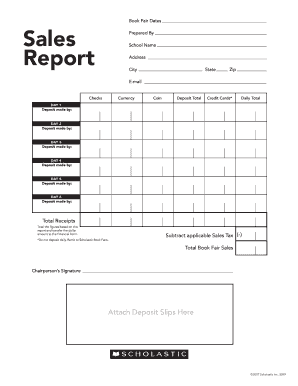
Practical tips for finalizing your ‘Sales Report Scholastic Book Fairs’ online
Are you weary of the burdens of handling paperwork? Look no further than airSlate SignNow, the premier electronic signature solution for individuals and organizations. Bid farewell to the tedious methods of printing and scanning documents. With airSlate SignNow, you can effortlessly complete and sign documents online. Utilize the comprehensive features contained within this user-friendly and budget-friendly platform to transform your documentation management approach. Whether you need to approve documents or gather electronic signatures, airSlate SignNow simplifies the process with just a few clicks.
Follow this comprehensive guide:
- Sign in to your account or initiate a free trial of our service.
- Click +Create to upload a file from your device, cloud storage, or our template collection.
- Open your ‘Sales Report Scholastic Book Fairs’ in the editor.
- Click Me (Fill Out Now) to complete the form on your end.
- Add and assign fillable fields for others (if necessary).
- Proceed with the Send Invite settings to solicit eSignatures from others.
- Download, print your version, or convert it into a reusable template.
No need to worry if you need to collaborate with your colleagues on your Sales Report Scholastic Book Fairs or send it for notarization—our platform provides all the tools you need to accomplish these tasks. Register with airSlate SignNow today and elevate your document management to new levels!
FAQs
-
What is the Sales Report Scholastic Book Fairs and how can it be used?
The Sales Report Scholastic Book Fairs is a detailed overview of sales data generated during book fair events. It allows educators and organizers to track sales performance, manage inventory, and assess the success of their events. Using airSlate SignNow, you can easily eSign and share these reports with stakeholders to enhance transparency and communication.
-
How does airSlate SignNow streamline the process of creating a Sales Report Scholastic Book Fairs?
airSlate SignNow simplifies the creation of a Sales Report Scholastic Book Fairs by providing customizable templates and an intuitive interface. You can quickly input sales data, generate reports, and eSign documents electronically. This not only saves time but also ensures accuracy and professionalism in your reporting.
-
What are the pricing options for using airSlate SignNow for Sales Report Scholastic Book Fairs?
airSlate SignNow offers flexible pricing plans suitable for various organizations, from small schools to large districts. Depending on your needs, you can choose a plan that includes features for generating and managing Sales Reports Scholastic Book Fairs efficiently. Contact our sales team for a customized quote based on your specific requirements.
-
Can I integrate airSlate SignNow with other tools to manage my Sales Report Scholastic Book Fairs?
Yes, airSlate SignNow seamlessly integrates with a variety of tools, such as Google Drive, Dropbox, and CRM systems. This allows you to import data directly into your Sales Report Scholastic Book Fairs and streamline your workflow. Integrations enhance collaboration and simplify document management across your teams.
-
What are the benefits of using airSlate SignNow for my Sales Report Scholastic Book Fairs?
Using airSlate SignNow for your Sales Report Scholastic Book Fairs offers numerous benefits, including increased efficiency, reduced paperwork, and enhanced security. The electronic signature feature allows for quick approvals, ensuring that your reports are processed faster. Additionally, the platform is user-friendly, making it accessible for all team members.
-
Is airSlate SignNow secure for handling Sales Report Scholastic Book Fairs?
Absolutely! airSlate SignNow prioritizes the security of your documents, including Sales Report Scholastic Book Fairs. The platform employs advanced encryption and security protocols to protect sensitive information. You can confidently create, sign, and share your reports knowing that your data is safe.
-
How can I access my Sales Report Scholastic Book Fairs once created?
Once you create your Sales Report Scholastic Book Fairs using airSlate SignNow, you can access it anytime through the platform's cloud storage. You can also download your reports in various formats for easy sharing with stakeholders. The user-friendly dashboard makes it simple to manage and retrieve your documents.
Find out other sales report scholastic book fairs form
- Close deals faster
- Improve productivity
- Delight customers
- Increase revenue
- Save time & money
- Reduce payment cycles
