Establishing secure connection…Loading editor…Preparing document…

Agreement to Extend Debt Payment

This template is fully customizable. Edit the text, fill out the fields, and send it for signature. Give it a try!
Agreement to Extend Debt Payment

What an Agreement to Extend Debt Payment Is and When it’s Used

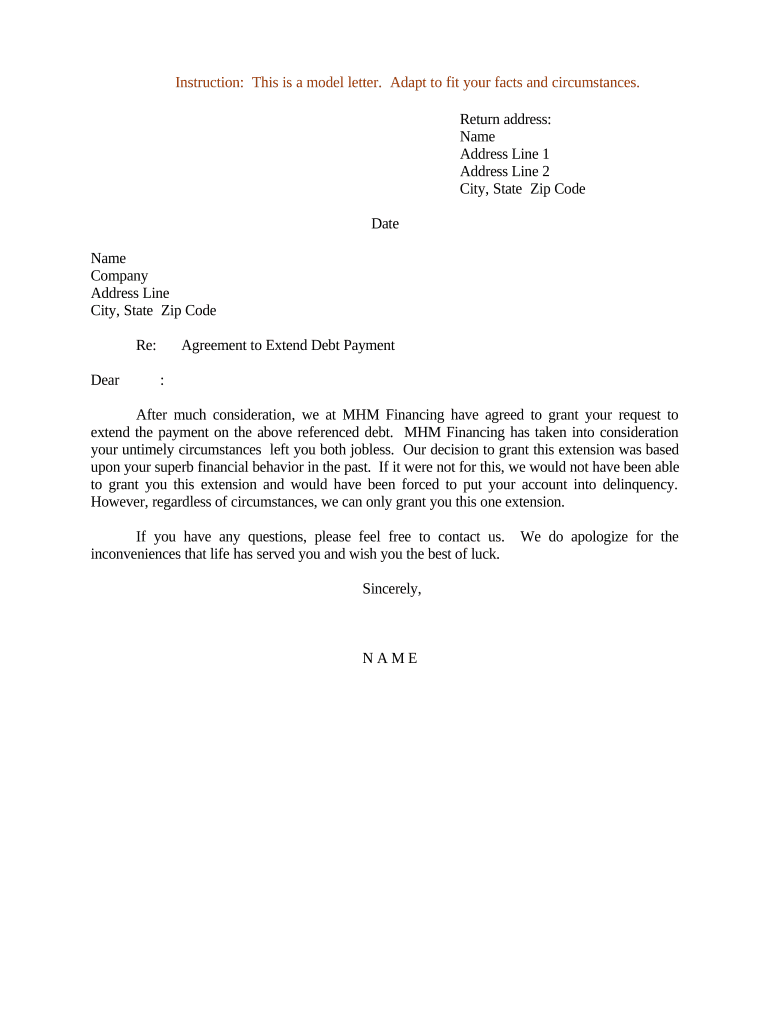
An Agreement to Extend Debt Payment is a written amendment that changes the payment terms of an existing debt obligation between a lender and a borrower. It typically restates the original debt reference, sets a new payment schedule, updates interest or fees if applicable, and records consideration for the change. This document creates a clear, binding record of modified obligations and timelines and is commonly executed when borrowers need more time, lenders permit restructuring, or parties mutually agree to altered repayment terms. Electronic execution is generally accepted under U.S. law when requirements for intent, consent, attribution, and retention are met.

Why a Formal Extension Agreement Matters

A formal extension clarifies updated obligations, reduces disputes, preserves lender remedies, and documents consideration. It replaces informal promises with a durable record that may be used for enforcement, accounting, and regulatory compliance.

Why a Formal Extension Agreement Matters

Who Typically Prepares or Signs an Extension Agreement

Typical parties and professionals involved in preparing or approving an extension agreement include the following representatives.

  • Bank and credit union loan officers handling account modifications and intake.
  • Small business owners and individual borrowers negotiating new payment schedules.
  • Attorneys and loan servicers reviewing legal terms and ensuring enforceability.

These roles help ensure the agreement reflects both parties’ intent, mitigates risk, and meets any industry-specific or state legal requirements.

Representative Signer Profiles

Loan Officer

Typically a bank or credit union representative authorized to negotiate and finalize loan modifications. They confirm account details, approve revised schedules within delegated authority, and coordinate execution with legal or servicing teams to document the extension.

Borrower Representative

The individual or authorized officer of a business who agrees to the new terms. They must sign with authority, provide accurate identification and contact details, and ensure the revised schedule is feasible and recorded for accounting and tax purposes.

Essential Elements to Include in a Professional Extension Agreement

A complete extension agreement should be concise but detailed, referencing the original obligation and specifying the changes, payments, and execution mechanics to avoid later disputes.

Parties

Full legal names and entity types for lender and borrower, including contact and remit addresses, and the authorized signer’s title and capacity to bind the entity.
Original Debt Reference

Cite original loan number, execution date, principal amount, and any prior amendments so the extension is clearly tied to the existing obligation without ambiguity.

New Payment Schedule

Detail amounts, due dates, frequency, and the total outstanding balance under the revised schedule so each payment obligation is unambiguous and enforceable.

Interest and Fees

State the applicable interest rate, whether interest accrues during the extension, late fees, and any forbearance charges to avoid later collection disputes.

Consideration

Record the consideration for the extension (e.g., fee, revised payment, collateral) to support contract validity and to distinguish the amendment from a gratuitous promise.

Execution Provisions

Include governing law, effective date, signature blocks, notarization/witness requirements if needed, and a clause confirming original agreement remains in force except as amended.

Step-by-Step: Completing an Extension Agreement

Follow these sequential steps to prepare, execute, and record an extension agreement efficiently and with fewer errors.

  • 01
    Gather Documents: Collect the original note, payment history, borrower ID, and any prior amendments before drafting.
  • 02
    Draft Amendment: Prepare a clear amendment referencing the original loan, updated terms, and consideration language.
  • 03
    Authenticate Signers: Confirm authority and identity; use notarization or enhanced remote methods if required.
  • 04
    Execute and Distribute: Obtain signatures, provide each party a copy, and store the fully executed agreement securely.

Typical Execution Flow for an Electronic Extension Agreement

Electronic workflows reduce turnaround time while preserving a verifiable audit trail; ensure authentication meets your risk tolerance and legal rules.

  • Upload Document: Sender uploads the executed draft to the signing platform and places required fields.
  • Add Signers: Enter signer emails and assign signing order or role-based access as needed.
  • Authenticate: Use email link, SMS code, or stronger methods depending on sensitivity and state rules.
  • Complete Signing: Signers apply signatures; system records timestamps, IP, and a certificate of completion.

Key Security and Compliance Attributes to Protect the Agreement

Encryption: AES-256 at rest; TLS 1.2/1.3 in transit
Audit Trail: Tamper-evident log with timestamps and IP
Authentication: Email, SMS, or multi-factor options available
ESIGN/UETA: Compliant with U.S. e-signature laws
HIPAA Support: BAA available where required
Data Residency: GDPR and ISO 27001 controls supported

Common Legal Risks and Consequences of a Flawed Extension

Invalid Signature: May render agreement unenforceable
Ambiguous Terms: Creates dispute over payment obligations
Failure to Record: May impair lien priority or public notice
Unauthorized Signer: Risk of breach and invalidation
Statute Limitations: Effective date errors can affect rights
Fraud Exposure: Improper changes may lead to litigation

Preparation Pitfalls to Avoid

  • Leaving the original loan reference vague, which can cause mismatched accounting and enforceability disputes later.
  • Failing to verify signer authority or identity, increasing the risk of challenges to the agreement’s validity.
  • Omitting consideration or describing it in vague terms, which can make the modification appear gratuitous.
  • Neglecting witness or notarization requirements where state law or title recording demands authentication for admissibility.

Practical Tips for Accurate and Efficient Agreements

Adopt a consistent template, include verification steps, and preserve signed originals to reduce future disputes and operational friction.

Use clear, numbered clauses
Write precise payment schedules and label any exhibits. Numbered clauses reduce ambiguity and speed legal review when disputes arise.
Confirm signer authority in writing
Request a corporate resolution or proof of authority for organizational signers and record the evidence with the agreement file.
Consider notarization or RON
When required by state law or recording offices, obtain notarization or use compliant RON procedures to ensure acceptance.
Maintain a controlled document repository
Store executed agreements in an auditable system with versioning and restricted access to preserve integrity and meet retention obligations.

Key Dates and Timing Considerations

Identify the effective date, sign-by deadlines, and any notice periods to ensure obligations are updated and enforceable on schedule.

Effective Date:

Date when amended terms and payment obligations begin.

Sign-by Deadline:

Date by which all parties must sign for the amendment to take effect.

Notice Period:

Any required advance notice to guarantors or third parties before changes take effect.

Recording Timeframe:

Time to record a change in lien or collateral, if necessary.

Retention Start:

When the document enters the retention lifecycle for compliance.

eSignature Vendor Comparison Relevant to Extension Agreements

Compare common vendor features and starting prices relevant to signing, bulk distribution, and compliance for amendment workflows; signNow is listed first per vendor ordering rules.

signNow DocuSign Adobe Sign PandaDoc HelloSign
Starting Price $8/user/mo $15/user/mo $14/user/mo $19/user/mo $15/user/mo
Free Trial 7-day free trial Varied Varied Varied Varied
Bulk Send Yes Yes Yes Yes No
Audit Trail Yes Yes Yes Yes Yes
HIPAA Compliant Yes Yes Yes No No

Frequently Asked Questions About Extension Agreements

Answers to common questions on enforceability, notarization, amendments, signer authority, revocation, and secure storage.


Need help? Contact support

be ready to get more
Join over 28 million airSlate SignNow users