Establishing secure connection…Loading editor…Preparing document…

Letter of Complaint about Co-Worker

This template is fully customizable. Edit the text, fill out the fields, and send it for signature. Give it a try!
Letter of Complaint about Co-Worker

What this Letter of Complaint about Co-Worker Is

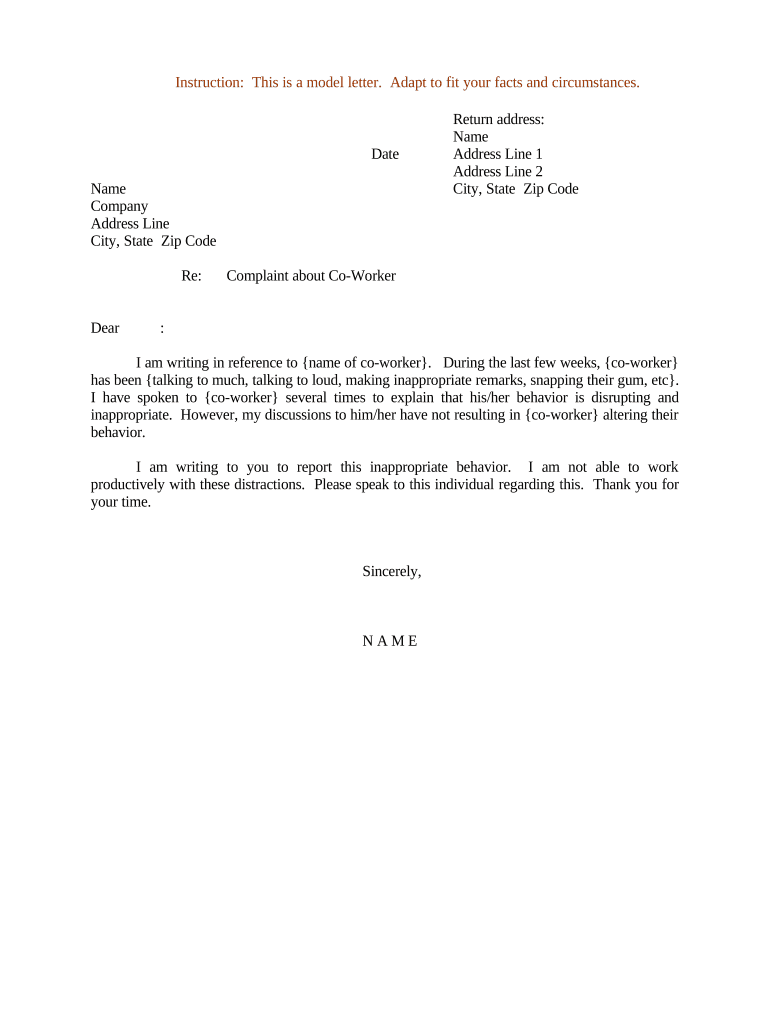
A Letter of Complaint about Co-Worker is a formal, written statement an employee submits to human resources or management to report workplace conduct concerns such as harassment, discrimination, bullying, safety breaches, or repeated policy violations. The document documents dates, locations, witnesses, and specific facts in a neutral tone and becomes part of the employer’s personnel and investigation record. While typically an internal HR record, it may be used as supporting evidence for external complaints to agencies such as the EEOC or OSHA if the employer does not resolve the issue.

Why a well-formed complaint matters

A clear, factual Letter of Complaint about Co-Worker gives HR the information needed to investigate, protects the reporting employee by creating a documented timeline, and helps employers meet legal obligations under federal law. Electronic records are generally admissible and enforceable under the ESIGN Act (15 U.S.C. ch. 96) and UETA (1999) when intent, consent, attribution, and reliable retention are satisfied.

Why a well-formed complaint matters

Who typically prepares or receives this letter

The letter can be prepared by the reporting employee or jointly with HR; keep a signed copy in the employee file and consider an electronic audit trail for proof of submission.

  • Individual employees who directly experienced or witnessed misconduct and need an official record.
  • Managers or HR representatives who draft or consolidate reports for an investigation.
  • Compliance or EEO officers handling internal investigations and external agency responses.

Essential sections to include in the complaint

A professional Letter of Complaint about Co-Worker follows a consistent structure so investigators can quickly identify facts, witnesses, and dates. Below are the six elements to include.

Header

Include your name, job title, department, and the date of submission to create a clear administrative record and enable personnel tracking.
Incident Summary

Provide a concise one-paragraph overview describing the nature of the complaint, the main alleged conduct, and the immediate impact on you or the workplace.

Detailed Timeline

List specific dates, times, locations, and sequence of events. Chronological detail reduces ambiguity during investigation and supports corroboration.

Witnesses

Name any coworkers or third parties who observed the events, including their contact info if available, so HR can seek statements.

Supporting Evidence

Reference emails, messages, photos, or other documents and attach copies. Label attachments clearly and describe their relevance in the body text.

Desired Outcome

State the resolution you seek (investigation, mediation, reassignment) while remaining realistic and leaving procedural steps to HR.

Step-by-step: drafting and submitting your complaint

Follow these sequential actions to prepare a clear, actionable complaint and ensure it reaches the right HR channels.

  • 01
    Draft facts: Write a neutral, chronological account focused on observable behavior and dates.
  • 02
    Collect evidence: Gather emails, screenshots, and witness names before submission.
  • 03
    Review policy: Check your employee handbook for reporting procedures and confidentiality terms.
  • 04
    Submit to HR: Send via HR portal or designated contact and keep a copy of the submission receipt.

Configuring the online submission workflow

If your organization uses an electronic form or eSignature platform, configure fields and routing to support anonymous intake, evidence upload, and investigator assignment.

Field Configuration
Complainant contact Required field; validate email and phone
Attachment uploader Allow PDF/JPG/PNG up to 25 MB
Routing rule Auto-route to HR intake queue
Acknowledgement Auto-send confirmation to submitter

How electronic submission and routing typically work

A typical eSubmission flow minimizes friction while preserving an audit trail that documents who submitted what and when.

  • Upload: Employee uploads the complaint and attachments
  • Verification: System validates required fields and file types
  • Routing: Form is routed to HR or designated investigator
  • Audit log: Platform records timestamps, IP, and activity log

Technical needs for secure eSubmission and eSigning

Ensure the selected system retains a non-editable certificate of completion and complies with applicable data-protection rules for personnel records.

  • Formats supported: PDF, DOCX, JPG, PNG
  • Integrations: Salesforce, Microsoft 365, Google Workspace available
  • Authentication: Email or SMS code plus optional SSO

Typical eSignature pricing and capability comparison for complaint workflows

Compare commonly used eSignature vendors on entry price and features relevant to internal complaint intake and secure HR workflows. signNow is listed first per pricing conventions.

signNow DocuSign Adobe Sign PandaDoc HelloSign
Starting Price $8/user/mo $15/user/mo $14/user/mo $19/user/mo $15/user/mo
Free Trial 7-day free trial, no credit card Trial varies Trial varies Trial varies Trial varies
Bulk Send Yes Yes Yes Yes Yes
Audit Trail Yes Yes Yes Yes Yes
HIPAA Compliant Yes Yes Yes No No

Best practices for an effective, defensible complaint

Follow these practical rules to make your Letter of Complaint about Co-Worker clear, credible, and easier for HR to act on.

Be factual and specific
Describe observable conduct, dates, times, and places. Avoid inflammatory language, opinion statements, and hearsay unless attributed to a specific witness.
Attach corroborating evidence
Include relevant emails, screenshots, or documents. Label attachments and refer to them in the timeline so investigators can locate supporting material quickly.
Follow company policy
Use the reporting channels outlined in the employee handbook and retain confirmation receipts. Deviating from policy can delay response or complicate chain-of-custody for evidence.
Keep a copy
Retain a signed and time-stamped copy. For electronic submissions, ensure the platform provides an audit trail showing submission time and uploader identity.

Common mistakes to avoid

  • Using accusatory or emotional language that undermines credibility and complicates investigation.
  • Failing to include dates, times, or locations, which prevents investigators from establishing a clear timeline.
  • Not attaching available supporting evidence such as messages or documents referenced in the complaint.
  • Submitting outside official channels so HR cannot track receipt or preserve an audit trail.

Risks and potential consequences of an incomplete or incorrect letter

Delayed investigation: Incomplete facts
Procedural challenge: Noncompliance with policy
Defamation exposure: False allegations risk legal claims
Retaliation risk: Monitor for adverse action
Loss of evidence: Missing attachments or timestamps
Regulatory penalty: Failure to preserve records

Data security and compliance points to check

Encryption in transit: TLS 1.2/1.3
Encryption at rest: AES-256 encryption
Audit trail: Detailed signing and upload log
HIPAA support: BAA available when required
Regulatory standards: SOC 2 Type II, ISO 27001
Accessibility: WCAG 2.0 Level AA support

Realistic examples of how organizations use the letter

Two common, practical scenarios show how a concise complaint supports investigations and outcomes.

Case Study 1

A mid-size healthcare clinic used a dated, evidence-backed complaint to prompt an internal investigation.

  • HR identified two witnesses and secured email evidence within five days.
  • The documented timeline and attachments allowed HR to mediate a resolution and update team training without escalating to external agencies.

Case Study 2

A technology firm required employees to submit complaints via an online form with attachment support.

  • The system provided an audit trail showing submission time and uploader identity.
  • That audit trail proved critical when an external agency later requested documentation of timely internal reporting and employer response.

Key timelines to consider after submitting a complaint

Timely submission and follow-up preserve your rights and help HR meet legal or regulatory response obligations.

Immediate filing:

Submit as soon as reasonably possible to preserve evidence and witness recollection.

HR investigation window:

Many employers aim to complete investigations within 30–90 days; check your handbook for specific targets.

EEOC filing deadline:

EEOC charges typically must be filed within 180 days (300 days in some deferral states).

Record retention:

Retain records while investigation is active and per company retention policy thereafter.

Appeal or follow-up:

If unsatisfied, inquire about appeal timelines in your employer’s grievance procedure.

Frequently asked questions about complaint letters

Answers to common questions on preparing, submitting, and updating a Letter of Complaint about Co-Worker.


Need help? Contact support

be ready to get more
Join over 28 million airSlate SignNow users