Establishing secure connection…Loading editor…Preparing document…

Letter Requesting Entry of Agreed Order of Dismissal

This template is fully customizable. Edit the text, fill out the fields, and send it for signature. Give it a try!
Letter Requesting Entry of Agreed Order of Dismissal

What the Letter Requesting Entry of Agreed Order of Dismissal Is

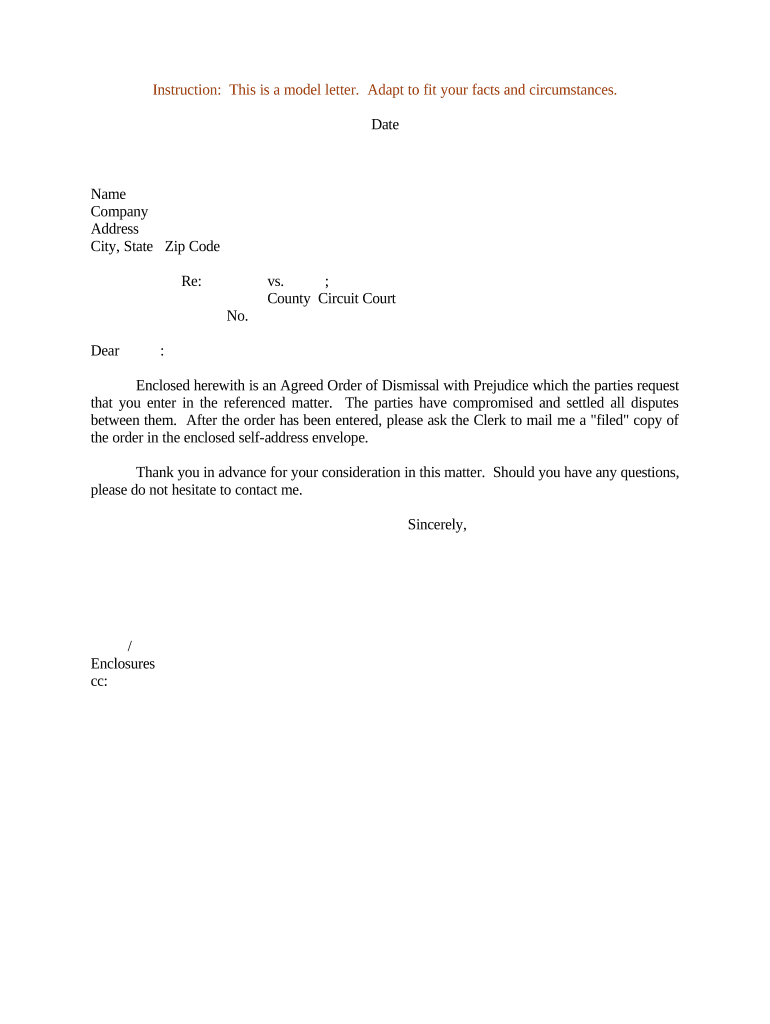
A Letter Requesting Entry of Agreed Order of Dismissal is a formal cover letter submitted to a court asking the judge or clerk to enter an agreed order that dismisses a case or specific claims after the parties reach a settlement. The letter identifies the case caption and docket number, confirms that parties have agreed to dismissal terms, states whether the dismissal is with or without prejudice, attaches the proposed Agreed Order of Dismissal, and supplies contact information for follow-up by the clerk or court. It serves to document the parties’ request and to facilitate docketing of the dismissal.

Why a Clear Letter Matters to the Court and Parties

A properly drafted letter clarifies the parties’ intent, reduces clerk follow-up, and supports timely docketing of the agreed order. It also creates a concise record of the agreement to reduce future disputes about terms or entry status.

Why a Clear Letter Matters to the Court and Parties

Who Typically Prepares and Submits This Letter

This letter is used by attorneys, pro se litigants, and parties’ representatives to request formal entry of an agreed dismissal with the court.

  • Plaintiff counsel — files the letter when parties stipulate to dismissal terms and submit the agreed order.
  • Defense counsel — lodges the letter as joint or unopposed filing per local rules.
  • Pro se parties — may send the letter directly if court rules permit self-represented filings.

Courts rely on the letter to confirm agreed language and to ensure the dismissal is entered according to the parties’ intent.

Step-by-Step: Prepare and Submit Your Letter

Follow these steps to prepare, attach the Agreed Order, and submit the letter to the court.

  • 01
    Identify Case: Enter caption and docket number at top of letter.
  • 02
    State Agreement: Summarize settlement terms and specify dismissal with or without prejudice.
  • 03
    Attach Order: Include the proposed Agreed Order of Dismissal as a separate attachment.
  • 04
    File or Mail: File via e-filing or deliver to clerk per local rules; include contact info.

Configure an Online Workflow for the Letter

Configure online workflow to attach the Agreed Order and route to signers with tracking and an audit trail.

Field Configuration
Authentication Email link or SMS code; select stronger verification if required.
Attachments Attach PDF of Agreed Order; enable required flag for attachment.
Signer Order Set signing order when signatures must be sequential or conditional.
Audit Trail Enable full audit capturing IP, timestamps, and certificate of completion.

Where to File or Send the Letter and Order

Select the correct court filing method and deliver the letter and agreed order according to local filing rules.

  • E-Filing: Upload the letter and proposed order via the court's electronic filing system (CM/ECF or state equivalent).
  • Clerk Office: Hand-deliver or mail hard copies when local rules require physical submissions and obtain a stamped receipt.
  • Email: Some clerks or chambers accept email lodgment; verify local rules before relying on email service.
  • Opposing Counsel: Serve opposing counsel concurrently and include proof of service per the applicable local rule.

Technical and Authentication Considerations for eSubmission

For electronic completion and distribution, confirm format compatibility, signer authentication, and court acceptance before e-submitting.

  • File Formats: Use PDF/A or standard PDF; courts generally accept searchable PDFs with clearly attached exhibits.
  • Integrations: Integrate with cloud storage and case management tools to maintain a single source of truth and streamlined routing.
  • Authentication: Choose email, SMS, or identity proofing; stronger authentication reduces clerk questions and supports attribution.

Maintain a tamper-evident copy and complete audit trail for the filing. If using a third-party e-sign or cloud provider, ensure a Business Associate Agreement or equivalent is in place when required, and that records remain retrievable for court review or audits.

Typical eSignature Plan Comparison for Preparing and Submitting the Letter

Compare common eSignature providers by starting price and key features relevant to preparing and routing dismissal letters and attached orders.

signNow DocuSign Adobe Sign PandaDoc HelloSign
Starting Price $8/user/mo $15/user/mo $14/user/mo $19/user/mo $15/user/mo
Free Trial 7-day free trial Varies Varies Varies Varies
Bulk Send Yes Yes Yes Yes No
Audit Trail Yes Yes Yes Yes Yes
HIPAA Compliant Yes Yes Yes No No

Key Components to Include in the Letter

A professional Letter Requesting Entry of Agreed Order of Dismissal includes discrete elements to aid swift clerk processing and accurate docketing.

Caption

Include the full case style exactly as on the docket, with plaintiff and defendant names. Accurate captioning helps the clerk match the submission to the correct case file.
Docket Number

Place the official docket number immediately beneath the caption and reference it in the opening sentence to minimize clerk follow-up and misfiling risk.

Statement of Agreement

Write a concise paragraph confirming parties’ agreement to the dismissal terms, indicating whether dismissal is with or without prejudice and any retained jurisdiction for enforcement.

Requested Action

Say explicitly that the court should enter the attached Agreed Order of Dismissal and note any effective date or conditions precedent to entry.

Attachments

List attached items, including the Agreed Order and any settlement exhibits, and identify any redactions or sealed material per local rules.

Signature Block

Provide the printed name, title, firm, address, phone number, and signature line for each signing party or counsel, plus the date executed.

Required Information Typically Included in the Letter

Case Caption: Exact case style
Docket Number: Court-assigned number
Party Names: Full legal names
Contact Details: Address and phone
Service Statement: How parties were served
Attachment List: Documents attached

Consequences and Risks from an Incorrect or Incomplete Letter

Clerk Rejection: Filing returned or rejected
Delays: Docketing postponed
Service Defect: Opposing party not properly served
Miscaption: Document misfiled by clerk
Waiver Risks: Unintended waiver of rights
Court Rules Conflict: Local rule noncompliance

Common Mistakes to Avoid When Preparing the Letter

  • Failing to attach the proposed Agreed Order of Dismissal — clerks often require the proposed order before entering dismissal and will not act on a letter alone.
  • Using an incorrect or incomplete docket number — even small typographical errors can prevent the clerk from locating the correct case file and delay entry.
  • Omitting a clear statement about 'with' or 'without prejudice' — ambiguity about the nature of dismissal creates downstream disputes about claims and re-filing rights.
  • Neglecting to include proof of service or certificate — many courts will not enter an order until the filing shows opposing counsel was served per local rules.

Practical Tips for Accurate and Efficient Completion

Implement these best practices to reduce clerk follow-up and expedite entry of the agreed order.

Confirm Local Court Rules Before Filing
Review the local federal or state court rules for required wording, service methods, e-filing format, and any signature or filing cover requirements. Courts vary widely and local compliance prevents rejections.
Use Clear, Unambiguous Language
State the parties’ agreement and requested relief in plain terms. Avoid conditional or vague phrasing about effectiveness, and specify whether the dismissal is with or without prejudice to avoid future disputes.
Provide Complete Proof of Service
Attach or include a certificate of service that documents how and when opposing counsel and parties were served. Lack of proof often leads to clerk inquiries or delayed entry.
Retain Tamper-Evident Records and Audit Trails
Keep an unalterable copy of the signed letter and the Agreed Order with an audit trail (timestamps, IP, signer attribution). This supports authenticity if entry or enforcement is later questioned.

Real-World Examples of Streamlined Document Processing

Two anonymized examples illustrate how organizations manage agreed-order workflows and recordkeeping at scale.

BIS — CEO Dan Rotelli

BIS standardized court cover letters and order templates for routine dismissals to reduce clerical steps.

  • Reduced manual routing and rework on signed orders.
  • 'We felt most comfortable with airSlate SignNow given their SOC 2 certification and strict focus on ESIGN and UETA act compliance,' a leader observed while describing security and compliance benefits.

Optica Ventures — COO Brian Fitzgibbons

Optica implemented template-based letters and attached orders to ensure consistent captions and docket numbers.

  • Faster clerk acceptance and fewer rejections.
  • 'The interface is simple and easy-to-use for our team; more importantly, it is just as easy for our customers,' which helped reduce processing time across many routine filings.

Frequently Asked Questions About the Letter Requesting Entry of Agreed Order of Dismissal

Answers to common questions about drafting, signing, serving, and filing the letter.


Need help? Contact support

be ready to get more
Join over 28 million airSlate SignNow users