Establishing secure connection…Loading editor…Preparing document…

Order to Seal Arrest and Criminal Records

This template is fully customizable. Edit the text, fill out the fields, and send it for signature. Give it a try!
Order to Seal Arrest and Criminal Records

What the Order to Seal Arrest and Criminal Records Is

An Order to Seal Arrest and Criminal Records is a court-issued directive that restricts public access to specified arrest logs, charging documents, and case files. It typically removes records from public indexes, limits disclosure to authorized parties, and may permit redaction or sealing across state and national databases when statutorily allowed.

Why Filing an Order to Seal Matters

Sealing can reduce collateral consequences of an arrest or non-conviction, preserve employment and housing opportunities, and prevent routine public access to sensitive records; eligibility and scope depend on statute and case disposition.

Why Filing an Order to Seal Matters

Who Typically Prepares or Requests a Sealing Order

Parties should confirm local eligibility rules and required attachments before filing to avoid delays or rejection.

  • Defense attorneys filing petitions or motions on behalf of clients to restrict public access.
  • Prosecutors responding to or stipulating about sealing when disposition permits it.
  • Court clerks and records custodians who process orders and update indexing systems.

Essential Information Required on the Order

Full Legal Name: Provide the individual's full name as shown on ID.
Date of Birth: MM/DD/YYYY format; helps match records.
Case or Docket Number: Exact court docket number for the matter.
Arresting Agency: Name of law enforcement agency involved.
Disposition: Final outcome (dismissed, not convicted, vacated).
Court Name: Full name of issuing court and jurisdiction.

Step-by-Step: Completing the Order to Seal

Follow a fixed sequence to prepare and file a sealing order petition accurately and consistently.

  • 01
    Gather Records: Collect charging documents, disposition proof, and arrest reports.
  • 02
    Complete Petition: Fill required fields and state legal basis for sealing.
  • 03
    Attach Evidence: Add certified disposition and identification documents.
  • 04
    File and Serve: Submit to court and serve interested parties per local rules.

Configuring an Online Sealing Order Workflow

Set up consistent fields, authentication, and routing when preparing an electronic petition to speed processing and preserve audit trails.

Setting | Recommended Value Field name | Configuration
Authentication Method Email link | SMS code or ID verification
Document Format PDF/A | Flattened final version
Template Fields Prepopulate key fields | Reduce entry errors
Routing Order Clerk → Judge → Records Custodian

How the Electronic Filing and Sealing Process Flows

Understanding each routing step helps you prepare the petition and anticipate required interactions with court personnel and agencies.

  • Prepare Petition: Assemble form, exhibits, and proof of disposition.
  • File with Court: Submit via eFile system or clerk's office per local rules.
  • Serve Parties: Provide required notice to prosecutor and affected entities.
  • Order Issued: Court signs order and sends to records custodians.

Delivery Options and Technology Considerations

Verify integration requirements with case management systems and confirm supported file types and authentication levels before submitting.

  • Electronic Filing: Use court-approved eFiling systems.
  • Certified Mail: Official service when eFiling is unavailable.
  • Secure Portal: For sensitive exhibits and protected information.

Typical Timing: Filing and Processing Expectations

Timelines vary by jurisdiction; plan for statutory notice periods, scheduling of hearings, and administrative processing once an order is signed.

Eligibility Waiting Period:

Varies by state; some require months or years.

Notice to Prosecutor:

Often 14–30 days before hearing.

Hearing Scheduling:

Courts typically set dates within 30–90 days.

Administrative Processing:

Clerks and agencies may take 30–180 days.

Appeal or Objection Window:

Statutory short window; check local rules.

Key Milestones from Petition to Sealing

A typical sequence includes filing, notice, hearing, and final processing across records custodians.

01

File Sealing Petition

Submit petition and supporting documents to the court clerk.

02

Serve Notice

Provide required notice to prosecuting agencies and affected parties.

03

Court Hearing

Judge reviews evidence and hears objections, if any.

04

Order Implementation

Clerk issues sealing order and records are updated.

Common Mistakes That Delay or Defeat a Sealing Request

  • Using an incorrect or incomplete docket number that prevents clerks from locating the case and matching records.
  • Failing to attach certified proof of disposition or dismissal that establishes eligibility under statutory criteria.
  • Sending notice to the wrong prosecutorial office or omitting service to required agencies per local rules.
  • Submitting unsigned or improperly dated petitions, or using initials where a full signature is required.

Potential Consequences of an Incorrect or Incomplete Order

Denial of Petition: Petition can be dismissed for noncompliance.
Records Not Sealed: Public access remains if order insufficient.
Delayed Relief: Processing errors extend exposure period.
Administrative Burden: Multiple filings and corrections required.
Sanctions Risk: Court may impose fees or sanctions.
Privacy Gaps: Some databases may not update immediately.

Core Components of a Professional Order to Seal

A complete order combines procedural findings, explicit sealing language, and clear distribution instructions so custodians can implement the directive.

Case Caption

Complete court caption including parties, docket number, and jurisdiction to identify the matter unequivocally.
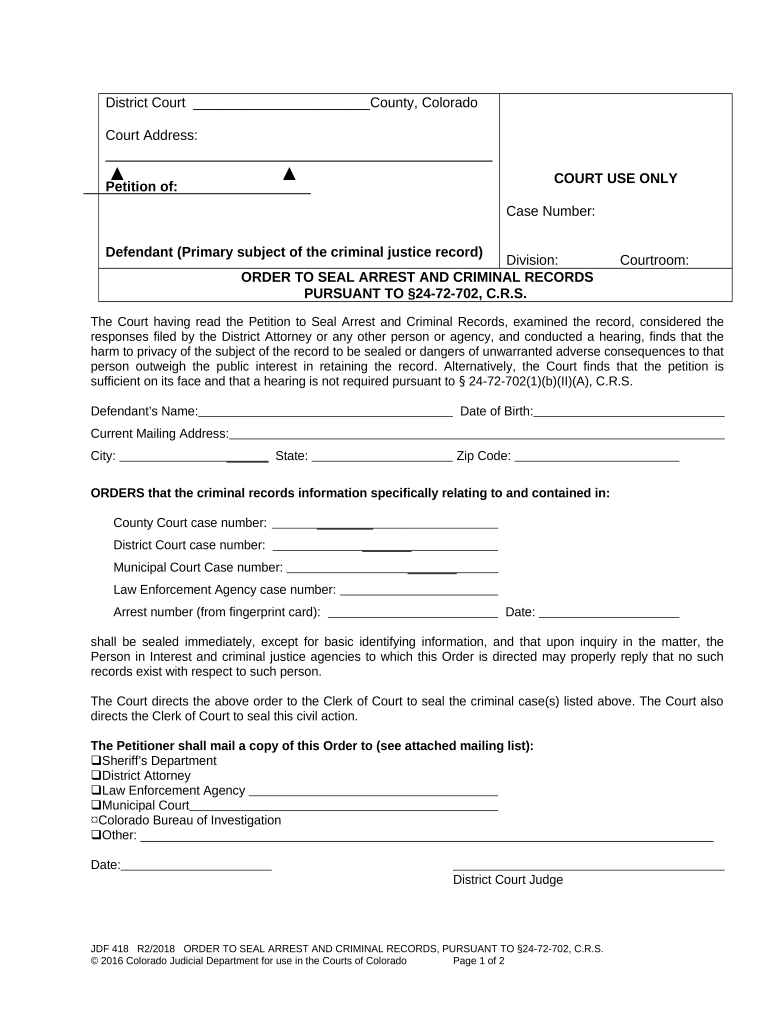
Findings of Fact

Judicial findings that establish legal criteria for sealing, often citing statute or controlling precedent.

Sealing Directive

Explicit instruction stating which records are sealed and the extent of access restriction.

Records List

Enumerate specific documents, indexes, and databases subject to sealing for clarity.

Distribution Order

Direct court clerk to notify law enforcement, repositories, and third parties responsible for records maintenance.

Judge Signature Block

Space for judicial signature, date, and clerk authentication to render the order effective.

Practical Tips to Improve Accuracy and Speed

Adopt consistent document preparation and verification practices to minimize rejection and administrative delay.

Verify Disposition Before Filing
Obtain certified disposition or court minute entry to prove eligibility; inconsistent or missing disposition evidence is a leading cause of denial and will require re-filing and additional court appearances.
Use Clear Identifiers
Include full legal name, aliases, DOB, and docket number in the petition and attachments so clerks and repositories can reliably match and seal all related records without omission.
Follow Local Filing Rules
Review and comply with local rules for service, required notices, and filing format; some courts require paper originals, while others accept eFiling with specific PDF/A formatting.
Preserve Audit Trails
When submitting electronically, use an ESIGN/UETA-compliant service that records signer attribution, timestamps, and delivery events to substantiate authenticity if challenged.

Illustrative Use Cases for Sealing Orders

These scenarios show typical reasons and outcomes for filing a petition to seal arrest and criminal records.

Non-Conviction Clearance

An individual dismissed after arrest seeks sealing to reduce collateral harm

  • Petition includes certified dismissal and ID evidence
  • The court grants relief limited to arrest records; employment background checks reflect the sealed status after custodian updates.

Expungement-Like Relief

A petitioner with a long-ago conviction meeting statutory relief criteria files a sealing motion

  • Counsel attaches rehabilitation evidence and statutory eligibility records
  • Court issues a sealing order requiring state repositories to restrict public access while preserving sealed files for limited official use.

Comparing eSignature Options for Sealing Orders

Choose an eSignature provider that supports ESIGN/UETA compliance, audit trails, and the authentication level required by your court or records custodians.

signNow DocuSign Adobe Sign PandaDoc HelloSign
Starting Price $8/user/mo $15/user/mo $14/user/mo $19/user/mo $15/user/mo
Free Trial Yes, 7-day trial No No Yes, limited Yes, limited
Bulk Send Yes Yes Yes Yes No
Audit Trail Yes Yes Yes Yes Yes
HIPAA Compliant Yes Yes Yes No No

Frequently Asked Questions About Sealing Orders

Answers to common procedural and practical questions about preparing, filing, and implementing a sealing order.


Need help? Contact support

be ready to get more
Join over 28 million airSlate SignNow users