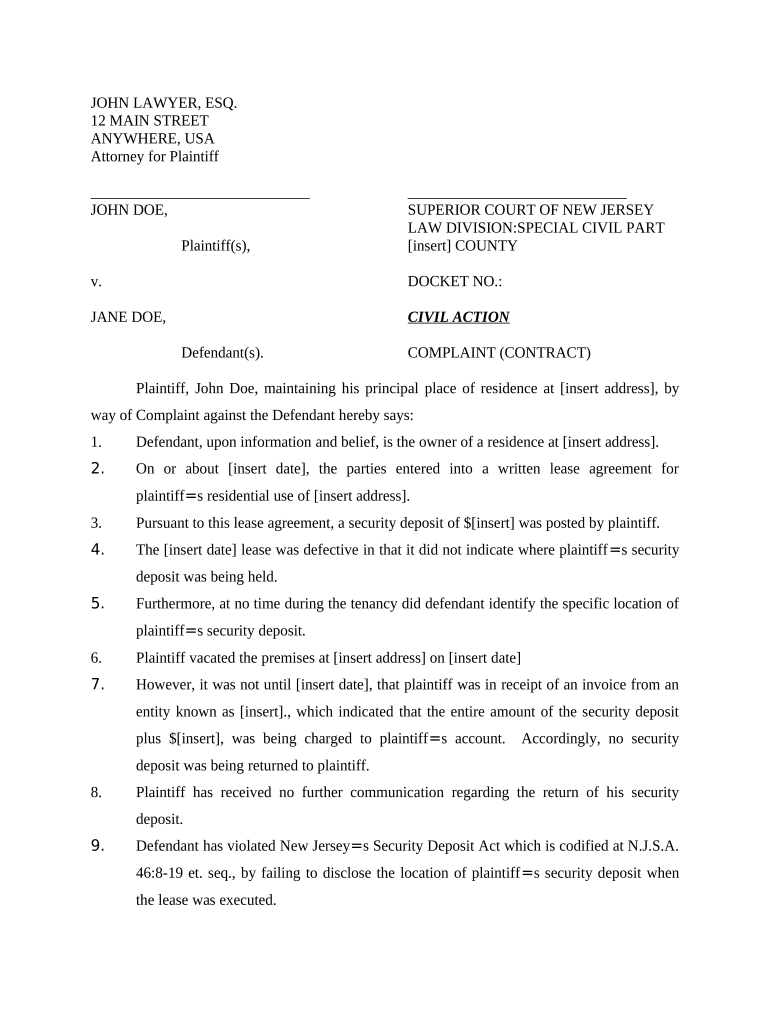
New Jersey Complaint for Security Deposit Return
What the New Jersey Complaint for Security Deposit Return Is
Why Filing This Complaint Matters
Filing a New Jersey Complaint for Security Deposit Return formalizes your claim, creates a court record, and enables recovery of the deposit plus statutory damages and attorney fees when applicable. It preserves evidence and compels a landlord response under New Jersey landlord-tenant statutes and court rules.
Who Typically Files This Complaint
Tenants, tenant advocates, and small-claims plaintiffs use this complaint to recover deposits and document landlord noncompliance.
- Individual renters who paid a security deposit for residential property and received partial or no refund.
- Legal aid clinics and tenant organizers assisting multiple clients with similar deposit disputes and documentation.
- Property managers or attorneys filing counterclaims or defending deposit retention actions on behalf of landlords.
Step-by-Step: Preparing and Filing the Complaint
-
01Gather Documents: Collect lease, receipts, photos, inspection reports, and correspondence.
-
02Calculate Claim: Total deposit plus any statutory damages and costs.
-
03Complete Complaint: Fill fields, attach exhibits, and sign the form.
-
04File & Serve: File at the correct court and serve landlord per court rules.
How to Configure an Online Complaint Workflow
| Field | Configuration |
|---|---|
| File Format | PDF/A preferred, include bookmarks for exhibits |
| Authentication | Email link plus SMS code or ID verification |
| Signature Type | Electronic signature under ESIGN/UETA accepted |
| Storage | Retain certified copy and audit trail for records |
Filing Flow from Draft to Judgment
-
Draft: Prepare complaint, list facts, attach exhibits.
-
File: Submit to municipal court and pay filing fee.
-
Serve: Serve landlord per court rules and provide proof.
-
Hearing: Attend hearing with evidence; request judgment and costs.
Technical and Integration Considerations for eFiling
Minimum technical requirements and integrations to submit and store the complaint electronically and to authenticate signers.
- Formats: PDF, DOCX accepted; PDF preferred.
- Integrations: Works with court e-filing portals and cloud storage.
- Authentication: Email link, SMS OTP, ID verification options.
Consequences of an Incorrect or Incomplete Complaint
Common Preparation Mistakes to Avoid
- Failing to attach a signed lease and itemized receipt for deductions often leads courts to disallow claimed landlord charges and award full deposit return.
- Using inconsistent names or abbreviations in pleadings, exhibits, and service documents can cause service failure or require amendment, delaying resolution.
- Requesting speculative statutory damages without calculating amounts or citing the statutory basis reduces credibility and may be dismissed or reduced.
- Serving the landlord incorrectly or missing proof of service commonly results in continuances or dismissal; follow municipal rules carefully.
Key Deadlines and Timing to Monitor
Statute of Limitations:
Consult NJ statute; typical claim limits are two to six years.
Filing Deadline:
File complaint promptly after deposit withheld; delays can impair evidence and recovery.
Service Timing:
Serve defendant according to municipal rules before hearing date
Hearing Notice:
Court will issue hearing date; prepare to attend with originals
Appeal Window:
Post-judgment appeals follow state rules; typical windows are 20 to 30 days
eSignature Vendor Comparison for Completing and Storing the Complaint
| signNow | DocuSign | Adobe Sign | PandaDoc | HelloSign | |
|---|---|---|---|---|---|
| Starting Price | $8/user/mo | $15/user/mo | $14/user/mo | $19/user/mo | $15/user/mo |
| Free Trial | Yes, 7-day free trial | No | No | Yes, limited | Yes, limited |
| Bulk Send | Yes | Yes | Yes | Yes | No |
| Audit Trail | Yes | Yes | Yes | Yes | Yes |
| HIPAA Compliant | Yes | Yes | Yes | No | No |
FAQs: Practical Answers About Filing and eSigning
-
Can I e-sign this complaint?
Yes. Electronic signatures are generally legally valid under the federal ESIGN Act (15 U.S.C. ch. 96) and UETA where adopted. Some court filings or affidavits may still require wet signatures or notarization; verify municipal court rules before e-signing.
-
What evidence should I attach?
Attach the lease, move-in and move-out checklists or photos, receipts for repairs or deductions, itemized statements from the landlord, and copies of communications. Labeled exhibits and clear chronology strengthen credibility and reduce the chance of dismissal for insufficient proof.
-
How much can I recover?
You may recover the disputed deposit, interest where statutory, plus statutory damages and attorney's fees when law permits. New Jersey statutes may provide specific penalties; amounts depend on lease terms and court discretion. Consult statutes or counsel for calculation.
-
Do I need a lawyer?
Not required; many tenants represent themselves in small claims or municipal court. Legal counsel is advisable for complex factual disputes, statutory damage calculations, or when counterclaims and appeals are likely. Attorney representation can affect costs and potential recovery.
-
What if landlord doesn't respond?
If the landlord fails to answer or appear, you may request a default judgment per court rules. Provide proof of service and attend any default hearing; the court may award the amount claimed plus costs if you meet evidentiary requirements.
-
Can I amend the complaint?
Yes. Amendments are typically allowed to correct factual errors or add exhibits before or during early stages, subject to court approval and timing rules. Timely amendments reduce dismissal risk; late changes may require leave of court or additional service.