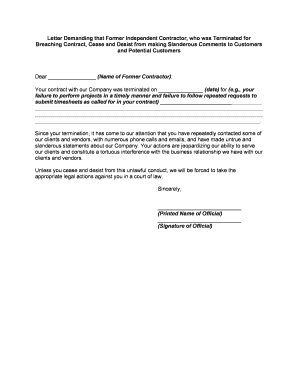
Cease and Desist Letter to Former Contractor
What a Cease and Desist Letter to Former Contractor Is
Why Use a Formal Cease and Desist Letter
A clear, dated letter creates a documented record of your demand, narrows the dispute, and gives the former contractor a defined opportunity to comply before escalation.
Who Typically Prepares and Sends This Letter
The sender should have authority to demand compliance (contracting party or authorized representative) and maintain the original signed letter and delivery records.
- Business owners and hiring managers asserting breach-of-contract or IP claims and seeking remediation without litigation.
- In-house or outside counsel drafting precise demands to protect client rights and preserve evidence.
- Operations or procurement teams documenting contract violations to support later claims or recoveries.
Step-by-Step: Drafting and Sending the Letter
-
01Draft the Letter: Write clear facts, cite contract provisions, and state specific demands.
-
02Review Internally: Have legal or authorized staff review wording to avoid admissions or overreach.
-
03Choose Delivery Method: Select certified mail, process server, or authenticated eDelivery with audit trail.
-
04Document Delivery: Keep copies, tracking numbers, or completion certificates as proof of service.
How to Configure an Online Cease and Desist Workflow
| Field | Configuration |
|---|---|
| Upload Template | Use a PDF or DOCX template for consistent wording |
| Add Fields | Insert date, name, and signature fields with conditional logic |
| Signer Authentication | Require email link, SMS code, or advanced verification |
| Archive Settings | Enable immutable storage and export to secure cloud |
Where to Send and How the Delivery Works
-
Certified Mail: USPS return receipt records physical delivery
-
Process Service: Formal personal delivery for legal proceedings
-
Authenticated Email: Email with delivery/read receipts and audit trail
-
eDelivery with Audit: eSignature platforms record timestamps and IP addresses
Digital Signing and eSubmission Considerations
Ensure the selected platform complies with ESIGN and UETA and can export a printable signed record for retention.
- Authentication: Email, SMS, or KBA options
- Audit Trail: Timestamps and IP addresses
- Storage: Encrypted at rest
Typical Deadlines and Timing to Expect
Immediate Demand:
Request immediate cessation of harmful conduct upon receipt
Cure Window:
Commonly 7–30 days to remedy the issue
Warning of Action:
State intent to pursue injunctive relief or damages after deadline
Evidence Preservation:
Preserve records contemporaneously upon sending letter
Escalation:
File suit or seek injunctive relief if noncompliant
Key Milestones from Sending to Resolution
Prepare Letter
Identify facts, contract clauses, and remedial demands
Send and Document
Deliver by chosen method and retain proof
Monitor Response
Log any reply, partial compliance, or refusal
Decide Next Steps
Negotiate, file suit, or seek injunctive relief
Common Pitfalls to Avoid When Preparing the Letter
- Vague or emotional language that fails to specify contract provisions and factual basis for the demand.
- Sending to an incorrect legal entity or using informal names that weaken service or create identity disputes.
- Failing to document delivery method and proof of service, which can impede enforcement later.
- Overstating remedies or making threats that expose the sender to counterclaims or estoppel.
Risks and Consequences of an Incorrect or Overbroad Letter
eSignature Pricing and Feature Comparison for Sending This Letter
| signNow | DocuSign | Adobe Sign | PandaDoc | HelloSign | |
|---|---|---|---|---|---|
| Starting Price | $8/user/mo | $15/user/mo | $14/user/mo | $19/user/mo | $15/user/mo |
| Free Trial | 7-day trial | Varies | Varies | Varies | Varies |
| Bulk Send | Yes | Yes | Yes | Yes | No |
| Audit Trail | Yes | Yes | Yes | Yes | Yes |
| HIPAA Compliant | Yes | Yes | Yes | No | No |
| Envelope Cap | No envelope cap | 100 envelopes/user/year | Varies by plan | Varies by plan | Varies by plan |
Frequently Asked Questions About Cease and Desist Letters
-
Is the letter legally binding?
A cease and desist letter itself does not create new legal rights but documents a demand and can support later legal action. The underlying contract and applicable law determine enforceability.
-
Does it need to be notarized?
Notarization is rarely required for the letter itself, but notarized affidavits or acknowledgements may be useful if facts must be later proved in court or if state rules require authentication.
-
Can it be sent electronically and e-signed?
Yes. Electronic delivery and e-signatures can be valid under the ESIGN Act (15 U.S.C. ch. 96) and UETA where adopted, provided intent, consent, attribution, and record retention are met.
-
How should I deliver to ensure proof?
Use certified mail with return receipt, process service, or an eSignature platform that provides an audit trail and delivery confirmations to establish proof of receipt.
-
When should I involve an attorney?
Consult counsel before sending if the facts are disputed, potential damages are high, or injunctive relief may be required to prevent ongoing harm.
-
How do I withdraw or revise the letter?
Send a clear written revocation or replacement with the same delivery safeguards and keep records. Revisions should be coordinated with counsel to avoid confusion or unintended admissions.