Caption
State the court name or statutory citation, case or estate number if applicable, and the document title to match local probate requirements and third-party expectations.
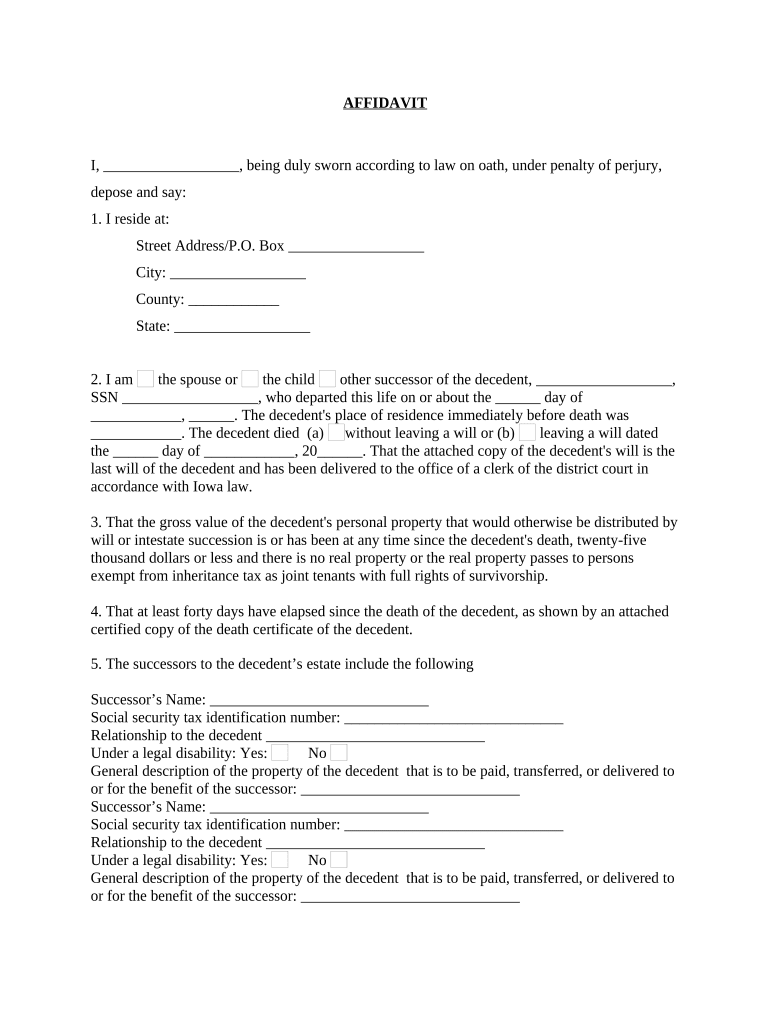
A Small Estate Affidavit for Personal Property streamlines transfer of modest assets, reduces time and cost compared with full probate, and provides a clear legal path for heirs or personal representatives to collect property. It reduces court involvement when statutory criteria are met.

Common users include heirs, surviving spouses, nominated personal representatives, and informal estate administrators handling small personal-property estates.
An heir or named beneficiary completes the affidavit when entitled to collect personal property. They must accurately state relationship to the decedent, list assets and their values, and sign before a notary. Misstatements can delay release or require court clarification.
A nominated personal representative or informal administrator may use the affidavit to dispose of personal property when appointed or when state law permits. They should attach proof of death, proof of identity, and any letters of appointment if required for third-party acceptance.
State the court name or statutory citation, case or estate number if applicable, and the document title to match local probate requirements and third-party expectations.
Provide full legal name, date of death, last residence, and identifying numbers as required by state law so institutions can verify the decedent and match records accurately before releasing property.
Identify each claimant, specify relationship, and state that no probate is pending or required under the state's small-estate statute; include affidavits of heirship if required by local rule.
Itemize personal property with descriptions, account numbers, owner names on records, and estimated values; be specific to avoid creditor or payor requests for further proof.
Include a sworn statement asserting truthfulness, the affiant's authority to act, and citations to the controlling small-estate statute; sign under penalty of perjury where required.
Provide space for the notary's signature, commission number, seal, and date; remote online notarization may be allowed where state law permits and verifier accepts RON.
Some states require a post-death waiting period before using affidavit.
Dollar limit varies widely by state; verify local statute.
Keep originals and certified death certificate copies.
Banks often take days to verify and release funds.
Some states allow voluntary court filing to avoid disputes.
| signNow | DocuSign | Adobe Sign | PandaDoc | HelloSign | |
|---|---|---|---|---|---|
| Starting Price | $8/user/mo | $15/user/mo | $14/user/mo | $19/user/mo | $15/user/mo |
| Free Trial | Yes, 7-day trial | No | No | Yes, limited | Yes, limited |
| Bulk Send | Yes | Yes | Yes | Yes | No |
| Audit Trail | Yes | Yes | Yes | Yes | Yes |
| HIPAA Compliant | Yes | Yes | Yes | No | No |
Digital filing and e-signing require compatible document formats, secure authentication, and recipient acceptance of electronic records under ESIGN.
A surviving daughter used a Small Estate Affidavit to recover a $6,500 bank account after her mother's death, avoiding formal probate.
A spouse used the affidavit to obtain a vehicle title transfer valued at $8,200 when no probate estate was needed under state law.
| Field | Configuration |
|---|---|
| Upload Document | Use PDF/A format for stability. |
| Signature Field | Require signer full name and date. |
| Attachment Required | Attach certified death certificate and photo ID. |
| Authentication | SMS code or email link. |
| Routing | Send signed copy to bank and heirs. |
Obtain certified death certificate and record date.
Confirm estate under state small-estate cap.
Complete and sign affidavit with supporting docs.
Present to payors; collect funds or titles.