Establishing secure connection…Loading editor…Preparing document…

Tennessee Name Change Form

This template is fully customizable. Edit the text, fill out the fields, and send it for signature. Give it a try!
Tennessee Name Change Form

What the Tennessee Name Change Form Is

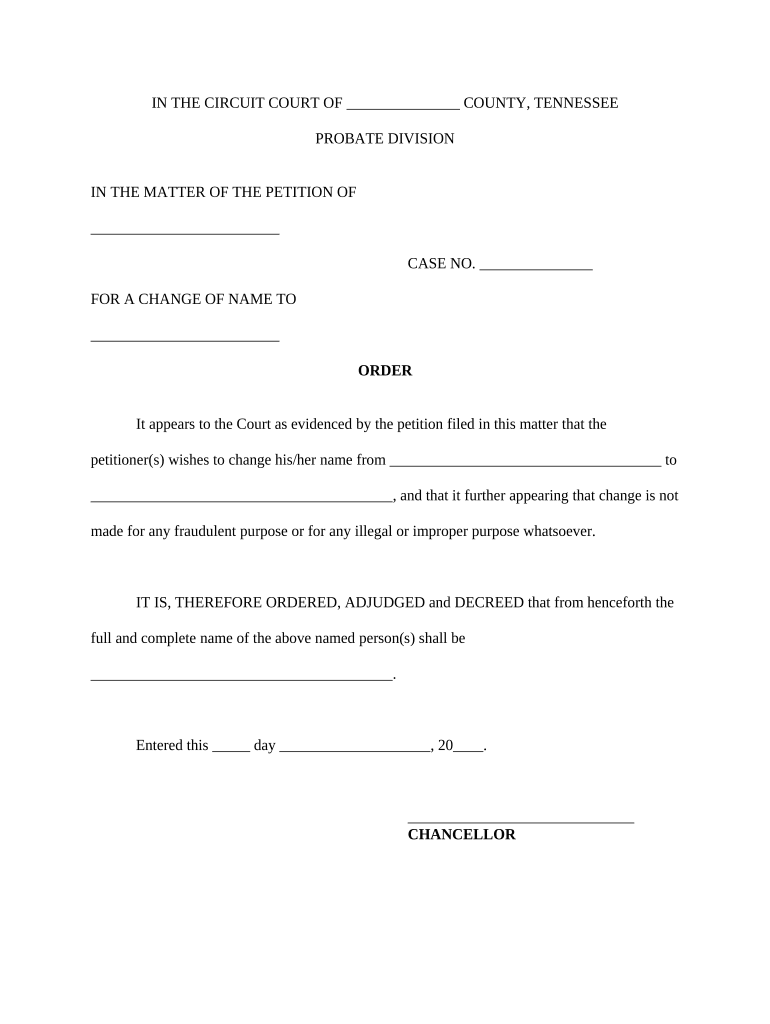
The Tennessee Name Change Form is the court petition used to request a legal change of name in Tennessee. It establishes the petitioner, current and proposed names, reasons for the change, and any supporting facts the court requires. The completed form is filed in the appropriate county court (typically chancery or circuit depending on local practice) and becomes the official record the judge reviews at a hearing or on the petition record. The form’s contents affect subsequent identity updates with agencies, banks, and records custodians.

Why a Proper Form Matters

A correctly completed Tennessee Name Change Form streamlines court review, reduces processing delays, and helps ensure the resulting order is accepted by government and private record holders.

Why a Proper Form Matters

Who Typically Completes This Form

Use the form appropriate to the county where you reside; local clerk offices often provide filing instructions and docket procedures.

  • Adult petitioners who want to update legal documents and identification records promptly.
  • Parents or legal guardians filing on behalf of minor children under court supervision.
  • Attorneys preparing petitions for clients to ensure procedural compliance.

Key Signatories and Roles

Petitioner

An adult requesting the change. The petitioner completes the form, signs under oath, and may need to appear at a hearing; accuracy here affects acceptance by courts, agencies, and third parties.

Guardian or Attorney

A parent, guardian, or licensed attorney may sign or file for minors or represented adults; they must show authority and may be required to submit supporting documentation such as birth certificates or guardianship orders.

Required Identifying Information

Full legal name: Current name as on ID
Proposed name: Exact new name
Date of birth: MM/DD/YYYY
Place of birth: City and state or country
Residential address: Street, city, state, ZIP
Signature and date: Signed under oath

Consequences of Errors or Omissions

Rejected filing: Court may refuse intake
Delay in order: Hearing rescheduled
Partial acceptance: Limited record updates
Void order risk: If fraud exists
Additional fees: Refiling or amendment costs
Privacy exposure: Public notices may publish

Common Preparation Mistakes to Avoid

  • Incomplete name history or omitted aliases that cause additional court questions and require supplemental filings.
  • Using informal abbreviations or initials instead of the full legal name, which can create mismatches with government IDs.
  • Missing notary or notarized signature when the petition requires oath-based verification, causing the clerk to reject the filing.
  • Failing to include required attachments such as birth certificates, court orders, or proof of residency which can delay acceptance.

Filing Step-By-Step Overview

Follow these four high-level steps to complete and submit the Tennessee Name Change Form.

  • 01
    Prepare petition: Complete form with accurate personal data.
  • 02
    Obtain notarization: Sign under oath before a notary if required.
  • 03
    File with court: Submit to county clerk and pay filing fee.
  • 04
    Attend hearing: Appear or confirm judge’s order issuance.

Customizing an Online Filing Workflow

Configure your digital workflow to collect signatures, proof of identity, and to route petitions to the appropriate court contact.

Field Configuration
Signature Field Required | signer must attest under oath
Authentication Email or SMS code for signer verification
Conditional Fields Show criminal history only if applicable
Document Retention Save signed PDF and audit trail

Where to File and How the Process Flows

Identify the correct county court and follow local filing and service rules for Tennessee name-change petitions.

  • County court: File petition with the clerk in your county.
  • Service: Provide required notice to interested parties as ordered.
  • Hearing: Attend or request ruling if hearing is waived.
  • Order issued: Obtain certified court order for record updates.

Digital Filing and eSubmission Considerations

Confirm with the county clerk whether they accept e-filed petitions, remote notarization, or require in-person submissions before relying solely on digital workflows.

  • File format: PDF or scanned PDF preferred
  • Signer auth: Email, SMS, or KBA options
  • Integrations: Works with common cloud storage

Typical Timelines and Processing Expectations

Timing varies by county; expect variable case scheduling and potential publication requirements depending on local rules.

Filing to docket:

Initial intake typically same day to two weeks

Hearing scheduling:

Often within 2–10 weeks depending on court caseload

Order issuance:

Judge signs order at or after hearing

Record update:

Allow additional weeks for agencies to process changes

Publication period:

Varies by county; some require public notice

Practical Tips for Accurate Completion

Follow these practical recommendations to avoid delays and help ensure a timely court decision.

Use exact legal names
Enter names exactly as they appear on government IDs and vital records to prevent mismatches with agencies like DMV and Social Security.
Attach proof documents
Include certified copies of birth certificates, prior court orders, or guardianship papers as required to substantiate identity and authority.
Confirm local rules
Check the county clerk’s filing checklist in advance for notarization, publication, or additional petition wording requirements.
Preserve certified copies
Obtain multiple certified copies of the court order for banks, agencies, and educational institutions to simplify downstream updates.

Core Sections of a Complete Petition

A professional Tennessee Name Change Form contains consistent sections covering identity, justification, and verification to facilitate judicial review.

Caption

Court identification and party names placed at the top for jurisdictional clarity and record routing.
Personal Details

Full legal name, aliases, DOB, and residence to support identity verification and background checks.

Proposed Name

Clear statement of the new name, including spacing and capitalization to avoid confusion in records.

Reason

Concise explanation of why the change is requested; be truthful and avoid misleading statements.

Background

Criminal-history disclosures or past judgments if required by the court for public safety review.

Verification

Signature, date, and notary or judicial oath verifying the petitioner's statements as true under penalty of perjury.

Real-World Use Examples

These examples illustrate common situations where a Tennessee Name Change Form is used.

Adult Petition Example

A petitioner updates a name after marriage dissolution for clarity on financial accounts

  • Court accepts complete petition with ID and fee
  • The petitioner receives certified order and updates DMV, Social Security, and bank records to match the new legal name.

Minor Name Change

A parent files on behalf of a child after adoption is finalized

  • Petition includes guardianship paperwork and certified birth certificate
  • The court issues an order used to update school, insurance, and medical records without requiring the child’s appearance.

Comparing eSignature Options for Name-Change Filings

Select a solution that meets security, notarization, and usability needs; the table compares common vendor features and starting prices.

signNow DocuSign Adobe Sign PandaDoc HelloSign
Starting Price $8/user/mo $15/user/mo $14/user/mo $19/user/mo $15/user/mo
Free Trial Yes, 7-day trial No No Yes, limited Yes, limited
Bulk Send Yes Yes Yes Yes No
Audit Trail Yes Yes Yes Yes Yes
HIPAA Compliant Yes Yes Yes No No

FAQs and Troubleshooting

Answers to common questions about completing, filing, and using the Tennessee Name Change Form.


Need help? Contact support

be ready to get more
Join over 28 million airSlate SignNow users