Establishing secure connection…Loading editor…Preparing document…

Mississippi Order Terminating Guardianship

This template is fully customizable. Edit the text, fill out the fields, and send it for signature. Give it a try!
Mississippi Order Terminating Guardianship

What the Mississippi Order Terminating Guardianship Is

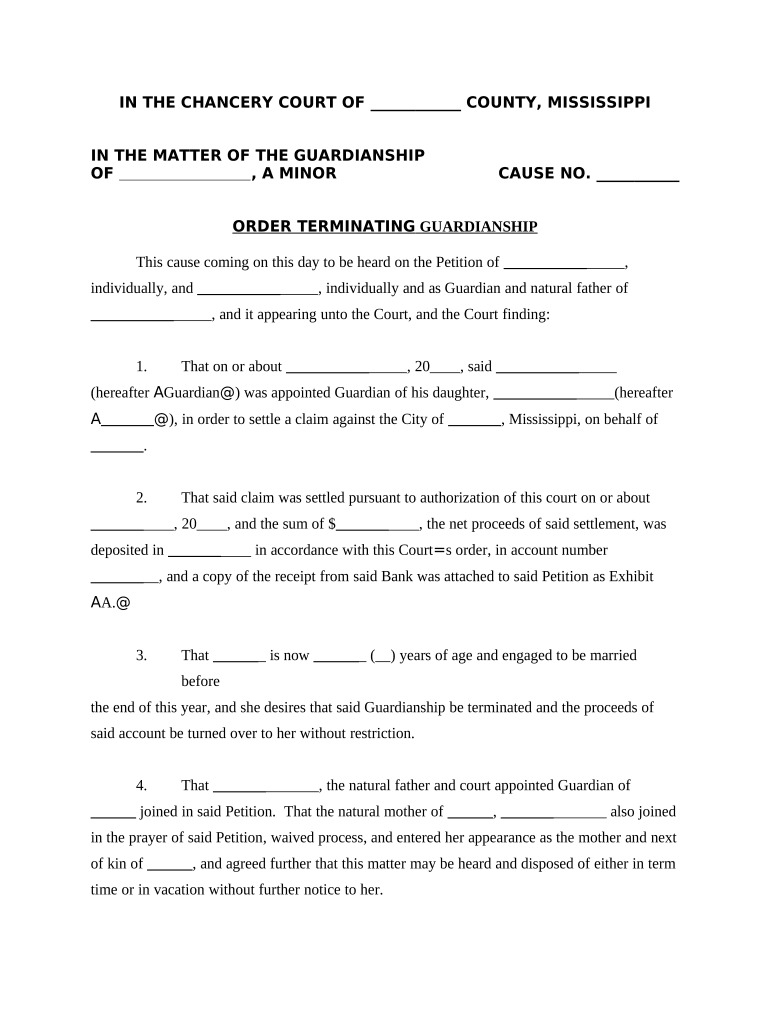
A Mississippi Order Terminating Guardianship is a court-issued document that ends a previously established guardianship over a person or an estate. It confirms that the statutory conditions for termination have been met — for example, restoration of the ward's capacity, death of the ward, marriage of a formerly minor ward, or successful transfer of guardianship to another party — and instructs the local court and relevant agencies to close the guardianship file and return control of personal or financial affairs. The order is signed by the judge and entered on the court record; supporting paperwork and notice to interested parties are typically required before the court will enter the order.

Why this Order Matters for Wards, Guardians, and Estate Administration

Terminating a guardianship restores legal rights to the former ward, closes ongoing fiduciary duties, and updates public records so that third parties accept the ward’s independent decisions. The order protects former guardians from future liability after duties end and clarifies asset ownership and authority for financial institutions and healthcare providers.

Why this Order Matters for Wards, Guardians, and Estate Administration

Who Typically Prepares and Receives the Order

Key participants include the ward (or ward’s attorney), the current guardian, interested family members, and the court clerk; local agencies and institutions may also receive notice.

Each party has procedural responsibilities: the petitioner files the termination motion and notices, the guardian may file accountings if required, and the court enters the formal order after any hearing or required filings.

Typical Signers and Their Roles

Petitioner — Guardian or Attorney

The petitioner is the person who files the motion to terminate guardianship. That may be the current guardian, the ward acting through counsel, or a legal representative. The petitioner prepares or signs supporting affidavits, accountings, and notices required by Mississippi procedure and presents evidence at the termination hearing.

Judge — Circuit or Chancery Court

A judge in the probate, chancery, or circuit court reviews the motion, hears any objections, and signs the Order Terminating Guardianship to make it effective. The judge’s signature on the document is the definitive act that ends the guardianship.

Essential Administrative Details to Record

Court Name: Full court title
Case Number: Docket/case identifier
Ward Name: Legal name of the ward
Guardian Name: Legal guardian name
Effective Date: MM/DD/YYYY
Judge Signature: Judge name and signature

Risks of Incomplete or Incorrect Termination Filings

Continued Liability: Guardians may remain liable if duties are not formally terminated
Asset Disputes: Banks may refuse transfers without a clear court order
Court Delay: Missing filings can cause hearings to be continued
Notice Failures: Improper notice can invalidate the termination
Record Gaps: Incomplete records complicate future probate matters
Reopening Risk: Incorrect orders may require reopening the case

Common Preparation Pitfalls to Avoid

  • Failing to serve required interested parties before the hearing, which can lead to rehearing and additional court cost.
  • Submitting incomplete accountings or financial reports when the court specifically requires a final accounting prior to termination.
  • Using mismatched names or dates that differ from the original guardianship record, causing administrative rejection by the clerk.
  • Assuming informal consent from institutions instead of obtaining a signed, docketed order that banks and agencies will accept.

Step-by-Step: How to Complete the Termination Motion and Order

Follow this sequence to prepare and file a termination petition and an Order Terminating Guardianship with the correct supporting paperwork and service.

  • 01
    Prepare Motion: Draft petition stating grounds for termination and relief requested.
  • 02
    Attach Support: Include affidavits, medical records, or accountings as required.
  • 03
    File with Court: Submit petition and supporting documents to the appropriate court clerk.
  • 04
    Serve Notice: Provide required notice to interested parties and await hearing.

How the Termination Order Moves Through Court and Agencies

The practical workflow after filing typically follows a short administrative path that culminates with the judge’s signature and distribution of the signed order.

  • Clerk Review: Court clerk checks filings for completeness and docketing.
  • Hearing Scheduled: Court sets hearing date if objections or required reports exist.
  • Judge Signs: Judge signs the Order Terminating Guardianship if proper criteria met.
  • Distribute Order: Clerk issues certified copies to interested parties and agencies.

What a Complete Mississippi Order Terminating Guardianship Should Include

A professional order is concise but thorough: it identifies the case, states the legal basis for termination, orders specific relief, and lists post-termination steps for distribution and record correction.

Caption

Court caption with county, court name, and the full case number so the order is properly docketed and searchable in the court record.
Findings

A short set of factual and legal findings explaining why termination is appropriate, including medical or evidentiary support when capacity issues were involved.

Disposition

Clear directive that guardianship is terminated and specifying whether the ward regains rights to person, estate, or both.

Order Provisions

Instructions for closing the guardianship estate, distributing assets, settling accounts, and notifying institutions like banks and insurers.

Effective Date

The exact date the termination becomes effective, which affects obligations and the statute of limitations for post-termination claims.

Certification

Judge’s signature line, date, and clerk’s certification for issuance of certified copies to relevant parties.

Typical Filing Workflow and Court Routing Settings

Use this checklist to match each document step to the responsible party and submission method before filing with court.

Task Responsible Party | Method
Prepare Petition Petitioner | Local counsel or self-file
File Documents Court Clerk | In person or e-filing where available
Service Petitioner | Certified mail or personal service
Objections Interested parties | File written objection

Electronic Completion and eFiling Considerations

Many courts accept e-filed petitions and scanned supporting documents; confirm local e-filing rules and required file formats before submitting.

  • File Formats: PDF preferred; PDF/A when requested
  • Signature Types: Court-signed orders require judge signature; scanned e-signed supporting affidavits may be acceptable
  • Authentication: Check local e-filing identity and notarization rules

If the court requires original certified copies, plan to obtain them after entry; if courts allow digital transmissions, ensure retained files meet archival and audit requirements.

Timelines: Filing, Notice, and Hearing Expectations

Timelines vary by county and case complexity; plan for local clerk processing and required notice periods before scheduling a termination hearing.

Filing to Hearing:

Typically 4–8 weeks depending on required notices

Service Deadline:

Serve interested parties at least 14–30 days before hearing

Accounting Requirement:

Final account may need 14–60 days to prepare and review

Clerk Processing:

Docketing and certification 7–21 days post-signature

Appeal Window:

Time to appeal per state rules after order entry

Representative eSignature Platform Pricing and Capabilities

Comparing platform starting prices and core capabilities can help teams choose an eSignature provider for preparing, routing, and sharing court-ready documents. signNow is listed first for consistency.

signNow DocuSign Adobe Sign PandaDoc HelloSign
Starting Price $8/user/mo $15/user/mo $14/user/mo $19/user/mo $15/user/mo
Free Trial 7-day free trial No No Yes, limited Yes, limited
Bulk Send Yes Yes Yes Yes No
Audit Trail Yes Yes Yes Yes Yes
Envelope Cap No envelope cap 100 envelopes/user/year Varies by plan Varies by plan Varies by plan

Example Scenarios Where an Order Terminating Guardianship Was Used

These short examples show typical circumstances that lead to a termination order and the practical next steps for parties involved.

Restoration of Capacity

A ward regained decision-making capacity after medical improvement and therapy

  • The guardian filed a motion supported by updated medical records
  • The court entered the termination order, the guardian closed the estate, and certified copies were delivered to the bank and healthcare providers for record updates.

Minor Reached Majority

A guardianship for a minor expired when the ward reached legal age

  • The guardian filed a simple termination notice and final accounting
  • The court signed an order releasing the guardian from duties and returned remaining funds to the now-adult former ward.

FAQs: Common Questions About Ending a Mississippi Guardianship

Answers to frequent procedural and practical questions about preparing, filing, and distributing an Order Terminating Guardianship.


Need help? Contact support

be ready to get more
Join over 28 million airSlate SignNow users