Establishing secure connection…Loading editor…Preparing document…

Termination Meeting Checklist

This template is fully customizable. Edit the text, fill out the fields, and send it for signature. Give it a try!
Termination Meeting Checklist

What the Termination Meeting Checklist Is and Why It Exists

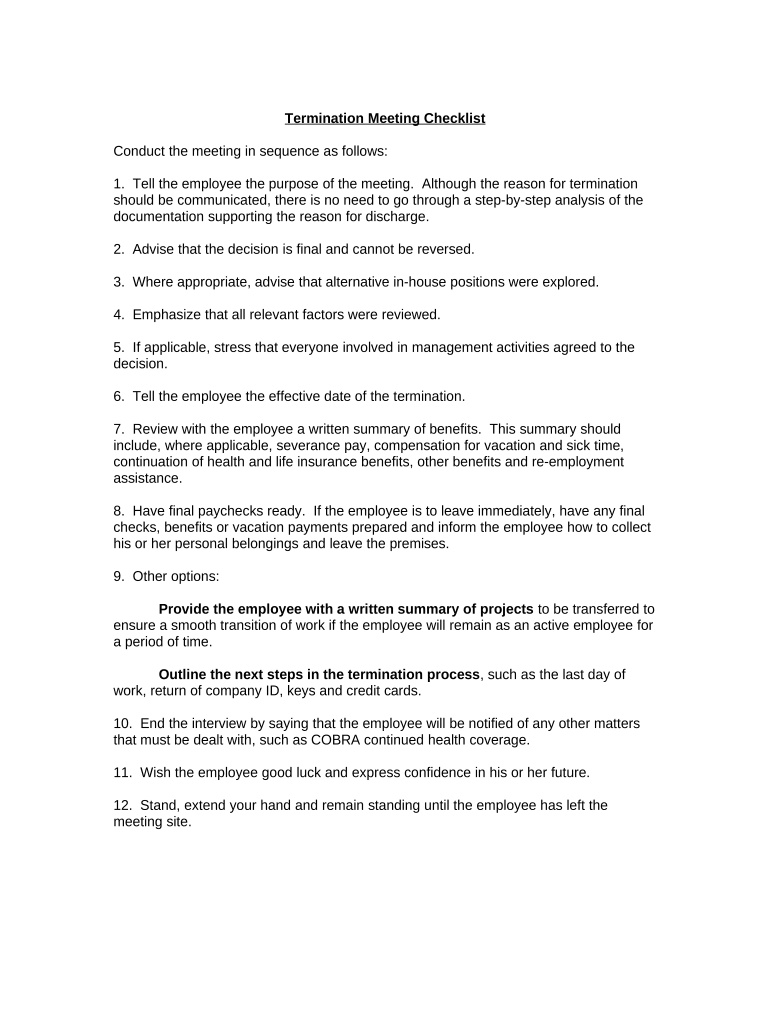
A Termination Meeting Checklist is a structured document HR or management uses to prepare for and document an employee separation meeting. It lists required disclosures, company property return steps, final pay calculations, benefit continuation options, and post-meeting follow-up actions. The checklist helps ensure consistent treatment across cases, documents required notices, and creates a clear record of what was said and delivered at the meeting.

Why a Standardized Checklist Improves Compliance and Consistency

Using a checklist reduces legal risk, ensures required notices are provided, and standardizes steps—minimizing oversights during sensitive separations. It creates an auditable record for HR, payroll, and legal review.

Why a Standardized Checklist Improves Compliance and Consistency

Typical Users and Stakeholders

Consistent use across these roles helps protect the organization and support an orderly transition for the departing employee.

  • HR managers and specialists responsible for compliant offboarding and benefits notices.
  • Direct supervisors and people managers who conduct or attend the meeting.
  • Legal counsel or HR business partners who advise on notices and documentation.

Who Signs and Approves the Checklist

HR Representative

An HR rep or HR manager typically completes and retains the checklist, documenting items covered, forms given, and next steps. They also confirm final pay and benefits information and coordinate secure collection of company property.

Supervisor

The direct supervisor or manager documents the meeting discussion and operational handover details, and confirms that any performance- or conduct-related reasons were communicated consistent with company policy and legal guidance.

Essential Sections to Include on the Checklist

A professional checklist groups tasks into logical sections so nothing is missed and responsibilities are clear. Each section should be concise and actionable.

Meeting Details

Date, time, participants, and meeting location or virtual platform details for the record.
Reason for Termination

Document the stated reason, whether involuntary, layoff, resignation, or mutual agreement; be factual and avoid commentary.

Pay and Benefits

Confirm final paycheck timing, accrued PTO payout, COBRA or continuation options, and benefit termination dates.

Company Property

List items to be returned (keys, badges, laptop, phone) and the process for collection and verification.

Security & Access

IT and facilities steps: disable system access, collect credentials, change passwords, and revoke remote access.

Follow-up Actions

Tasks assigned post-meeting: exit interview, reference communication, unemployment information, and document retention.

Step-by-Step: Completing the Checklist Before, During, and After the Meeting

Follow these sequential actions so the meeting is documented and required compliance steps are completed promptly.

  • 01
    Prepare Documents: Gather checklist, final pay info, benefit notices, and separation letter.
  • 02
    Schedule Meeting: Coordinate time with manager, HR, and, if needed, a witness or legal advisor.
  • 03
    Conduct Meeting: Cover the checklist items, allow employee questions, and present required notices.
  • 04
    Document Follow-up: Assign tasks, confirm returns, revoke access, and file the completed checklist.

Typical Workflow for Using the Checklist in Practice

A clear workflow assigns responsibility and ensures the checklist is captured in personnel files and relevant systems.

  • Initiation: HR or manager opens the checklist and populates known fields in advance.
  • Meeting Execution: All attendees use the checklist as an agenda and tick items as completed.
  • System Update: IT and payroll receive their task items and confirm completion in the checklist.
  • Record Retention: Final checklist stored in the employee file and relevant systems for the retention period.

Configuring a Digital Checklist Workflow

Set up digital fields and routing to assign tasks, require approvals, and capture signatures without paper.

Field Configuration
Signer Authentication Email link or SMS code; stronger KBA where required.
Routing Rules Sequential or parallel routing to HR, manager, IT, and payroll.
Required Fields Make signature, effective date, and property return fields mandatory.
Retention Tagging Automatically tag record with retention category and export format.

Technical and Integration Considerations

Choose a platform that supports secure signing, audit trails, and integrations with HRIS and payroll systems.

  • Authentication: Supports email links, SMS codes, SSO and optional KBA.
  • Integrations: Connects to HRIS, payroll, and cloud storage for auditability.
  • File Formats: Accepts PDF and DOCX; exports PDF/A for long-term retention.

Ensure the platform you choose meets your legal and security needs and can retain an unalterable audit trail for compliance.

Key Timing Items and Statutory Deadlines to Track

Track deadlines related to final pay, benefits, and employment records to ensure compliance with federal and state obligations.

Final Pay Timing:

State laws vary; pay the final wage according to state rules and company policy.

I-9 Retention Rule:

Retain I-9 for 3 years after hire or 1 year after termination, whichever is later (8 CFR §274a.2).

COBRA Notices:

Provide COBRA election information per federal rules and state continuation requirements.

Tax Reporting:

Ensure final wage and withholding are correct for W-2 or other reporting deadlines.

Record Filing:

File and retain separation documentation according to company retention schedule and legal requirements.

Milestone Timeline for a Typical Separation

These numbered milestones represent the usual sequential stages from notice to final record closure.

01

Pre-Meeting Preparation

Compile checklist, final pay details, benefit notices, and property lists before the meeting.

02

Notice and Scheduling

Provide any required notice and arrange meeting with necessary participants and witness if required.

03

Termination Meeting

Complete the checklist on record, present notices, and collect signatures or acknowledgment.

04

Post-Meeting Actions

Execute IT, payroll, and facilities tasks; store the checklist in the personnel file.

Security and Compliance Controls to Capture

Encryption: TLS 1.2/1.3; AES-256 at rest
Audit Trail: Timestamp, IP, and action log
Access Controls: Role-based permissions
BAA Availability: HIPAA BAA option
Retention Tagging: Automated retention metadata
Accessibility: WCAG 2.0 Level AA

Common Legal and Operational Risks from Incomplete Checklists

Tax Reporting Risk: IRC §6721 penalties possible
I-9 Violations: 8 CFR §274a.2 fines apply
HIPAA Exposure: Protected health data misuse risk
Wrongful Termination: Potential litigation exposure
Data Breach: Unauthorized access after exit
Records Loss: Failure to retain evidence

Avoidable Mistakes to Watch For

  • Failing to document final pay or benefit election accurately causes disputes and delays.
  • Not revoking system access immediately can create security breaches and data exposure.
  • Using vague termination reasons increases litigation risk and inconsistent treatment.
  • Losing signed records or using unsigned checklists undermines auditability and compliance.

Real-World Examples of Checklist Use

These examples show how organizations use a structured checklist to create consistent, auditable separation outcomes.

Optica Ventures — COO

The team standardized an offboarding checklist to reduce rework and ensure compliance.

  • 'The interface is simple and easy-to-use for our team;'
  • The documented process improved completeness, reduced follow-up tasks, and provided a reliable audit trail for future reviews.

Tech Data — CEO

Tech Data integrated checklist steps into HR and payroll flows to speed closures.

  • 'We use the platform to improve our internal and external customer service'
  • The result was faster settlement of final pay, fewer access lapses, and clearer records for legal and payroll reconciliation.

Comparing eSignature Options for a Termination Checklist Workflow

Vendor pricing and compliance features vary; signNow is listed first for comparison. Confirm current vendor plans before purchasing.

signNow DocuSign Adobe Sign PandaDoc HelloSign
Starting Price $8/user/mo $15/user/mo $14/user/mo $19/user/mo $15/user/mo
Free Trial 7-day free trial Varies Varies Varies Varies
Bulk Send Yes Yes Yes Yes Yes
Audit Trail Yes Yes Yes Yes Yes
HIPAA Compliant Yes Yes Yes No No
Envelope Cap No cap 100 envelopes/user/year Varies Varies Varies

Frequently Asked Questions About Using the Checklist

Answers to common questions about legal validity, e-signatures, notarization, and recordkeeping when using a termination meeting checklist.


Need help? Contact support

be ready to get more
Join over 28 million airSlate SignNow users