Establishing secure connection…Loading editor…Preparing document…

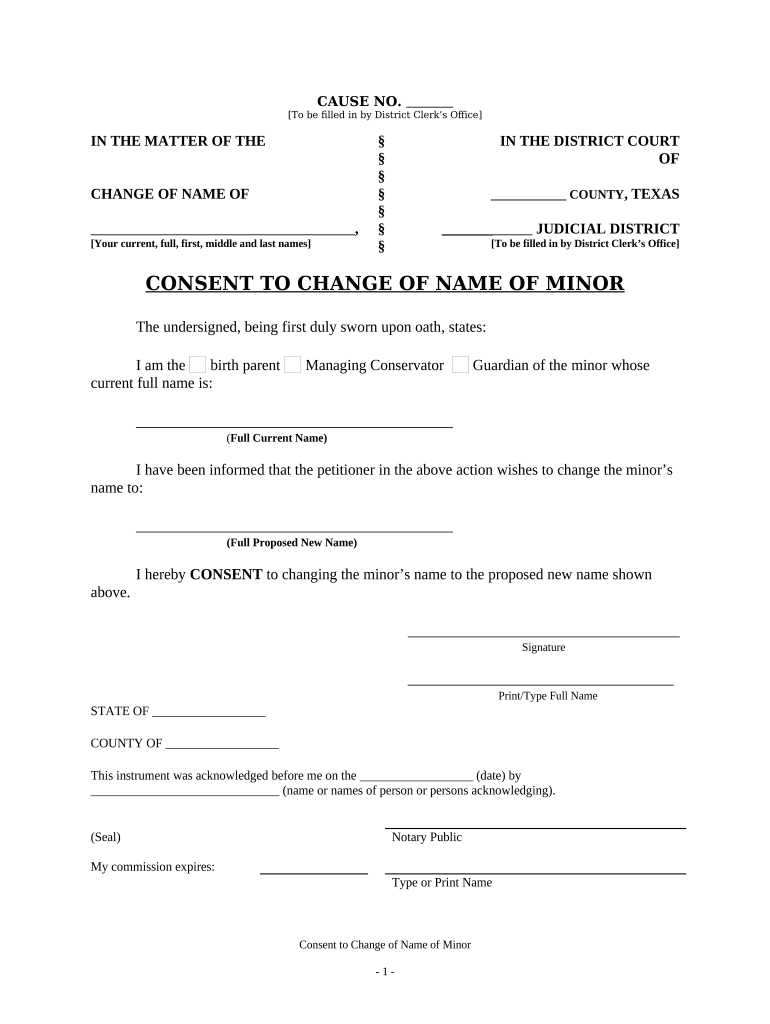
Texas Consent to Change of Name of Minor

This template is fully customizable. Edit the text, fill out the fields, and send it for signature. Give it a try!
Texas Consent to Change of Name of Minor

What the Texas Consent to Change of Name of Minor Is

The Texas Consent to Change of Name of Minor is a signed declaration by a parent or legal guardian consenting to a minor's legal name change and providing the facts the court requires to process the petition. It typically accompanies a petition filed in the county probate or family court and documents parental agreement, the minor's identifying information, and the requested new name. The form helps the court evaluate standing, custody considerations, and potential objections from other legal guardians; when executed correctly it becomes part of the change-of-name record used by agencies for certificates, schools, and government IDs.

Why a Signed Consent Matters

A completed consent clarifies parental agreement, reduces contested proceedings, and creates a written record the court relies on when granting a minor name change. Properly executed consent also helps agencies accept the court order for school, Social Security, and identification updates.

Why a Signed Consent Matters

Who typically completes this consent

The consent is completed by parties with legal authority over the child and by professionals who prepare filings for court submission.

  • Custodial parent or guardian — The primary caregiver with legal custody who must attest to the request and sign the consent.
  • Noncustodial parent or legal guardian — A parent without primary custody who must sign if the court requires consent from both parents.
  • Attorney or court representative — Prepares and files documents on behalf of a parent, ensuring procedural and formatting compliance.

If custody is disputed or a parent cannot be located, the court may require notice, additional evidence, or a contested hearing before granting a name change.

Step-by-step: completing and submitting the consent

Follow these steps in order to prepare a court-ready consent and accompanying filing.

  • 01
    Prepare documents: Gather birth certificate, IDs, and custody documents.
  • 02
    Complete consent: Fill every required field clearly and legibly.
  • 03
    Authenticate signature: Have signature notarized if the court or county requires it.
  • 04
    File with court: Submit consent with the petition and pay filing fee to the county clerk.

Digital workflow settings to consider

Set up a consistent digital workflow so all required steps—authentication, notarization, filing, and retention—are enforced.

Field Configuration
Signer authentication Email plus SMS or ID verification for stronger attribution
Notarization Enable remote online notarization where allowed and accepted by court
eSignature method Use platform audit trails and timestamped signatures
Document retention Retain originals and audit logs per legal retention rules

Platform and technical requirements for eCompletion

Choose a platform that supports secure e-signing, notarization, and export to court-acceptable PDF/A formats.

  • File formats: PDF and DOCX supported
  • Authentication: Email, SMS, or credential analysis
  • Integrations: Works with cloud storage and case management

Ensure the chosen platform provides an auditable trail, tamper-evident signed files, and any required business-associate agreement for health-related records before submission.

How electronic completion and routing works

A standard e-submission workflow reduces back-and-forth and preserves a reliable audit trail for court review.

  • Upload document: Place the consent and attachments in the signing workspace
  • Assign signers: Add parent/guardian emails and signing order
  • Authenticate signer: Use email/SMS or ID verification
  • Execute and record: Capture timestamp, IP, and certificate of completion

Essential elements a professional consent should include

A clear, court-ready consent contains specific legal and factual components so judges and agencies can rely on the record.

Minor identification

Full legal name, date of birth, and current residence, with supporting ID or birth certificate information attached to verify identity and prevent misfiling.
Requested name

Exact proposed new name spelled out completely; avoid nicknames to ensure the court order matches agency records such as Social Security and schools.

Parental capacity

Statement of the signer's legal capacity (custodial parent, guardian) and any limitations on authority or existing custody orders that affect consent.

Legal statement

Plain-language consent sentence and affirmation that the request is not for fraudulent or improper purpose, meeting the court's integrity expectations.

Notarization block

Space for a notary's acknowledgment or jurat when required by local rules; include notary seal and printed name for authentication.

Supporting attachments

Places to list or attach birth certificate, custody orders, or prior court documents that support jurisdiction and standing for the petition.

Security and compliance features to verify

In-transit encryption: TLS 1.2/1.3
At-rest encryption: AES-256
Audit trail: Timestamped event log
Regulatory compliance: ESIGN and UETA adherence
HIPAA readiness: BAA available
Certifications: SOC 2 Type II, ISO 27001

Risks and legal consequences of incorrect consent

Invalid consent: May cause petition denial
Perjury exposure: False statements can lead to sanctions
Custody disputes: Unresolved parental rights may trigger hearings
Notary defects: Improper notarization can void signature validity
Agency rejection: SSN or school records may not update
Privacy violations: Improper PHI handling risks HIPAA penalties

Common preparation mistakes to avoid

  • Using inconsistent name spellings between the petition and the minor's birth certificate often causes clerical rejection or delays at the county clerk's office.
  • Failing to include or attach custody orders and proof of guardianship can lead the court to question standing and require additional briefing or a hearing.
  • Omitting notarization where the county requires an acknowledgment or jurat often renders the consent unusable and forces refiling.
  • Relying on unsigned or initialed consent blocks when a full signature is required creates ambiguity and can prompt the court to request a corrected document.

Timelines and processing expectations

Timing varies by county; use these typical milestones to plan filing and service of the consent and petition.

Preparation time:

1–3 days to collect IDs and custody documents

Notarization window:

Depends on notary availability; remote options may shorten time

Court filing:

Immediate upon submission; clerk assigns case number

Service period:

Other parents often must be served 20–30 days before hearing

Hearing scheduling:

4–12 weeks typical, depending on docket and objections

Key milestones from signature to court order

A sequential view of the main stages helps ensure timely completion and service before any scheduled hearing.

01

Document assembly

Complete consent, petition, and supporting exhibits before filing

02

Signature and notarization

Sign in presence of notary where required and capture the notarial certificate

03

Filing and service

File with county court and serve required parties per local rules

04

Court disposition

Judge signs order if requirements are met and no objections prevail

eSignature vendor pricing and capability snapshot

Compare typical entry pricing and core features relevant for preparing and executing a consent to change a minor's name; signNow is listed first as a reference point.

signNow DocuSign Adobe Sign PandaDoc HelloSign
Starting Price $8/user/mo $15/user/mo $14/user/mo $19/user/mo $15/user/mo
Free Trial Yes, 7-day trial Varies Varies Varies Varies
Bulk Send Yes Yes Yes Yes Yes
Audit Trail Yes Yes Yes Yes Yes
HIPAA Compliant Yes Yes Yes No No

Frequently asked questions about the Texas Consent to Change of Name of Minor

Answers to common questions about validity, signing, notarization, filing, and record updates for minor name-change consent forms.


Need help? Contact support

be ready to get more
Join over 28 million airSlate SignNow users