Establishing secure connection…Loading editor…Preparing document…

Texas Utility Easement

This template is fully customizable. Edit the text, fill out the fields, and send it for signature. Give it a try!
Texas Utility Easement

What a Texas Utility Easement Is and how it functions

A Texas Utility Easement is a legal instrument that grants a utility provider a specified right to access, install, maintain, repair, or replace infrastructure on private property in Texas. The easement describes the parties, the location using a legal property description, the scope of permitted uses, any limitations or reserved rights, and whether the easement is perpetual or for a fixed term. Once signed, acknowledged, and recorded in the county clerk or recorder's office, the easement typically becomes part of the public land records and binds current and future owners.

Why recording a clearly drafted easement matters

A professionally drafted Texas Utility Easement protects both the property owner and the utility by defining access rights, maintenance responsibilities, compensation, and boundaries to reduce disputes and enable clear title recording.

Why recording a clearly drafted easement matters

Who typically prepares and signs utility easements

Common participants include property owners, utility companies, title companies, and local government or permitting authorities.

  • Property owners and developers negotiating access and compensation terms with utilities.
  • Investor and commercial landlords coordinating infrastructure installations before leasing or sale.
  • Utility companies or municipal utilities establishing long-term rights for power, water, sewer, or communications.

Each party has distinct priorities—owners focus on limits and compensation, utilities on access and continuity, and title companies on recordable form and chain of title.

Primary signatories and stakeholders

Property Owner

A fee simple owner or authorized representative who grants the easement; must provide accurate legal name, title evidence if an entity, and sign with a notary acknowledgement to permit recordation. Owners should confirm the legal description and any reserved property rights before signing.

Utility Representative

An authorized agent of a utility company, municipality, or cooperative with delegated authority to accept the easement; the representative should sign in an official capacity and provide proof of authority or corporate resolution if required by the county recorder or the landowner.

Essential data fields the easement must include

Grantor: Full legal owner name
Grantee: Utility entity legal name
Legal Description: Metes and bounds or lot reference
Consideration: Dollar amount or stated value
Term: Perpetual or fixed term
Recordation: County, book/page or instrument number

Core clauses to include in a professional Texas Utility Easement

A complete easement balances clarity for the utility with protections for the property owner. The following six components are standard in professionally prepared instruments.

Granting Clause

Clear statement of the right granted, specifying access, installation, and maintenance rights and any associated equipment, ensuring enforceability and straightforward interpretation.
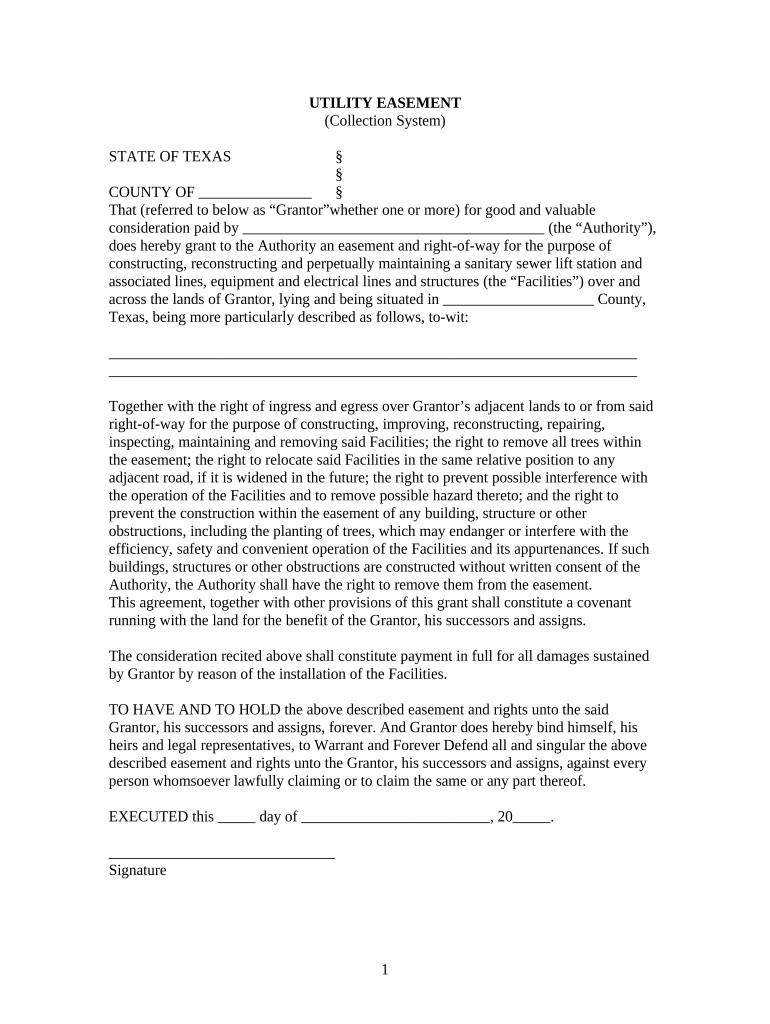
Legal Description

Precise property identification using metes and bounds, lot and block, or recorded plat references so the easement can be accurately located and recorded in county records.

Scope and Limitations

Defined permitted activities, hours of access if applicable, restrictions on disturbance, restoration obligations, and any activities expressly excluded from the easement.

Compensation and Consideration

Monetary payment, non-monetary consideration, or a statement of nominal consideration and how fees, if any, are calculated or paid.

Duration and Termination

Whether the easement is perpetual, for a defined term, renewable, or terminable upon specified conditions, and procedures for extinguishment or relocation.

Execution and Recordation

Signature blocks, notary acknowledgement, witness clauses where required, and a recording instruction block to ensure timely filing in the appropriate county.

Step-by-step: creating, signing, and recording an easement

Follow these sequential steps to minimize execution errors and secure priority in county records.

  • 01
    Draft Agreement: Prepare a complete easement with legal description and clauses.
  • 02
    Review Titles: Confirm owner on title and any liens or encumbrances.
  • 03
    Execute & Notarize: Obtain authorized signatures and notary acknowledgement.
  • 04
    Record Instrument: File with the county clerk where the property is located.

How to amend or revise a recorded easement

Amendments require clear drafting, consent, and usually a separate recorded document; follow these steps to revise terms.

01

Obtain Consent:

Secure written agreement from both grantor and grantee.
02

Draft Amendment:

Reference original instrument and list precise changes.
03

Sign & Notarize:

Have authorized parties execute with notarization.
04

Prepare Recording Cover:

Include reference to original instrument and recording details.
05

File with County:

Record amendment in the same county records.
06

Update Title:

Provide amended instrument to the title company and stakeholders.

Typical workflow for submitting and finalizing an easement

This overview shows the common handoffs from drafting through recording and distribution.

  • Prepare Draft: Attorney or title agent drafts instrument.
  • Execute: Authorized parties sign before a notary.
  • Record: County clerk accepts and indexes the easement.
  • Distribute: Provide recorded copy to all parties and title insurer.

Configuring a digital workflow for easement execution

Set up signing, authentication, and recording steps when using an eSignature platform for execution.

Field Configuration
Authentication Email link plus SMS code or KBA
Notary/RON Support for RON session recording where permitted
Conditional Fields Show pay/compensation fields only if applicable
Document Export PDF/A with audit trail for county or title use

Technical considerations for eSigning and eRecording

Choose a platform that supports secure signing, notarization workflows, audit trails, and common integrations for title and permitting systems.

  • Integrations: Salesforce, NetSuite, Box, Procore
  • Formats: PDF, DOCX, PDF/A exports
  • Security: TLS 1.2/1.3, AES-256 at rest

Ensure the platform can produce a tamper-evident signed PDF and provide a full certificate of completion to support recording and title updating.

eSignature vendor pricing and feature snapshot for document execution

Compare starting price and core capabilities for typical eSignature vendors used to execute and manage easements; signNow is listed first per standard comparison format.

signNow DocuSign Adobe Sign PandaDoc HelloSign
Starting Price $8/user/mo $15/user/mo $14/user/mo $19/user/mo $15/user/mo
Free Trial Yes, 7-day trial Varies Varies Varies Varies
Bulk Send Yes Yes Yes Yes No
Audit Trail Yes Yes Yes Yes Yes
Envelope Cap No cap 100 envelopes/user/year No cap No cap No cap

Timing considerations and practical deadlines

Although no uniform statutory deadline exists for recording an easement, timely actions protect priority and reduce title risk.

Record Promptly:

Record the executed easement as soon as possible to preserve priority against later claims.

Title Update:

Provide recorded instrument to the title company immediately after recording for policy updates.

Tax Reporting:

Report consideration amounts on tax returns per IRS guidance if material in amount.

Permit Timing:

Coordinate recording with required municipal or county permits for utility construction.

Renewal Notices:

Calendar any renewal or termination notice windows in the easement language.

Key milestones from negotiation to recorded instrument

A typical project timeline includes discrete stages that affect risk and priority; keep stakeholders aligned at each milestone.

01

Negotiation Complete

Final terms agreed by owner and utility; prepare final draft.

02

Draft Execution

Parties sign and notarize the instrument to create recordable paper or digital original.

03

County Recording

Submit instrument and fees to county clerk for indexing and assignment of instrument number.

04

Distribution

Deliver recorded copies to owner, utility, title insurer, and relevant municipal offices.

Common pitfalls when preparing a Texas Utility Easement

  • Using an imprecise legal description that leads to ambiguous boundaries and potential recording rejection or boundary disputes.
  • Failing to obtain an authorized signature or corporate resolution for entity grantors, which can render the instrument unenforceable.
  • Omitting restoration or indemnity provisions, leaving the owner responsible for construction damage without recourse.
  • Delaying recording until after construction, which risks later claims and priority problems with liens or subsequent purchasers.

Legal and practical risks of errors

Recording Rejection: Invalid or incomplete instrument
Title Defects: Undisclosed liens or conflicts
Enforceability Issues: Unauthorized signatory risk
Boundary Disputes: Ambiguous descriptions
Permitting Delays: Noncompliant terms halt construction
Liability Exposure: Missing indemnity clauses

Practical examples of typical easement scenarios

Two concise examples illustrate how easements are used and recorded in practice.

Municipal Water Main

A city negotiates a perpetual easement to run a water main across a developer's lot

  • The easement specifies installation, maintenance access, and restoration obligations
  • After signing and county recording, the city installs lines; the recorded easement remains with the property and clarifies future developer obligations.

Private Utility Fiber

A telecom company secures a 30-year easement for fiber and equipment pads

  • Compensation and relocation costs are defined in the document
  • The company and owner notarize and record the easement, enabling construction and providing clear title notice for subsequent buyers and lenders.

Frequently asked questions about Texas Utility Easements

Answers to common execution, recording, and enforcement questions help avoid delays and protect interests.


Need help? Contact support

be ready to get more
Join over 28 million airSlate SignNow users