Establishing secure connection…Loading editor…Preparing document…

Vermont Lien Form

This template is fully customizable. Edit the text, fill out the fields, and send it for signature. Give it a try!
Vermont Lien Form

What the Vermont Lien Form Is and When it's Used

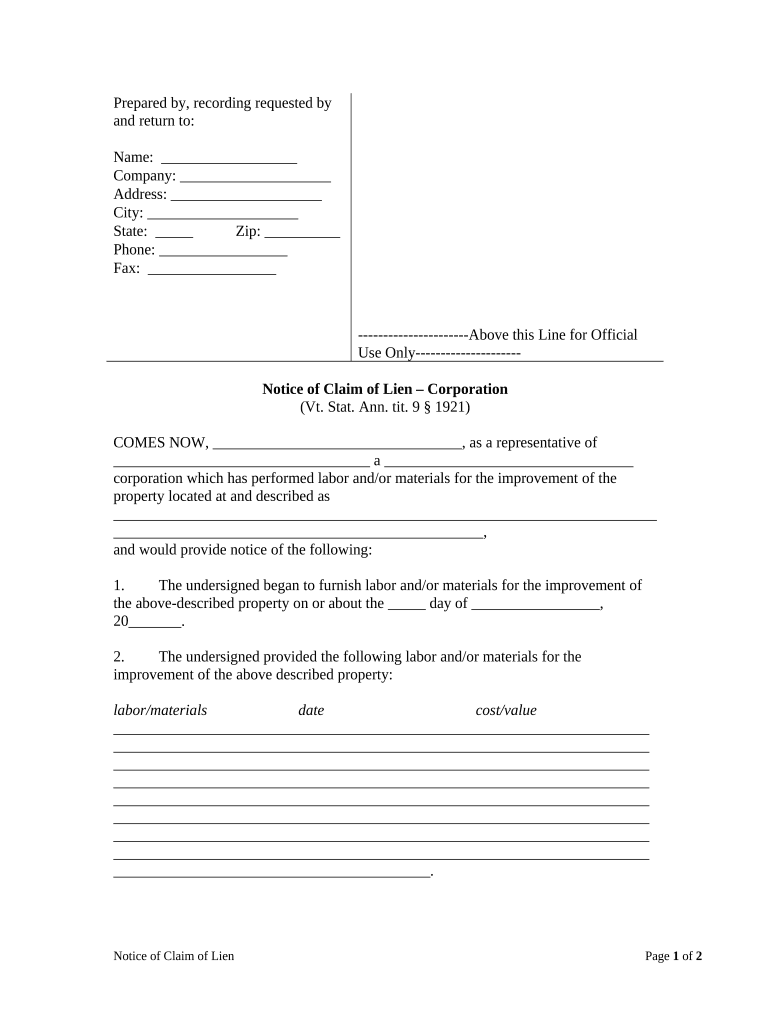
The Vermont Lien Form allows a claimant—such as a contractor, subcontractor, or supplier—to record a statutory claim against real property or an interest in property under Vermont law. The form typically identifies the claimant, the amount claimed, the nature of labor or materials supplied, precise property description, and the dates of service. Filing creates a public record that supports priority in payment disputes and potential enforcement. Electronic execution is generally recognized where signatures meet the ESIGN Act (15 U.S.C. ch. 96) and applicable state electronic transaction rules, subject to statutory exceptions.

Why a Proper Vermont Lien Form Matters

A correctly completed Vermont Lien Form preserves payment rights, establishes public notice, and improves a claimant's priority over subsequent creditors; accurate forms reduce costly disputes and make enforcement or foreclosure more straightforward.

Why a Proper Vermont Lien Form Matters

Who Typically Prepares and Signs This Form

Common users include contractors, suppliers, and property stakeholders involved in construction or improvement projects.

  • Contractors: Prime contractors asserting unpaid contract balance for construction on real property.
  • Subcontractors and suppliers: Parties without direct contract with owner seeking security for unpaid labor or materials.
  • Property owners and title agents: Need lien status checks before sale or financing to avoid clouds on title.

Six Elements Every Professional Vermont Lien Form Should Include

Ensure each lien form has consistent, verifiable components so it will be accepted for recording and supported in enforcement proceedings.

Claimant Details

Provide the claimant's full legal name, business entity type, mailing address, contact phone and email, and tax ID where applicable to avoid identity disputes and recording rejections.
Amount Claimed

State the exact unpaid dollar amount, with itemized breakdowns for labor, materials, taxes, retainage, and any agreed interest to support the claim under audit or challenge.

Property Description

Use the legal description from the deed or municipal tax map, include parcel or MAP ID and street address; vague descriptions risk misfiling or invalidation.

Work Dates

List first and last dates of performance or delivery using MM/DD/YYYY; service period determines priority and statutory deadlines for filing or notice.

Verification

Include claimant signature, printed name, title, and date; notarization or sworn verification may be required for recording in some jurisdictions.

Filing Instructions

Specify the recording office, required number of copies, service obligations, and applicable fees so clerks can accept and index the claim.

Step-by-Step: From Preparation to Recording

Follow these four practical steps to prepare, authenticate, file, and serve a Vermont Lien Form with minimal risk of rejection.

  • 01
    Prepare Documents: Gather contracts, invoices, and proof of delivery or performance.
  • 02
    Complete Form: Fill every required field; attach supporting documents.
  • 03
    Notarize if needed: Obtain notary acknowledgement where statute or recorder requires.
  • 04
    Record & Serve: File with county recorder and serve owner per statute.

Typical Online Workflow for e-Signing and Submission

A streamlined e-sign and e-submission process helps firms prepare and deliver lien forms to recording authorities while preserving audit evidence.

  • Upload Document: Add the completed lien form PDF and attachments.
  • Add Signers: Specify claimant and authorized signer details and order.
  • Authenticate Signer: Use email or stronger authentication as needed.
  • Submit Filing: Send to recorder or export for local submission.

Recommended Online Settings Before Sending for Signature

Configure the document workflow to produce a durable signed record and reduce friction for recording or notarization.

Document Field Configuration and Settings Configuration
Preferred Document Format for Recording PDF/A preferred for long-term records
Accepted Signature Types and Notary Options Electronic with audit trail or notarized wet ink
Signer Authentication and Verification Methods Email link; SMS code or ID verification for higher assurance
Delivery and Submission Methods to Recorder Download for mail or electronic upload to recorder

Technical and Security Requirements for Electronic Filing

Ensure the signing platform supports strong encryption, audit trails, and exportable, tamper-evident signed PDFs for recording and evidentiary purposes.

  • Encryption: AES-256 at rest; TLS 1.2/1.3 in transit
  • Audit Trail: Timestamped actions, IP, and signer metadata
  • Formats: PDF, DOCX accepted; exportable signed PDF

Timing Considerations and Key Deadlines

Observe filing, service, and enforcement windows closely; missing statutory timelines can forfeit lien rights or reduce priority.

Filing Deadline:

Varies by lien type; start deadline from last work date.

Service Requirement:

Serve owner per statutory timeline to perfect lien rights.

Priority Date:

Priority typically dates to first furnishing of labor or materials.

Enforcement Window:

Statutory period to foreclose or enforce varies—act promptly.

Extension or Tolling:

Check statutes for notice, waiver, or tolling provisions.

Milestone Timeline from Work to Enforcement

A sequential view of critical milestones helps coordinate documentation, recording, service, and potential enforcement actions.

01

Work Performed

Dates of performance establish priority and start limitation periods.

02

Claim Preparation

Assemble invoices, contracts, and exact legal property description.

03

Filing Recorded

Record lien in county land records; pay recording fee.

04

Enforcement Action

File suit or foreclosure within the statutory enforcement period.

Frequent Errors and How They Hurt Your Claim

  • Missing or vague property descriptions lead to rejections or allow owners to challenge the lien's applicability, causing delays or forfeiture of priority rights.
  • Failing to serve the required notice to the property owner or other interested parties can void the lien or limit enforcement remedies.
  • Incorrect claimant identity, such as using a trade name instead of the legal entity or omitting EIN, frequently causes recording offices to reject claims or complicate litigation.
  • Late filing after statutory deadlines or incomplete supporting documentation risks loss of lien rights and increases exposure to countersuits and costs.

Consequences of Incorrect or Late Filings

Loss of Priority: Lien becomes subordinate.
Rejection at Recorder: Form returned or rejected.
Attorney Fees: May be awarded to prevailing party.
Statutory Forfeiture: Claim barred after deadline.
Civil Liability: Potential damages and costs.
Tax Liens Impact: Can affect property tax status.

Security Controls and Compliance Considerations

Encryption Standards: AES-256 at rest; TLS 1.2/1.3
Audit Trail: Complete timestamps and signer IPs
Access Controls: Role-based permissions and SSO
HIPAA Support: BAA available for health workflows
Retention Options: Exportable signed PDF/A archives
Certifications: SOC 2 Type II; ISO 27001

Real-World Examples: Electronic Documentation for Property Claims

These examples show how timely, secure electronic workflows and clear lien documentation reduced delays and supported enforceable claims.

Tim Martin — Martin Properties

Tim Martin used electronic signing and online document workflows to process property-related claims efficiently.

  • He executed lien-related documents digitally to avoid in-person steps.
  • "I can process and execute all of these documents online with 100% compliance and built-in security. Whether on mobile or working offline, I can get forms back to their necessary parties efficiently."

Dan Rotelli — BIS

Dan Rotelli adopted digital execution to secure recorded claims with demonstrable audit trails.

  • He relied on certified security controls and recorded evidence.
  • "We felt most comfortable with airSlate SignNow given their SOC 2 certification and strict focus on ESIGN and UETA act compliance," followed by adoption that improved audit acceptance and internal compliance demonstration.

Frequently Asked Questions About the Vermont Lien Form

Answers to common practical questions about e-signatures, notarization, filing locations, corrections, and releases for lien claims.


Need help? Contact support

be ready to get more
Join over 28 million airSlate SignNow users