Establishing secure connection…Loading editor…Preparing document…

Washington Juvenile Court Warrant of Arrest

This template is fully customizable. Edit the text, fill out the fields, and send it for signature. Give it a try!
Washington Juvenile Court Warrant of Arrest

What the Washington Juvenile Court Warrant of Arrest Is

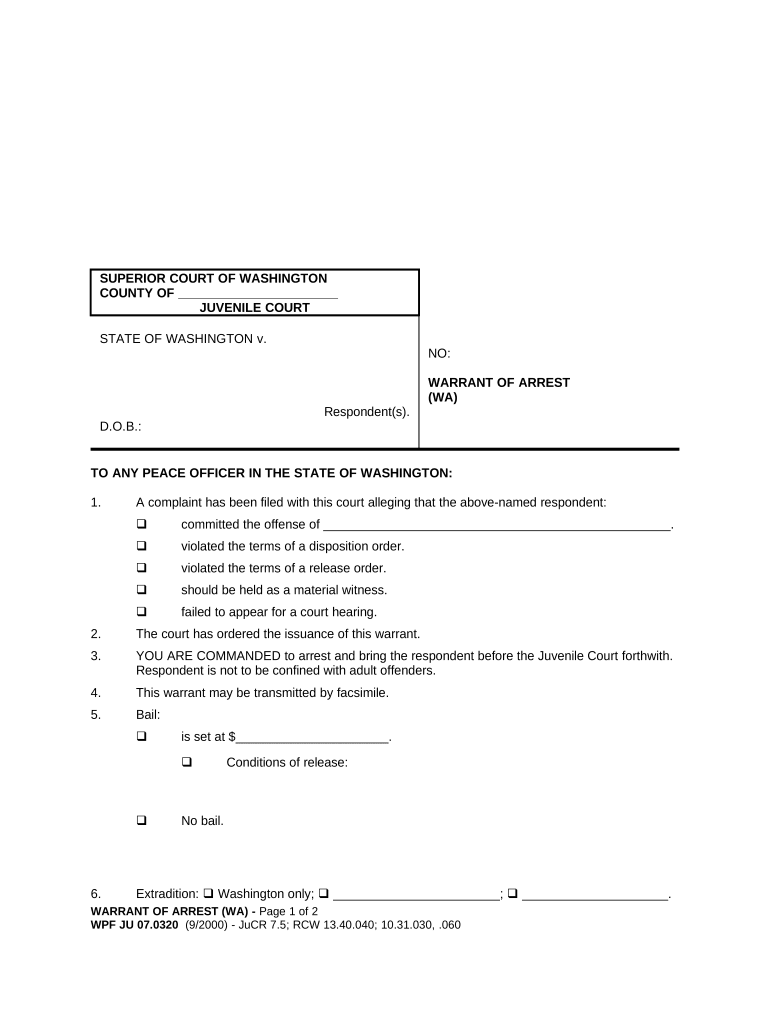
A Washington Juvenile Court Warrant of Arrest is a court-issued document authorizing law enforcement to take a juvenile into custody based on probable cause or other statutory grounds. It identifies the juvenile, summarizes the factual basis for the request, and directs an officer to execute the arrest. The warrant is signed or endorsed by a judge or magistrate and becomes part of the juvenile file; it triggers custody, intake, and initial detention-review procedures under state juvenile code. Proper completion ensures lawful detention authority and preserves procedural safeguards for the juvenile.

Why the Warrant Matters for Courts and Law Enforcement

A correctly prepared warrant protects constitutional rights, enables lawful detention, and documents probable cause. It reduces legal challenge risk and ensures the juvenile receives mandated hearings and safeguards under juvenile procedure rules.

Why the Warrant Matters for Courts and Law Enforcement

Who Prepares and Relies on This Warrant

The warrant is prepared or authorized by prosecutors, judicial officers, juvenile court staff, and law enforcement; defense counsel and intake staff also rely on it during initial processing.

  • Prosecutors and intake officers who draft or request arrest authority for a juvenile in delinquency matters
  • Judges and magistrates who review probable cause and sign the warrant before execution
  • Law enforcement officers who execute the warrant and document custody, chain of custody, and transport details

Clear roles and accurate completion reduce procedural delays and support admissibility and custody-review timelines.

Step-by-Step: Preparing and Issuing the Warrant

Follow a concise sequence to gather facts, draft the warrant, obtain judicial approval, and transmit it for execution and filing.

  • 01
    Gather Evidence: Collect witness statements and incident details supporting probable cause.
  • 02
    Draft Warrant: Populate juvenile identifiers, factual basis, and requested relief.
  • 03
    Judicial Review: Present probable cause to a judge or magistrate for signature.
  • 04
    Transmit & Execute: Send warrant to law enforcement and file with the clerk after execution.

From Request to Execution: Typical Process Flow

A compact operational flow ensures warrants are issued and acted on promptly while preserving juvenile procedural protections.

  • Request Filed: Prosecutor or intake requests arrest authority.
  • Review & Sign: Judge assesses facts and signs warrant.
  • Law Enforcement Notified: Warrant provided to executing agency.
  • Custody & Booking: Officer arrests juvenile and completes custody paperwork.

Key Sections of a Professional Warrant Document

A complete warrant includes standardized sections that document authority, identity, factual basis, and execution instructions to make the arrest lawful and defensible.

Court Header

Court name, county, docket number, and caption establishing jurisdiction and linking the warrant to a case file for clerk indexing and tracking.
Juvenile Identifiers

Full name, aliases, date of birth, and physical descriptors that law enforcement uses to confirm identity and avoid wrongful arrest.

Probable Cause Narrative

A clear, specific statement of facts and evidence supporting probable cause; ties to witnesses, exhibits, dates, and locations are essential.

Warrant Language

Explicit order authorizing arrest, specifying scope (custody, search, seizure) and any restrictions or conditions for execution.

Judicial Authentication

Judge name, signature, and issuance date; electronic signatures must meet court acceptance standards to be valid.

Execution and Return

Section for officer to note execution time, location, custody disposition, and to return the document to the clerk for filing.

Information and Security Elements to Protect

Encryption: TLS 1.2/1.3; AES-256
Access Controls: Role-based access required
Audit Trail: IP, timestamp, action log
HIPAA: BAA required for PHI
Record Retention: Secure, tamper-evident storage
Certifications: SOC 2 Type II; ISO 27001

Common Preparation Errors to Avoid

  • Using a nickname, incomplete birthdate, or wrong case number causes misidentification and delays in processing and execution by law enforcement.
  • Vague or conclusory probable cause statements that lack specific facts or times invite judicial rejection or evidentiary challenges later in court.
  • Failing to record the issuing judge’s full name, signature, or issuance date undermines the warrant’s validity and can lead to suppression challenges.
  • Not returning the executed warrant to the clerk or failing to note time and place of arrest creates recordkeeping gaps and procedural compliance issues.

Legal Risks and Consequences of an Incorrect Warrant

Unlawful Detention: Civil liability exposure
Suppressed Evidence: Court exclusion risk
Due Process Claims: Possible federal challenges
Professional Discipline: Attorney or officer sanctions
Case Dismissal: Charges may be dropped
Record Sealing: Complicates long-term disposition

Configuring an Electronic Warrant Workflow

Set up a clear digital workflow for drafting, judicial review, secure delivery, and automatic filing to reduce transcription errors and speed processing.

Field Configuration
Drafting Portal Secure court or prosecutor system
Judge Authentication Strong multi-factor or court PKI
Transmission Encrypted delivery to executing agency
Clerk Filing Auto-file and index in case record

Technical Considerations for eSubmission and Signing

Electronic preparation and e-signing require platforms that meet legal and court-security requirements, including auditability and strong signer authentication.

  • File Formats: PDF/A or PDF with forensic metadata
  • Authentication: MFA, SAML, or court PKI
  • Integrations: Case management and law enforcement systems

Timelines to Expect After Warrant Issuance

While statutory timelines vary by jurisdiction, timely execution, return, and initial detention review are essential to meeting due process and juvenile rules.

Execution Window:

Execute without unnecessary delay

Return to Court:

File executed warrant promptly with clerk

Initial Hearing:

Juvenile detention hearing held quickly

Record Update:

Update case management systems same day

Appeals/Challenges:

Defense may file motions promptly

Key Milestones from Draft to Court Record

A concise milestone sequence helps track progress from request through judicial signing and clerk filing.

01

Draft Completed

Warrant draft prepared with facts and identifiers.

02

Judicial Approval

Judge reviews probable cause and signs document.

03

Execution

Officer arrests juvenile and records execution facts.

04

Return & Filing

Executed warrant returned and filed with clerk.

eSignature Vendor Pricing Snapshot for Warrant Workflows

Comparison of starting prices and key features relevant to secure warrant drafting and eSubmission. Pricing reflects common annual plan rates and feature availability; verify plan details with each vendor directly.

signNow DocuSign Adobe Sign PandaDoc HelloSign
Starting Price $8/user/mo $15/user/mo $14/user/mo $19/user/mo $15/user/mo
Free Trial 7-day free trial Free trial Free trial Free plan limited Free plan limited
Bulk Send Yes Yes Yes Yes No
Audit Trail Yes Yes Yes Yes Yes
HIPAA Compliant Yes Yes Yes No No

Frequently Asked Questions about the Washington Juvenile Court Warrant of Arrest

Concise answers to common questions about drafting, execution, signature validity, and recordkeeping for juvenile arrest warrants.


Need help? Contact support

be ready to get more
Join over 28 million airSlate SignNow users