Establishing secure connection…Loading editor…Preparing document…

Waiver, Assumption of Risk and Release of Claims for Future Injuries

This template is fully customizable. Edit the text, fill out the fields, and send it for signature. Give it a try!
Waiver, Assumption of Risk and Release of Claims for Future Injuries

What this Waiver, Assumption of Risk and Release Does

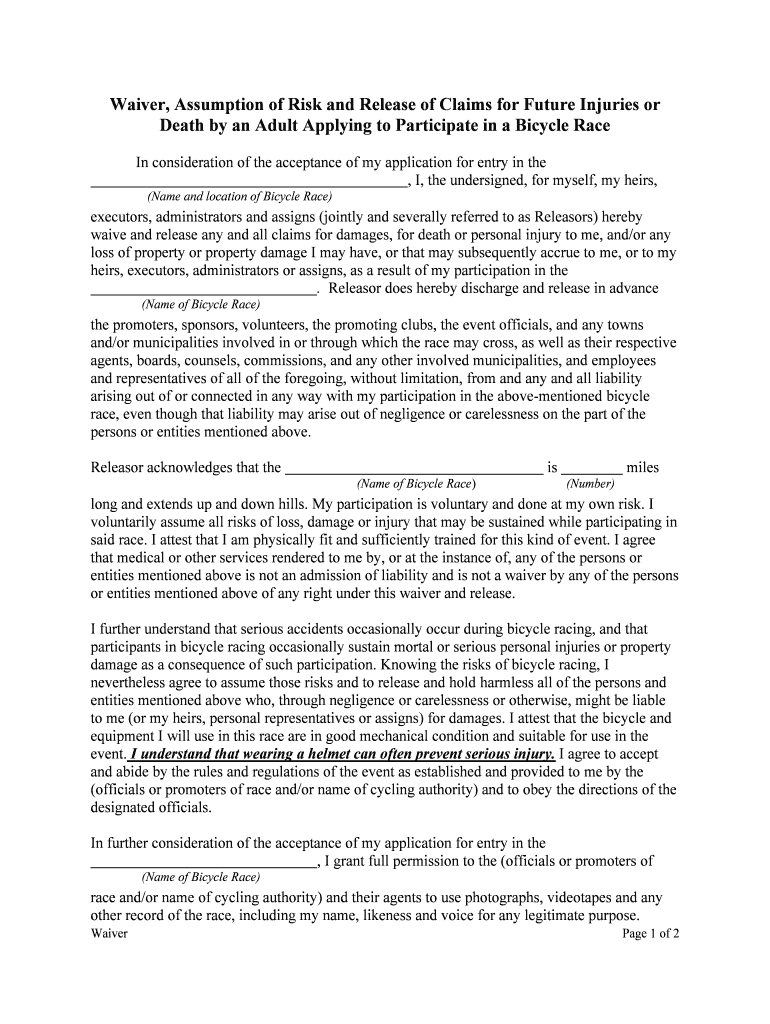
A Waiver, Assumption of Risk and Release of Claims for Future Injuries is a legal agreement where a participant acknowledges known and inherent risks, agrees to assume them, and releases another party from liability for specified future injuries. It typically identifies the parties, describes activities and risks, defines the scope of released claims, and records the participant's signature and date to evidence consent and attribution under U.S. e-signature laws.

Why include this waiver in your intake process

This waiver helps clarify risk allocation, documents participant consent, and reduces exposure to claims by recording informed acceptance of hazards and an explicit release of future injury claims.

Why include this waiver in your intake process

Who typically completes a waiver like this

Organizations use the document to record consent, document assumption of risk, and establish an evidentiary record of release for potential claims.

  • Recreational participants and athletes who enroll in classes or events and must acknowledge physical risks.
  • Volunteers and event attendees at community, school, or nonprofit activities involving hands-on tasks.
  • Clients of service providers (fitness, adventure, experiential) where activities have inherent danger.

Primary signer roles

Participant

An individual who will take part in the activity and signs to acknowledge personal understanding of risks; signature creates attribution and consent and may be required to validate assumed risk language.

Authorized Representative

A parent, legal guardian, or corporate signatory who signs on behalf of a minor or organization; must confirm authority to bind the minor or entity and include relationship or title information.

Core elements to include in a professional waiver

A clear, well-drafted waiver combines descriptive risk language with explicit release terms, identifiable parties, and signature blocks to maximize enforceability while remaining readable for participants.

Parties

Identify the releasor (participant) and releasee (organization, instructor, venue) with full legal names and contact information to avoid ambiguity about who is bound.
Activity Description

Describe the activity or services covered, including locations and foreseeable hazards so the participant understands the scope of assumed risk.

Assumption of Risk

State that the signer knowingly assumes specified risks, including examples of typical injuries, and acknowledges voluntary participation despite those risks.

Release Clause

Specify which claims are released (negligence, ordinary damages) and any carve-outs (gross negligence, willful misconduct) to define legal boundaries clearly.

Consideration

Note the consideration supporting the release (admission, service, or participation) to strengthen contractual validity.

Signature Block

Provide space for printed name, signature, date, and where applicable parent/guardian signature, plus witness or notary fields if required by jurisdiction.

Step-by-step: completing the waiver

Follow these sequential steps when filling out the waiver to ensure clarity and reduce legal risk.

  • 01
    Review text: Read all sections and definitions before entering information.
  • 02
    Provide details: Complete name, DOB, activity, and emergency contact fields.
  • 03
    Confirm authority: If signing for another, state your relationship and legal authority.
  • 04
    Sign and date: Sign in the designated field and enter today's date.

Where to file or send the completed waiver

Determine the appropriate recipient and storage location after the waiver is signed to ensure accessibility and legal retention.

  • Organization Records: Store the executed waiver in the participant's file for the event or program.
  • Event Manager: Provide a copy to on-site staff or the designated organizer for immediate access.
  • Electronic Archive: Upload to a secure document management system with audit logs.
  • Legal Counsel: Share copies with counsel when claims or disputes arise.

Digital signing and technical requirements

Select an e-signature platform that meets required security standards and, where applicable, supports HIPAA BAAs or advanced authentication.

  • Authentication: Email link or SMS code provides basic signer verification.
  • Audit Trail: Capture timestamps, IP addresses, and actions for evidentiary value.
  • Storage: Store signed copies in encrypted, access-controlled repositories.

Customizing an online waiver workflow

Configure form logic and delivery to match your intake process and reduce signer friction.

Field Configuration
Required fields Mark name, DOB, signature as mandatory to prevent incomplete submissions.
Conditional fields Show parental consent only when age indicates minor status.
Authentication level Choose email, SMS, or KBA depending on risk and regulatory needs.
Retention policy Set automatic archival and access controls based on retention schedule.

Common mistakes to avoid when preparing this waiver

  • Using overly broad or ambiguous release language that a court could find unconscionable or unclear.
  • Failing to identify the releasee precisely, which can render the waiver unenforceable against unnamed parties.
  • Not obtaining a parent or guardian signature for minors, creating vulnerability to later challenges.
  • Storing signed waivers insecurely or deleting audit logs needed to prove electronic signature authenticity.

Risks and legal consequences of an incorrect waiver

Enforceability: Unclear language may lead courts to decline enforcement.
Claims Exposure: Invalid waivers can leave defendants fully liable.
Regulatory Risk: Healthcare waivers without HIPAA safeguards risk violations.
Tax Issues: Incorrect records can affect deductible expenses.
I-9/Employment: Improper forms may trigger administrative fines.
Notarization Errors: Missing notarization can void signature attestations.

How this waiver differs from related document types

Compare the waiver with similar instruments to choose the correct form and scope for your needs.

Document Type Primary Purpose Typical Signature Requirement
Liability Waiver shift risk away participant signature
Hold Harmless Agreement indemnity for third-party claims often dual-signed
Release of Claims terminate future claims rights clear, specific language
Assumption of Risk acknowledge inherent dangers participant attestation

eSignature vendor comparison for executing waivers

Basic vendor comparisons highlight starting prices and a few feature considerations relevant when choosing an e-signature solution for waivers.

signNow DocuSign Adobe Sign PandaDoc HelloSign
Starting Price $8/user/mo $15/user/mo $14/user/mo $19/user/mo $15/user/mo
Free Trial 7-day free trial Varies by vendor Varies by vendor Varies by vendor Varies by vendor
Bulk Send Yes Yes Yes Yes Varies by vendor
Audit Trail Yes Yes Yes Yes Yes
HIPAA Compliant Yes Yes Yes No No
Envelope Cap No cap 100 envelopes/user/year Varies by plan Varies by plan Varies by plan

Frequently asked questions about waivers and releases

Answers to common questions when drafting, signing, or storing a Waiver, Assumption of Risk and Release of Claims for Future Injuries.


Need help? Contact support

be ready to get more
Join over 28 million airSlate SignNow users