Establishing secure connection…Loading editor…Preparing document…

Washington Easement

This template is fully customizable. Edit the text, fill out the fields, and send it for signature. Give it a try!
Washington Easement

What a Washington Easement Is and why it matters

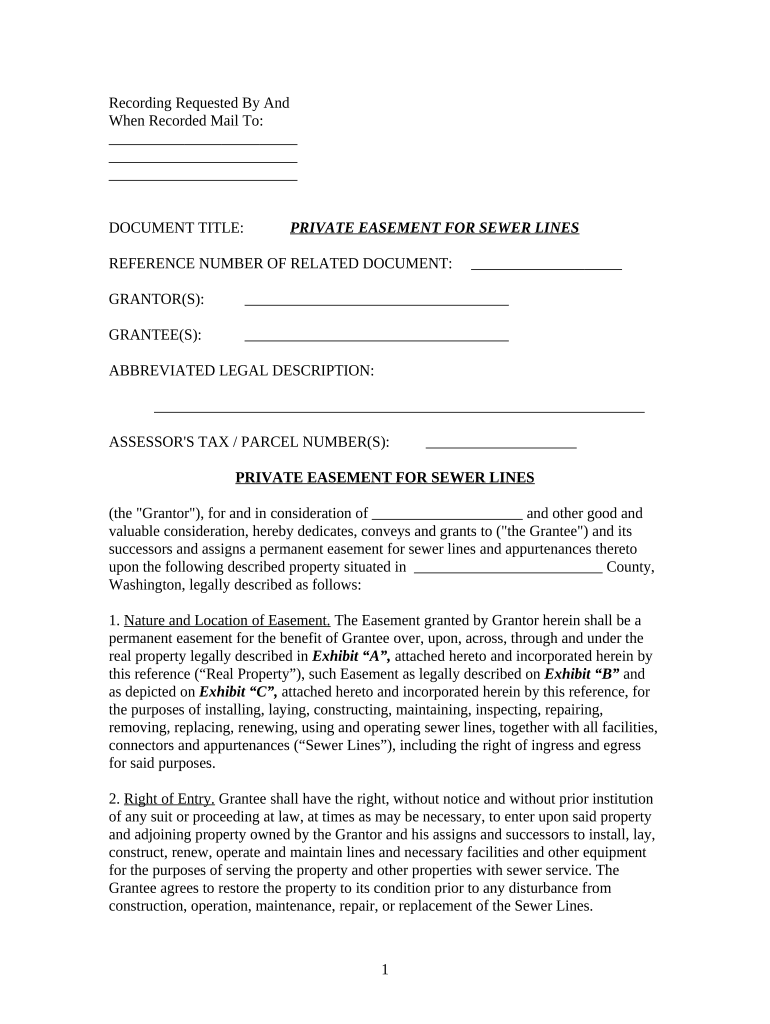
A Washington easement is a written property interest that gives one party legal rights to use another party's land for a limited purpose while the original ownership remains with the grantor. Common forms include utility easements, access or right-of-way easements, conservation easements, and easements appurtenant tied to dominant and servient parcels. In Washington these instruments are typically executed in writing, acknowledged by a notary or other acceptable method, and recorded with the county auditor to provide public notice and preserve priority against later purchasers.

Why a formal Washington easement is useful

A documented easement clarifies legal rights and limits disputes by creating recorded notice, preserving access, protecting investment in improvements, and enabling lenders and title insurers to evaluate encumbrances before closing.

Why a formal Washington easement is useful

Who commonly prepares and signs Washington easements

Several stakeholder groups routinely prepare, review, or accept easements in Washington; paperwork varies by role and purpose.

  • Landowners and buyers — negotiate rights-of-way and access conditions when buying, selling, or subdividing property.
  • Utilities and infrastructure providers — secure permanent or temporary access for lines, pipes, or maintenance corridors.
  • Conservation organizations and governments — record conservation or trail easements to protect resources and public access.

Each participant should confirm signing authority, recordation practice, and any lender or county requirements before execution.

Step-by-step: completing a Washington easement

Follow these four steps to prepare an enforceable easement and reduce recording or title issues.

  • 01
    Draft the instrument: Describe parties, property, rights, and restrictions clearly.
  • 02
    Confirm authority: Verify owner, corporate signatory authority, or trustee power.
  • 03
    Authenticate and notarize: Complete acknowledgments and any witness requirements.
  • 04
    Record in county: Submit to the county auditor for public notice and priority.

Where to sign, notarize, and record in Washington

Recording and distribution follow a clear chain: execute with proper attestations, notarize when required, then file with the county auditor to achieve public notice.

  • Execution: All parties sign in ink or via accepted electronic method.
  • Notarization: Complete the notary acknowledgement required for deeds and recorded instruments.
  • County Recording: Submit the original instrument to the county auditor for indexing.
  • Distribution: Provide recorded copies to grantee, grantor, lender, and title insurer.

Configuring an online completion workflow

Set up an online template for repeated use; specify authentication, conditional fields, and recording attachments to streamline execution.

Field Configuration
Signature Authentication Email link plus optional SMS code
Notary Requirement Support remote online or in-person notary
Conditional Fields Show termination fields only when term-limited
Document Template Save reusable clause sets and exhibits

Digital delivery and platform needs

Use a platform that supports PDF, DOCX export, audit trails, and integrations with storage or title systems.

  • File formats: PDF and Word DOCX supported
  • Integrations: Works with Google Drive, NetSuite, Box
  • Authentication: Email, SMS code, or advanced options

Ensure the chosen platform preserves the executed PDF, provides a tamper-evident audit trail, and supports notarization attachments for recording or title deliverables.

Typical timelines and processing expectations

Expect variable turnaround times and coordinate recording with closing, title review, and any lender conditions.

Effective Date:

Becomes effective as stated or upon recording, per instrument language

Recording Processing Time:

Typically 1–10 business days, depending on county workload

Title Company Review:

Allow 2–5 business days for endorsements and exception handling

Lender Clearance:

Timing varies; factor in lender payoff and approval steps

Public Record Update:

Assessor and indexing updates may take weeks

Key milestones from drafting to recorded instrument

Track these sequential milestones to monitor progress and identify potential delays in finalizing an easement.

01

Drafting and Negotiation

Prepare text, exhibits, and legal descriptions for review

02

Execution and Notarization

Signatures and notary acknowledgement completed by parties

03

Delivery to Recorder

Submit original instrument and required fees to county

04

Indexing and Distribution

Recorder indexes document and returns recorded copies

Recorded versus prescriptive rights: a concise comparison

Comparing a recorded Washington easement to prescriptive rights clarifies written notice, transferability, and consent requirements.

Criteria Recorded easement Prescriptive easement
Written requirement
Notice to buyers
Transferable limited
Need owner consent

Six core parts of a professional Washington easement

A complete easement clearly defines parties, property, permitted uses, maintenance, duration, and remedies to reduce later disputes and support title insurance.

Granting Clause

Expressly identifies the grantor and grantee and states the precise rights being conveyed, creating the legal basis for the easement.
Legal Description

Provides the parcel description or survey reference so the easement is unambiguous and properly indexed in county records.

Scope of Use

Defines permitted activities, hours, equipment, and any exclusive or nonexclusive rights to prevent later encroachment disputes.

Maintenance and Access

Specifies who maintains the easement area, access protocols, repair responsibilities, and liability allocations among parties.

Term and Termination

States duration—perpetual, fixed term, or conditional termination—and procedures for extinguishment or abandonment.

Remedies and Insurance

Describes enforcement remedies, indemnity obligations, and insurance requirements for activities within the easement corridor.

Security and compliance considerations for electronic easements

Encryption in transit: TLS 1.2 / 1.3
Encryption at rest: AES-256
Audit trail: Complete timestamped log
Regulatory compliance: ESIGN, UETA support
HIPAA capability: BAA available
Certifications: SOC 2 Type II, ISO 27001

Common errors and legal risks to avoid

Incorrect description: Boundary or survey errors
Missing notarization: Recording rejection risk
Lack of authority: Unauthorized signatory issues
Failure to record: Loss of priority
Ambiguous scope: Future use disputes
Improper termination: Unclear extinguishment terms

Practical tips for accurate and efficient completion

Follow these procedures to reduce errors, speed recording, and support title insurance and lender requirements.

Use precise legal descriptions
Attach the recorded plat or survey and reference parcel identifiers. A verified survey prevents boundary disputes and reduces title exception risk during title review and insurance underwriting.
Verify signing authority
Confirm corporate resolutions, trustee authority, or power-of-attorney before execution. Lender and title insurers commonly require documented proof of authority for non-individual grantors.
Accommodate notarization and recording
Provide space for a county notary acknowledgement and follow local recorder formatting rules. Many counties reject instruments missing required acknowledgements or margin standards.
Keep and distribute recorded copies
Once recorded, obtain certified copies for grantee, grantor, lender, and title insurer to preserve rights and ensure consistent enforcement.

Typical real-world easement scenarios

Representative scenarios show how easements resolve recurring land-use and access challenges across sectors.

Utility Access Example

A utility secures a 20-foot access corridor across two parcels to install underground lines.

  • The easement specifies construction, maintenance, and restoration obligations.
  • Recorded with the county auditor and accompanied by a survey exhibit, the instrument preserves perpetual access while assigning liability and repair responsibilities to the utility.

Conservation Easement Example

A land trust acquires a conservation easement to limit development on a scenic parcel.

  • The document lists prohibited activities and monitoring rights.
  • The recorded easement includes baseline documentation, enforcement procedures, and a grantor reporting schedule to ensure preservation objectives are enforceable over time.

eSignature vendor pricing and capability snapshot

Compare basic pricing and core features relevant to executing and tracking easements; signNow appears first per vendor order requirements.

signNow DocuSign Adobe Sign PandaDoc HelloSign
Starting Price $8/user/mo $15/user/mo $14/user/mo $19/user/mo $15/user/mo
Free Trial 7-day free trial, no credit card Varies by plan Varies by plan Yes, limited Yes, limited
Bulk Send Yes Yes Yes Yes No
Audit Trail Yes Yes Yes Yes Yes
HIPAA Compliant Yes Yes Yes No No

Frequently asked questions about Washington easements

Answers to common practical and legal questions about drafting, signing, notarization, and recording of Washington easements.


Need help? Contact support

be ready to get more
Join over 28 million airSlate SignNow users