Establishing secure connection…Loading editor…Preparing document…

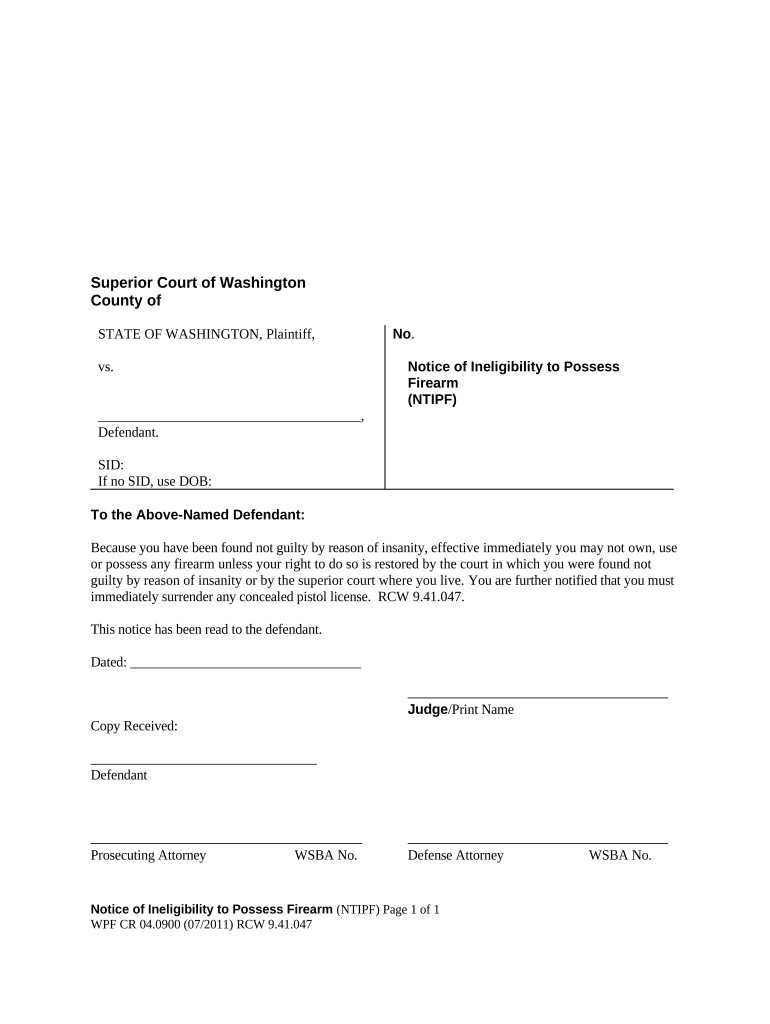
Washington Notice of Ineligibility to Possess Firearm

This template is fully customizable. Edit the text, fill out the fields, and send it for signature. Give it a try!
Washington Notice of Ineligibility to Possess Firearm

What the Washington Notice of Ineligibility to Possess Firearm Is

The Washington Notice of Ineligibility to Possess Firearm is a formal state document used to notify an individual that, under Washington law or a court order, they are barred from possessing firearms. The notice identifies the individual, cites the statutory or order-based authority for the prohibition, records the effective date and duration, and documents service. Agencies, courts, or law enforcement commonly prepare the notice as a record for enforcement, licensing checks, and inclusion in background-check databases to prevent prohibited possession.

Why this Notice Matters for Legal Compliance and Public Safety

A clear, documented notice creates an auditable record that supports enforcement, informs background-check systems, and notifies the affected person of their legal status.

Why this Notice Matters for Legal Compliance and Public Safety

Who Issues and Who Receives These Notices

Typical issuers include law enforcement agencies, courts, and licensing authorities responsible for documenting firearm ineligibility.

  • Law enforcement agencies issuing prohibition or seizure notices for individuals
  • Courts entering orders that create statutory disqualifications or restraining conditions
  • Licensing or regulatory agencies using notices in background-check processes

Step-by-step: Completing the Washington Notice of Ineligibility

Follow these steps to prepare a complete, accurate notice and to minimize processing or enforcement delays.

  • 01
    Issuing Authority: Enter the agency, court name, docket number, and contact information.
  • 02
    Subject Information: Provide full legal name, date of birth, and identifying numbers used for verification.
  • 03
    Statutory Basis: Cite the exact statute, RCW, or court order that creates the ineligibility.
  • 04
    Signature and Service: Sign, date, and document method and date of service or delivery.

How to set up a digital workflow for this notice

Configure the digital workflow to prefill data, enforce authentication, and capture proof of service and audit trails.

Field Configuration
Document Template Pre-fill identifying fields and statutory citation to reduce manual entry.
Signer Authentication Use SMS code or email link; consider KBA for higher identity assurance.
Service Method Field Include fields for service type, dates, and tracking or delivery receipts.
Retention Policy Automatically archive final PDF and audit trail for the required retention period.

Technical considerations for e-submission and storage

Electronic handling preserves timestamps and audit trails when the legal framework permits e-signatures and electronic records.

  • Supported Formats: PDF, DOCX, HTML
  • Integrations: Salesforce, Microsoft 365, NetSuite, Google Workspace
  • Authentication: Email link, SMS code, KBA, two-factor

Security and compliance features to look for

Encryption: TLS 1.2/1.3; AES-256 at rest
Audit Trail: Timestamped event log with IP address
HIPAA BAA: Business Associate Agreement available
Authentication: Multi-factor and KBA options
Certifications: SOC 2 Type II; ISO 27001
Accessibility: WCAG 2.0 Level AA support

Penalties and risks from incorrect or missing notices

Enforcement Gaps: Failure to notify can permit prohibited possession
Administrative Sanctions: Agency penalties for noncompliance
Civil Liability: Wrongful service or misidentification risks lawsuits
Criminal Exposure: Falsified entries may lead to criminal charges
Data Privacy: Improper handling of identifiers can breach privacy laws
Delayed Enforcement: Incomplete notices slow background-check responses

Common pitfalls to avoid when preparing the notice

  • Incomplete identifying details (misspelled name, wrong DOB) cause misidentification and may require correction through the issuing agency.
  • Missing statutory citation or docket number prevents downstream systems from validating the legal basis for ineligibility.
  • Failing to document service method and date can frustrate enforcement and open procedural challenges.
  • Storing copies without an audit trail or tamper-evident PDF makes later authentication difficult for courts and agencies.

Timing considerations and typical deadlines

Timing obligations vary by issuing authority; these items represent common timing milestones to monitor when issuing or responding to a notice.

Upon Order Entry:

Issue notice immediately after a court or agency order is entered.

Proof of Service:

File or retain proof of service per agency requirements.

Appeal Period:

Appeal or challenge timeframes are set by the underlying order or statute.

Background Updates:

Update databases promptly to ensure accurate background checks.

Retention Action:

Follow retention timelines for archival or destruction actions.

Key milestones from order to recorded entry

This sequential milestone list shows typical stages from issuance through official recording and archival.

01

Order Issued

Court or agency enters the order creating ineligibility.

02

Notice Prepared

Agency drafts the notice with required identifying and statutory information.

03

Notice Served

Deliver the notice by the prescribed service method and record proof.

04

Record Updated

Enter the notice into relevant databases and retain the audit trail.

Real-world examples of when the notice is used

Two common scenarios illustrate how and why the notice is prepared and circulated.

Domestic Violence Restraining Order

A court issues a temporary restraining order naming the respondent and prohibiting firearm possession

  • The clerk prepares a notice citing the order and effective dates
  • The notice is served, proof filed, and databases updated so authorities can enforce the prohibition.

Felony Conviction Update

Following a felony conviction, court records create statutory disqualification from firearm possession

  • Court staff or probation office prepares the notice with conviction citation
  • The notice is entered into criminal records and used in background checks for licensing and purchases.

Essential elements to include on a professional notice

A complete notice should include six core elements to ensure it is enforceable, searchable, and defensible.

Identifying Data

Full legal name, aliases, date of birth, and government ID numbers for precise identity matching.
Issuing Entity

Name of the court or agency, docket number, and contact details for verification and follow-up.

Statutory Citation

Exact RCW or court order citation that establishes the legal basis for ineligibility.

Effective Date

The date the prohibition begins and any expiration or review date, if applicable.

Service Information

Method, date, and recipient details demonstrating the notice was properly delivered.

Signature Block

Authorized official signature, printed name, title, and date to validate the document.

Practical tips for accurate, defensible notices

Follow these best practices to reduce disputes and improve downstream processing.

Verify identity against multiple sources
Cross-check full legal name, DOB, and ID numbers against court records or state ID to avoid misidentification that could invalidate enforcement.
Capture proof of service
Retain certified mail receipts, signed acknowledgements, or electronic receipt logs with timestamps to demonstrate proper delivery.
Use precise legal citations
Record the exact statute, RCW section, or order number so third parties can locate the underlying authority quickly.
Securely store final documents
Archive the signed PDF and audit trail in a secure records system with access controls and retention policies.

Typical electronic process for issuing and storing the notice

A common electronic workflow reduces manual steps while preserving required evidence and audit trails.

  • Upload Document: Scan or upload the court order or template PDF.
  • Prefill Fields: Auto-populate name, DOB, citation, and docket number.
  • Authenticate Signer: Require email/SMS code or stronger KBA for identity verification.
  • Serve & Archive: Deliver notice, capture delivery receipts, and archive final PDF with audit trail.

Frequently asked questions about notices and common issues

Answers to common questions about issuing, signing, serving, and correcting the Washington Notice of Ineligibility to Possess Firearm.


Need help? Contact support

be ready to get more
Join over 28 million airSlate SignNow users