Establishing secure connection…Loading editor…Preparing document…

Washington Motion

This template is fully customizable. Edit the text, fill out the fields, and send it for signature. Give it a try!
Washington Motion

What a Washington Motion Is and when it’s used

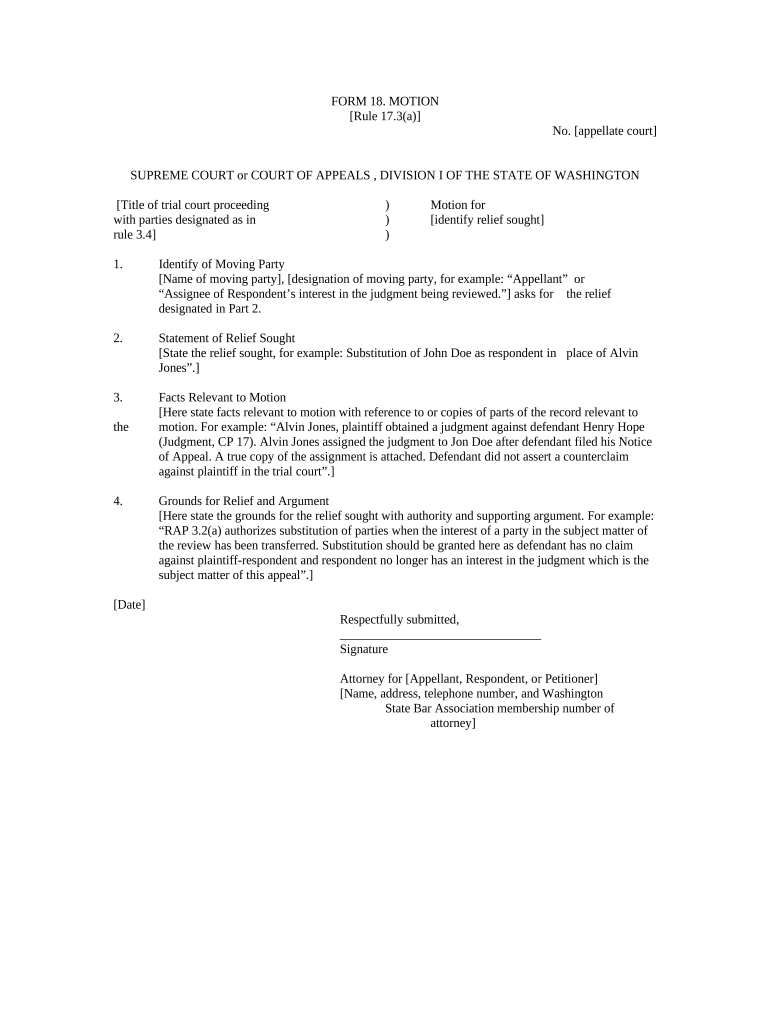
Washington Motion is a formal written request submitted to a Washington state court asking the judge to issue an order, rule on an issue, or modify case conditions. Typical motions include motions to dismiss, motions for summary judgment, motions to compel discovery, and temporary restraining order requests. A properly completed Washington Motion sets out the relief sought, legal grounds, supporting facts, and a proposed order. Filers must follow Washington Rules of Civil Procedure and local court rules for formatting, service, and timing; electronic filing and e-signature options are increasingly accepted under state and federal law.

Why a clear Washington Motion matters

Using a clear Washington Motion focuses the court on specific relief, reduces procedural delays, and creates a record for appeal. Well-structured motions help opposing parties evaluate claims and can expedite resolution when accompanied by accurate citations and compliant service.

Why a clear Washington Motion matters

Who typically files and responds to these motions

Common filers include litigants, attorneys, and self-represented parties using motions to ask judges for procedural or substantive relief.

  • Civil plaintiffs and defendants filing motions in superior or municipal courts.
  • Family law parties seeking temporary orders, custody changes, or support modifications.
  • Government agencies and prosecutors filing motions in administrative or criminal matters.

Essential parts of a professional Washington Motion

Key parts of a professional Washington Motion clarify the request, present legal authority, and make it simple for the court to enter an order.

Caption

Include the court name, case caption, docket number, party names and the document title 'Motion for [relief]'. Proper captioning ensures the clerk routes filings correctly.
Statement of Relief

State precisely the order requested, the statutory or rule basis, and the exact text you ask the court to adopt in the proposed order, and explain why relief is necessary.

Statement of Facts

Present relevant facts in numbered paragraphs, with dates and concise descriptions. Link facts to legal claims; avoid argumentative language in the factual section and attach key exhibits by exhibit letter.

Legal Argument

Cite controlling Washington authority, statutes, and rule-based standards. Use short headings, apply facts to law succinctly, and include any necessary federal law when jurisdiction is federal.

Evidence

Attach declarations, affidavits, and documentary exhibits. Authenticate exhibits through sworn statements and identify pages or paragraphs relied upon in argument to streamline judicial review and cite exhibit labels.

Proposed Order

Include a separate, concise proposed order the judge may sign that repeats the relief and any timelines, deadlines, or compliance steps, labeled and attached after the motion and supporting papers.

Step-by-step: preparing and filing a Washington Motion

Follow these steps to prepare, sign, and file a Washington Motion that meets court formatting and service requirements.

  • 01
    Prepare Draft: Draft the motion, statement of facts, and proposed order.
  • 02
    Compile Evidence: Attach declarations, exhibits, and indexes.
  • 03
    Sign & Date: Sign per rules; include electronic or notarized signature as required.
  • 04
    File & Serve: E-file where available and serve opposing parties per local rule.

Setting up an e-filing and signing workflow

Set up your e-filing and signing workflow to ensure correct document types, metadata, and delivery to the court and opposing counsel.

Field Configuration
Document Type Motion PDF that complies with court formatting requirements
Filename Convention Use pattern: CaseNumber_Party_Motion_YYYYMMDD.pdf for tracking
Signer Authentication Email link plus SMS code or two-factor for counsel.
Service Method E-service when allowed; certified mail if required by local rule.

How a motion progresses from draft to ruling

This overview shows how a Washington Motion moves from drafting to judicial decision, including signing and service steps.

  • Draft: Author composes motion, proposed order, and exhibits.
  • Sign: Signers execute electronically or with notary, as required.
  • File: File via e-filing portal or deliver to clerk's office.
  • Decision: Judge issues order or sets hearing; clerk enters ruling.

Technical checklist for e-submission and signatures

Ensure your e-signature platform supports required file formats, audit trails, and the authentication methods accepted by the court.

  • File Formats: PDF/A preferred; DOCX accepted by some courts.
  • Audit Trail: Timestamp, IP, and action log must be retained.
  • Integrations: Court portals, PACER, or case management systems.

Security and compliance considerations for electronic motions

Encryption: TLS 1.2/1.3 in transit, AES-256 at rest.
Certifications: SOC 2 Type II, ISO 27001, PCI DSS available.
HIPAA: HIPAA-compliant with BAA available.
ESIGN/UETA: Compliant with ESIGN and UETA standards.
21 CFR Part 11: Supports FDA electronic record requirements.
Accessibility: WCAG 2.0 Level AA compliance.

Common penalties and risks from improper motions

Dismissal Risk: Improper motions may be denied or dismissed.
Sanctions: Court may impose monetary or evidentiary sanctions.
Late Filing: Missed deadlines can forfeit relief rights.
Service Failure: Invalid service can invalidate the motion.
Perjury Risk: False affidavits may lead to perjury charges.
Appeal Record: Incomplete records harm appellate review prospects.

Practical tips to reduce rejection and delay

Follow these best practices to improve clarity, avoid procedural defects, and make it easier for the court to rule promptly on your Washington Motion.

Use Plain, Numbered Paragraphs
Number factual paragraphs and keep each paragraph to a single idea; courts prefer concise declarations with exhibit cross-references. Numbering improves citation in briefs and orders and reduces misunderstanding during hearings or on appeal.
Cite Controlling Authority Early
Lead with the controlling statute or precedent and briefly state the legal test. Short, targeted citations reduce the judge's research time and frame your factual presentation effectively for dispositive relief such as summary judgment.
Attach a Proposed Order
Provide a separate proposed order that mirrors the relief requested, using clear, discrete paragraphs and specific deadlines. Judges frequently sign proposed orders that are precise and formatted to the court's preferred template or local rule.
Verify Service and Proofs
Confirm service methods aligned with local rules, attach declarations of service, and include certified mail or e-service receipts when required. Incomplete proof of service is one of the most common blemishes that lead to rejection or delay.

Real-world examples of Washington Motions in practice

Representative examples show how Washington Motions are used across civil, family, and administrative matters in practice.

Civil Summary Judgment

A plaintiff filed a Washington Motion for summary judgment after discovery closed, focusing on undisputed facts and legal standards.

  • Asked court to enter judgment as a matter of law.
  • The motion included numbered facts, precise citations to governing Washington precedent, and a proposed order. The court adopted the proposed order in substantial part, shortening the case and limiting issues for trial, with a clear appellate record.

Family Temporary Orders

A parent sought emergency temporary orders via a Washington Motion supported by a sworn declaration alleging imminent risk to the child.

  • Requested ex parte relief and supervised visitation.
  • The motion attached declarations, medical records, and a proposed order; the court held an expedited hearing and entered limited temporary relief. Clear evidence and compliant service expedited judicial review and protected the child's interests pending further proceedings.

eSignature pricing and feature comparison relevant to filing Washington Motions

Compare eSignature pricing and core features that affect motion filing workflows and document signing; signNow appears first for column alignment.

signNow DocuSign Adobe Sign PandaDoc HelloSign
Starting Price $8/user/mo $15/user/mo $14/user/mo $19/user/mo $15/user/mo
Free Trial 7-day free trial Varies Varies Varies Varies
Bulk Send Yes Yes Yes Yes No
Audit Trail Yes Yes Yes Yes Yes
HIPAA Compliant Yes Yes Yes No No

Frequently asked questions and practical solutions

Frequently asked questions about completing, signing, and filing a Washington Motion, with practical solutions to common issues.


Need help? Contact support

be ready to get more
Join over 28 million airSlate SignNow users