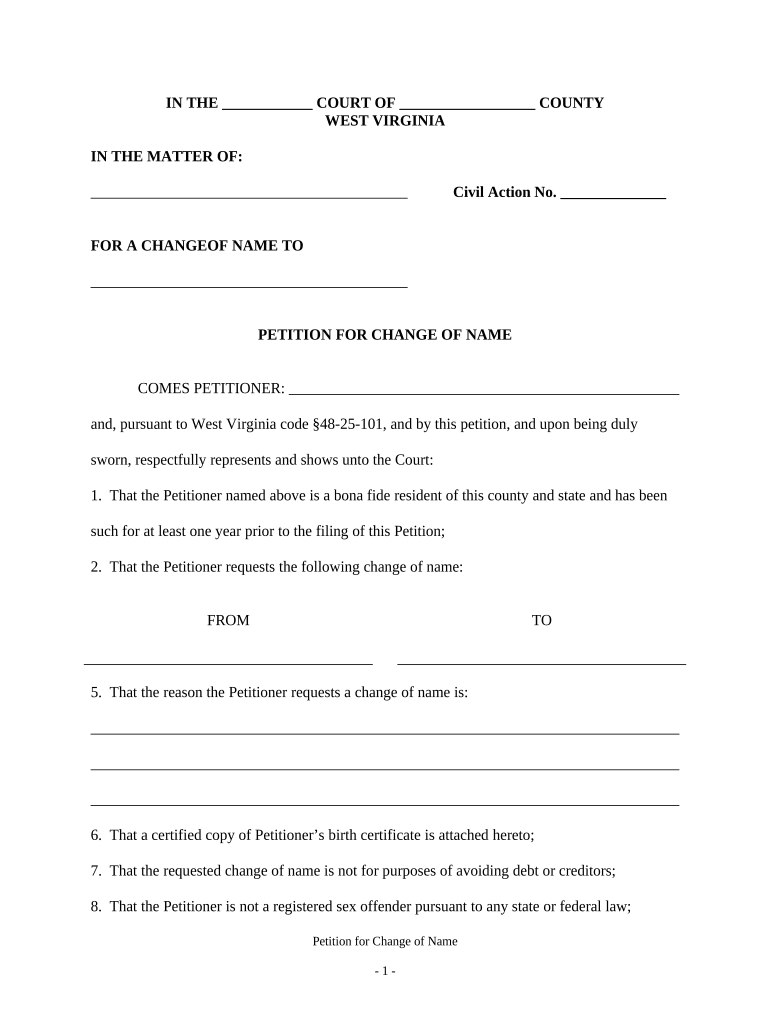
West Virginia Name Change Form
What the West Virginia Name Change Form Is and when it’s used
Why completing the form correctly matters
A properly prepared name change petition speeds court review, reduces the chance of rejection, and produces an official court order you can use to update identification, records, and accounts. Accuracy at filing protects against delays and duplicate work later.
Who commonly files a West Virginia name change petition
Individuals, parents or guardians, and attorneys typically prepare and file name change petitions; counties and clerks then process them for circuit court review.
- Self-represented adult petitioners completing the form to match identity documents and records.
- Parents or guardians filing on behalf of minor children to reflect custody or family decisions.
- Attorneys preparing petitions for clients with complex histories or legal name obstacles.
After the court issues an order, petitioners use the certified order to update DMV, Social Security, banks, and other records; proper filing reduces follow-up steps.
Step-by-step: filing a name change in West Virginia
-
01Prepare petition: Complete the county circuit court name change petition.
-
02Gather documents: Collect ID, birth certificate, and any supporting records.
-
03File with court: Submit the petition to the clerk and pay filing fees.
-
04Receive order: After hearing or administrative review, obtain certified court order.
Online filing and eSubmission configuration checklist
| Field | Configuration |
|---|---|
| Document format | PDF/A preferred for court documents |
| Filename | Use LastName_FirstName_Petition.pdf |
| Authentication | Confirm signer identity method accepted |
| Attachments | Include certified copies where required |
Where the completed form goes after submission
-
County Clerk: Receives filing, assigns case number.
-
Service/Notice: Clerk or petitioner serves notices as required.
-
Court Review: Judge reviews petition or schedules hearing.
-
Order Issued: Clerk issues certified name change order.
Digital submission and signing requirements
Confirm whether your county circuit court accepts electronic filing and which signature or notarization methods are permitted.
- Accepted formats: PDF, DOCX accepted in some courts
- Authentication: Email or two-factor identity methods
- Notarization: Local rules may require in-person or RON
If the court permits electronic signatures or remote notarization, use a compliant eSignature workflow that meets ESIGN and state requirements; when in doubt, follow the clerk’s guidance for acceptable authentication and retained records.
Consequences of filing incorrect or incomplete petitions
Common mistakes to avoid when preparing the petition
- Entering inconsistent names between the petition and supporting ID triggers clerk requests and delays.
- Failing to verify county fee amounts or required attachments can cause the clerk to reject the filing.
- Skipping publication or service steps required by certain jurisdictions leads to later dismissal or re-filing.
- Using informal or unclear new-name language creates ambiguity in the court order and downstream identity updates.
eSignature vendor comparison for completing the form electronically
| signNow | DocuSign | Adobe Sign | PandaDoc | HelloSign | |
|---|---|---|---|---|---|
| Starting Price | $8/user/mo | $15/user/mo | $14/user/mo | $19/user/mo | $15/user/mo |
| Free Trial | 7-day free trial | Varies | Varies | Varies | Varies |
| Bulk Send | Yes | Yes | Yes | Yes | No |
| Audit Trail | Yes | Yes | Yes | Yes | Yes |
| HIPAA Compliant | Yes | Yes | Yes | No | No |
Frequently asked questions about the West Virginia Name Change Form
-
Can I sign the petition electronically?
Possibly; acceptance of electronic signatures varies by county and by the court clerk’s local rules. Confirm with the circuit court clerk whether ESIGN-compliant eSignatures or remote notarization are accepted before relying on an electronic signature.
-
Is notarization required for filing?
Notarization requirements depend on the county and document type. Some clerks require notarized verification or sworn statements. Contact the local circuit court clerk to confirm whether a notarized signature or witness acknowledgment is necessary.
-
Do I need to publish notice publicly?
Publication requirements differ by jurisdiction and by the nature of the request. Some counties require notice in a newspaper or service to interested parties; others permit sealed or waived publication for safety-sensitive cases.
-
How long until the court issues an order?
Timing varies: some petitions are processed in a few weeks while others require a hearing scheduled several weeks out. County backlog, required notices, and whether objections are filed affect timing.
-
What should I update after the order is issued?
Use the certified court order to update Social Security, DMV, passport records, banks, employers, and insurance. Each agency has its own process and may require certified copies of the order.
-
Can the petition be denied or opposed?
Yes. A judge may deny a petition for insufficient cause, outstanding legal reasons, or unresolved objections. Proper documentation and following local procedures reduce the risk of opposition or denial.